No HDMI audio out with Windows 7

I don't have any sound from hdmi to my tv, picture works fine, use to work with windows vista and now that i have upgraded to windows 7 the sound is no longer available . I have rolled back the driver and did not work , i have also installed ATI HDMI Audio Device from realtek and still no sound. please help !

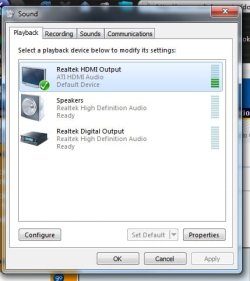
i set hdmi on default and test it , it shows no problems but does not play on tv
 

Attachments
  • 222.jpg
    222.jpg
    28.4 KB · Views: 56

My Computer My Computer

At a glance

32,windows 7
OS
32,windows 7
Sound HDMI

Try this. DELETE all the Audio Drivers using the same window you use to roll back your sound drivers(you must completely delete the sound drivers). Now you have no sound at all! GOOD. Turn off your computer, then turn it on again. Windows 7 will recognize your sound card and install it's own drivers. These work fine. You should have sound and vision through your HDMI cable. GOOD LUCK :D
 

My Computer My Computer

At a glance

windows 7 Ultimate 32 bit
OS
windows 7 Ultimate 32 bit
Try this. DELETE all the Audio Drivers using the same window you use to roll back your sound drivers(you must completely delete the sound drivers). Now you have no sound at all! GOOD. Turn off your computer, then turn it on again. Windows 7 will recognize your sound card and install it's own drivers. These work fine. You should have sound and vision through your HDMI cable. GOOD LUCK :D

Thanks for the respond but it still did not work, i uninstalled them and i restarted then the drivers installed automatically and still nothing,

btw i have tried windows + p switching to extend and duplicate and still no sound :(
 

My Computer My Computer

At a glance

32,windows 7
OS
32,windows 7
Is it possible to get sound from laptop (windows 7 OS) on the HDTV, connected using an RCA audio cable? My dell vostro has no HDMI port and I dont want to do any conversion

I was able to do it with Vista but Ive recently upgraded

Hi there
RCA Audio output should be no problem so long as you've got an AUX audio input on your TV

Use an adapter small jack plugged into headphone socket on laptop with audio rca plugs connected to AUX input on your TV.

Cheers
jimbo
 

My Computer My Computer

At a glance

Linux CENTOS 7 / various Windows OS'es and se...Intel i7 Intel i58GB, 16GBOn Motherboard
Computer type
PC/Desktop
Computer Manufacturer/Model Number
Custom built, several laptops HP/ASUS
OS
Linux CENTOS 7 / various Windows OS'es and servers
CPU
Intel i7 Intel i5
Memory
8GB, 16GB
Graphics Card(s)
On Motherboard
Sound Card
Realtek HD audio
Monitor(s) Displays
Apple Cinema display, Samsung LCD
Screen Resolution
1920 X 1080
Hard Drives
4 X 1TB SATA
Mouse
Toshiba wireless laser
Internet Speed
> 20MB up
I have fixed the problem , I had the HDMI cable connected to the TV on HDMI2 i changed it to HDMI 1 and I got the sound working. :D
 

My Computer My Computer

At a glance

32,windows 7
OS
32,windows 7
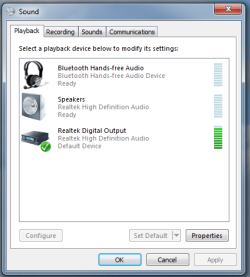
I cant get my audio working on the TV (LG LE5300) as well. Attached you can see how my sound panel looks like.

My laptop is Acer Aspire 7720-6381 with NVidia 8600GT. I have tried removing sound drivers, installing the latest realtek drivers and nvdia drivers, but nothing is working.

I have a DVI to HDMI adapter on the laptop and HDMI port on the TV.

Any suggestions?
 

Attachments

  • 1.png
    1.png
    16.3 KB · Views: 19

My Computer My Computer

At a glance

Sofia
OS
Sofia
I had same problem and fixed it this way. With the HDMI cable connected to laptop and to the tv, right click on the little speaker icon on the taskbar. Select Playback devices. My tv appeared on the playback devices window simply as Samsung. Click on the icon to make it the default device and this should cure the problem. When HDMI cable is disconnected the default reverts back to Seakers/Headphones.
 

My Computer My Computer

At a glance

Windows 7 64 bit
OS
Windows 7 64 bit
I've had this same problem. My setup is that the HTPC is connected to an AV Receiver connected to a TV. There were two problems. First, the HDMI audio would become "unplugged" and the only way to solve that was to turn the TV on and off. And secondly, there was flicker in the WMC TV playback. I tried using both NVidia and ATI cards. The flicker problem was solved by setting the Adjust Desktop Color setting to "Full Screen Video" on NVidia cards. However, that did not stick. On the ATI card, you had to disable dynamic contrast -- and that did stick. The HDMI audio not plugged in problem existed on both cards and is a function of how the AV Receiver translated the signal to the PC. The only solution that worked was to connect the PC directly to the HDMI2 port on the TV bypassing the receiver and then using the audio output on the PC connecting it to the MULTI 7.1 channel input on the receiver and then disabling HDMI audio on the PC. I couldn't connect the HDMI cable from the PC to the receiver because then there was a lipsync issue. This has worked flawlessly. Fortunately, I use a Harmony remote and choosing the right inputs was easy.
 

My Computer My Computer

At a glance

Windows 8 Pro x64i5
Computer type
PC/Desktop
Computer Manufacturer/Model Number
Custom
OS
Windows 8 Pro x64
CPU
i5
Back
Top