No HDMI audio out with Windows 7

Great, after downloading the intel driver, i now have lost the picture on the input tv screen. It is fine on the laptop but bearly readable on the tv, really white..... The only plus is i now have the sound for the hdmi. I have since downloaded the graphics driver from dell, and it said that it was an older version than the one installed (the intel site one), hoping it would fix the tv problem but didn't.. this is really frustrating as i'm and too good with computers.
does anyone have any ideas????

But it WORKS! My HDMI sound is back but the screen on my laptop in barely readable which is opposite of your case. I'm getting a heavy reddish hue on my laptop screen but I don't care. I own a Inspiron 11z.

I think this all can be traced to Windows Update as I remember selecting an optional update for my Intel Graphics and Realtek Audio couple weeks back which probably borked the HDMI out. I'll play around with the graphics drivers to see if I can get the anomaly straighted out.

Much thanks to Kivanc for the tip btw.:party:

EDIT: Got the Red glare issue fixed. Right click desktop>select graphic properties>pulls up the new Intel Graphics Control App>Goto Color Enhancement and select restore to default.

For some reason the new driver set mine to a high red gain on the built in display. Hope this helps.
 
Last edited:

My Computer My Computer

At a glance

Windows Se7en Ultimate Beta x86 Build 70571.83Ghz Centrino Duo4GB 2x2GB 677Mhz256MB nVidia Gefroce Go7400
Computer Manufacturer/Model Number
Dell XPS M1210
OS
Windows Se7en Ultimate Beta x86 Build 7057
CPU
1.83Ghz Centrino Duo
Motherboard
MXC062 Dell Mainboard
Memory
4GB 2x2GB 677Mhz
Graphics Card(s)
256MB nVidia Gefroce Go7400
Sound Card
Intel High Definition
Monitor(s) Displays
12.1 LED Glossy
Screen Resolution
1280x800
Hard Drives
Hitachi 320GB 5400| SimpleDrive 1TB External USB2.0 |
Cooling
NextTech Laptop Cooling Pad. 15CFMx2 USB powered
Keyboard
Dell US Standard Full Size w/o Backlight
Mouse
Synaptics Touchpad/Logitech Notebook Mini
Internet Speed
10Mbps Down/512Kbps Up
Other Info
Eee 701 Original Netbook Overclocked to 1GHz
Windows XP SP3
1GB RAM
4GB SSD
16GB SDHC
I'm still having this frustrating no sound problem even though I've set my HDMI playback device "Digital Output Device (S/PDIF and HDMI)" as the default device and updated everything possible. Has anyone got an idea of where to go from here?
 

My Computer My Computer

At a glance

Windows 7
OS
Windows 7
Do you have a home theater receiver?
 

My Computer My Computer

At a glance

Windows 7 Pro & Vista Home PremiumAthlon 64 3800+ (Orleans) 2.40GHz2GB DDR2 RAM DIMMNVIDIA GeForce 8500 GT 512 MB memory HDMI out
Computer Manufacturer/Model Number
Cheap $399.00 E-Machine
OS
Windows 7 Pro & Vista Home Premium
CPU
Athlon 64 3800+ (Orleans) 2.40GHz
Motherboard
Winfast
Memory
2GB DDR2 RAM DIMM
Graphics Card(s)
NVIDIA GeForce 8500 GT 512 MB memory HDMI out
Sound Card
creative X-Fi Exteme 7..1 channel
Monitor(s) Displays
Acer V223W 22" widescreen DVI
Screen Resolution
1680x1050
Hard Drives
WDC WD5 500GB
WDC WD25 250GB
PSU
OCZ 550 watt
Case
Gateway
Cooling
2 fans
Keyboard
Dell
Mouse
Sony Vaio
Internet Speed
18MB/s down - .72MB /s up
no, just my HDTV... otherwise I'd just run sound from the laptop's 3.5mm RCA jack. But at this point, im thinking that might be the way to go.
 

My Computer My Computer

At a glance

Windows 7
OS
Windows 7
wow, the minute I say I've updated everything Intel puts out a new video driver update... or at least one that i hadn't noticed before and it's fixed the problem. sweet.
 

My Computer My Computer

At a glance

Windows 7
OS
Windows 7
To the extent this helps anyone - I also had the same problem discussed in this thread (I have a Sony Vaio VGN-FZ21Z, with a sigmatel high defintion audio and Nvidia Ge FOrce 8600M GS), and unfortunately none of the solutions worked for me.

HOWEVER... I recently tried again and this time got the HDMI audio to work... what i did was uninstall IDT audio from my list of programmes, and then restart the computer ! naturally windows reinstalled a high definition driver and this driver allows my now to hear audio through my hdmi!!!

This was purely discovered by accident (as I was going to try to stop windows installing a generic driver and try to install an updated IDT audio file - but as windows 7 was too quick for me to stop it - I stumbled accros this 'solution').

I hope this helps others with the same configuration... and Happy holidays

UPDATE 28/12/09 - With this new generic driver I now no longer can use the builtin microphone on my computer... very annoying - the webcam works (in MSn but not skype?) but the microphone doesnt work (in any programme) - any suggestion would be warmly welcomed!
 
Last edited:

My Computer My Computer

At a glance

Windows 7Intel4GbNvidia Ge-Force 8600M GS
Computer Manufacturer/Model Number
Sony Vaio - VGN-FZ21Z
OS
Windows 7
CPU
Intel
Memory
4Gb
Graphics Card(s)
Nvidia Ge-Force 8600M GS
Sound Card
Sigmatel High Definition Audio Codec
Woooooooo hooooooo! it's working on my VAIO too thank man!!!!!!
 

My Computer My Computer

At a glance

Windows 7
OS
Windows 7
Just an FYI, I came here looking for a solution for my Pavilion dv3t. I had Vista 64 and upgraded to Win7 64 and lost audio through HDMI. After spending a little time fumbling with stuff, I upgraded the IDT driver to latest, went to device manager, uninstalled the display driver, and when windows started back up it re-installed the drivers and now everything works fine. Worked for me, so I just thought I'd let everyone know.
 

My Computer My Computer

At a glance

Windows 7 Ultimate 64
OS
Windows 7 Ultimate 64
I have a Vaio anda now they detect the HDMI audio but no sound pass to the TV, i put a music to play and in the mixer show that the music is playing but i dont hear nothing. When i disconnect the HDMI cable the TV was still the main audio device. What i do to the cable work?
 

My Computer My Computer

At a glance

Windows 7
OS
Windows 7
WORKING at last!!! woop

Ok, I never write on forums but I decided today was the day after trying hours to sort out no sound through hdmi and eventually got it sorted by piecing together bits of what people have said across various forums

The problem I was having was I could not change the hdmi output to default as it was showing it was not plugged in when it was! So, I went into device manager and in actions at the top there is an option to show hidden files (in view)

Once I had done, staying on device manager, I went down to sound and doubled clicked it which showed up a atmi audio hdmi option. Right click and then disable it. Wait a few seconds and then enable it again. Now go back into sound settings where the device is showing as not plugged in and it should now show as ready..... right click on it and set as default.... Close media player or itunes down and then reopen and play something... after a few seconds it should come through!!!!

Hope this helps... and as sad as it sounds, after trying for hours im well chuffed its working.... ! :D
 

My Computer My Computer

At a glance

windows 7
OS
windows 7
FYI: I was having the "AUDIO Not Plugged IN" problem on my SONY VGN-FW139E when directly plugged into a "Newer" tv. Sound used to work and then stopped.

The problem kicked in around when I installed Windows 7.

I fixed it by deleting the Audio HDMI device from hardware and then scan for new hardware. I could then click it in hardware/sound and set as default.
 

My Computer My Computer

At a glance

windows 7
OS
windows 7
Just info for those that need multiple audio playback devices as some have stated having to unplug HDMI when using other programs. Most programs allow you to manually select what audio device you can use for playback despite what is set for your default. In my case I have my gaming headset plugged into my Realtek device(my default) and then I went into WMP, Media Center, and Pro Tools and manually selected my Sound Blaster as the playback device. It keeps me from unplugging cables and allows my wife to hear music off the network drive while I am gaming at the same time. Works great.
 
Last edited:

My Computer My Computer

At a glance

Windows 7 Home Premium x64AMD Phenom II X4 9458 GB G-Skill 1.5v DDR 3 1333Mhz(2) MSI 512MB GTS 250 SLI
Computer Manufacturer/Model Number
Home built
OS
Windows 7 Home Premium x64
CPU
AMD Phenom II X4 945
Motherboard
ASUS M4N98TD EVO AM3 NVIDIA nForce 980a SLI
Memory
8 GB G-Skill 1.5v DDR 3 1333Mhz
Graphics Card(s)
(2) MSI 512MB GTS 250 SLI
Sound Card
Soundblaster Audigy 2 platinum
Monitor(s) Displays
Samsung 2255BW 22"
Screen Resolution
1650 x 1050
Hard Drives
2 WD 250GB 7500RPM
PSU
Antec TP-750. The ultimate bang for the buck PSU
Case
Raidmax
Cooling
Sycthe Slipstream cooling fans(4)
Keyboard
Zboard Merc
Mouse
Logitech MX-518
Internet Speed
3MB
Other Info
LG Blu-Ray/DVD combo drive/LG DVD-RW w/ lightscribe
Look who is back hehehehehe. I have a small problem now, my sound pass tro HDMI cable, but at time intervals the image stop pass and the signal is restarted, did u know what is?
 

My Computer My Computer

At a glance

Windows 7
OS
Windows 7
I had the same problem with HDmi video blinking out... I desceased the resolution and video is always on (Sony laptop)
 

My Computer My Computer

At a glance

windows 7
OS
windows 7
Sorry to ask and forgive my stupidity, but what means "desceased the resolution "?
 

My Computer My Computer

At a glance

Windows 7
OS
Windows 7
Resolution is the amount of rows and columns of pixels that can be displayed on a monitor/TV. 1920x1080 with progressive scan is considered 1080P(blueray/HDDVD). The same resolution without progressive scan is 1080i(HD TV channels). You may be losing sync and need to lower your resolution to keep sync. Follow this turtorial:
http://www.sevenforums.com/tutorials/255-screen-resolution-display-settings.html

Update your system specs with all your pc hardware so any future issues can be addressed more effectively. Cheers.
 

My Computer My Computer

At a glance

Windows 7 Home Premium x64AMD Phenom II X4 9458 GB G-Skill 1.5v DDR 3 1333Mhz(2) MSI 512MB GTS 250 SLI
Computer Manufacturer/Model Number
Home built
OS
Windows 7 Home Premium x64
CPU
AMD Phenom II X4 945
Motherboard
ASUS M4N98TD EVO AM3 NVIDIA nForce 980a SLI
Memory
8 GB G-Skill 1.5v DDR 3 1333Mhz
Graphics Card(s)
(2) MSI 512MB GTS 250 SLI
Sound Card
Soundblaster Audigy 2 platinum
Monitor(s) Displays
Samsung 2255BW 22"
Screen Resolution
1650 x 1050
Hard Drives
2 WD 250GB 7500RPM
PSU
Antec TP-750. The ultimate bang for the buck PSU
Case
Raidmax
Cooling
Sycthe Slipstream cooling fans(4)
Keyboard
Zboard Merc
Mouse
Logitech MX-518
Internet Speed
3MB
Other Info
LG Blu-Ray/DVD combo drive/LG DVD-RW w/ lightscribe
Thanks, change the resolution works.
 

My Computer My Computer

At a glance

Windows 7
OS
Windows 7
Haha... I'm still learning how to type on this iPod touch... I lowered the resolution... I forget the numbers but 780 was too high so I dropped it to 720 or something. Video has been solid ever since. Also I had to set it back after win7 upgrade.
 

My Computer My Computer

At a glance

windows 7
OS
windows 7

My Computer My Computer

At a glance

Windows 7 Home Premium x64AMD Phenom II X4 9458 GB G-Skill 1.5v DDR 3 1333Mhz(2) MSI 512MB GTS 250 SLI
Computer Manufacturer/Model Number
Home built
OS
Windows 7 Home Premium x64
CPU
AMD Phenom II X4 945
Motherboard
ASUS M4N98TD EVO AM3 NVIDIA nForce 980a SLI
Memory
8 GB G-Skill 1.5v DDR 3 1333Mhz
Graphics Card(s)
(2) MSI 512MB GTS 250 SLI
Sound Card
Soundblaster Audigy 2 platinum
Monitor(s) Displays
Samsung 2255BW 22"
Screen Resolution
1650 x 1050
Hard Drives
2 WD 250GB 7500RPM
PSU
Antec TP-750. The ultimate bang for the buck PSU
Case
Raidmax
Cooling
Sycthe Slipstream cooling fans(4)
Keyboard
Zboard Merc
Mouse
Logitech MX-518
Internet Speed
3MB
Other Info
LG Blu-Ray/DVD combo drive/LG DVD-RW w/ lightscribe
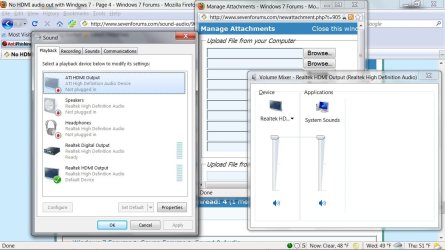
This is killing me. I was having the same "not plugged in" problem. I finally was able to get past that by setting the onboard audio to "Enable" rather than "Auto" in the bios. Now I have my HDMI audio output set as default, but as you can see in the picture the ATI HDMI Audio still says not plugged in, and I still have no sound!:


Help?

FYI I am running Windows 7 32bit into a Sharp HDTV. I can play my HD Camcorder back through the same hdmi input on the TV and get audio just fine. Video card is an ATI Radeon 3600. Running the hdmi cable directly from the hdmi out on the card to the TV (no DVI to HDMI adapter).
 

Attachments

  • HDMI Audio Problem.jpg
    HDMI Audio Problem.jpg
    113.8 KB · Views: 1,655

My Computer My Computer

At a glance

Windows 7 and Windows XP
OS
Windows 7 and Windows XP
Back
Top