No HDMI audio out with Windows 7

Do you happen to have a home theater receiver with HDMI and SPDIF out on your soind card?

That's the only hookup that worked for me to get 5.1 channel surround
 

My Computer My Computer

At a glance

Windows 7 Pro & Vista Home PremiumAthlon 64 3800+ (Orleans) 2.40GHz2GB DDR2 RAM DIMMNVIDIA GeForce 8500 GT 512 MB memory HDMI out
Computer Manufacturer/Model Number
Cheap $399.00 E-Machine
OS
Windows 7 Pro & Vista Home Premium
CPU
Athlon 64 3800+ (Orleans) 2.40GHz
Motherboard
Winfast
Memory
2GB DDR2 RAM DIMM
Graphics Card(s)
NVIDIA GeForce 8500 GT 512 MB memory HDMI out
Sound Card
creative X-Fi Exteme 7..1 channel
Monitor(s) Displays
Acer V223W 22" widescreen DVI
Screen Resolution
1680x1050
Hard Drives
WDC WD5 500GB
WDC WD25 250GB
PSU
OCZ 550 watt
Case
Gateway
Cooling
2 fans
Keyboard
Dell
Mouse
Sony Vaio
Internet Speed
18MB/s down - .72MB /s up
I'm having this exact same problem. I have an ATI 4850 on an ECS motherboard. Sometimes I have both audio and video just fine over hdmi, and then other times I have only video and the audio panel shows the same "not plugged in" message. Once that happens the only way I have found so far to fix it is to uninstall and reinstall the ati driver. It is quite annoying.

Same problem here, i have Gigabyte motherboard AM770-UD3 with this hardware onboard Gigabyte GV-R465OC-1GI (Radeon HD 4650) ; Sound Blaster Audigy 2 ZS ; AMD Phenom X4 9650 Agena 2.3GHz and Kingston HyperX T1 Series 4GB (PC2 8500), running Windows 7 Ultimate x64. The audio and video in my pc are ok for few days until i realize that i don't have any sound and of course a red X over the taskbar sound speaker and when i open the sound console hdmi message said "cable not plugged" but my display is a lcd hdtv so the cable is totally plugged, but sound blaster still working fine with external decoder, to fix the proplem i put disable sound blaster and restart in safemode restart again in normally windows mode and again hdmi audio and sound blaster audio. The sound blaster audigy 2 zs i usally use when the pc is on monitor display but i had to unplugged the monitor because but when the no hdmi audio comes again i lose the video signal in the 2 display i got no video and i had to remove the monitor for don't lose the video ANY HELP WILL BE HEAVELY APPRECIATE
 

My Computer My Computer

At a glance

Windows 7 x64AMD Phenom X4 9650 Agena 2.3GHz Socket AM2+ 9...Kingston HyperX T1 Series 4GB DDR2 SDRAM PC8500GIGABYTE GV-R465OC-1GI Radeon HD 4650 1GB
OS
Windows 7 x64
CPU
AMD Phenom X4 9650 Agena 2.3GHz Socket AM2+ 95W Quad-Core
Motherboard
GIGABYTE GA-MA770-UD3 AM2+/AM2 AMD 770 ATX
Memory
Kingston HyperX T1 Series 4GB DDR2 SDRAM PC8500
Graphics Card(s)
GIGABYTE GV-R465OC-1GI Radeon HD 4650 1GB
Sound Card
Sound Blaster Audigy 2 ZS
Hard Drives
Seagate Barracuda 7200.11 ST31500341AS 1.5TB 7200 RPM SATA 3.0
I had the same problem: "AUDIO Not Plugged IN". I fixed it by disabling on board audio in BIOS. Than I got usb audio device and start using it as a default device. When I need HDMI audio I just switch between these two in Sound>Playback Devices.
 

My Computer My Computer

At a glance

Windows 7Dual 2 Core 2.77G.SKILL 4GB (2 x 2GB) SDRAM DDR2 1066HIS Hightech H467QT512P Radeon HD 4670 IceQ T...
OS
Windows 7
CPU
Dual 2 Core 2.77
Motherboard
GIGABYTE GA-EP45-UD3R
Memory
G.SKILL 4GB (2 x 2GB) SDRAM DDR2 1066
Graphics Card(s)
HIS Hightech H467QT512P Radeon HD 4670 IceQ Turbo 512MB 128-
Sound Card
SYBA USB Stereo Audio Adapter
Monitor(s) Displays
ASUS MK241H 24"
Hard Drives
2 x Western Digital Caviar Blue WD1600AAJS 160GB
Western Digital Caviar Black WD6401AALS 640GB
PSU
CORSAIR CMPSU-750TX 750W
Case
Rosewill R5605-BK ATX Mid Tower
Cooling
ASUS V-60 92mm Vapo Bearing, 2 x 120mm Fans
possible solution here

The solution seemed to fix the following combination:
- motherboard has Realtek integrated audio
- video card is ATi chipset

It's a known problem even if HDMI cable plugged in to your HDTV from your HDMI video card but Windows said no HDMI cable plugged in. Following the steps below might fix the sound issue but do it at your own risk.

System I fixed with DFi mobo which had the integrated Realtek audio chipset and video card was an Asus EAH4350.

Steps:
- latest ATi CCC installed
- go to Realtek
- find and click "High Definition Audio Codecs (Software)" link
- ack the download agreement
- find "ATI HDMI Audio Device" (currently version R2.39) and download it
- follow the rest of the installation steps to finish the setup

Setup will prompt for a reboot and it should play sound on your HDTV after all :)

Good luck!
 

My Computer My Computer

At a glance

W7 Ultimate
OS
W7 Ultimate
I had some of the same issues with the HDMI audio not plugged in. The HDMI audio connected directly thru the ATI high definition audio built into my ATI 4890 GPU. I was running Windows 7RC1 with no problems but when I upgraded to Windows 7 I started having these issues. When I did the upgrade I used PCMover to transfer files and programs from my Vista hard drive to W7 (this was a dual boot system on seperate hard drives). Any way I was getting increasingly agravated with the no audio issue and some other strange issues with WMC and other devices not being recognised like my Canon EOS 30D camera so i did several full reinstalls with no sucsess and Microsoft Support couldnt help finally I did a low level format by using KillDisk I wrote zeros to the hard drive and then did a complete reinstall but this time I didnt import any settings or programs from Vista (I reinstalled them the old fashioned way, took me almost two days) but now I am very happy to say that my HDMI Audio works all the time every time and all the other anoying bugs I had are gone.
Windows 7 64bit
Gigabyte: GA-MA790FXT-UD5P motherboard
2 ATI Asus HD4890 GPU's in crossfire
8 Gb GSkill Memory
AMD Phenom II 955 BE
1000 watt corsair PS
 

My Computer My Computer

At a glance

Windows 7 64bit
OS
Windows 7 64bit
i had same problem. no hdmi sound.

1 activate both monitors
2 open control panels, sounds
3 tv shows up, set as default
4 voila, dvd plays on tv with sound
 

My Computer My Computer

At a glance

win 7
Computer Manufacturer/Model Number
gateway dx4831-01e
OS
win 7
HDMI audio issue with Sony Vaio laptops.

When I tried to connect my Sony VGN-AR71J to my TV by HDMI after upgrading to Windows 7 I realised that I no longer had sound, only picture. After doing some tweaking and online investigation I discovered that many of the manufacturers are not releasing up to date Windows 7 drivers for a number of the audio codecs that come pre-installed on machines. Sigmatel for example advise to try the manufacturers website as they do not support updated Windows 7 versions of their HD audio codecs for OEM software that comes pre-installed on a manufacturers machine. Once on the Sony website they too do not support the older machines so it's catch 22. If you are experiencing problems on an older laptop with drivers that previously worked on Windows Vista, once you have upgraded try going into the properties tab of the audio device in question and doing a 'Driver Rollback.' It seems that while the latest drivers are either incompatible or causing issues many users ( myself included ) have discovered that older driver versions are working without issue in Windows 7. Please note that this solution is only applicable if the device in question is visible in your Volume control options.
 

My Computer My Computer

At a glance

Windows 7 32bit
OS
Windows 7 32bit
Acer AS 1410 and no audio out

I have read this form and many others trying to find a solution for my setup as well and nothing seems to be working.

HDMI out plays video just fine, but no audio. I have tried updating the drivers, deleting then restarting and letting the OS do the updates, all to no avail. The only thing I have found to work is to hook up a powered speaker out of the headphone port... works, but a PITA...

Anyone know of a specific site that addresses this issue with more fixes to try? I am going to setup a chat with ACER as well to see if they know of a solution, but wanted to try here as well.

Once I get this working it will really make this little netbook a wonder, to be able to hook up to a TV and stream Netflix (or library of iTunes movies) all via a wireless keyboard/mouse..

thanks,

cory
 

My Computer My Computer

At a glance

Windows 7Intel Core Solo4gig
Computer Manufacturer/Model Number
Acer AS 1410
OS
Windows 7
CPU
Intel Core Solo
Memory
4gig
Hi everyone HDMI Sound Problem Solved,

After installing the new windows 7, the hdmi icon on the playback devices menu disappeared.

Here is what i did and got the icon back and make the hdmi sound work again.

The intel graphic cards needs to be updated. The link below will take you to intel site and it will detect the required updates for your system.

Intel® Driver Update Utility

Run the program and install the required updates and restart windows. HDMI icon will be back and the sound will work normal like it used to.

I hope this will solve everyones problem with the hdmi sound issue. I have hp Pavilion dv6, i m happy to hear the crisp clear sound from my Philips Hts6100 sound bar.

Kevin


this worked for me.
 

My Computer My Computer

At a glance

Windows Vista 64bit
Computer Manufacturer/Model Number
Gateway SX2800
OS
Windows Vista 64bit
nickyd23 is the freaking man!!!!!!!!!!!!!!!!!!!!!!!!!!!!!!!!!

That worked like a charm. I don't ever post on forums either, but thank you for doing so!!!!!!!!!!! :party:
 

My Computer My Computer

At a glance

win 7
OS
win 7
finally working

I updated the video driver following the aforementioned instructions, and Viola! I got the HDMI thing on sound playback! Set it as default and got sound on TV. Beautiful. Thank U guys so very much.
 

My Computer My Computer

At a glance

windows 7
Computer Manufacturer/Model Number
gateway nv44
OS
windows 7
No HDMI Audio

I figured it out! You have to uninstall the IDT driver, restart with the computer plugged into the monitor via the HDMI cable. It will auto-install the correct driver. Then you have to go to the device in your sound menu and set it as a default device. It was really simple in the end!
 

My Computer My Computer

At a glance

Windows 7
OS
Windows 7
Is it possible to get sound from laptop (windows 7 OS) on the HDTV, connected using an RCA audio cable? My dell vostro has no HDMI port and I dont want to do any conversion

I was able to do it with Vista but Ive recently upgraded
 

My Computer My Computer

At a glance

windows 7
OS
windows 7
nice post. thanks for sharing.
 

My Computer My Computer

At a glance

winxp2.4 quadcore2gb128mb
OS
winxp
CPU
2.4 quadcore
Motherboard
asus
Memory
2gb
Graphics Card(s)
128mb
Hard Drives
segate 500gb
Similar problem solved

Hi, I posted this in msn answers bc I found a solution for my particular issue which seems to yours:

I lost audio on the HDMI input of my TV/Monitor, all drivers (nvidia WHQL 258,96, realtek sound were up-to-date) and this is the setup:

-OS: Windows 7
- Video card: Nvidia XFX GTS-250 connected to a 32LH70YR LG Full HD TV through a DVI to HDMI adapter cable.
- Audio: 3,5mm audio cable from one of the rear outputs of the motherboard integrated sound to the sound input of the TV.

The solution I found:
1.- HDMI integrates audio by default, so I disabled its audio feature like this:
a. On the clear desktop, right click then go to "NVIDIA Control Panel"
b. At Nvidia Control Panel, go to Display -> Change Resolution.
c. Select your desired resolution and make sure the HDMI-HDTV connector is set to "Audio disabled", this way the TV will use the audio coming from your sound card and not the default integrated in HDMI.

2.- If that didn't work inmediately, then you may have a program related to overclocking/temperature measurement. In my case I had running MSI Afterburner. CLOSE IT. Then try Enabling/disabling HDMI sound as explained in point 1.
Notes:
- Don't forget to play a song or video, as well as checking your TV's volume and player volume before saying it didn't work.
- Also make sure the tv speakers are set as your default device under "Windows Control Panel -> Sound". You can even change the icon to a TV-like one.
- I did this with all devices on. I've read you need to turn on PC then TV, that's not true at least for me.

Good luck.
 

My Computer My Computer

At a glance

indows 7 Ultimate 32bit
OS
indows 7 Ultimate 32bit

My Computer My Computer

At a glance

Windows 7 Pro & Vista Home PremiumAthlon 64 3800+ (Orleans) 2.40GHz2GB DDR2 RAM DIMMNVIDIA GeForce 8500 GT 512 MB memory HDMI out
Computer Manufacturer/Model Number
Cheap $399.00 E-Machine
OS
Windows 7 Pro & Vista Home Premium
CPU
Athlon 64 3800+ (Orleans) 2.40GHz
Motherboard
Winfast
Memory
2GB DDR2 RAM DIMM
Graphics Card(s)
NVIDIA GeForce 8500 GT 512 MB memory HDMI out
Sound Card
creative X-Fi Exteme 7..1 channel
Monitor(s) Displays
Acer V223W 22" widescreen DVI
Screen Resolution
1680x1050
Hard Drives
WDC WD5 500GB
WDC WD25 250GB
PSU
OCZ 550 watt
Case
Gateway
Cooling
2 fans
Keyboard
Dell
Mouse
Sony Vaio
Internet Speed
18MB/s down - .72MB /s up
Everything on laptop shows there should be sound !

WW3 - I have the same problem you have described and apparently solved. Namely, I have video through the HDMI from my Vaio to my LCD (Sony), but no audio. I can see the levels moving in the volume mixer (For iTunes and Sony TV) but there is no sound. My laptop speakers are disabled and HDMI, which is the TV, is set to be the default in the control panel.
I have had my Vaio connected successfully to a Panasonic TV about a year ago and remember I had to reboot if I was to change my default speakers. However, if I change the default back to laptop, the sound plays without having to reboot.

I'm really stumped. Could you let me know how you fixed your problem?
 

My Computer My Computer

At a glance

Windows 7 Professional x64Intel Core 2 Duo P9700 2.8 GhzNvidia GeForce 93M GS
Computer Manufacturer/Model Number
Sony Vaio
OS
Windows 7 Professional x64
CPU
Intel Core 2 Duo P9700 2.8 Ghz
Graphics Card(s)
Nvidia GeForce 93M GS
Sound Card
Realtek High Definition Audio
Is it possible to get sound from laptop (windows 7 OS) on the HDTV, connected using an RCA audio cable? My dell vostro has no HDMI port and I dont want to do any conversion

I was able to do it with Vista but Ive recently upgraded

Yep. All you have to do is get a stereo 3mm male to RCA female adapter and plug it into your line out jack on your laptop. Newer HDTVs also have a pc audio port. You might want to check to see if that is an option. If so you just need a stereo 3mm double male cable.

Windows 7 should recognize and you should be able to select the port. Line out is usually labeled with speakers and the audio driver you are using.
 

My Computer My Computer

At a glance

Windows 7 Home Premium x64AMD Phenom II X4 9458 GB G-Skill 1.5v DDR 3 1333Mhz(2) MSI 512MB GTS 250 SLI
Computer Manufacturer/Model Number
Home built
OS
Windows 7 Home Premium x64
CPU
AMD Phenom II X4 945
Motherboard
ASUS M4N98TD EVO AM3 NVIDIA nForce 980a SLI
Memory
8 GB G-Skill 1.5v DDR 3 1333Mhz
Graphics Card(s)
(2) MSI 512MB GTS 250 SLI
Sound Card
Soundblaster Audigy 2 platinum
Monitor(s) Displays
Samsung 2255BW 22"
Screen Resolution
1650 x 1050
Hard Drives
2 WD 250GB 7500RPM
PSU
Antec TP-750. The ultimate bang for the buck PSU
Case
Raidmax
Cooling
Sycthe Slipstream cooling fans(4)
Keyboard
Zboard Merc
Mouse
Logitech MX-518
Internet Speed
3MB
Other Info
LG Blu-Ray/DVD combo drive/LG DVD-RW w/ lightscribe
No Sound

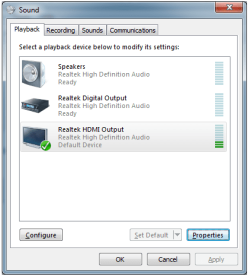
I'm by no means a computer person. However I've beenusing my desktop with my HMDI tv 42" LG for about 6 months now without a problem. I've choosen to use the tv speakers over my computer speakers just for the sake of ease. Anyways everything was working fine until a couple days ago. For whatever reason I get no audio through the hdmi cable. My computer shows that the sound is working fine but I don't hear anything. If I change the audio to my computer speakers everything works fine. Switch it back to HDMI and nothing. All drivers are updated. I don't know what happened or how to fix it but it's really frustrating.
 

Attachments

  • sound.png
    sound.png
    13.9 KB · Views: 42

My Computer My Computer

At a glance

Windows 7 64bit
OS
Windows 7 64bit
Windows 7: No sound in HDMI output using Recommended Realteck Drivers. Re-solved. I have a Sony Vaio VGN AR 61M Notebook. I upgraded from Vista to Windows 7 32 bit and had exactly the same problem. This Solution worked for me: 1: I Remove installed drivers from the sound card and delete them with the given option. 2: Re-start Windows. 3: Windows will recognize you have no drivers for your sound card and install its drivers, which work fine. I have HDMI Audio out to my LCD TV through the HDMI cable. Everything works fine. Hope this works for you.
 

My Computer My Computer

At a glance

windows 7 Ultimate 32 bit
OS
windows 7 Ultimate 32 bit
Back
Top