
Hello everyone. I will just copy what I have written to Toshiba troubleshooting forum - unfortunately, they have not answered yet.
--------------------------------------------------
Hello.
I recently performed a clean installation of Windows 7 Home Premium. Before that on preinstalled Windows the problem described below did not show up, sound worked just great.
Now I don't have sound when inserting my headphones in jack (built-in speakers work fine however). Windows reports that sound works, no problems found, but I hear nothing. On the same computer I have also Linux installed and the same headphones work well there in the same jack.
When I put my headphones in, Realtek Manager makes notification that the device is plugged in.
My model is Qosmio X775-3DV78. What I have tried so far:
1) Reinstalling, updating, removing, trying different versions of Realtek HD Audio driver.
2) Changing every possible setting in Realtek HD Audio Manager.
3) Trying different headphones - same result: nothing.
4) Changing settings in Playback Devices.
Since it worked before reinstalling Windows and since it works on Linux on the same computer, there is definitely something wrong with my drivers. Could you please provide information as to what drivers exactly I should have installed to make sound work correctly? Maybe some motherboard driver is missing (though I installed everything important I could find on Toshiba site).
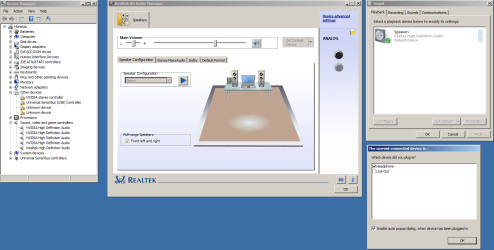
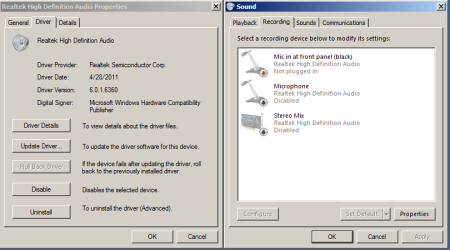
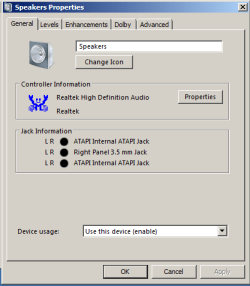
Attached are some important screenshots. Please note that there are 2 unknown devices in my Device Manager and also USB Controller driver has problems, though I do not think it has any connection with the problem.
* On both Playback Devices forms Disabled Devices and Disconnected Devices are shown.
Thanks!
UPDATE: One of "Unknown devices" proved to be Toshiba HDD Shock Sensor driver and another one is ACPI\TOS6205. Another on is Bluetooth driver which I do not need.
UPDATE2: Headphones suddenly worked today afternoon for a few minutes when I turned the laptop on first time in the day, but then, after I rebooted it, they were not working again. I did not do anything.
--------------------------------------------------
Hello.
I recently performed a clean installation of Windows 7 Home Premium. Before that on preinstalled Windows the problem described below did not show up, sound worked just great.
Now I don't have sound when inserting my headphones in jack (built-in speakers work fine however). Windows reports that sound works, no problems found, but I hear nothing. On the same computer I have also Linux installed and the same headphones work well there in the same jack.
When I put my headphones in, Realtek Manager makes notification that the device is plugged in.
My model is Qosmio X775-3DV78. What I have tried so far:
1) Reinstalling, updating, removing, trying different versions of Realtek HD Audio driver.
2) Changing every possible setting in Realtek HD Audio Manager.
3) Trying different headphones - same result: nothing.
4) Changing settings in Playback Devices.
Since it worked before reinstalling Windows and since it works on Linux on the same computer, there is definitely something wrong with my drivers. Could you please provide information as to what drivers exactly I should have installed to make sound work correctly? Maybe some motherboard driver is missing (though I installed everything important I could find on Toshiba site).
Attached are some important screenshots. Please note that there are 2 unknown devices in my Device Manager and also USB Controller driver has problems, though I do not think it has any connection with the problem.
* On both Playback Devices forms Disabled Devices and Disconnected Devices are shown.
Thanks!
UPDATE: One of "Unknown devices" proved to be Toshiba HDD Shock Sensor driver and another one is ACPI\TOS6205. Another on is Bluetooth driver which I do not need.
UPDATE2: Headphones suddenly worked today afternoon for a few minutes when I turned the laptop on first time in the day, but then, after I rebooted it, they were not working again. I did not do anything.
Attachments
My Computer
At a glance
Windows 7 Home Premium x64Intel Core i7-2630QM8 GbNVidia GeForce 560M GTX
- Computer Manufacturer/Model Number
- Toshiba Qosmio X775-3DV78
- OS
- Windows 7 Home Premium x64
- CPU
- Intel Core i7-2630QM
- Motherboard
- Intel HM65
- Memory
- 8 Gb
- Graphics Card(s)
- NVidia GeForce 560M GTX
- Screen Resolution
- 1920x1080x32@120Hz
- Mouse
- Logitech wireless
- Internet Speed
- 10MBit/sec

