Reinstalled Windows 7-->No sound-->BSOD after audio driver install

dom2755

New member
Local time
1:01 AM
Messages
6
Reinstalled Windows 7-->No sound-->BSOD after audio driver install

So i am having a similar problem as that one https://www.sevenforums.com/sound-audio/344079-reinstalled-windows-7-no-sound-bsod-after-audio-driver-install.html#post3393678. In this post someone said to go to BIOS and check audio settings, i did went to my BIOS and i had my audio disabled so i enabled it, but it still doesn't work. I've just reinstalled Windows 7 Ultimate 64 bit and was trying to install drivers from the motherboard manufacturer website. I have no sound and when I try to install the latest Realtek drivers, I did get a BSOD right after. Yes, i said DID because i found a Microsoft update specific for it and now i just get error in windows. From what i understand the driver from NVIDIA is no for sound, but video and even if it is for sound i remember having both Realtek and NVIDIA last time when my windows 7 worked.
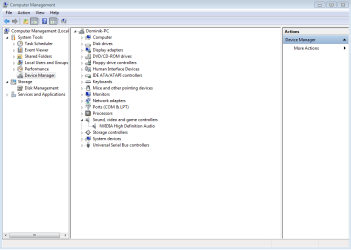
Untitled.png

So i have a driver installed for my graphic card and when i installed audio driver it does not show up there, but i don't know if it supposed to. So i found out that is have to go to
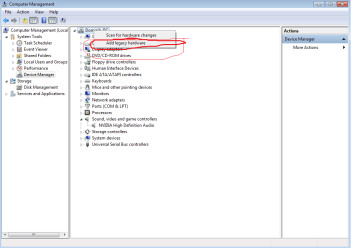
Untit1led.png

Add legacy hardware--> Advanced-->Sound-->Realtek, and than go through the procedure. Before i installed the Microsoft update i would get a BSOD here, now i get this
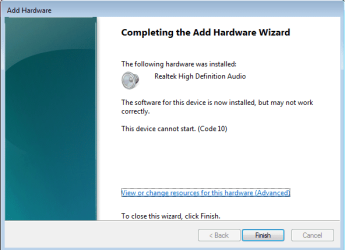
Unt12itled.png

So i restart my PC just to see if anything changes, but no
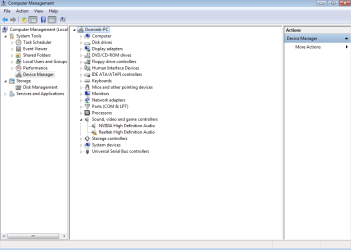
Untitleda.png

Now when i go to my software that detects my drivers and do i need to update them it says YES for the audio Realtek, but when i do it i get BSOD. Now something that i think is important to note, when i installed the drivers in safe mode they did work and by "work" i mean i can see all the staff that should be in that section for audio in device manager, i don't know if it actually works because i don't know how to enable sound in safe mode and i also think that i would have to set up my headphones.

P.S.
On the other post, the one that i put the link to at the begging, i also post this message, but i didn't realized that is was marked as resolved.
 

My Computer My Computer

At a glance

Windows 7 Ultimate; 64 bitIntel Xenon CPU E543 2.33GHz16GBNVIDIA GeForce GT 520
Computer type
PC/Desktop
Computer Manufacturer/Model Number
HP
OS
Windows 7 Ultimate; 64 bit
CPU
Intel Xenon CPU E543 2.33GHz
Motherboard
HP Inc. RP000112077 XW6400
Memory
16GB
Graphics Card(s)
NVIDIA GeForce GT 520
Hard Drives
1. WDC_WD5000AAKS-00A7B0
2. WDC_WD5001AALS-00L3B2
Antivirus
Avast
Browser
Chome
Hi dom2755,

Welcome to SevenForums!

Your computer management screenshot :warn: warning indicates your Realtek Audio Drive is corrupt.
Create a system restore point, or better yet, a full system image.

Here's a link to Realtek 64 bit Audio Driver click on the link and install it.

Reboot, open device manager and ascertain the status of the driver, i.e. (no :warn:)

Check to see if your audio works. If you get another BSOD, please follow
Blue Screen of Death (BSOD) Posting Instruction

And we'll have a look.

Nic
 
Last edited:

My Computer My Computer

At a glance

Win 10 x64, Linux Lite, Win 7 x64, BlackArch,...
Computer type
PC/Desktop
Computer Manufacturer/Model Number
HP Desktop & Compaq Laptop
OS
Win 10 x64, Linux Lite, Win 7 x64, BlackArch, & Kali
Hard Drives
Samsung 850 Pro 256Gb,
Hitachi HDD 1Tb,
Crucial MX SSD 250Gb
Segate 3Tb USB 3.0 Ext. Backup HDD
Internet Speed
150Mbps dn, 20Mbps up
Antivirus
Avast Free, Malwarebytes Anti-Exploit & Anti-Ransomware
Browser
Firefox, Chrome, Opera, & VPN

My Computer My Computer

At a glance

Windows 7 Ultimate; 64 bitIntel Xenon CPU E543 2.33GHz16GBNVIDIA GeForce GT 520
Computer type
PC/Desktop
Computer Manufacturer/Model Number
HP
OS
Windows 7 Ultimate; 64 bit
CPU
Intel Xenon CPU E543 2.33GHz
Motherboard
HP Inc. RP000112077 XW6400
Memory
16GB
Graphics Card(s)
NVIDIA GeForce GT 520
Hard Drives
1. WDC_WD5000AAKS-00A7B0
2. WDC_WD5001AALS-00L3B2
Antivirus
Avast
Browser
Chome
OOPS!! Try it now! You want the second one in the list for 64 bit, click on Global.
Nic
 

My Computer My Computer

At a glance

Win 10 x64, Linux Lite, Win 7 x64, BlackArch,...
Computer type
PC/Desktop
Computer Manufacturer/Model Number
HP Desktop & Compaq Laptop
OS
Win 10 x64, Linux Lite, Win 7 x64, BlackArch, & Kali
Hard Drives
Samsung 850 Pro 256Gb,
Hitachi HDD 1Tb,
Crucial MX SSD 250Gb
Segate 3Tb USB 3.0 Ext. Backup HDD
Internet Speed
150Mbps dn, 20Mbps up
Antivirus
Avast Free, Malwarebytes Anti-Exploit & Anti-Ransomware
Browser
Firefox, Chrome, Opera, & VPN
I guess you mean that, because in you reply there is no link and the link you posted earlier is still the same for me

Unasdsatitled.png

So i am supposed to download the second thing in it for 64-bit, i already did this, but if you are going to say yes i will do it again.
 

My Computer My Computer

At a glance

Windows 7 Ultimate; 64 bitIntel Xenon CPU E543 2.33GHz16GBNVIDIA GeForce GT 520
Computer type
PC/Desktop
Computer Manufacturer/Model Number
HP
OS
Windows 7 Ultimate; 64 bit
CPU
Intel Xenon CPU E543 2.33GHz
Motherboard
HP Inc. RP000112077 XW6400
Memory
16GB
Graphics Card(s)
NVIDIA GeForce GT 520
Hard Drives
1. WDC_WD5000AAKS-00A7B0
2. WDC_WD5001AALS-00L3B2
Antivirus
Avast
Browser
Chome
I corrected link and tested it prior to my previous post, and it worked. Just tried it again and it's broken. :rolleyes: Corrected it again and tested, it worked. Maybe having a bad hair day today! LOL Anyway, yes, that is correct. If you already tried that and it didn't work, BSOD, then I don't see a need to try it again, most likely same result.


I also have been experiencing extra blank line being placed between paragraphs on this forum. Maybe an issue with the website as I haven't experienced same on other sites.


Could you follow BSOD post instruction in previous post? (Humm, no post number on that!) WTH?
Might provide useful info to your issue. May be other drive conflict, or corrupt driver.


Have you tried HP website for their driver for Realtek? It's suggested on the Realtek website on one of the pages. I would have located it for you, however, your HP Desktop make. model are required for the correct driver or use auto detect.


Here's the link HP Drivers
Hopefully, it will continue to work!


Nic


ps see what I mean about extra spaces! Just tried link again after typing this and it worked.
 
Last edited:

My Computer My Computer

At a glance

Win 10 x64, Linux Lite, Win 7 x64, BlackArch,...
Computer type
PC/Desktop
Computer Manufacturer/Model Number
HP Desktop & Compaq Laptop
OS
Win 10 x64, Linux Lite, Win 7 x64, BlackArch, & Kali
Hard Drives
Samsung 850 Pro 256Gb,
Hitachi HDD 1Tb,
Crucial MX SSD 250Gb
Segate 3Tb USB 3.0 Ext. Backup HDD
Internet Speed
150Mbps dn, 20Mbps up
Antivirus
Avast Free, Malwarebytes Anti-Exploit & Anti-Ransomware
Browser
Firefox, Chrome, Opera, & VPN
So when i was just looking online for the drivers and hot to fix it, I thought that the problem might by caused by the newest drivers, a bug or something. I went to HP website to download the drivers from there (my PC is basically HP XW6400 Workstation, but i won't post a link because i don't know how really). I had the same result as with the newest version of the driver from the Realtek website. After that i decided to download Creative Sound Blaster X-Fi XtremeMusic Audio Drivers (32-bit and 64-bit) with is from the website, but i get the same result like with realtek. I am going to follow BSOD post, so when i finish that i will post what happened.


p.s.
Your link works now

After edit
Here is the file from BSOD - Posting Instructions

View attachment DOMINIK-PC-28_06_2018_181649_46.zip
 

My Computer My Computer

At a glance

Windows 7 Ultimate; 64 bitIntel Xenon CPU E543 2.33GHz16GBNVIDIA GeForce GT 520
Computer type
PC/Desktop
Computer Manufacturer/Model Number
HP
OS
Windows 7 Ultimate; 64 bit
CPU
Intel Xenon CPU E543 2.33GHz
Motherboard
HP Inc. RP000112077 XW6400
Memory
16GB
Graphics Card(s)
NVIDIA GeForce GT 520
Hard Drives
1. WDC_WD5000AAKS-00A7B0
2. WDC_WD5001AALS-00L3B2
Antivirus
Avast
Browser
Chome
Thank you dom2755,
In regards to posting a link, enter text in your post, highlight it to make that text a hyperlink, click the
createlink.gif
above, in the popup, delete what's there or you'll have a double http entry and it won't work, copy and paste the address in the url (top of your browser where the https:// bla bla bla is for the page, etc, you want the link to. Piece of cake. If you want to create a link to a download so that it pops up, you right-click the download info, i.e. button or whatever you would normally left click to start the download and select copy link location (that copies the url to your clipboard. The rest is the same as the above instructions. Piece of Cake as well.

Will take me a few to look over the info in your link.

Just a thought, if you would run disk check (sfc /scannow) from an elevated command prompt, I'd like to see if you have any issue with system files. To do so:

Click :orb: type CMD, right-click on it (cmd.exe) choose run as administrator (has to be such to have permission.) at the > with your mouse, copy and paste
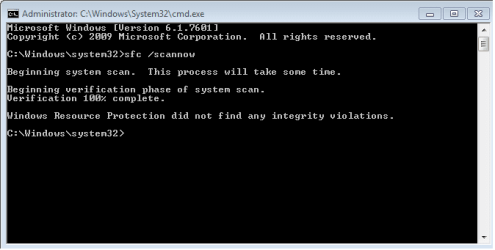
sfc /scannow
be patient, if it indicates problems with the files it checks run it again a time or two. sometimes it takes a couple runs to repair what it can, and sometimes it can't repair them and will have to run the SURT tool (instructions later if needed.)

I might have to contact AxeO with the BSOD issue if it's not apparent to me. (at 65 I'm studying for IT exams)

Nic
 

My Computer My Computer

At a glance

Win 10 x64, Linux Lite, Win 7 x64, BlackArch,...
Computer type
PC/Desktop
Computer Manufacturer/Model Number
HP Desktop & Compaq Laptop
OS
Win 10 x64, Linux Lite, Win 7 x64, BlackArch, & Kali
Hard Drives
Samsung 850 Pro 256Gb,
Hitachi HDD 1Tb,
Crucial MX SSD 250Gb
Segate 3Tb USB 3.0 Ext. Backup HDD
Internet Speed
150Mbps dn, 20Mbps up
Antivirus
Avast Free, Malwarebytes Anti-Exploit & Anti-Ransomware
Browser
Firefox, Chrome, Opera, & VPN
So i have run this scan, i am running it again now but with my first time i had no issues.

Untit423423424324ed.png

If anything changes with the second scan i will let you know, but i don't think it will show anything, so I am doing the second scan just in case.
 

My Computer My Computer

At a glance

Windows 7 Ultimate; 64 bitIntel Xenon CPU E543 2.33GHz16GBNVIDIA GeForce GT 520
Computer type
PC/Desktop
Computer Manufacturer/Model Number
HP
OS
Windows 7 Ultimate; 64 bit
CPU
Intel Xenon CPU E543 2.33GHz
Motherboard
HP Inc. RP000112077 XW6400
Memory
16GB
Graphics Card(s)
NVIDIA GeForce GT 520
Hard Drives
1. WDC_WD5000AAKS-00A7B0
2. WDC_WD5001AALS-00L3B2
Antivirus
Avast
Browser
Chome
No integrity violations, you don't need to re-scan! If you are and you want to cancel it, click inside the cmd window and press CTRL + C. At the > type exit and press enter.

Research seems to point to conflict with other driver(s).
Still perusing all the text files you uploaded.

If you can recall, when your Realtek audio worked, have you added any hardware, drivers, etc. since then? Something changed on your computer since the time it was working.

Nic
 
Last edited:

My Computer My Computer

At a glance

Win 10 x64, Linux Lite, Win 7 x64, BlackArch,...
Computer type
PC/Desktop
Computer Manufacturer/Model Number
HP Desktop & Compaq Laptop
OS
Win 10 x64, Linux Lite, Win 7 x64, BlackArch, & Kali
Hard Drives
Samsung 850 Pro 256Gb,
Hitachi HDD 1Tb,
Crucial MX SSD 250Gb
Segate 3Tb USB 3.0 Ext. Backup HDD
Internet Speed
150Mbps dn, 20Mbps up
Antivirus
Avast Free, Malwarebytes Anti-Exploit & Anti-Ransomware
Browser
Firefox, Chrome, Opera, & VPN
Sorry that i haven't been here for a few days, but i had a small trip.

Well, the last time my drivers were working was like a few weeks ago, but my PC suddenly stopped working and even windows reaper could do anything so i decided to reinstall system and audio is not working now. Would it be possible to somehow not work because i formatted my dick(random idea)? would it help is i change the windows to let's say 8 or even Linux Ubuntu? And the last idea i had, reinstall system and install audio drivers first.

I don't really know if any of those ideas are good, but i remember when i reinstalled the system last time (with was something about 2 years ago) i don't remember any problems. Accept my new graphic card(i had a really bad graphic card and when i reinstalled the system i put my current graphic card in) i didn't change anything.
 

My Computer My Computer

At a glance

Windows 7 Ultimate; 64 bitIntel Xenon CPU E543 2.33GHz16GBNVIDIA GeForce GT 520
Computer type
PC/Desktop
Computer Manufacturer/Model Number
HP
OS
Windows 7 Ultimate; 64 bit
CPU
Intel Xenon CPU E543 2.33GHz
Motherboard
HP Inc. RP000112077 XW6400
Memory
16GB
Graphics Card(s)
NVIDIA GeForce GT 520
Hard Drives
1. WDC_WD5000AAKS-00A7B0
2. WDC_WD5001AALS-00L3B2
Antivirus
Avast
Browser
Chome
Back
Top