No hibernation or sleep after upgrading to SSD

BobNanner

New member
Local time
11:10 AM
Messages
14
I just installed a new Samsung NAND SSD 860 EVO drive in my desktop. After cloning it and then disconnecting the previous Seagate hard drive, I can't put the computer into either sleep or hibernation. I've tried resetting in Power Options, reloading Enable_Hibernate.reg, and also something else using cmd.exe to check what all is connected that can wake.

I've got it set to hibernate when I push the power button. The screen will go blank for two seconds and then turn right back on.

I really want my hibernate back, but I don't want to put the old hard drive back in to get it. If I reconnect the old drive and boot to it, hibernate works. Does anyone have any solutions?. The only difference is the hard drive. Nothing else was changed. It worked before, why won't it work now?
 

My Computer My Computer

At a glance

Windows 7 Home Premium 64 bitIntel(R) Core(TM) i5 3470 @ 3.20 GHz8GBMSI GT730
Computer type
PC/Desktop
Computer Manufacturer/Model Number
Custom build
OS
Windows 7 Home Premium 64 bit
CPU
Intel(R) Core(TM) i5 3470 @ 3.20 GHz
Motherboard
MSI B75MA-P45
Memory
8GB
Graphics Card(s)
MSI GT730
Sound Card
On Board
Monitor(s) Displays
Vizio M320SL & ViewSonic VP201s
Screen Resolution
1600x1024
Hard Drives
Samsung NAND SSD 860 EVO
Keyboard
Logitech K740
Mouse
Logitech M570 Wireless
Internet Speed
20Mb
Antivirus
MS Security Essentials
Browser
Chrome
I would like to add that using "powercfg -devicequery wake_armed" in the command prompt returns nothing. Everything is disabled.
 

My Computer My Computer

At a glance

Windows 7 Home Premium 64 bitIntel(R) Core(TM) i5 3470 @ 3.20 GHz8GBMSI GT730
Computer type
PC/Desktop
Computer Manufacturer/Model Number
Custom build
OS
Windows 7 Home Premium 64 bit
CPU
Intel(R) Core(TM) i5 3470 @ 3.20 GHz
Motherboard
MSI B75MA-P45
Memory
8GB
Graphics Card(s)
MSI GT730
Sound Card
On Board
Monitor(s) Displays
Vizio M320SL & ViewSonic VP201s
Screen Resolution
1600x1024
Hard Drives
Samsung NAND SSD 860 EVO
Keyboard
Logitech K740
Mouse
Logitech M570 Wireless
Internet Speed
20Mb
Antivirus
MS Security Essentials
Browser
Chrome
Did you install Samsung Magician?
Have found that it's more part of the problem than part of a solution.
 

My Computers My Computers

  • At a glance

    Windows 7 HP 64i5 6600K - 800MHz to 4200MHz4+4G GSkill DDR4 3000IG - Intel 530
    Computer type
    PC/Desktop
    Computer Manufacturer/Model Number
    custom build
    OS
    Windows 7 HP 64
    CPU
    i5 6600K - 800MHz to 4200MHz
    Motherboard
    GA-Z170-HD3P
    Memory
    4+4G GSkill DDR4 3000
    Graphics Card(s)
    IG - Intel 530
    Monitor(s) Displays
    Samsung 226BW
    Screen Resolution
    1680x1050
    Hard Drives
    (1) -1 SM951 – 128GB M.2 AHCI PCIe SSD drive for Windows 7 and Lubuntu
    (2) -1 WD SATA 3 - 1T for Data
    (3) -1 WD SATA 3 - 1T for backup
    PSU
    Thermaltake 450W TR2 gold
    Keyboard
    Old and good Chicony mechanical keyboard
    Mouse
    Logitech mX performance - 9 buttons (had to disable some)
    Internet Speed
    500Mb/s
    Browser
    Firefox 64
    Other Info
    TinyWall firewall
  • At a glance

    Windows 7 Proi7-4500U 800MHz to 3.0GHz(4+4)G DDR3 1600IG intel 4400 + NVIDIA GeForce GT 745M
    Computer type
    Laptop
    System Manufacturer/Model Number
    Asus Q550LF
    OS
    Windows 7 Pro
    CPU
    i7-4500U 800MHz to 3.0GHz
    Motherboard
    Asus Q550LF
    Memory
    (4+4)G DDR3 1600
    Graphics Card(s)
    IG intel 4400 + NVIDIA GeForce GT 745M
    Sound Card
    Realtek
    Monitor(s) Displays
    LG Display LP156WF4-SPH1
    Screen Resolution
    1920 x 1080
    Hard Drives
    BX500 120G SSD for Windows and programs +
    1T HDD for data
    Internet Speed
    500 Mb/s
    Browser
    Firefox
    Other Info
    TinyWall firewall
You don't hibernate or sleep SSD and it will stop you doing it. There is nothing to be gained hibernate as it won't boot any quicker but it will wear out the drive the less you can write to the drive the longer it lasts all my SSD are set the same by default
 

My Computer My Computer

At a glance

win 8 32 bit
Computer type
PC/Desktop
OS
win 8 32 bit
Did you install Samsung Magician?
Have found that it's more part of the problem than part of a solution.

I uninstalled SM and it made no difference.

You don't hibernate or sleep SSD and it will stop you doing it. There is nothing to be gained hibernate as it won't boot any quicker but it will wear out the drive the less you can write to the drive the longer it lasts all my SSD are set the same by default

I'm not worried about wearing it out. The computer now will do a cold boot in 15 seconds. What I like about hibernate is that I can leave all of my work open and shutdown the computer, and it will all be waiting for me when I turn it back on. It's not about how long it takes to boot, but how long it takes me to pick up where I left off.
 

My Computer My Computer

At a glance

Windows 7 Home Premium 64 bitIntel(R) Core(TM) i5 3470 @ 3.20 GHz8GBMSI GT730
Computer type
PC/Desktop
Computer Manufacturer/Model Number
Custom build
OS
Windows 7 Home Premium 64 bit
CPU
Intel(R) Core(TM) i5 3470 @ 3.20 GHz
Motherboard
MSI B75MA-P45
Memory
8GB
Graphics Card(s)
MSI GT730
Sound Card
On Board
Monitor(s) Displays
Vizio M320SL & ViewSonic VP201s
Screen Resolution
1600x1024
Hard Drives
Samsung NAND SSD 860 EVO
Keyboard
Logitech K740
Mouse
Logitech M570 Wireless
Internet Speed
20Mb
Antivirus
MS Security Essentials
Browser
Chrome
Open Control Panel\All Control Panel Items\Power Options.
What power plan is set? Set it to Balanced.
Edit the settings (Control Panel\All Control Panel Items\Power Options\Edit Plan Settings) - Change advanced settings.
Check all settings.
 

My Computers My Computers

  • At a glance

    Windows 7 HP 64i5 6600K - 800MHz to 4200MHz4+4G GSkill DDR4 3000IG - Intel 530
    Computer type
    PC/Desktop
    Computer Manufacturer/Model Number
    custom build
    OS
    Windows 7 HP 64
    CPU
    i5 6600K - 800MHz to 4200MHz
    Motherboard
    GA-Z170-HD3P
    Memory
    4+4G GSkill DDR4 3000
    Graphics Card(s)
    IG - Intel 530
    Monitor(s) Displays
    Samsung 226BW
    Screen Resolution
    1680x1050
    Hard Drives
    (1) -1 SM951 – 128GB M.2 AHCI PCIe SSD drive for Windows 7 and Lubuntu
    (2) -1 WD SATA 3 - 1T for Data
    (3) -1 WD SATA 3 - 1T for backup
    PSU
    Thermaltake 450W TR2 gold
    Keyboard
    Old and good Chicony mechanical keyboard
    Mouse
    Logitech mX performance - 9 buttons (had to disable some)
    Internet Speed
    500Mb/s
    Browser
    Firefox 64
    Other Info
    TinyWall firewall
  • At a glance

    Windows 7 Proi7-4500U 800MHz to 3.0GHz(4+4)G DDR3 1600IG intel 4400 + NVIDIA GeForce GT 745M
    Computer type
    Laptop
    System Manufacturer/Model Number
    Asus Q550LF
    OS
    Windows 7 Pro
    CPU
    i7-4500U 800MHz to 3.0GHz
    Motherboard
    Asus Q550LF
    Memory
    (4+4)G DDR3 1600
    Graphics Card(s)
    IG intel 4400 + NVIDIA GeForce GT 745M
    Sound Card
    Realtek
    Monitor(s) Displays
    LG Display LP156WF4-SPH1
    Screen Resolution
    1920 x 1080
    Hard Drives
    BX500 120G SSD for Windows and programs +
    1T HDD for data
    Internet Speed
    500 Mb/s
    Browser
    Firefox
    Other Info
    TinyWall firewall
Open Control Panel\All Control Panel Items\Power Options.
What power plan is set? Set it to Balanced.
Edit the settings (Control Panel\All Control Panel Items\Power Options\Edit Plan Settings) - Change advanced settings.
Check all settings.

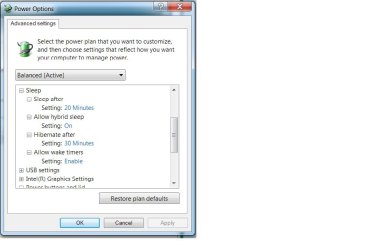
Advanced Settings
Balanced [Active]
Sleep
Sleep after
Setting: 20 Minutes
Allow hybrid sleep
Setting: On
Hibernate after
Setting: 30 Minutes
Allow wake timers
Setting: Enable
Power buttons and lid
Power button action
Setting: Hibernate
Sleep button action
Setting: Hibernate

Anything else? It still doesn't work. After changing it to "Balanced", I hit the power button and it shut down. Then I rebooted and set the power button to "Hibernate". I hit the power button, the screen went blank and then popped back on after 2 seconds.

I've checked my drivers and they are all up to date.
 

Attachments

  • Power Options.jpg
    Power Options.jpg
    40.2 KB · Views: 1

My Computer My Computer

At a glance

Windows 7 Home Premium 64 bitIntel(R) Core(TM) i5 3470 @ 3.20 GHz8GBMSI GT730
Computer type
PC/Desktop
Computer Manufacturer/Model Number
Custom build
OS
Windows 7 Home Premium 64 bit
CPU
Intel(R) Core(TM) i5 3470 @ 3.20 GHz
Motherboard
MSI B75MA-P45
Memory
8GB
Graphics Card(s)
MSI GT730
Sound Card
On Board
Monitor(s) Displays
Vizio M320SL & ViewSonic VP201s
Screen Resolution
1600x1024
Hard Drives
Samsung NAND SSD 860 EVO
Keyboard
Logitech K740
Mouse
Logitech M570 Wireless
Internet Speed
20Mb
Antivirus
MS Security Essentials
Browser
Chrome
Samsung Magician probably changed some parameters.
Try to Restore plan defaults and then check again.
 

My Computers My Computers

  • At a glance

    Windows 7 HP 64i5 6600K - 800MHz to 4200MHz4+4G GSkill DDR4 3000IG - Intel 530
    Computer type
    PC/Desktop
    Computer Manufacturer/Model Number
    custom build
    OS
    Windows 7 HP 64
    CPU
    i5 6600K - 800MHz to 4200MHz
    Motherboard
    GA-Z170-HD3P
    Memory
    4+4G GSkill DDR4 3000
    Graphics Card(s)
    IG - Intel 530
    Monitor(s) Displays
    Samsung 226BW
    Screen Resolution
    1680x1050
    Hard Drives
    (1) -1 SM951 – 128GB M.2 AHCI PCIe SSD drive for Windows 7 and Lubuntu
    (2) -1 WD SATA 3 - 1T for Data
    (3) -1 WD SATA 3 - 1T for backup
    PSU
    Thermaltake 450W TR2 gold
    Keyboard
    Old and good Chicony mechanical keyboard
    Mouse
    Logitech mX performance - 9 buttons (had to disable some)
    Internet Speed
    500Mb/s
    Browser
    Firefox 64
    Other Info
    TinyWall firewall
  • At a glance

    Windows 7 Proi7-4500U 800MHz to 3.0GHz(4+4)G DDR3 1600IG intel 4400 + NVIDIA GeForce GT 745M
    Computer type
    Laptop
    System Manufacturer/Model Number
    Asus Q550LF
    OS
    Windows 7 Pro
    CPU
    i7-4500U 800MHz to 3.0GHz
    Motherboard
    Asus Q550LF
    Memory
    (4+4)G DDR3 1600
    Graphics Card(s)
    IG intel 4400 + NVIDIA GeForce GT 745M
    Sound Card
    Realtek
    Monitor(s) Displays
    LG Display LP156WF4-SPH1
    Screen Resolution
    1920 x 1080
    Hard Drives
    BX500 120G SSD for Windows and programs +
    1T HDD for data
    Internet Speed
    500 Mb/s
    Browser
    Firefox
    Other Info
    TinyWall firewall
Samsung Magician probably changed some parameters.
Try to Restore plan defaults and then check again.

I restored to the defaults and then changed the power button action back from shutdown to hibernate. If I didn't do that, then it would shut down and not hibernate. Unfortunately, hibernation only lasts 2 seconds. If I can't get it to hibernate, then shutdown is the only action that will work for the power button which is not the action I want.

For what it's worth, Samsung Magician wasn't installed until the new hard drive was installed, and even then before it was installed, hibernate didn't work. For my problem, SM is just another rabbit hole.
 

My Computer My Computer

At a glance

Windows 7 Home Premium 64 bitIntel(R) Core(TM) i5 3470 @ 3.20 GHz8GBMSI GT730
Computer type
PC/Desktop
Computer Manufacturer/Model Number
Custom build
OS
Windows 7 Home Premium 64 bit
CPU
Intel(R) Core(TM) i5 3470 @ 3.20 GHz
Motherboard
MSI B75MA-P45
Memory
8GB
Graphics Card(s)
MSI GT730
Sound Card
On Board
Monitor(s) Displays
Vizio M320SL & ViewSonic VP201s
Screen Resolution
1600x1024
Hard Drives
Samsung NAND SSD 860 EVO
Keyboard
Logitech K740
Mouse
Logitech M570 Wireless
Internet Speed
20Mb
Antivirus
MS Security Essentials
Browser
Chrome
I suspect Windows does it like it disables defrag all PC from top makers have it set that way depends on the type of SSD chips it doesn't do the drive any good so it makes sense not to write gigs of Data to it as it starts fast enough from scratch and shuts down fast
 

My Computer My Computer

At a glance

win 8 32 bit
Computer type
PC/Desktop
OS
win 8 32 bit
I have many brands of SSD's and hibernate and sleep works on all them.

Lets try a CMD. Open a CMD window as admin and type
powercfg -H on

If you type
powercfg /?
It will list all power config. At Hibernate it says "Hibernate timeout is not supported on all systems"
It may be your case.
 

My Computers My Computers

  • At a glance

    Windows 7 HP 64i5 6600K - 800MHz to 4200MHz4+4G GSkill DDR4 3000IG - Intel 530
    Computer type
    PC/Desktop
    Computer Manufacturer/Model Number
    custom build
    OS
    Windows 7 HP 64
    CPU
    i5 6600K - 800MHz to 4200MHz
    Motherboard
    GA-Z170-HD3P
    Memory
    4+4G GSkill DDR4 3000
    Graphics Card(s)
    IG - Intel 530
    Monitor(s) Displays
    Samsung 226BW
    Screen Resolution
    1680x1050
    Hard Drives
    (1) -1 SM951 – 128GB M.2 AHCI PCIe SSD drive for Windows 7 and Lubuntu
    (2) -1 WD SATA 3 - 1T for Data
    (3) -1 WD SATA 3 - 1T for backup
    PSU
    Thermaltake 450W TR2 gold
    Keyboard
    Old and good Chicony mechanical keyboard
    Mouse
    Logitech mX performance - 9 buttons (had to disable some)
    Internet Speed
    500Mb/s
    Browser
    Firefox 64
    Other Info
    TinyWall firewall
  • At a glance

    Windows 7 Proi7-4500U 800MHz to 3.0GHz(4+4)G DDR3 1600IG intel 4400 + NVIDIA GeForce GT 745M
    Computer type
    Laptop
    System Manufacturer/Model Number
    Asus Q550LF
    OS
    Windows 7 Pro
    CPU
    i7-4500U 800MHz to 3.0GHz
    Motherboard
    Asus Q550LF
    Memory
    (4+4)G DDR3 1600
    Graphics Card(s)
    IG intel 4400 + NVIDIA GeForce GT 745M
    Sound Card
    Realtek
    Monitor(s) Displays
    LG Display LP156WF4-SPH1
    Screen Resolution
    1920 x 1080
    Hard Drives
    BX500 120G SSD for Windows and programs +
    1T HDD for data
    Internet Speed
    500 Mb/s
    Browser
    Firefox
    Other Info
    TinyWall firewall
If you type
powercfg /?
It will list all power config. At Hibernate it says "Hibernate timeout is not supported on all systems"
It may be your case.

"powercfg /?" is the help file, not a system request or system command. Any machine that you put that command on will return the same help file that all say "Hibernate timeout is not supported on all systems." Unfortunately, the first 16 lines of the help file don't appear at the top because it drops off by the time it gets to the end of the file. I was able to copy and paste it into a .txt file and hit the break key as soon as I hit enter to stop it and capture the first several lines of the file. I've attached it here.

Here is what I get using -AvailableSleepStates or in this case, the short version -a:

C:\Windows\system32>powercfg -a
The following sleep states are available on this system: Standby ( S3 ) Hibernate Hybrid Sleep
The following sleep states are not available on this system:
Standby (S1)
The system firmware does not support this standby state.
Standby (S2)
The system firmware does not support this standby state.

Using "powercfg -devicequery wake_armed" returns nothing.

Here's another one with the copy and paste results:

C:\Windows\system32>powercfg -devicequery wake_from_any
Logitech Driver Interface
USB Input Device
HID Keyboard Device (001)
Generic USB Hub
ACPI Power Button
Intel(R) 7 Series/C216 Chipset Family USB Enhanced Host Controller - 1E26
Realtek High Definition Audio
HID-compliant device (004)
Logitech HID-compliant Unifying device (001)
USB Input Device (006)
HID-compliant device (005)
Xeon(R) processor E3-1200 v2/3rd Gen Core processor PCI Express Root Port - 0151

HID-compliant mouse
Intel(R) 7 Series/C216 Chipset Family USB Enhanced Host Controller - 1E2D
Logitech Unifying USB receiver (001)
Logitech Driver Interface (004)
Logitech Driver Interface (005)
Intel(R) USB 3.0 eXtensible Host Controller
UMBus Enumerator
Logitech HID-Compliant Keyboard (001)
USB Composite Device (002)
HID-compliant device (010)
Intel(R) Management Engine Interface
Logitech HID-compliant Unifying keyboard (001)
Logitech Driver Interface (006)
HID-compliant consumer control device (003)
Logitech Driver Interface (008)
USB Root Hub
Intel(R) USB 3.0 Root Hub
Intel(R) 7 Series/C216 Chipset Family PCI Express Root Port 1 - 1E10
USB Root Hub (001)
HID-compliant consumer control device (005)
Logitech HID-compliant Unifying device (003)
Logitech USB Input Device (001)
HID-compliant device (014)
Microsoft Virtual WiFi Miniport Adapter
Intel(R) 7 Series/C216 Chipset Family PCI Express Root Port 2 - 1E12
Intel(R) 82801 PCI Bridge - 244E
Logitech Driver Interface (010)
Generic USB Hub (002)
Logitech HID-compliant Unifying device (004)
HID-compliant device (020)
USB Composite Device (006)
HID-compliant consumer control device (010)
High Definition Audio Controller (001)
HID-compliant device (021)
Logitech HID-compliant Unifying Mouse (001)
Generic USB Hub (003)
USB Input Device (015)
Realtek PCIe GBE Family Controller

Does that give any clues? That's too much information for me to sort through especially since I don't know what most of it is.
 

Attachments

My Computer My Computer

At a glance

Windows 7 Home Premium 64 bitIntel(R) Core(TM) i5 3470 @ 3.20 GHz8GBMSI GT730
Computer type
PC/Desktop
Computer Manufacturer/Model Number
Custom build
OS
Windows 7 Home Premium 64 bit
CPU
Intel(R) Core(TM) i5 3470 @ 3.20 GHz
Motherboard
MSI B75MA-P45
Memory
8GB
Graphics Card(s)
MSI GT730
Sound Card
On Board
Monitor(s) Displays
Vizio M320SL & ViewSonic VP201s
Screen Resolution
1600x1024
Hard Drives
Samsung NAND SSD 860 EVO
Keyboard
Logitech K740
Mouse
Logitech M570 Wireless
Internet Speed
20Mb
Antivirus
MS Security Essentials
Browser
Chrome
Did you run
powercfg -H on

C:\Windows\system32>powercfg -a
The following sleep states are available on this system: Standby ( S3 ) Hibernate Hybrid Sleep
The following sleep states are not available on this system:
Standby (S1)
The system firmware does not support this standby state.
Standby (S2)
The system firmware does not support this standby state.

Some computers has on BIOS a Power tab.
There you may have the option to set
Standby (S1) and Standby (S2)
 

My Computers My Computers

  • At a glance

    Windows 7 HP 64i5 6600K - 800MHz to 4200MHz4+4G GSkill DDR4 3000IG - Intel 530
    Computer type
    PC/Desktop
    Computer Manufacturer/Model Number
    custom build
    OS
    Windows 7 HP 64
    CPU
    i5 6600K - 800MHz to 4200MHz
    Motherboard
    GA-Z170-HD3P
    Memory
    4+4G GSkill DDR4 3000
    Graphics Card(s)
    IG - Intel 530
    Monitor(s) Displays
    Samsung 226BW
    Screen Resolution
    1680x1050
    Hard Drives
    (1) -1 SM951 – 128GB M.2 AHCI PCIe SSD drive for Windows 7 and Lubuntu
    (2) -1 WD SATA 3 - 1T for Data
    (3) -1 WD SATA 3 - 1T for backup
    PSU
    Thermaltake 450W TR2 gold
    Keyboard
    Old and good Chicony mechanical keyboard
    Mouse
    Logitech mX performance - 9 buttons (had to disable some)
    Internet Speed
    500Mb/s
    Browser
    Firefox 64
    Other Info
    TinyWall firewall
  • At a glance

    Windows 7 Proi7-4500U 800MHz to 3.0GHz(4+4)G DDR3 1600IG intel 4400 + NVIDIA GeForce GT 745M
    Computer type
    Laptop
    System Manufacturer/Model Number
    Asus Q550LF
    OS
    Windows 7 Pro
    CPU
    i7-4500U 800MHz to 3.0GHz
    Motherboard
    Asus Q550LF
    Memory
    (4+4)G DDR3 1600
    Graphics Card(s)
    IG intel 4400 + NVIDIA GeForce GT 745M
    Sound Card
    Realtek
    Monitor(s) Displays
    LG Display LP156WF4-SPH1
    Screen Resolution
    1920 x 1080
    Hard Drives
    BX500 120G SSD for Windows and programs +
    1T HDD for data
    Internet Speed
    500 Mb/s
    Browser
    Firefox
    Other Info
    TinyWall firewall
Yes, I've done the "powercfg -h on" several times. There is never anything returned except the prompt, so I don't know if that is doing anything or not.

Going into the BIOS:
ACPI Standby State [S3] (the ONLY other option is S1)

Power Management Setup
EuP2013 [Disabled]

Wakeup Event Setup
Wakeup Event By [BIOS] other option is [OS]
Resume By RTC Alarm [Disabled]
Resume By PCI or PCI-E Device [Disabled]
Resume From S3 by USB Device [Enabled]
Resume From S3/S4/S5 by PS2 Mouse [Disabled]
Resume From S3/S4/S5 by PS2 Keyboard [Disabled]

Keyboard is USB, mouse is wireless, so USB bluetooth. Also, wireless network adapter is USB. Those are the only USB connections.

This makes me wonder if the wireless adapter could be causing the issue. However, it didn't cause an issue with the old spinning platter hard drive.
 

My Computer My Computer

At a glance

Windows 7 Home Premium 64 bitIntel(R) Core(TM) i5 3470 @ 3.20 GHz8GBMSI GT730
Computer type
PC/Desktop
Computer Manufacturer/Model Number
Custom build
OS
Windows 7 Home Premium 64 bit
CPU
Intel(R) Core(TM) i5 3470 @ 3.20 GHz
Motherboard
MSI B75MA-P45
Memory
8GB
Graphics Card(s)
MSI GT730
Sound Card
On Board
Monitor(s) Displays
Vizio M320SL & ViewSonic VP201s
Screen Resolution
1600x1024
Hard Drives
Samsung NAND SSD 860 EVO
Keyboard
Logitech K740
Mouse
Logitech M570 Wireless
Internet Speed
20Mb
Antivirus
MS Security Essentials
Browser
Chrome
You don't hibernate or sleep SSD and it will stop you doing it. There is nothing to be gained hibernate as it won't boot any quicker but it will wear out the drive the less you can write to the drive the longer it lasts all my SSD are set the same by default

Horsefeathers! You most certainly can hibernate a computer running on an SSD ans the SSD won't prevent you from doing so. I occasionally hibernate mine. Unless you hibernate multiple (as in dozens) times a day, it won't reduce remaining write life enough to worry about.

There are plenty of reasons for hibernating a computer with an SSD. The two top reasons I do are when I'm going to be away from the computer for a while and I have ongoing work I don't want interrupted, and hibernation is what my UPS uses to essentially save any work I have going on when there is a power outage.
 

My Computer My Computer

At a glance

Win 7 Ultimate 64 bitIntel i7-3930KKingston HyperX Genesis 32GB Kit (8x4GB Modul...MSI R7850 Twin Frozr 2GD5/OC Radeon HD 7850 2...
Computer type
PC/Desktop
Computer Manufacturer/Model Number
Custom Build
OS
Win 7 Ultimate 64 bit
CPU
Intel i7-3930K
Motherboard
ASUS P9X79 WS
Memory
Kingston HyperX Genesis 32GB Kit (8x4GB Modules) 1600MHz DDR
Graphics Card(s)
MSI R7850 Twin Frozr 2GD5/OC Radeon HD 7850 2GB 256-bit GDDR
Sound Card
Asus Xonar Essence STX
Monitor(s) Displays
3x Asus VG248QE 24", Vizio 32" TV
Screen Resolution
1920 x 1080, ?
Hard Drives
Samsung 128GB 840 Pro SSD (1),
Samsung 4TB 850 EVO SSDs (4)
Samsung 4TB 850 EVO SSDs (16) external backup drives used in 2.5" hot swap bays in the computer.
PSU
Corsair HX750w
Case
Antec Two Hundred v2 (modified)
Cooling
Cooler Master GeminII S524 120mm (fan replaced with a 140mm)
Keyboard
Logitech G510s
Mouse
Logitech M525 (two in use)
Internet Speed
=< 32Mbps down, 8Mbps up
Antivirus
AVAST!, MBAM, SAS, Spybot S&D (all but MBAM free) Glary Util
Browser
IE11
Other Info
LSI 9211-8i HBA card (8 SATA III ports), 2.5" & 3.5" Hot Swap Bays, HooToo HT-CR001 PCI-E to USB 3.0 Internal Hub + 6 Slot Card Reader, and LG Model CH12LS28 BD-ROM Optical Drive. Also, ScanSnap S1500 ADF duplexing scanner, Canon 9000F flat bed scanner, Corsair SP2500 2.1 speakers, Samsung CLP 415nw laser color printer, Cyberpower PP2200SW UPS
I suspect Windows does it like it disables defrag all PC from top makers have it set that way depends on the type of SSD chips it doesn't do the drive any good so it makes sense not to write gigs of Data to it as it starts fast enough from scratch and shuts down fast

Seriously?:rolleyes:
 

My Computer My Computer

At a glance

Win 7 Ultimate 64 bitIntel i7-3930KKingston HyperX Genesis 32GB Kit (8x4GB Modul...MSI R7850 Twin Frozr 2GD5/OC Radeon HD 7850 2...
Computer type
PC/Desktop
Computer Manufacturer/Model Number
Custom Build
OS
Win 7 Ultimate 64 bit
CPU
Intel i7-3930K
Motherboard
ASUS P9X79 WS
Memory
Kingston HyperX Genesis 32GB Kit (8x4GB Modules) 1600MHz DDR
Graphics Card(s)
MSI R7850 Twin Frozr 2GD5/OC Radeon HD 7850 2GB 256-bit GDDR
Sound Card
Asus Xonar Essence STX
Monitor(s) Displays
3x Asus VG248QE 24", Vizio 32" TV
Screen Resolution
1920 x 1080, ?
Hard Drives
Samsung 128GB 840 Pro SSD (1),
Samsung 4TB 850 EVO SSDs (4)
Samsung 4TB 850 EVO SSDs (16) external backup drives used in 2.5" hot swap bays in the computer.
PSU
Corsair HX750w
Case
Antec Two Hundred v2 (modified)
Cooling
Cooler Master GeminII S524 120mm (fan replaced with a 140mm)
Keyboard
Logitech G510s
Mouse
Logitech M525 (two in use)
Internet Speed
=< 32Mbps down, 8Mbps up
Antivirus
AVAST!, MBAM, SAS, Spybot S&D (all but MBAM free) Glary Util
Browser
IE11
Other Info
LSI 9211-8i HBA card (8 SATA III ports), 2.5" & 3.5" Hot Swap Bays, HooToo HT-CR001 PCI-E to USB 3.0 Internal Hub + 6 Slot Card Reader, and LG Model CH12LS28 BD-ROM Optical Drive. Also, ScanSnap S1500 ADF duplexing scanner, Canon 9000F flat bed scanner, Corsair SP2500 2.1 speakers, Samsung CLP 415nw laser color printer, Cyberpower PP2200SW UPS
Horsefeathers! You most certainly can hibernate a computer running on an SSD ans the SSD won't prevent you from doing so. I occasionally hibernate mine. Unless you hibernate multiple (as in dozens) times a day, it won't reduce remaining write life enough to worry about.

There are plenty of reasons for hibernating a computer with an SSD. The two top reasons I do are when I'm going to be away from the computer for a while and I have ongoing work I don't want interrupted, and hibernation is what my UPS uses to essentially save any work I have going on when there is a power outage.

I agree, I just want to be able to turn off the computer and save my work. I don't really care if it shortens the life of the SSD. The time to failure is so much longer than the old platters that it doesn't really matter. With the SSD, the computer will now cold boot in 15 seconds which is still less time than it took to come back from hibernation. Now, if I could just get it to hibernate I'd be a happy camper.
 

My Computer My Computer

At a glance

Windows 7 Home Premium 64 bitIntel(R) Core(TM) i5 3470 @ 3.20 GHz8GBMSI GT730
Computer type
PC/Desktop
Computer Manufacturer/Model Number
Custom build
OS
Windows 7 Home Premium 64 bit
CPU
Intel(R) Core(TM) i5 3470 @ 3.20 GHz
Motherboard
MSI B75MA-P45
Memory
8GB
Graphics Card(s)
MSI GT730
Sound Card
On Board
Monitor(s) Displays
Vizio M320SL & ViewSonic VP201s
Screen Resolution
1600x1024
Hard Drives
Samsung NAND SSD 860 EVO
Keyboard
Logitech K740
Mouse
Logitech M570 Wireless
Internet Speed
20Mb
Antivirus
MS Security Essentials
Browser
Chrome
I agree, I just want to be able to turn off the computer and save my work. I don't really care if it shortens the life of the SSD. The time to failure is so much longer than the old platters that it doesn't really matter. With the SSD, the computer will now cold boot in 15 seconds which is still less time than it took to come back from hibernation. Now, if I could just get it to hibernate I'd be a happy camper.

Have you tried resetting the power button to work normally and activate Hibernate by using the Shut Down menu when you click the Windows button or click the Windows key?
 

My Computer My Computer

At a glance

Win 7 Ultimate 64 bitIntel i7-3930KKingston HyperX Genesis 32GB Kit (8x4GB Modul...MSI R7850 Twin Frozr 2GD5/OC Radeon HD 7850 2...
Computer type
PC/Desktop
Computer Manufacturer/Model Number
Custom Build
OS
Win 7 Ultimate 64 bit
CPU
Intel i7-3930K
Motherboard
ASUS P9X79 WS
Memory
Kingston HyperX Genesis 32GB Kit (8x4GB Modules) 1600MHz DDR
Graphics Card(s)
MSI R7850 Twin Frozr 2GD5/OC Radeon HD 7850 2GB 256-bit GDDR
Sound Card
Asus Xonar Essence STX
Monitor(s) Displays
3x Asus VG248QE 24", Vizio 32" TV
Screen Resolution
1920 x 1080, ?
Hard Drives
Samsung 128GB 840 Pro SSD (1),
Samsung 4TB 850 EVO SSDs (4)
Samsung 4TB 850 EVO SSDs (16) external backup drives used in 2.5" hot swap bays in the computer.
PSU
Corsair HX750w
Case
Antec Two Hundred v2 (modified)
Cooling
Cooler Master GeminII S524 120mm (fan replaced with a 140mm)
Keyboard
Logitech G510s
Mouse
Logitech M525 (two in use)
Internet Speed
=< 32Mbps down, 8Mbps up
Antivirus
AVAST!, MBAM, SAS, Spybot S&D (all but MBAM free) Glary Util
Browser
IE11
Other Info
LSI 9211-8i HBA card (8 SATA III ports), 2.5" & 3.5" Hot Swap Bays, HooToo HT-CR001 PCI-E to USB 3.0 Internal Hub + 6 Slot Card Reader, and LG Model CH12LS28 BD-ROM Optical Drive. Also, ScanSnap S1500 ADF duplexing scanner, Canon 9000F flat bed scanner, Corsair SP2500 2.1 speakers, Samsung CLP 415nw laser color printer, Cyberpower PP2200SW UPS
The C:\Windows\System32\shutdown.exe /h puts the computer to hibernate

Create a shortcut and paste the above command line. See what happens.
 

My Computers My Computers

  • At a glance

    Windows 7 HP 64i5 6600K - 800MHz to 4200MHz4+4G GSkill DDR4 3000IG - Intel 530
    Computer type
    PC/Desktop
    Computer Manufacturer/Model Number
    custom build
    OS
    Windows 7 HP 64
    CPU
    i5 6600K - 800MHz to 4200MHz
    Motherboard
    GA-Z170-HD3P
    Memory
    4+4G GSkill DDR4 3000
    Graphics Card(s)
    IG - Intel 530
    Monitor(s) Displays
    Samsung 226BW
    Screen Resolution
    1680x1050
    Hard Drives
    (1) -1 SM951 – 128GB M.2 AHCI PCIe SSD drive for Windows 7 and Lubuntu
    (2) -1 WD SATA 3 - 1T for Data
    (3) -1 WD SATA 3 - 1T for backup
    PSU
    Thermaltake 450W TR2 gold
    Keyboard
    Old and good Chicony mechanical keyboard
    Mouse
    Logitech mX performance - 9 buttons (had to disable some)
    Internet Speed
    500Mb/s
    Browser
    Firefox 64
    Other Info
    TinyWall firewall
  • At a glance

    Windows 7 Proi7-4500U 800MHz to 3.0GHz(4+4)G DDR3 1600IG intel 4400 + NVIDIA GeForce GT 745M
    Computer type
    Laptop
    System Manufacturer/Model Number
    Asus Q550LF
    OS
    Windows 7 Pro
    CPU
    i7-4500U 800MHz to 3.0GHz
    Motherboard
    Asus Q550LF
    Memory
    (4+4)G DDR3 1600
    Graphics Card(s)
    IG intel 4400 + NVIDIA GeForce GT 745M
    Sound Card
    Realtek
    Monitor(s) Displays
    LG Display LP156WF4-SPH1
    Screen Resolution
    1920 x 1080
    Hard Drives
    BX500 120G SSD for Windows and programs +
    1T HDD for data
    Internet Speed
    500 Mb/s
    Browser
    Firefox
    Other Info
    TinyWall firewall
Have you tried resetting the power button to work normally and activate Hibernate by using the Shut Down menu when you click the Windows button or click the Windows key?

That's how it worked before. I have the power button set to hibernate, the screen goes blank and then it pops back on in 2 seconds. If I hook up the old platter and boot from it, that's what it will do. That tells me that it's probably not something in the BIOS. But, when I cloned the hard drive, it quit working with the SSD. All of the settings in Windows 7 were the same. There is a setting somewhere that causes it to not work with the SSD. Finding that setting is the problem. Or, could it be something that is bad with the SSD?
 

My Computer My Computer

At a glance

Windows 7 Home Premium 64 bitIntel(R) Core(TM) i5 3470 @ 3.20 GHz8GBMSI GT730
Computer type
PC/Desktop
Computer Manufacturer/Model Number
Custom build
OS
Windows 7 Home Premium 64 bit
CPU
Intel(R) Core(TM) i5 3470 @ 3.20 GHz
Motherboard
MSI B75MA-P45
Memory
8GB
Graphics Card(s)
MSI GT730
Sound Card
On Board
Monitor(s) Displays
Vizio M320SL & ViewSonic VP201s
Screen Resolution
1600x1024
Hard Drives
Samsung NAND SSD 860 EVO
Keyboard
Logitech K740
Mouse
Logitech M570 Wireless
Internet Speed
20Mb
Antivirus
MS Security Essentials
Browser
Chrome
Back
Top