no image preview - help

kampinas

New member
I can't make my photos preview. When I go to "My pictures" all I see is only the program's icon (I currently use irfanview) instead of the mini pic as it should, so to know the photo.

All I get is this:


no mini preview of my photos! Is this fixable? Any help appreciated.


My Computer

OS
Windows 7 Home Premium
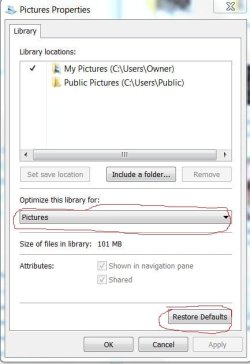
In Windows Explorer, right click on Pictures and select Properties. Look and see what the setting for Optimize this library for: is set at. It should be set to Pictures from the drop down menu. If it is set to Pictures, you can try restoring the default settings.

I do not know how to change the associations in Windows Explorer. Hopefully someone will come along that knows how to that. I think when you when you installed Irfanview, you made it the default for everything.

I will dig into Irfanview and get back to you.
 

Attachments

  • Capture.JPG
    Capture.JPG
    70.9 KB · Views: 51

My Computer

Computer Manufacturer/Model Number
Home built
OS
Windows 7 Ultimate 32 bit
CPU
Intel(R) Pentium(R) 4 CPU 3.00GHz
Motherboard
ASUS P4P800-VM Motherboard Chipset: Intel 865G + ICH5
Memory
2.50 GB RAM
Graphics Card(s)
NVIDIA GeForce 7600 GS
Sound Card
SoundMax Integrated Digital Audio (Chip)
Monitor(s) Displays
ViewSonic VX 1962 wm
Screen Resolution
1680 X 1050
Hard Drives
Seagate Barracuda 7200.10 80 GB
ST380215A ATA Device 18.6 GB
Western Digital "My Book" external hard drive 750 GB
Cooling
Fan based
Keyboard
Microsoft Comfort Curve Keyboard 2000 v10 USB
Mouse
Logitec optic USB
Internet Speed
3.01 Mb/s download 0.64 Mb/s upload
thanks for the attemp of help Carl but still nothing happened. I tried changing the assossiation by switching the default program of opening it to Windows picture view program but nothing here too.
Thanks by the way
 

My Computer

OS
Windows 7 Home Premium
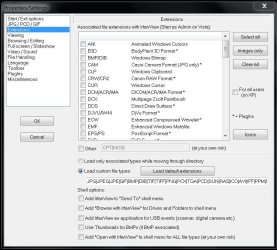
Open Irfanview and click on Properties and settings on the tool bar. Now click on Extensions and see what is checked there. Pay particular attention to the bottom portion, Shell options: Make sure none of these, especially the last one, are checked.
 

Attachments

  • Capture.JPG
    Capture.JPG
    125.7 KB · Views: 140

My Computer

Computer Manufacturer/Model Number
Home built
OS
Windows 7 Ultimate 32 bit
CPU
Intel(R) Pentium(R) 4 CPU 3.00GHz
Motherboard
ASUS P4P800-VM Motherboard Chipset: Intel 865G + ICH5
Memory
2.50 GB RAM
Graphics Card(s)
NVIDIA GeForce 7600 GS
Sound Card
SoundMax Integrated Digital Audio (Chip)
Monitor(s) Displays
ViewSonic VX 1962 wm
Screen Resolution
1680 X 1050
Hard Drives
Seagate Barracuda 7200.10 80 GB
ST380215A ATA Device 18.6 GB
Western Digital "My Book" external hard drive 750 GB
Cooling
Fan based
Keyboard
Microsoft Comfort Curve Keyboard 2000 v10 USB
Mouse
Logitec optic USB
Internet Speed
3.01 Mb/s download 0.64 Mb/s upload
I have been experimenting with theese option before posting my friend. But nothing yet again. I bet it is gonna be really easy to fix this and we are slipping that :p
 

My Computer

OS
Windows 7 Home Premium
I have been experimenting with theese option before posting my friend. But nothing yet again. I bet it is gonna be really easy to fix this and we are slipping that :p
You are probably right about that. I am out of ideas short of uninstalling Irfanview, rebooting, and reinstalling Irfanview being careful not to make it the default association with anything - a custom install.

Edited to add: Try removing all the associations you have inIrfanview and see what the results are. You can add them back one at a time until you discover which association hijacked your library icons.
 
Last edited:

My Computer

Computer Manufacturer/Model Number
Home built
OS
Windows 7 Ultimate 32 bit
CPU
Intel(R) Pentium(R) 4 CPU 3.00GHz
Motherboard
ASUS P4P800-VM Motherboard Chipset: Intel 865G + ICH5
Memory
2.50 GB RAM
Graphics Card(s)
NVIDIA GeForce 7600 GS
Sound Card
SoundMax Integrated Digital Audio (Chip)
Monitor(s) Displays
ViewSonic VX 1962 wm
Screen Resolution
1680 X 1050
Hard Drives
Seagate Barracuda 7200.10 80 GB
ST380215A ATA Device 18.6 GB
Western Digital "My Book" external hard drive 750 GB
Cooling
Fan based
Keyboard
Microsoft Comfort Curve Keyboard 2000 v10 USB
Mouse
Logitec optic USB
Internet Speed
3.01 Mb/s download 0.64 Mb/s upload
about irfanview the only thing I choose on assossiations settings is that I choose only images.
 

My Computer

OS
Windows 7 Home Premium
That may be the problem; it is associating all images. The better approach is to limit it to specific images or to none at all. You can always right click on an image and open it with Irfanview. In Windows Explorer, right click on one of those Irfanview icons and click on properties. What shows up under Opens with?
 

My Computer

Computer Manufacturer/Model Number
Home built
OS
Windows 7 Ultimate 32 bit
CPU
Intel(R) Pentium(R) 4 CPU 3.00GHz
Motherboard
ASUS P4P800-VM Motherboard Chipset: Intel 865G + ICH5
Memory
2.50 GB RAM
Graphics Card(s)
NVIDIA GeForce 7600 GS
Sound Card
SoundMax Integrated Digital Audio (Chip)
Monitor(s) Displays
ViewSonic VX 1962 wm
Screen Resolution
1680 X 1050
Hard Drives
Seagate Barracuda 7200.10 80 GB
ST380215A ATA Device 18.6 GB
Western Digital "My Book" external hard drive 750 GB
Cooling
Fan based
Keyboard
Microsoft Comfort Curve Keyboard 2000 v10 USB
Mouse
Logitec optic USB
Internet Speed
3.01 Mb/s download 0.64 Mb/s upload
Very good. Glad you solved the problem.
 

My Computer

Computer Manufacturer/Model Number
Home built
OS
Windows 7 Ultimate 32 bit
CPU
Intel(R) Pentium(R) 4 CPU 3.00GHz
Motherboard
ASUS P4P800-VM Motherboard Chipset: Intel 865G + ICH5
Memory
2.50 GB RAM
Graphics Card(s)
NVIDIA GeForce 7600 GS
Sound Card
SoundMax Integrated Digital Audio (Chip)
Monitor(s) Displays
ViewSonic VX 1962 wm
Screen Resolution
1680 X 1050
Hard Drives
Seagate Barracuda 7200.10 80 GB
ST380215A ATA Device 18.6 GB
Western Digital "My Book" external hard drive 750 GB
Cooling
Fan based
Keyboard
Microsoft Comfort Curve Keyboard 2000 v10 USB
Mouse
Logitec optic USB
Internet Speed
3.01 Mb/s download 0.64 Mb/s upload
Back
Top