no installation method works?!

skyedemon

New member
Local time
12:03 PM
Messages
8
Location
Edmonton, Canada
So when I try to install windows 7 from a burnt dvd i get an error that there are files missing, yet using the same DVD I was able to successfully install it on my laptop. (Side note, installing vista or xp works fine using my dvd drive)

A while ago I simply did an upgrade from vista to windows 7 and it worked fine, but I heard its far better to do a clean install. I tried using my portable harddrive and setting it up to boot from it (like using a usb stick) and when i start up the computer it just has a blinking line at the top left corner and thats it - using the same portable harddrive setup I again successfully installed it on my laptop.

I even tried doing a clean installation of vista then doing an upgrade to windows 7 and now it doesn't seem to want to work either (same files missing message)

System is:
P5B Deluxe, core 2 duo E8500, ATI 4890, 4gb crucial ballistX ram

thanks in advance for any help!!
 

My Computer

Computer Manufacturer/Model Number
myself
OS
windows 7
CPU
Core 2 Duo E8500
Motherboard
Asus P5B Deluxe
Memory
4GB Crucial BallistX
Graphics Card(s)
XFX HD4890
Monitor(s) Displays
24" Acer
Screen Resolution
1920x1200
Hard Drives
150gb Raptor X (for os and other stuff)
400gb Seagate (for games/program installs)
PSU
Enermax 620 watt
Case
Antec 900
Cooling
Zalman 120mm cpu fan
Keyboard
Saitek Eclipse
Mouse
Logitech G5
Hi skyedemon, welcome to the forums.

Firstly, have you set the BIOS to boot from the USB drive? The default is CD/DVD then HD.
   Note
Some BIOS systems don't allow the booting of certain USB hardware

Also, the missing files...would they be CD/DVD driver files? If so you need to disable IDE emulation for SATA within the BIOS as this has been known to cause installation issue in Vista & Seven, i know you said it installed in Vista but it might just work.

Hope this helps :)


OS
 

My Computer

Computer Manufacturer/Model Number
Compaq Desktop
OS
Windows 7 Ultimate x64
CPU
AMD Sempron Dual Core
Memory
3GB
Graphics Card(s)
NVIDIA GeForce 6150SE nForce 430
Screen Resolution
1024x768
Hard Drives
150GB Sata
guess I forgot to mention but yeah I changed the boot priority to the usb drive.

I'm not sure what you mean by IDE emulation, but in the bios theres a setting for SATA configuration that I currently have set to "compatible", other choices are "enhanced" and "disabled"
 

My Computer

Computer Manufacturer/Model Number
myself
OS
windows 7
CPU
Core 2 Duo E8500
Motherboard
Asus P5B Deluxe
Memory
4GB Crucial BallistX
Graphics Card(s)
XFX HD4890
Monitor(s) Displays
24" Acer
Screen Resolution
1920x1200
Hard Drives
150gb Raptor X (for os and other stuff)
400gb Seagate (for games/program installs)
PSU
Enermax 620 watt
Case
Antec 900
Cooling
Zalman 120mm cpu fan
Keyboard
Saitek Eclipse
Mouse
Logitech G5
Try 'disabled' or 'enhanced' and see if that has any effect.
 

My Computer

Computer Manufacturer/Model Number
Compaq Desktop
OS
Windows 7 Ultimate x64
CPU
AMD Sempron Dual Core
Memory
3GB
Graphics Card(s)
NVIDIA GeForce 6150SE nForce 430
Screen Resolution
1024x768
Hard Drives
150GB Sata
I set it to enhanced, booted from the dvd but is extremely slow; i've heard a lot of people have that answer but google searches don't yield good answers?
 

My Computer

Computer Manufacturer/Model Number
myself
OS
windows 7
CPU
Core 2 Duo E8500
Motherboard
Asus P5B Deluxe
Memory
4GB Crucial BallistX
Graphics Card(s)
XFX HD4890
Monitor(s) Displays
24" Acer
Screen Resolution
1920x1200
Hard Drives
150gb Raptor X (for os and other stuff)
400gb Seagate (for games/program installs)
PSU
Enermax 620 watt
Case
Antec 900
Cooling
Zalman 120mm cpu fan
Keyboard
Saitek Eclipse
Mouse
Logitech G5
Best bet is to try disabled :p

Although, if the DVD is running slow you may still be able to install. Might take a while though...
 

My Computer

Computer Manufacturer/Model Number
Compaq Desktop
OS
Windows 7 Ultimate x64
CPU
AMD Sempron Dual Core
Memory
3GB
Graphics Card(s)
NVIDIA GeForce 6150SE nForce 430
Screen Resolution
1024x768
Hard Drives
150GB Sata
with disabled, i couldn't even boot the dvd, just asked to enter bootable media. its 3am here so i probably shouldn't attempt a long install now haha
 

My Computer

Computer Manufacturer/Model Number
myself
OS
windows 7
CPU
Core 2 Duo E8500
Motherboard
Asus P5B Deluxe
Memory
4GB Crucial BallistX
Graphics Card(s)
XFX HD4890
Monitor(s) Displays
24" Acer
Screen Resolution
1920x1200
Hard Drives
150gb Raptor X (for os and other stuff)
400gb Seagate (for games/program installs)
PSU
Enermax 620 watt
Case
Antec 900
Cooling
Zalman 120mm cpu fan
Keyboard
Saitek Eclipse
Mouse
Logitech G5
That might be best, you can reset the setting on the BIOS after you've finished the install anyway :p

Out of curiosity, what BIOS do you have? Name/Version
 

My Computer

Computer Manufacturer/Model Number
Compaq Desktop
OS
Windows 7 Ultimate x64
CPU
AMD Sempron Dual Core
Memory
3GB
Graphics Card(s)
NVIDIA GeForce 6150SE nForce 430
Screen Resolution
1024x768
Hard Drives
150GB Sata
p5b deluxe bios version 1238, newest one asus has released
 

My Computer

Computer Manufacturer/Model Number
myself
OS
windows 7
CPU
Core 2 Duo E8500
Motherboard
Asus P5B Deluxe
Memory
4GB Crucial BallistX
Graphics Card(s)
XFX HD4890
Monitor(s) Displays
24" Acer
Screen Resolution
1920x1200
Hard Drives
150gb Raptor X (for os and other stuff)
400gb Seagate (for games/program installs)
PSU
Enermax 620 watt
Case
Antec 900
Cooling
Zalman 120mm cpu fan
Keyboard
Saitek Eclipse
Mouse
Logitech G5
Sorry, been sorting other issues :p

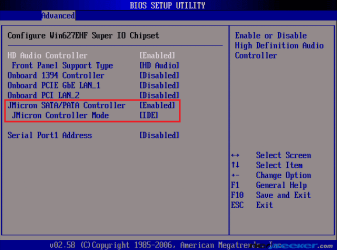
What settings do you have available to you under this setting (while enabled)?

bios_intperiph1.png
 

My Computer

Computer Manufacturer/Model Number
Compaq Desktop
OS
Windows 7 Ultimate x64
CPU
AMD Sempron Dual Core
Memory
3GB
Graphics Card(s)
NVIDIA GeForce 6150SE nForce 430
Screen Resolution
1024x768
Hard Drives
150GB Sata
It appears that the DVD drive is not reading the DVD correctly. This is not uncommon.

The clue here is: "So when I try to install windows 7 from a burnt dvd i get an error that there are files missing, yet using the same DVD I was able to successfully install it on my laptop"

If you booted from the DVD, all BIOS settings were fine when you started out.

Replace the DVD drive on the target machine. The laptop DVD drive is a known working drive - use it.

If you are not comfortable with disassembling your laptop, buy a new DVD drive (rated to read your DVD type). You can return the drive for a refund if you are sufficiently sinister.
 
What model DVD drive do you have, and what controller is it connected to if it is a SATA drive?
 

My Computer

Computer Manufacturer/Model Number
home-built
OS
Win 7-32, XP Pro-32
CPU
Xeon 3070 (2.66 GHz)
Motherboard
Asus P5W DH Deluxe, BIOS 2901
Memory
4 GB
Graphics Card(s)
PowerColor ATI Radeon HD 5750 (fanless)
Sound Card
on-board
Monitor(s) Displays
Dell U2711
Screen Resolution
2560x1440
Hard Drives
All SATA:
ICH7R (AHCI): 1 Intel X-25M 80GB SSD, 2 Samsung HD103UJ 1TB, 1 Seagate ST3750330MS 750GB;
JMB363: Samsung SH-S223L DVD;
Promise TX4302: two mobile racks, normally powered off
PSU
Seasonic SS-650HT
Case
Antec P180
Cooling
Sunbeam Tuniq Tower 120, 4 120mm fans (variable rpm)
Keyboard
Lexmark IBM Type "M" - PS/2 connector
Mouse
Wacom Intous4, Logitech Wheel Mouse as backup
Internet Speed
Cable ~ 6 mbps
Other Info
DVD: Samsung SH-S223L (SATA),
SanDisk CompactFlash reader,
Epson R280 printer,
HP Laserjet 4100dtn,
Epson scanner,
NeatReceipts scanner

Laptops: Dell XPS 15 L501x, Dell E5420
writemaster, i think thats samsung? don't know model exactly, its getting old though and it doesn't have litescribe. It's plugged directly into the motherboard sata ports
 

My Computer

Computer Manufacturer/Model Number
myself
OS
windows 7
CPU
Core 2 Duo E8500
Motherboard
Asus P5B Deluxe
Memory
4GB Crucial BallistX
Graphics Card(s)
XFX HD4890
Monitor(s) Displays
24" Acer
Screen Resolution
1920x1200
Hard Drives
150gb Raptor X (for os and other stuff)
400gb Seagate (for games/program installs)
PSU
Enermax 620 watt
Case
Antec 900
Cooling
Zalman 120mm cpu fan
Keyboard
Saitek Eclipse
Mouse
Logitech G5
That's interesting, because your configuration is similar to mine, and I mostly can't run the install either. I did get it to run once, but the installed version of Windows 7 can't find the cdrom device.

In my case, I have a Samsung SATA DVD connected to the JMB363 controller on the motherboard. So far, I've tried updating the DVD firmware and that hasn't helped. The next two tests I plan to try are to flash the BIOS to get the most recent JMB363 firmware and to try recabling the computer to connect the DVD to one of the ICH7R (or TX4302) ports instead of the JMB363 port.

I've seen suggestions to replace the drive. For anyone who has done this, I'd like to know if replacing a SATA DVD drive with another SATA drive, using the same controller, has been successful. If successful, what model drive did you install?
 

My Computer

Computer Manufacturer/Model Number
home-built
OS
Win 7-32, XP Pro-32
CPU
Xeon 3070 (2.66 GHz)
Motherboard
Asus P5W DH Deluxe, BIOS 2901
Memory
4 GB
Graphics Card(s)
PowerColor ATI Radeon HD 5750 (fanless)
Sound Card
on-board
Monitor(s) Displays
Dell U2711
Screen Resolution
2560x1440
Hard Drives
All SATA:
ICH7R (AHCI): 1 Intel X-25M 80GB SSD, 2 Samsung HD103UJ 1TB, 1 Seagate ST3750330MS 750GB;
JMB363: Samsung SH-S223L DVD;
Promise TX4302: two mobile racks, normally powered off
PSU
Seasonic SS-650HT
Case
Antec P180
Cooling
Sunbeam Tuniq Tower 120, 4 120mm fans (variable rpm)
Keyboard
Lexmark IBM Type "M" - PS/2 connector
Mouse
Wacom Intous4, Logitech Wheel Mouse as backup
Internet Speed
Cable ~ 6 mbps
Other Info
DVD: Samsung SH-S223L (SATA),
SanDisk CompactFlash reader,
Epson R280 printer,
HP Laserjet 4100dtn,
Epson scanner,
NeatReceipts scanner

Laptops: Dell XPS 15 L501x, Dell E5420
It appears that the DVD drive is not reading the DVD correctly. This is not uncommon.

The clue here is: "So when I try to install windows 7 from a burnt dvd i get an error that there are files missing, yet using the same DVD I was able to successfully install it on my laptop"

If you booted from the DVD, all BIOS settings were fine when you started out.

Replace the DVD drive on the target machine. The laptop DVD drive is a known working drive - use it.

If you are not comfortable with disassembling your laptop, buy a new DVD drive (rated to read your DVD type). You can return the drive for a refund if you are sufficiently sinister.
I am not entirely innocent with that last statement...Wal-Mart has been suckered quite a bit with that from me
 

My Computer

Computer Manufacturer/Model Number
Compal JFT02 (Custom Build Laptop)
OS
Windows 7 Home Premium x64 - Mac OS X 10.6.4 x64
CPU
Intel Core 2 Duo T9300 2.5 GHz
Motherboard
JFT02
Memory
4GB Kingston DDR2-800
Graphics Card(s)
NVIDIA Geforce 8600M GT (512MB Model)
Sound Card
Realtek HD Audio
Monitor(s) Displays
WUXGA Standard Laptop Display
Screen Resolution
1680*1050
Hard Drives
Toshiba 320GB 5400RPM Laptop HD
PSU
Standard Laptop Power Supply
Case
Standard Laptop Case
Cooling
Standard Laptop Cooling
Keyboard
Standard Laptop 105 Key-Keyboard
Mouse
Synaptics Touchpad
Internet Speed
Verizion Online DSL 3360/864 kbs (dl/up)

My Computer

Computer Manufacturer/Model Number
Samsung NP530U4B-S02IN
OS
Windows® 8 Pro (64-bit)
CPU
Intel® Core™ i5 Processor 2467M (1.60GHz, 3MB L3 Cache)
Motherboard
Samsung Electronics
Memory
6GB DDR3 System Memory at 1,333MHz (on BD 4GB + 2GB x 1)
Graphics Card(s)
AMD Radeon™ HD7550M 1GB DDR3 (Ext. Graphic)
Sound Card
Realtek High Definition Audio
Monitor(s) Displays
35.56cm (14.0) SuperBright 300nit HD LED Display
Screen Resolution
1366x768
Hard Drives
1TB S-ATA II Hard Drive (5400RPM) with ExpressCache 16GB SSD
Internet Speed
sucks
Antivirus
Microsoft Security Essentials
Browser
Google Chrome (Sync enabled)
I think that's the same as using a portable harddrive? cause i've already tried that. I upgraded from vista to windows 7 and seems to run fine now, the vista i had was only on for a few days so it wasn't bogged down or anything
 

My Computer

Computer Manufacturer/Model Number
myself
OS
windows 7
CPU
Core 2 Duo E8500
Motherboard
Asus P5B Deluxe
Memory
4GB Crucial BallistX
Graphics Card(s)
XFX HD4890
Monitor(s) Displays
24" Acer
Screen Resolution
1920x1200
Hard Drives
150gb Raptor X (for os and other stuff)
400gb Seagate (for games/program installs)
PSU
Enermax 620 watt
Case
Antec 900
Cooling
Zalman 120mm cpu fan
Keyboard
Saitek Eclipse
Mouse
Logitech G5
I am getting the message during install of W7 RTM about a missing CD/DVD driver. I have not had this problem on previous W7 installs. I am on a Dell Inspirion 5100. BIOS has no settings for the CD/DVD drive. Starting the install from within the current W7 installation seems to be my only option.
 

My Computer

OS
Windows Vista Ultimate
Back
Top