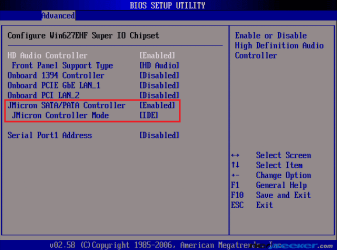
So when I try to install windows 7 from a burnt dvd i get an error that there are files missing, yet using the same DVD I was able to successfully install it on my laptop. (Side note, installing vista or xp works fine using my dvd drive)
A while ago I simply did an upgrade from vista to windows 7 and it worked fine, but I heard its far better to do a clean install. I tried using my portable harddrive and setting it up to boot from it (like using a usb stick) and when i start up the computer it just has a blinking line at the top left corner and thats it - using the same portable harddrive setup I again successfully installed it on my laptop.
I even tried doing a clean installation of vista then doing an upgrade to windows 7 and now it doesn't seem to want to work either (same files missing message)
System is:
P5B Deluxe, core 2 duo E8500, ATI 4890, 4gb crucial ballistX ram
thanks in advance for any help!!
A while ago I simply did an upgrade from vista to windows 7 and it worked fine, but I heard its far better to do a clean install. I tried using my portable harddrive and setting it up to boot from it (like using a usb stick) and when i start up the computer it just has a blinking line at the top left corner and thats it - using the same portable harddrive setup I again successfully installed it on my laptop.
I even tried doing a clean installation of vista then doing an upgrade to windows 7 and now it doesn't seem to want to work either (same files missing message)
System is:
P5B Deluxe, core 2 duo E8500, ATI 4890, 4gb crucial ballistX ram
thanks in advance for any help!!
My Computer
- Computer Manufacturer/Model Number
- myself
- OS
- windows 7
- CPU
- Core 2 Duo E8500
- Motherboard
- Asus P5B Deluxe
- Memory
- 4GB Crucial BallistX
- Graphics Card(s)
- XFX HD4890
- Monitor(s) Displays
- 24" Acer
- Screen Resolution
- 1920x1200
- Hard Drives
- 150gb Raptor X (for os and other stuff)
400gb Seagate (for games/program installs)
- PSU
- Enermax 620 watt
- Case
- Antec 900
- Cooling
- Zalman 120mm cpu fan
- Keyboard
- Saitek Eclipse
- Mouse
- Logitech G5