No Internet access for wireless devices

meiiyeiinz

New member
Local time
6:36 PM
Messages
24
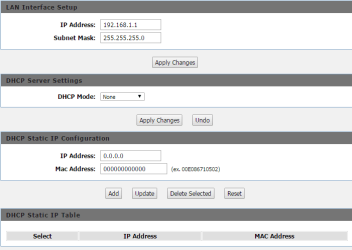
I've configure my router that connects to my desktop modem. my LAN has internet access by not using "obtain IP adddress automatically " but the Wireless device has no internet access. if I use the automatic settings. both local and wireless has no internet connection.

please help me solve this problem. thanks in advanced!

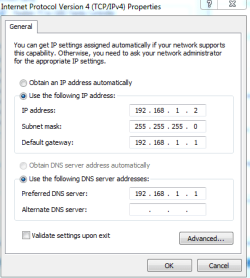
here's my internet protocol settings

IP ADD : 192.168.1.8
SUB MASK: 255.255.255.0
DEFAULT GATEWAY: 192.168.1.1

PREFERED DNS: 192.168.1.1
 

My Computer

Computer type
PC/Desktop
OS
windows 7 Ultimate x32
It is possible the DHCP server on your router is stopped if you don't get an IP address when it is set to automatic.

I would check that first.
 

My Computer

Computer type
PC/Desktop
Computer Manufacturer/Model Number
Custom Build
OS
Windows 7 Ultimate x64 SP1
CPU
AMD Phenom 2 1090T
Motherboard
Gigabyte GA-890FXA-UD5
Memory
2x8GB Kingston HyperX Fury Black 1600Mhz Unganged
Graphics Card(s)
MSI GTX 970 Gaming 4G
Sound Card
Realtek On-Board HD 7.1 Audio / Logitech G35
Monitor(s) Displays
3xAcer GD245HQ
Screen Resolution
1920x1080
Hard Drives
Samsung 850 Pro 512GB SSD - OS /
WD Caviar Black SATA 3 - 1 TBx2 - Dynamic RAID 0 /
WD Caviar Green SATA 2 - 640GBx2 - Dynamic RAID 0 /
WD Caviar Green SATA 2 - 640GB - Internal Backup /
Seagate Barracude SATA 3 - 3TB - External Backup/ Sync
PSU
HighPower 1000W
Case
Cooler Master HAF 932
Cooling
Noctua NH-D14
Keyboard
Logitech G19
Mouse
Logitech G500
Internet Speed
100/4 Mbit Cable (100GB quota)
Antivirus
ZoneAlarm Extreme Security / MBAM Pro / MBAE Free / SAS Free
Browser
IE 11 - Firefox - Chrome
Other Info
Logitech F710/ G27/ G940/ Z5500 // TrackIR 5 // Nvidia 3D Surround Vision
It is possible the DHCP server on your router is stopped if you don't get an IP address when it is set to automatic.

I would check that first.

Okay sir thankyou! I will wait for your response. thanks in advanced!
 

My Computer

Computer type
PC/Desktop
OS
windows 7 Ultimate x32
Note: You have 2 threads open so I am a bit confused.

Wait me for what? :) You have to do it.

Go into router management screen (http://192.168.1.1), check if DHCP is working.

What IP do you get when you set wireless to automatic?

Run cmd then:
ping 192.168.1.1
after:
ping 173.194.113.72

post results here
 

My Computer

Computer type
PC/Desktop
Computer Manufacturer/Model Number
Custom Build
OS
Windows 7 Ultimate x64 SP1
CPU
AMD Phenom 2 1090T
Motherboard
Gigabyte GA-890FXA-UD5
Memory
2x8GB Kingston HyperX Fury Black 1600Mhz Unganged
Graphics Card(s)
MSI GTX 970 Gaming 4G
Sound Card
Realtek On-Board HD 7.1 Audio / Logitech G35
Monitor(s) Displays
3xAcer GD245HQ
Screen Resolution
1920x1080
Hard Drives
Samsung 850 Pro 512GB SSD - OS /
WD Caviar Black SATA 3 - 1 TBx2 - Dynamic RAID 0 /
WD Caviar Green SATA 2 - 640GBx2 - Dynamic RAID 0 /
WD Caviar Green SATA 2 - 640GB - Internal Backup /
Seagate Barracude SATA 3 - 3TB - External Backup/ Sync
PSU
HighPower 1000W
Case
Cooler Master HAF 932
Cooling
Noctua NH-D14
Keyboard
Logitech G19
Mouse
Logitech G500
Internet Speed
100/4 Mbit Cable (100GB quota)
Antivirus
ZoneAlarm Extreme Security / MBAM Pro / MBAE Free / SAS Free
Browser
IE 11 - Firefox - Chrome
Other Info
Logitech F710/ G27/ G940/ Z5500 // TrackIR 5 // Nvidia 3D Surround Vision
Note: You have 2 threads open so I am a bit confused.

Wait me for what? :) You have to do it.

Go into router management screen (http://192.168.1.1), check if DHCP is working.

What IP do you get when you set wireless to automatic?

Run cmd then:
ping 192.168.1.1
after:
ping 173.194.113.72

post results here


let's focus on this thread sir Gokay okay I will try what you've said.
 

My Computer

Computer type
PC/Desktop
OS
windows 7 Ultimate x32
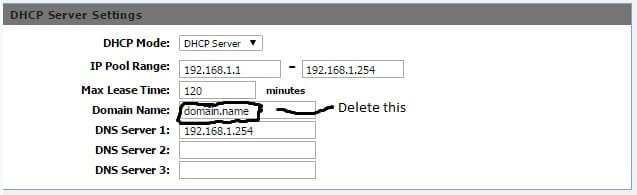
Same as other thread:

In "DHCP Server Settings" remove:
domain.name

and see if it helps
 

My Computer

Computer type
PC/Desktop
Computer Manufacturer/Model Number
Custom Build
OS
Windows 7 Ultimate x64 SP1
CPU
AMD Phenom 2 1090T
Motherboard
Gigabyte GA-890FXA-UD5
Memory
2x8GB Kingston HyperX Fury Black 1600Mhz Unganged
Graphics Card(s)
MSI GTX 970 Gaming 4G
Sound Card
Realtek On-Board HD 7.1 Audio / Logitech G35
Monitor(s) Displays
3xAcer GD245HQ
Screen Resolution
1920x1080
Hard Drives
Samsung 850 Pro 512GB SSD - OS /
WD Caviar Black SATA 3 - 1 TBx2 - Dynamic RAID 0 /
WD Caviar Green SATA 2 - 640GBx2 - Dynamic RAID 0 /
WD Caviar Green SATA 2 - 640GB - Internal Backup /
Seagate Barracude SATA 3 - 3TB - External Backup/ Sync
PSU
HighPower 1000W
Case
Cooler Master HAF 932
Cooling
Noctua NH-D14
Keyboard
Logitech G19
Mouse
Logitech G500
Internet Speed
100/4 Mbit Cable (100GB quota)
Antivirus
ZoneAlarm Extreme Security / MBAM Pro / MBAE Free / SAS Free
Browser
IE 11 - Firefox - Chrome
Other Info
Logitech F710/ G27/ G940/ Z5500 // TrackIR 5 // Nvidia 3D Surround Vision
Microsoft Windows [Version 6.1.7601]
Copyright (c) 2009 Microsoft Corporation. All rights reserved.

C:\Users\_r3v>ping 192.168.1.1

Pinging 192.168.1.1 with 32 bytes of data:
Reply from 192.168.1.1: bytes=32 time=1ms TTL=30

Ping statistics for 192.168.1.1:
Packets: Sent = 4, Received = 4, Lost = 0 (0% loss),
Approximate round trip times in milli-seconds:
Minimum = 1ms, Maximum = 1ms, Average = 1ms

C:\Users\_r3v>ping 173.194.113.72

Pinging 173.194.113.72 with 32 bytes of data:
Reply from 173.194.113.72: bytes=32 time=423ms TTL=47
Reply from 173.194.113.72: bytes=32 time=443ms TTL=47
Reply from 173.194.113.72: bytes=32 time=438ms TTL=47
Reply from 173.194.113.72: bytes=32 time=418ms TTL=47

Ping statistics for 173.194.113.72:
Packets: Sent = 4, Received = 4, Lost = 0 (0% loss),
Approximate round trip times in milli-seconds:
Minimum = 418ms, Maximum = 443ms, Average = 430ms


here's the ping. yes DHCP is enabled sir gokay
 

My Computer

Computer type
PC/Desktop
OS
windows 7 Ultimate x32
You are connected to the Internet, but perhaps name resolution (DNS) is not working properly, due to domain.name being entered in that configuration.

So, remove it (DHCP Server Settings) - then run in cmd:
ipconfig -release
ipconfig -renew
ipconfig -flushdns
 

My Computer

Computer type
PC/Desktop
Computer Manufacturer/Model Number
Custom Build
OS
Windows 7 Ultimate x64 SP1
CPU
AMD Phenom 2 1090T
Motherboard
Gigabyte GA-890FXA-UD5
Memory
2x8GB Kingston HyperX Fury Black 1600Mhz Unganged
Graphics Card(s)
MSI GTX 970 Gaming 4G
Sound Card
Realtek On-Board HD 7.1 Audio / Logitech G35
Monitor(s) Displays
3xAcer GD245HQ
Screen Resolution
1920x1080
Hard Drives
Samsung 850 Pro 512GB SSD - OS /
WD Caviar Black SATA 3 - 1 TBx2 - Dynamic RAID 0 /
WD Caviar Green SATA 2 - 640GBx2 - Dynamic RAID 0 /
WD Caviar Green SATA 2 - 640GB - Internal Backup /
Seagate Barracude SATA 3 - 3TB - External Backup/ Sync
PSU
HighPower 1000W
Case
Cooler Master HAF 932
Cooling
Noctua NH-D14
Keyboard
Logitech G19
Mouse
Logitech G500
Internet Speed
100/4 Mbit Cable (100GB quota)
Antivirus
ZoneAlarm Extreme Security / MBAM Pro / MBAE Free / SAS Free
Browser
IE 11 - Firefox - Chrome
Other Info
Logitech F710/ G27/ G940/ Z5500 // TrackIR 5 // Nvidia 3D Surround Vision
You are connected to the Internet, but perhaps name resolution (DNS) is not working properly, due to domain.name being entered in that configuration.

So, remove it (DHCP Server Settings) - then run in cmd:
ipconfig -release
ipconfig -renew
ipconfig -flushdns


it gives me error


C:\Windows\system32>ipconfig -release

Windows IP Configuration

An error occurred while releasing interface Loopback Pseudo-Interface 1 : The sy
stem cannot find the file specified.

The operation failed as no adapter is in the state permissible for
this operation.

C:\Windows\system32>
 

My Computer

Computer type
PC/Desktop
OS
windows 7 Ultimate x32
The domain.name is deleted, right? If so...

Just restart the computer :p

Better than trying to find interface name etc..
 

My Computer

Computer type
PC/Desktop
Computer Manufacturer/Model Number
Custom Build
OS
Windows 7 Ultimate x64 SP1
CPU
AMD Phenom 2 1090T
Motherboard
Gigabyte GA-890FXA-UD5
Memory
2x8GB Kingston HyperX Fury Black 1600Mhz Unganged
Graphics Card(s)
MSI GTX 970 Gaming 4G
Sound Card
Realtek On-Board HD 7.1 Audio / Logitech G35
Monitor(s) Displays
3xAcer GD245HQ
Screen Resolution
1920x1080
Hard Drives
Samsung 850 Pro 512GB SSD - OS /
WD Caviar Black SATA 3 - 1 TBx2 - Dynamic RAID 0 /
WD Caviar Green SATA 2 - 640GBx2 - Dynamic RAID 0 /
WD Caviar Green SATA 2 - 640GB - Internal Backup /
Seagate Barracude SATA 3 - 3TB - External Backup/ Sync
PSU
HighPower 1000W
Case
Cooler Master HAF 932
Cooling
Noctua NH-D14
Keyboard
Logitech G19
Mouse
Logitech G500
Internet Speed
100/4 Mbit Cable (100GB quota)
Antivirus
ZoneAlarm Extreme Security / MBAM Pro / MBAE Free / SAS Free
Browser
IE 11 - Firefox - Chrome
Other Info
Logitech F710/ G27/ G940/ Z5500 // TrackIR 5 // Nvidia 3D Surround Vision
yes, I turned of the dhcp server settings.
now my device keeps on obtaining ip address/authentication problem/Limited(laptop).. it's stucked
 

My Computer

Computer type
PC/Desktop
OS
windows 7 Ultimate x32
Post another screenshot of DHCP Server Settings please.

Also post ipconfig -all result
 

My Computer

Computer type
PC/Desktop
Computer Manufacturer/Model Number
Custom Build
OS
Windows 7 Ultimate x64 SP1
CPU
AMD Phenom 2 1090T
Motherboard
Gigabyte GA-890FXA-UD5
Memory
2x8GB Kingston HyperX Fury Black 1600Mhz Unganged
Graphics Card(s)
MSI GTX 970 Gaming 4G
Sound Card
Realtek On-Board HD 7.1 Audio / Logitech G35
Monitor(s) Displays
3xAcer GD245HQ
Screen Resolution
1920x1080
Hard Drives
Samsung 850 Pro 512GB SSD - OS /
WD Caviar Black SATA 3 - 1 TBx2 - Dynamic RAID 0 /
WD Caviar Green SATA 2 - 640GBx2 - Dynamic RAID 0 /
WD Caviar Green SATA 2 - 640GB - Internal Backup /
Seagate Barracude SATA 3 - 3TB - External Backup/ Sync
PSU
HighPower 1000W
Case
Cooler Master HAF 932
Cooling
Noctua NH-D14
Keyboard
Logitech G19
Mouse
Logitech G500
Internet Speed
100/4 Mbit Cable (100GB quota)
Antivirus
ZoneAlarm Extreme Security / MBAM Pro / MBAE Free / SAS Free
Browser
IE 11 - Firefox - Chrome
Other Info
Logitech F710/ G27/ G940/ Z5500 // TrackIR 5 // Nvidia 3D Surround Vision
Post another screenshot of DHCP Server Settings please.

Also post ipconfig -all result

DHCP.PNG

There it is sir.

Microsoft Windows [Version 6.1.7601]
Copyright (c) 2009 Microsoft Corporation. All rights reserved.

C:\Users\_r3v>ipconfig -all

Windows IP Configuration

Host Name . . . . . . . . . . . . : workstation
Primary Dns Suffix . . . . . . . :
Node Type . . . . . . . . . . . . : Hybrid
IP Routing Enabled. . . . . . . . : No
WINS Proxy Enabled. . . . . . . . : No

Ethernet adapter Local Area Connection:

Connection-specific DNS Suffix . :
Description . . . . . . . . . . . : Realtek PCIe GBE Family Controller
Physical Address. . . . . . . . . : 14-DA-E9-6E-5A-F8
DHCP Enabled. . . . . . . . . . . : No
Autoconfiguration Enabled . . . . : Yes
Link-local IPv6 Address . . . . . : fe80::95a5:c0f3:4f00:5461%10(Preferred)
IPv4 Address. . . . . . . . . . . : 192.168.1.2(Preferred)
Subnet Mask . . . . . . . . . . . : 255.255.255.0
Default Gateway . . . . . . . . . : 192.168.1.1
DHCPv6 IAID . . . . . . . . . . . : 236247785
DHCPv6 Client DUID. . . . . . . . : 00-01-00-01-1B-F8-B5-1D-14-DA-E9-6E-5A-F8

DNS Servers . . . . . . . . . . . : 192.168.1.1
NetBIOS over Tcpip. . . . . . . . : Enabled

Tunnel adapter Teredo Tunneling Pseudo-Interface:

Media State . . . . . . . . . . . : Media disconnected
Connection-specific DNS Suffix . :
Description . . . . . . . . . . . : Teredo Tunneling Pseudo-Interface
Physical Address. . . . . . . . . : 00-00-00-00-00-00-00-E0
DHCP Enabled. . . . . . . . . . . : No
Autoconfiguration Enabled . . . . : Yes

Tunnel adapter isatap.{451233BB-FAA8-44CD-99DC-8E1111ABEAFB}:

Media State . . . . . . . . . . . : Media disconnected
Connection-specific DNS Suffix . :
Description . . . . . . . . . . . : Microsoft ISATAP Adapter
Physical Address. . . . . . . . . : 00-00-00-00-00-00-00-E0
DHCP Enabled. . . . . . . . . . . : No
Autoconfiguration Enabled . . . . : Yes

C:\Users\_r3v>
 

My Computer

Computer type
PC/Desktop
OS
windows 7 Ultimate x32
and also this. if there are problems in here
isitfine.PNG
 

My Computer

Computer type
PC/Desktop
OS
windows 7 Ultimate x32
Yes there are problems :) I didn't say to disable DHCP, just clear domain

1. Enable DHCP
2. Clear/delete domain.name
network_dhcp_setting.jpg
Also change DNS Server 1 to: 192.168.1.1
IP Pool Range: 192.168.1.2 - 192.168.1.254

3. IP V4 settings: Automatic IP address and automatic DNS server

After this restart PC, check IP address (ipconfig -all). Local Area Connection IP Address should be 192.168.1.X (X:2-254)
ping 173.194.113.72
 

My Computer

Computer type
PC/Desktop
Computer Manufacturer/Model Number
Custom Build
OS
Windows 7 Ultimate x64 SP1
CPU
AMD Phenom 2 1090T
Motherboard
Gigabyte GA-890FXA-UD5
Memory
2x8GB Kingston HyperX Fury Black 1600Mhz Unganged
Graphics Card(s)
MSI GTX 970 Gaming 4G
Sound Card
Realtek On-Board HD 7.1 Audio / Logitech G35
Monitor(s) Displays
3xAcer GD245HQ
Screen Resolution
1920x1080
Hard Drives
Samsung 850 Pro 512GB SSD - OS /
WD Caviar Black SATA 3 - 1 TBx2 - Dynamic RAID 0 /
WD Caviar Green SATA 2 - 640GBx2 - Dynamic RAID 0 /
WD Caviar Green SATA 2 - 640GB - Internal Backup /
Seagate Barracude SATA 3 - 3TB - External Backup/ Sync
PSU
HighPower 1000W
Case
Cooler Master HAF 932
Cooling
Noctua NH-D14
Keyboard
Logitech G19
Mouse
Logitech G500
Internet Speed
100/4 Mbit Cable (100GB quota)
Antivirus
ZoneAlarm Extreme Security / MBAM Pro / MBAE Free / SAS Free
Browser
IE 11 - Firefox - Chrome
Other Info
Logitech F710/ G27/ G940/ Z5500 // TrackIR 5 // Nvidia 3D Surround Vision
x2tq9w.png


when I clear the domain name. and hit save changes. that gives me an error " invalid characters"
 

My Computer

Computer type
PC/Desktop
OS
windows 7 Ultimate x32
Are you sure there are no spaces in domain name?

Maybe it is not important, hmmm, if you can't change it, keep it same.

It may be that DNS server was wrong, so you couldn't access websites before. We already fixed it but haven't tried yet!

IP Address and DNS automatic now?

Ok, do this:
1- Write back: domain.name
2- IP Pool Range (1st number): 192.168.1.2
3- Restart PC
 

My Computer

Computer type
PC/Desktop
Computer Manufacturer/Model Number
Custom Build
OS
Windows 7 Ultimate x64 SP1
CPU
AMD Phenom 2 1090T
Motherboard
Gigabyte GA-890FXA-UD5
Memory
2x8GB Kingston HyperX Fury Black 1600Mhz Unganged
Graphics Card(s)
MSI GTX 970 Gaming 4G
Sound Card
Realtek On-Board HD 7.1 Audio / Logitech G35
Monitor(s) Displays
3xAcer GD245HQ
Screen Resolution
1920x1080
Hard Drives
Samsung 850 Pro 512GB SSD - OS /
WD Caviar Black SATA 3 - 1 TBx2 - Dynamic RAID 0 /
WD Caviar Green SATA 2 - 640GBx2 - Dynamic RAID 0 /
WD Caviar Green SATA 2 - 640GB - Internal Backup /
Seagate Barracude SATA 3 - 3TB - External Backup/ Sync
PSU
HighPower 1000W
Case
Cooler Master HAF 932
Cooling
Noctua NH-D14
Keyboard
Logitech G19
Mouse
Logitech G500
Internet Speed
100/4 Mbit Cable (100GB quota)
Antivirus
ZoneAlarm Extreme Security / MBAM Pro / MBAE Free / SAS Free
Browser
IE 11 - Firefox - Chrome
Other Info
Logitech F710/ G27/ G940/ Z5500 // TrackIR 5 // Nvidia 3D Surround Vision
Yes, sure!

The only problem is the wireless device, still no access into internet. when I put P V4 settings: Automatic IP address and automatic DNS server. the desktop or LAN will lose the internet also and gives the error "default gateway not available"

so for now, I will try what you've said and give you the result.
 

My Computer

Computer type
PC/Desktop
OS
windows 7 Ultimate x32
Are you sure there are no spaces in domain name?

Maybe it is not important, hmmm, if you can't change it, keep it same.

It may be that DNS server was wrong, so you couldn't access websites before. We already fixed it but haven't tried yet!

IP Address and DNS automatic now?

Ok, do this:
1- Write back: domain.name
2- IP Pool Range (1st number): 192.168.1.2
3- Restart PC


didn't work also. I always need to make IP and dns manual to access the LAN connection
 

My Computer

Computer type
PC/Desktop
OS
windows 7 Ultimate x32
I want to see wireless after we sort LAN.

I need screens from the failed attempt:

- Post latest DHCP settings again
- IP/DNS automatic, restart
- ipconfig -all
- ping 192.168.1.1
- ping 173.194.113.72

Also in cmd: nslookup (ENTER) - www.google.com (ENTER)
It should say something like:
Code:
> www.google.com
Server:  UnKnown
Address:  46.197.15.60
Non-authoritative answer:
Name:    www.google.com
Addresses:  2a00:1450:4016:805::2004
          216.58.211.36
 

My Computer

Computer type
PC/Desktop
Computer Manufacturer/Model Number
Custom Build
OS
Windows 7 Ultimate x64 SP1
CPU
AMD Phenom 2 1090T
Motherboard
Gigabyte GA-890FXA-UD5
Memory
2x8GB Kingston HyperX Fury Black 1600Mhz Unganged
Graphics Card(s)
MSI GTX 970 Gaming 4G
Sound Card
Realtek On-Board HD 7.1 Audio / Logitech G35
Monitor(s) Displays
3xAcer GD245HQ
Screen Resolution
1920x1080
Hard Drives
Samsung 850 Pro 512GB SSD - OS /
WD Caviar Black SATA 3 - 1 TBx2 - Dynamic RAID 0 /
WD Caviar Green SATA 2 - 640GBx2 - Dynamic RAID 0 /
WD Caviar Green SATA 2 - 640GB - Internal Backup /
Seagate Barracude SATA 3 - 3TB - External Backup/ Sync
PSU
HighPower 1000W
Case
Cooler Master HAF 932
Cooling
Noctua NH-D14
Keyboard
Logitech G19
Mouse
Logitech G500
Internet Speed
100/4 Mbit Cable (100GB quota)
Antivirus
ZoneAlarm Extreme Security / MBAM Pro / MBAE Free / SAS Free
Browser
IE 11 - Firefox - Chrome
Other Info
Logitech F710/ G27/ G940/ Z5500 // TrackIR 5 // Nvidia 3D Surround Vision
Back
Top