
No Internet access for wireless devices

This is what i've got without connection


C:\Windows\system32>ipconfig -all

Windows IP Configuration

Host Name . . . . . . . . . . . . : workstation
Primary Dns Suffix . . . . . . . :
Node Type . . . . . . . . . . . . : Mixed
IP Routing Enabled. . . . . . . . : No
WINS Proxy Enabled. . . . . . . . : No
DNS Suffix Search List. . . . . . : domain.name

Ethernet adapter Local Area Connection:

Connection-specific DNS Suffix . : domain.name
Description . . . . . . . . . . . : Realtek PCIe GBE Family Controller
Physical Address. . . . . . . . . : 14-DA-E9-6E-5A-F8
DHCP Enabled. . . . . . . . . . . : Yes
Autoconfiguration Enabled . . . . : Yes
Link-local IPv6 Address . . . . . : fe80::95a5:c0f3:4f00:5461%10(Preferred)
IPv4 Address. . . . . . . . . . . : 192.168.1.2(Preferred)
Subnet Mask . . . . . . . . . . . : 255.255.255.0
Lease Obtained. . . . . . . . . . : Sunday, May 24, 2015 5:08:04 AM
Lease Expires . . . . . . . . . . : Sunday, May 24, 2015 7:08:04 AM
Default Gateway . . . . . . . . . : 192.168.1.254
DHCP Server . . . . . . . . . . . : 192.168.1.1
DHCPv6 IAID . . . . . . . . . . . : 236247785
DHCPv6 Client DUID. . . . . . . . : 00-01-00-01-1B-F8-B5-1D-14-DA-E9-6E-5A-F8

DNS Servers . . . . . . . . . . . : 114.108.193.201
114.108.195.1
NetBIOS over Tcpip. . . . . . . . : Enabled

Tunnel adapter Teredo Tunneling Pseudo-Interface:

Media State . . . . . . . . . . . : Media disconnected
Connection-specific DNS Suffix . :
Description . . . . . . . . . . . : Teredo Tunneling Pseudo-Interface
Physical Address. . . . . . . . . : 00-00-00-00-00-00-00-E0
DHCP Enabled. . . . . . . . . . . : No
Autoconfiguration Enabled . . . . : Yes

Tunnel adapter isatap.domain.name:

Media State . . . . . . . . . . . : Media disconnected
Connection-specific DNS Suffix . : domain.name
Description . . . . . . . . . . . : Microsoft ISATAP Adapter #2
Physical Address. . . . . . . . . : 00-00-00-00-00-00-00-E0
DHCP Enabled. . . . . . . . . . . : No
Autoconfiguration Enabled . . . . : Yes

C:\Windows\system32>


C:\Windows\system32>ping 192.168.1.1

Pinging 192.168.1.1 with 32 bytes of data:
Reply from 192.168.1.1: bytes=32 time=2ms TTL=30
Reply from 192.168.1.1: bytes=32 time=1ms TTL=30

Ping statistics for 192.168.1.1:
Packets: Sent = 4, Received = 4, Lost = 0 (0% loss),
Approximate round trip times in milli-seconds:
Minimum = 1ms, Maximum = 2ms, Average = 1ms

C:\Windows\system32>ping 173.194.113.72

Pinging 173.194.113.72 with 32 bytes of data:
Request timed out.
Reply from 192.168.1.2: Destination host unreachable.
Request timed out.
Request timed out.

Ping statistics for 173.194.113.72:
Packets: Sent = 4, Received = 1, Lost = 3 (75% loss),

C:\Windows\system32>nslookup -www.google.com
*** Invalid option: Google
DNS request timed out.
timeout was 2 seconds.
Default Server: UnKnown
Address: 114.108.193.201

>


the dhcp settings is still the same. anyway do you use TV7?
 

My Computer

Computer type
PC/Desktop
OS
windows 7 Ultimate x32
Yes I have Team Viewer. But version 10. PM details if you wish so.
 

My Computer

Computer type
PC/Desktop
Computer Manufacturer/Model Number
Custom Build
OS
Windows 7 Ultimate x64 SP1
CPU
AMD Phenom 2 1090T
Motherboard
Gigabyte GA-890FXA-UD5
Memory
2x8GB Kingston HyperX Fury Black 1600Mhz Unganged
Graphics Card(s)
MSI GTX 970 Gaming 4G
Sound Card
Realtek On-Board HD 7.1 Audio / Logitech G35
Monitor(s) Displays
3xAcer GD245HQ
Screen Resolution
1920x1080
Hard Drives
Samsung 850 Pro 512GB SSD - OS /
WD Caviar Black SATA 3 - 1 TBx2 - Dynamic RAID 0 /
WD Caviar Green SATA 2 - 640GBx2 - Dynamic RAID 0 /
WD Caviar Green SATA 2 - 640GB - Internal Backup /
Seagate Barracude SATA 3 - 3TB - External Backup/ Sync
PSU
HighPower 1000W
Case
Cooler Master HAF 932
Cooling
Noctua NH-D14
Keyboard
Logitech G19
Mouse
Logitech G500
Internet Speed
100/4 Mbit Cable (100GB quota)
Antivirus
ZoneAlarm Extreme Security / MBAM Pro / MBAE Free / SAS Free
Browser
IE 11 - Firefox - Chrome
Other Info
Logitech F710/ G27/ G940/ Z5500 // TrackIR 5 // Nvidia 3D Surround Vision
couple of things you can try.

In your other post the last screenshot try ticking allow Web.
The other regarding password security set to WPA2 not wpa/wpa2 mixed

Roy
 

My Computer

Computer type
PC/Desktop
Computer Manufacturer/Model Number
medionl/Aspire 6930G/acer x55a
OS
W7 home premium 32bit/W7HP 64bit/w10 tp insider ring
CPU
E5300 dual core
Motherboard
medion MS7366
Memory
3gb
Graphics Card(s)
Nvidia Geforce 7100 Nforce 630i
Monitor(s) Displays
avixc
Internet Speed
n (isp resticted to 72)
Antivirus
mse/pands
Browser
palemoon
Other Info
Belkin Fd7050 n USB using Railink RT2870 drivers, more upto date
Tried lots of things with TeamViewer. Seems as if the router is not routing the clients when they get configuration from DHCP. All devices including wireless gained access to the Internet as soon as was given a static IP. Adviced to take the router to the shop.
 

My Computer

Computer type
PC/Desktop
Computer Manufacturer/Model Number
Custom Build
OS
Windows 7 Ultimate x64 SP1
CPU
AMD Phenom 2 1090T
Motherboard
Gigabyte GA-890FXA-UD5
Memory
2x8GB Kingston HyperX Fury Black 1600Mhz Unganged
Graphics Card(s)
MSI GTX 970 Gaming 4G
Sound Card
Realtek On-Board HD 7.1 Audio / Logitech G35
Monitor(s) Displays
3xAcer GD245HQ
Screen Resolution
1920x1080
Hard Drives
Samsung 850 Pro 512GB SSD - OS /
WD Caviar Black SATA 3 - 1 TBx2 - Dynamic RAID 0 /
WD Caviar Green SATA 2 - 640GBx2 - Dynamic RAID 0 /
WD Caviar Green SATA 2 - 640GB - Internal Backup /
Seagate Barracude SATA 3 - 3TB - External Backup/ Sync
PSU
HighPower 1000W
Case
Cooler Master HAF 932
Cooling
Noctua NH-D14
Keyboard
Logitech G19
Mouse
Logitech G500
Internet Speed
100/4 Mbit Cable (100GB quota)
Antivirus
ZoneAlarm Extreme Security / MBAM Pro / MBAE Free / SAS Free
Browser
IE 11 - Firefox - Chrome
Other Info
Logitech F710/ G27/ G940/ Z5500 // TrackIR 5 // Nvidia 3D Surround Vision
Just some observations:

If I am understanding your setup correctly, you have a router (192.168.1.1) and you have a separate modem (which is probably using 192.168.1.254 on the Local Area Network side).

According to post #21, the router is telling DHCP enabled clients that the Default Gateway is 192.168.1.254.

Code:
Default Gateway . . . . . . . . . : 192.168.1.254
You are only able to surf to websites if you manually change the Default Gateway and (or?) DNS to 192.168.1.1.

Also (for what it is worth), the two DNS IP addresses shown in post #21 (114.108.193.201 & 114.108.195.1) do not respond to DNS queries for me. However, some Internet Service Providers restrict DNS replies to their geographic region.

If you can surf to 192.168.1.254 and you see the user interface for managing the modem, then 192.168.1.254 should probably be removed from your router's IP Pool Range (see posts #16).
 

My Computer

Computer type
Laptop
Computer Manufacturer/Model Number
Employer provided Dell Latitude
OS
W7 Pro SP1 64bit
CPU
i7
Memory
8GB
Graphics Card(s)
Intel HD Graphics
Hard Drives
crappy SSD
Antivirus
Employer mandated Symantec Endpoint Protection
Browser
Pale Moon 64bit, IE11 64bit & Chrome 64bit
192.168.1.254 was miss-configured, I corrected that. The router gets WAN IP from ISP DHCP server.

And ISP DNS works too. The static configuration had DNS as 192.168.1.1 (same as router DHCP setting) and no problem with access.

Furthermore, as soon as we changed IP to automatic, we couldn't get any ping to router WAN port (works alright with static IP).

Also, configured DHCP to exclude 192.168.1.1 (it was listed in IP pool initially).
 

My Computer

Computer type
PC/Desktop
Computer Manufacturer/Model Number
Custom Build
OS
Windows 7 Ultimate x64 SP1
CPU
AMD Phenom 2 1090T
Motherboard
Gigabyte GA-890FXA-UD5
Memory
2x8GB Kingston HyperX Fury Black 1600Mhz Unganged
Graphics Card(s)
MSI GTX 970 Gaming 4G
Sound Card
Realtek On-Board HD 7.1 Audio / Logitech G35
Monitor(s) Displays
3xAcer GD245HQ
Screen Resolution
1920x1080
Hard Drives
Samsung 850 Pro 512GB SSD - OS /
WD Caviar Black SATA 3 - 1 TBx2 - Dynamic RAID 0 /
WD Caviar Green SATA 2 - 640GBx2 - Dynamic RAID 0 /
WD Caviar Green SATA 2 - 640GB - Internal Backup /
Seagate Barracude SATA 3 - 3TB - External Backup/ Sync
PSU
HighPower 1000W
Case
Cooler Master HAF 932
Cooling
Noctua NH-D14
Keyboard
Logitech G19
Mouse
Logitech G500
Internet Speed
100/4 Mbit Cable (100GB quota)
Antivirus
ZoneAlarm Extreme Security / MBAM Pro / MBAE Free / SAS Free
Browser
IE 11 - Firefox - Chrome
Other Info
Logitech F710/ G27/ G940/ Z5500 // TrackIR 5 // Nvidia 3D Surround Vision
192.168.1.254 was miss-configured, I corrected that....
After correcting that, does a DHCP client get assigned a Default Gateway and DNS of 192.168.1.1?


...The router gets WAN IP from ISP DHCP server....
Okay, but what is the LAN side IP for the modem? 192.168.1.254? What IP address does the OP have to surf to to manage the modem?
 

My Computer

Computer type
Laptop
Computer Manufacturer/Model Number
Employer provided Dell Latitude
OS
W7 Pro SP1 64bit
CPU
i7
Memory
8GB
Graphics Card(s)
Intel HD Graphics
Hard Drives
crappy SSD
Antivirus
Employer mandated Symantec Endpoint Protection
Browser
Pale Moon 64bit, IE11 64bit & Chrome 64bit
LAN IP was 192.168.1.1 - I didn't change that, used this to manage router.

DHCP clients (LAN and wireless) all got the correct settings. No APIPA, correct gateway/DNS. They could ping 192.168.1.1 but not WAN IP (timed out).
 

My Computer

Computer type
PC/Desktop
Computer Manufacturer/Model Number
Custom Build
OS
Windows 7 Ultimate x64 SP1
CPU
AMD Phenom 2 1090T
Motherboard
Gigabyte GA-890FXA-UD5
Memory
2x8GB Kingston HyperX Fury Black 1600Mhz Unganged
Graphics Card(s)
MSI GTX 970 Gaming 4G
Sound Card
Realtek On-Board HD 7.1 Audio / Logitech G35
Monitor(s) Displays
3xAcer GD245HQ
Screen Resolution
1920x1080
Hard Drives
Samsung 850 Pro 512GB SSD - OS /
WD Caviar Black SATA 3 - 1 TBx2 - Dynamic RAID 0 /
WD Caviar Green SATA 2 - 640GBx2 - Dynamic RAID 0 /
WD Caviar Green SATA 2 - 640GB - Internal Backup /
Seagate Barracude SATA 3 - 3TB - External Backup/ Sync
PSU
HighPower 1000W
Case
Cooler Master HAF 932
Cooling
Noctua NH-D14
Keyboard
Logitech G19
Mouse
Logitech G500
Internet Speed
100/4 Mbit Cable (100GB quota)
Antivirus
ZoneAlarm Extreme Security / MBAM Pro / MBAE Free / SAS Free
Browser
IE 11 - Firefox - Chrome
Other Info
Logitech F710/ G27/ G940/ Z5500 // TrackIR 5 // Nvidia 3D Surround Vision
LAN IP was 192.168.1.1 - I didn't change that, used this to manage router.....
Yes, I understand that the router's user interface can be reached via 192.168.1.1. But can the modem's user interface be reached from the LAN side of the router? Perhaps not and maybe it does not matter. I'm just trying to understand the setup. Thanks for your patience.

In a screenshot in the other thread, there is a gateway IP of 10.27.48.1 for the router's WAN side. That seems to indicate that there is another NAT device between the router and the internet. Maybe the modem is doing that NAT or maybe some other device upstream.

The setup could be:
internet facing IP address on the WAN side of the modem
modem doing NAT
modem's private IP of 10.27.48.1 on the LAN side of the modem

10.27.48.??? IP address on the WAN side of the router
router doing NAT
router's private IP of 192.168.1.1 on the LAN side of the router


But you mentioned that the router gets its WAN IP from the ISP DHCP server. I'm not sure how that can happen if the modem (or some other device) is doing NAT. Maybe I'm not understanding what the screenshot in that other thread is telling me.

Anyway, you are probably correct about the router being bad. Being behind a double NAT should still work.
 

My Computer

Computer type
Laptop
Computer Manufacturer/Model Number
Employer provided Dell Latitude
OS
W7 Pro SP1 64bit
CPU
i7
Memory
8GB
Graphics Card(s)
Intel HD Graphics
Hard Drives
crappy SSD
Antivirus
Employer mandated Symantec Endpoint Protection
Browser
Pale Moon 64bit, IE11 64bit & Chrome 64bit
Oh, yes it's 10.x.x.x :o my mistake to call it Internet IP, indeed it is private.

I didn't try to connect to modem interface. Didn't think it would be relevant as you could get out with static IP.

However, I believe that WAN IP is from ISP directly (who gives such a network ID when both routers and modems usually use 192.168.0-1) and (assumption) modem is in bridge mode. Maybe we can ask about this to OP when he returns. I doubt he would even need to modify anything in the router menus to get Internet access, should just work out of the box.
 

My Computer

Computer type
PC/Desktop
Computer Manufacturer/Model Number
Custom Build
OS
Windows 7 Ultimate x64 SP1
CPU
AMD Phenom 2 1090T
Motherboard
Gigabyte GA-890FXA-UD5
Memory
2x8GB Kingston HyperX Fury Black 1600Mhz Unganged
Graphics Card(s)
MSI GTX 970 Gaming 4G
Sound Card
Realtek On-Board HD 7.1 Audio / Logitech G35
Monitor(s) Displays
3xAcer GD245HQ
Screen Resolution
1920x1080
Hard Drives
Samsung 850 Pro 512GB SSD - OS /
WD Caviar Black SATA 3 - 1 TBx2 - Dynamic RAID 0 /
WD Caviar Green SATA 2 - 640GBx2 - Dynamic RAID 0 /
WD Caviar Green SATA 2 - 640GB - Internal Backup /
Seagate Barracude SATA 3 - 3TB - External Backup/ Sync
PSU
HighPower 1000W
Case
Cooler Master HAF 932
Cooling
Noctua NH-D14
Keyboard
Logitech G19
Mouse
Logitech G500
Internet Speed
100/4 Mbit Cable (100GB quota)
Antivirus
ZoneAlarm Extreme Security / MBAM Pro / MBAE Free / SAS Free
Browser
IE 11 - Firefox - Chrome
Other Info
Logitech F710/ G27/ G940/ Z5500 // TrackIR 5 // Nvidia 3D Surround Vision
Correct. No need to connect to modem's user interface.
(Other than to confirm the double NAT theory.)

If the static IP values are setup just like the DHCP values...
...and static works, but DHCP fails
...then I cannot wrap my head around that one.
Maybe the OP can return/exchange the router.

Thanks for taking the time to help me think/learn about this.
 

My Computer

Computer type
Laptop
Computer Manufacturer/Model Number
Employer provided Dell Latitude
OS
W7 Pro SP1 64bit
CPU
i7
Memory
8GB
Graphics Card(s)
Intel HD Graphics
Hard Drives
crappy SSD
Antivirus
Employer mandated Symantec Endpoint Protection
Browser
Pale Moon 64bit, IE11 64bit & Chrome 64bit
It is a new router, he will be taking it to the shop.

One thing I couldn't change in router DHCP settings was domain name. I never had such an option in my previous routers so I am not sure what this would be. My guess is it is a just a descriptive informational setting.

Default value was: domain.name and when the textbox was cleared, it wouldn't save with an error of Invalid characters!

Do you know anything about this setting? The only webpage I found this setting on lists this setting as "Optional".

Also want to add, factory reset was already performed by OP.
 

My Computer

Computer type
PC/Desktop
Computer Manufacturer/Model Number
Custom Build
OS
Windows 7 Ultimate x64 SP1
CPU
AMD Phenom 2 1090T
Motherboard
Gigabyte GA-890FXA-UD5
Memory
2x8GB Kingston HyperX Fury Black 1600Mhz Unganged
Graphics Card(s)
MSI GTX 970 Gaming 4G
Sound Card
Realtek On-Board HD 7.1 Audio / Logitech G35
Monitor(s) Displays
3xAcer GD245HQ
Screen Resolution
1920x1080
Hard Drives
Samsung 850 Pro 512GB SSD - OS /
WD Caviar Black SATA 3 - 1 TBx2 - Dynamic RAID 0 /
WD Caviar Green SATA 2 - 640GBx2 - Dynamic RAID 0 /
WD Caviar Green SATA 2 - 640GB - Internal Backup /
Seagate Barracude SATA 3 - 3TB - External Backup/ Sync
PSU
HighPower 1000W
Case
Cooler Master HAF 932
Cooling
Noctua NH-D14
Keyboard
Logitech G19
Mouse
Logitech G500
Internet Speed
100/4 Mbit Cable (100GB quota)
Antivirus
ZoneAlarm Extreme Security / MBAM Pro / MBAE Free / SAS Free
Browser
IE 11 - Firefox - Chrome
Other Info
Logitech F710/ G27/ G940/ Z5500 // TrackIR 5 // Nvidia 3D Surround Vision
should I marked this as solved? anyway big thanks for Mr.GoKay for sharing his time fixing this problem. still he manage to find a soulution to this. now my wireless devices can connect to internet.
 

My Computer

Computer type
PC/Desktop
OS
windows 7 Ultimate x32
Hey, it would be better to wait until you change that router (at shop) and actually get Internet access with dynamic IP. What we did was just a workaround.
 

My Computer

Computer type
PC/Desktop
Computer Manufacturer/Model Number
Custom Build
OS
Windows 7 Ultimate x64 SP1
CPU
AMD Phenom 2 1090T
Motherboard
Gigabyte GA-890FXA-UD5
Memory
2x8GB Kingston HyperX Fury Black 1600Mhz Unganged
Graphics Card(s)
MSI GTX 970 Gaming 4G
Sound Card
Realtek On-Board HD 7.1 Audio / Logitech G35
Monitor(s) Displays
3xAcer GD245HQ
Screen Resolution
1920x1080
Hard Drives
Samsung 850 Pro 512GB SSD - OS /
WD Caviar Black SATA 3 - 1 TBx2 - Dynamic RAID 0 /
WD Caviar Green SATA 2 - 640GBx2 - Dynamic RAID 0 /
WD Caviar Green SATA 2 - 640GB - Internal Backup /
Seagate Barracude SATA 3 - 3TB - External Backup/ Sync
PSU
HighPower 1000W
Case
Cooler Master HAF 932
Cooling
Noctua NH-D14
Keyboard
Logitech G19
Mouse
Logitech G500
Internet Speed
100/4 Mbit Cable (100GB quota)
Antivirus
ZoneAlarm Extreme Security / MBAM Pro / MBAE Free / SAS Free
Browser
IE 11 - Firefox - Chrome
Other Info
Logitech F710/ G27/ G940/ Z5500 // TrackIR 5 // Nvidia 3D Surround Vision
Alright sir gokay, if not tomorrow then I'll go on thursday to return the router into the shop. thank you

anyway, should I get a same unit? or a different one.
 

My Computer

Computer type
PC/Desktop
OS
windows 7 Ultimate x32
These cheap routers are pretty much the same deal, I have Linksys WR110 (also a cheap router) which has the same features and nothing more. If it works same is ok, if not get some other model.
 

My Computer

Computer type
PC/Desktop
Computer Manufacturer/Model Number
Custom Build
OS
Windows 7 Ultimate x64 SP1
CPU
AMD Phenom 2 1090T
Motherboard
Gigabyte GA-890FXA-UD5
Memory
2x8GB Kingston HyperX Fury Black 1600Mhz Unganged
Graphics Card(s)
MSI GTX 970 Gaming 4G
Sound Card
Realtek On-Board HD 7.1 Audio / Logitech G35
Monitor(s) Displays
3xAcer GD245HQ
Screen Resolution
1920x1080
Hard Drives
Samsung 850 Pro 512GB SSD - OS /
WD Caviar Black SATA 3 - 1 TBx2 - Dynamic RAID 0 /
WD Caviar Green SATA 2 - 640GBx2 - Dynamic RAID 0 /
WD Caviar Green SATA 2 - 640GB - Internal Backup /
Seagate Barracude SATA 3 - 3TB - External Backup/ Sync
PSU
HighPower 1000W
Case
Cooler Master HAF 932
Cooling
Noctua NH-D14
Keyboard
Logitech G19
Mouse
Logitech G500
Internet Speed
100/4 Mbit Cable (100GB quota)
Antivirus
ZoneAlarm Extreme Security / MBAM Pro / MBAE Free / SAS Free
Browser
IE 11 - Firefox - Chrome
Other Info
Logitech F710/ G27/ G940/ Z5500 // TrackIR 5 // Nvidia 3D Surround Vision
Okay sir, I will inform you asap when I get a new one! :) anyway the router cost only around 13.80 euro. it's really cheap
 

My Computer

Computer type
PC/Desktop
OS
windows 7 Ultimate x32
It is a new router, he will be taking it to the shop.

One thing I couldn't change in router DHCP settings was domain name. I never had such an option in my previous routers so I am not sure what this would be. My guess is it is a just a descriptive informational setting.

Default value was: domain.name and when the textbox was cleared, it wouldn't save with an error of Invalid characters!

Do you know anything about this setting? The only webpage I found this setting on lists this setting as "Optional".

Also want to add, factory reset was already performed by OP.

The router's field for "domain.name" is explained here:
https://tools.ietf.org/html/rfc6762

Some networking equipment's user interface label this field as optional. Some let you leave the field blank. (Some might not offer the field at all.) But all networking equipment handling DHCP should assign ".local" as the domain if no other value is (or can be) entered into the local domain field.

There are plenty of reasons why you might want to use local domain names. Here is one such reason: How (and Why) to Assign the .local Domain to Your Raspberry Pi
 

My Computer

Computer type
Laptop
Computer Manufacturer/Model Number
Employer provided Dell Latitude
OS
W7 Pro SP1 64bit
CPU
i7
Memory
8GB
Graphics Card(s)
Intel HD Graphics
Hard Drives
crappy SSD
Antivirus
Employer mandated Symantec Endpoint Protection
Browser
Pale Moon 64bit, IE11 64bit & Chrome 64bit
Hmm, my router/modem doesn't have such a field for domain name, but I made a little test:
- pinging <computername>.local did return a response whilst a random .domain_name could not find the host, so router DHCP sets the .local configuration.

I believe I used to know all this stuff (MCSE 2000, it has been 10-12 years) but forgot almost all about them :cry:

I also tried ping <computername> and that also resulted in a response. I wonder if .local dns suffix(?) is added automatically from somewhere, or it was possible because it was in the same network segment.

Thanks for the info!
 

My Computer

Computer type
PC/Desktop
Computer Manufacturer/Model Number
Custom Build
OS
Windows 7 Ultimate x64 SP1
CPU
AMD Phenom 2 1090T
Motherboard
Gigabyte GA-890FXA-UD5
Memory
2x8GB Kingston HyperX Fury Black 1600Mhz Unganged
Graphics Card(s)
MSI GTX 970 Gaming 4G
Sound Card
Realtek On-Board HD 7.1 Audio / Logitech G35
Monitor(s) Displays
3xAcer GD245HQ
Screen Resolution
1920x1080
Hard Drives
Samsung 850 Pro 512GB SSD - OS /
WD Caviar Black SATA 3 - 1 TBx2 - Dynamic RAID 0 /
WD Caviar Green SATA 2 - 640GBx2 - Dynamic RAID 0 /
WD Caviar Green SATA 2 - 640GB - Internal Backup /
Seagate Barracude SATA 3 - 3TB - External Backup/ Sync
PSU
HighPower 1000W
Case
Cooler Master HAF 932
Cooling
Noctua NH-D14
Keyboard
Logitech G19
Mouse
Logitech G500
Internet Speed
100/4 Mbit Cable (100GB quota)
Antivirus
ZoneAlarm Extreme Security / MBAM Pro / MBAE Free / SAS Free
Browser
IE 11 - Firefox - Chrome
Other Info
Logitech F710/ G27/ G940/ Z5500 // TrackIR 5 // Nvidia 3D Surround Vision
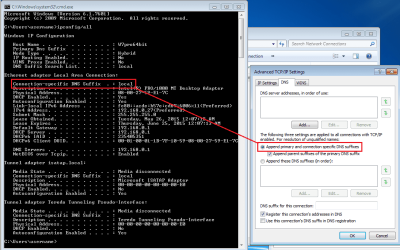
When testing name resolution scenarios, it is probably best to disable the service named DNS Client (dnscache). That said, your description of Ping's performance is as expected. A total guess on my part would be that Ping asked the OS on your computer to find the computer that you wanted to ping. The OS on your computer followed the settings for the network adapter in use at the time.

DNS-suffix.png

Hopefully, we are not boring the OP while we await a new router :-)
 

My Computer

Computer type
Laptop
Computer Manufacturer/Model Number
Employer provided Dell Latitude
OS
W7 Pro SP1 64bit
CPU
i7
Memory
8GB
Graphics Card(s)
Intel HD Graphics
Hard Drives
crappy SSD
Antivirus
Employer mandated Symantec Endpoint Protection
Browser
Pale Moon 64bit, IE11 64bit & Chrome 64bit
Back
Top