no internet access

parperis

New member
Local time
9:43 PM
Messages
12
i have a problem with internet access.i made a format on my laptop and i put the windows 7 ultimate 64 bits.i was ok the first day with internet.the next day i had the problem with internet access.the yellow triangle and ununidentified network.in a week i made 3 times format of the laptop and i have the same problem again.and i dont know y it let me to have internet access the first day.i didnt install any program.i have another laptop and its ok with the internet access.i also try another router but nothing.pls help me.......
 

My Computer

Computer Manufacturer/Model Number
toshiba satellite L505-10V
OS
windows 7 ultimate x64
CPU
INTEL core duo 2.2ghz
Memory
4 GB RAM
Graphics Card(s)
512MB
Sound Card
realtec
When you say formatted, did you wipe the hard drive and then restored Windows 7 from the recovery drive? or just a complete restore without the drivers for your hardware? Sounds to me maybe your network card driver may not have been installed correctly.

Could you post a screen shot of the problem? (the yellow beside the icon)
 

My Computer

Computer Manufacturer/Model Number
HP Pavilion pc6000
OS
Windows 7 Ultimate
CPU
Intel Core Processor 2 Quad Processor Q9400 Series
Memory
2 GIG
Graphics Card(s)
NVIDIA Geforce GT230 3D
Sound Card
Integrated Intel HIgh Definition Audio 5.1 Surround Sound
Monitor(s) Displays
20 Inch 2009F 16:9 HP LCD Monitor
Hard Drives
Primary 320GIG
External 1 500G
External 2 640G
Keyboard
HP USB Keyboard
Mouse
HP USB Mouse
Try to unplug ya router/modem from power and reconnect see if that helps.
 

My Computer

Computer Manufacturer/Model Number
Packard Bell MH36-U300
OS
Windows 7 Ultimate 64-Bit
CPU
Intel(R) Pentium(R) Dual CPU T3400 @ 2.16GHz
Memory
2GB DDR2
Graphics Card(s)
Mobile Intel(R) 4 Series Express Chipset
Sound Card
Realtek High Definition Audio
Monitor(s) Displays
15" LCD
Screen Resolution
1280 x 800
Hard Drives
320GB Western Digital
Case
Notebook
Internet Speed
10Mbps
If you have iTunes installed, Bonjour may have installed another connection. If this is the case, uninstall Bonjour.
 

My Computer

Computer Manufacturer/Model Number
MSI
OS
Windows 7 Professional 64bit
CPU
Intel Celeron 2.4 GH
Memory
4 GB
Graphics Card(s)
NVidia GeForce 9800GT
Sound Card
ATI HDMI Audio
Monitor(s) Displays
Acer S231HL Dual Monitors
Hard Drives
Hitachi 300GB ATA
Maxtor 300GB USB
Cooling
Standard
Keyboard
Logitech wireless
Mouse
Logitech wireless
Internet Speed
Cable
i install from a new windows cd.i made updates of the drivers with driver genius.i think its not a problem with a driver coz the driver genius unistall the old driver and install the new one.the strange is why it let me to access the internet the first day?????and the three times it made this crap.
i unplug,reset,switched off the router but nothing.but as i said before i tried many router wired and wireless but nothing...
 

My Computer

Computer Manufacturer/Model Number
toshiba satellite L505-10V
OS
windows 7 ultimate x64
CPU
INTEL core duo 2.2ghz
Memory
4 GB RAM
Graphics Card(s)
512MB
Sound Card
realtec
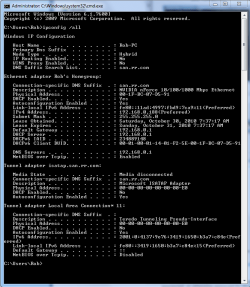
Try running this batch file which will reset winsock, reset the TCP/IP stack and release renew your IP.


If you are still having problems please post a screen shot of your ipconfig /all like in the picture below.
 

Attachments

  • My ipconfig all.PNG
    My ipconfig all.PNG
    21.9 KB · Views: 10

My Computer

Computer type
PC/Desktop
Computer Manufacturer/Model Number
Home built
OS
Windows 7 Ult, Windows 8.1 Pro,
CPU
Q9650-4.275GHz, E8600 4.5GHz, E6750-3.8GHz
Motherboard
Evga 780i FTW
Memory
G.Skill PC2 9600 1200Mhz 5 5 5 15 2T
Graphics Card(s)
GTX480
Sound Card
Asus Xonar D2
Monitor(s) Displays
HannsG
Screen Resolution
1680X1050
Hard Drives
GSkill Phoenix Pro 120GB SSD
PSU
ThermalTake Toughpower 1000Watt modular
Case
ThermalTake XaserV
Cooling
Xigmatek S1283
Keyboard
Logitech G15
Mouse
Logitech G9
Internet Speed
T1
now i made again format and install of windows(windows 7 extreme R1) and i have internet access.i will wait until tomorrow to see if i will have the problem with the internet access and probably i will.
then i will try your solution chev65 and i will tell you the result
 

My Computer

Computer Manufacturer/Model Number
toshiba satellite L505-10V
OS
windows 7 ultimate x64
CPU
INTEL core duo 2.2ghz
Memory
4 GB RAM
Graphics Card(s)
512MB
Sound Card
realtec
now i made again format and install of windows(windows 7 extreme R1) and i have internet access.i will wait until tomorrow to see if i will have the problem with the internet access and probably i will.
then i will try your solution chev65 and i will tell you the result

Ok parperis, I hope it works this time but if it doesn't just follow instructions and we can go from there. :)
 

My Computer

Computer type
PC/Desktop
Computer Manufacturer/Model Number
Home built
OS
Windows 7 Ult, Windows 8.1 Pro,
CPU
Q9650-4.275GHz, E8600 4.5GHz, E6750-3.8GHz
Motherboard
Evga 780i FTW
Memory
G.Skill PC2 9600 1200Mhz 5 5 5 15 2T
Graphics Card(s)
GTX480
Sound Card
Asus Xonar D2
Monitor(s) Displays
HannsG
Screen Resolution
1680X1050
Hard Drives
GSkill Phoenix Pro 120GB SSD
PSU
ThermalTake Toughpower 1000Watt modular
Case
ThermalTake XaserV
Cooling
Xigmatek S1283
Keyboard
Logitech G15
Mouse
Logitech G9
Internet Speed
T1
until now i have internet access.if something goes wrong again i will inform u....ty for the help
 

My Computer

Computer Manufacturer/Model Number
toshiba satellite L505-10V
OS
windows 7 ultimate x64
CPU
INTEL core duo 2.2ghz
Memory
4 GB RAM
Graphics Card(s)
512MB
Sound Card
realtec
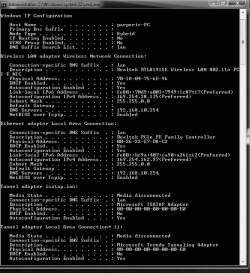
If you are still having problems please post a screen shot of your ipconfig /all like in the picture below.
i have the problem again...
 

Attachments

  • Capture.PNG
    Capture.PNG
    19.7 KB · Views: 7
Last edited:

My Computer

Computer Manufacturer/Model Number
toshiba satellite L505-10V
OS
windows 7 ultimate x64
CPU
INTEL core duo 2.2ghz
Memory
4 GB RAM
Graphics Card(s)
512MB
Sound Card
realtec
If you are still having problems please post a screen shot of your ipconfig /all like in the picture below.

From the ipconfig I see that you have both the wired and wireless connection enabled but neither of them is getting anything useful from the router.

You should disable one of those connections then reset your router. It would also help if you can find a firmware update for your router.

I'm not sure which router you have but it's not working as it should be.
 

My Computer

Computer type
PC/Desktop
Computer Manufacturer/Model Number
Home built
OS
Windows 7 Ult, Windows 8.1 Pro,
CPU
Q9650-4.275GHz, E8600 4.5GHz, E6750-3.8GHz
Motherboard
Evga 780i FTW
Memory
G.Skill PC2 9600 1200Mhz 5 5 5 15 2T
Graphics Card(s)
GTX480
Sound Card
Asus Xonar D2
Monitor(s) Displays
HannsG
Screen Resolution
1680X1050
Hard Drives
GSkill Phoenix Pro 120GB SSD
PSU
ThermalTake Toughpower 1000Watt modular
Case
ThermalTake XaserV
Cooling
Xigmatek S1283
Keyboard
Logitech G15
Mouse
Logitech G9
Internet Speed
T1
windows 7 extreme R1 is not a legitimate Microsoft operating service. That may be your problem.
 

My Computer

Computer type
PC/Desktop
Computer Manufacturer/Model Number
Bruce ... somewhere in his 40's
OS
Windows 7 Ultimate 32bit SP1
CPU
Intel(R) Core(TM)2 Quad CPU @ 2.40GHz, 2400 MHz
Motherboard
INTEL/D975XBX2
Memory
4 GB
Graphics Card(s)
ATI Radeon HD 2600 Pro
Monitor(s) Displays
Samsung SyncMaster 914v
Screen Resolution
1280 x 1024
Hard Drives
2/500GB each ... ST3500630AS ATA Device.
One is not connected
PSU
Rocketfish 700 W
Case
G.Skill Gigabyte Chassis
Keyboard
Standard PS/2 Keyboard
Mouse
Microsoft PS/2 Mouse
Internet Speed
DSL
Antivirus
Avira Internet Security
Browser
IE 11
Other Info
ATI HDMI Audio
Back
Top