No internet access

Rosco2382

New member
Member
Local time
10:07 PM
Messages
38
I am having an issue with a PC. I can ping the IP address of the computer, but it has no internet access. I can't access the computer with \\192.168.1.83, though. When i run the troubleshooter, I get "A problem is preventing troubleshooter from starting". I have did all fixes that microsoft gives to help fixt the error 0x80070490. I have ran SFC as well but it states errors can't be fixed. I also tried a automatic repair. I will attach my CBS log, hoping someone can read it and advise on what to do next.
 

My Computer

Computer type
PC/Desktop
Computer Manufacturer/Model Number
Lenovo ThinkCentre
OS
Microsoft Windows 7 Professional 64-bit 7601 Multiprocessor Free Service Pack 1
CPU
Intel(R) Core(TM) i5-2400 CPU @ 3.10GHz
Motherboard
LENOVO
Memory
4.00 GB
Graphics Card(s)
Intel(R) HD Graphics
Sound Card
(1) Realtek High Definition Audio (2) Intel(R) Display Aud
Screen Resolution
1440 x 900 x 32 bits (4294967296 colors) @ 59 Hz
Hard Drives
WDC WD5000AAKX-083CA1
Internet Speed
T1

My Computer

Computer type
PC/Desktop
Computer Manufacturer/Model Number
Custom Built
OS
Windows 7 Professional x64 SP1 ; Windows Server 2012 R2 Standard
CPU
Intel Core i5 2400 @ 3.10GHz
Motherboard
Foxconn H67MP-S/-V/H67MP
Memory
8.0GB DDR3 @ 665MHz (2GBx4)
Graphics Card(s)
AMD Radeon HD 6870
Sound Card
Realtek High Definition Audio
Monitor(s) Displays
AOC 2243W & SMB1930NW
Screen Resolution
1440x900 & 1920x1080
Hard Drives
977GB Seagate ST31000524AS ATA Drive (SATA)
250GB WD iSCSI attached Drive
PSU
750W Gaming PSU
Case
Novatech Night
Cooling
Fan
Keyboard
Dell Standard PS/2 Keyboard
Mouse
R.A.T 07 Gaming Mouse
Internet Speed
Download: 10 Mbps Ping: 30ms Upload: 0.81 Mbps
Browser
Google Chrome
Other Info
Optiarc DVD RW AD-5260S ATA Device
I guess I should have said, i also ran Malware bytes and AV programs as well. They only found spyware, 4 files in total I believe. I also downloaded that .bat file as well
 

Attachments

  • Capture.JPG
    Capture.JPG
    90 KB · Views: 8

My Computer

Computer type
PC/Desktop
Computer Manufacturer/Model Number
Lenovo ThinkCentre
OS
Microsoft Windows 7 Professional 64-bit 7601 Multiprocessor Free Service Pack 1
CPU
Intel(R) Core(TM) i5-2400 CPU @ 3.10GHz
Motherboard
LENOVO
Memory
4.00 GB
Graphics Card(s)
Intel(R) HD Graphics
Sound Card
(1) Realtek High Definition Audio (2) Intel(R) Display Aud
Screen Resolution
1440 x 900 x 32 bits (4294967296 colors) @ 59 Hz
Hard Drives
WDC WD5000AAKX-083CA1
Internet Speed
T1
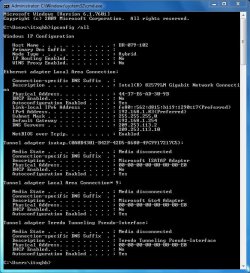
It would appear that you are using public DNS servers. Could you please temporarily replace these with the following DNS servers to test internet connectivity:

Primary: 8.8.8.8

Alternate: 8.8.4.4

Many Thanks,
Josh! :)
 

My Computer

Computer type
PC/Desktop
Computer Manufacturer/Model Number
Custom Built
OS
Windows 7 Professional x64 SP1 ; Windows Server 2012 R2 Standard
CPU
Intel Core i5 2400 @ 3.10GHz
Motherboard
Foxconn H67MP-S/-V/H67MP
Memory
8.0GB DDR3 @ 665MHz (2GBx4)
Graphics Card(s)
AMD Radeon HD 6870
Sound Card
Realtek High Definition Audio
Monitor(s) Displays
AOC 2243W & SMB1930NW
Screen Resolution
1440x900 & 1920x1080
Hard Drives
977GB Seagate ST31000524AS ATA Drive (SATA)
250GB WD iSCSI attached Drive
PSU
750W Gaming PSU
Case
Novatech Night
Cooling
Fan
Keyboard
Dell Standard PS/2 Keyboard
Mouse
R.A.T 07 Gaming Mouse
Internet Speed
Download: 10 Mbps Ping: 30ms Upload: 0.81 Mbps
Browser
Google Chrome
Other Info
Optiarc DVD RW AD-5260S ATA Device
Also, are you able to ping 192.168.1.254?

Code:
ping 192.168.1.254

Enter the above in a command prompt

Josh
 

My Computer

Computer type
PC/Desktop
Computer Manufacturer/Model Number
Custom Built
OS
Windows 7 Professional x64 SP1 ; Windows Server 2012 R2 Standard
CPU
Intel Core i5 2400 @ 3.10GHz
Motherboard
Foxconn H67MP-S/-V/H67MP
Memory
8.0GB DDR3 @ 665MHz (2GBx4)
Graphics Card(s)
AMD Radeon HD 6870
Sound Card
Realtek High Definition Audio
Monitor(s) Displays
AOC 2243W & SMB1930NW
Screen Resolution
1440x900 & 1920x1080
Hard Drives
977GB Seagate ST31000524AS ATA Drive (SATA)
250GB WD iSCSI attached Drive
PSU
750W Gaming PSU
Case
Novatech Night
Cooling
Fan
Keyboard
Dell Standard PS/2 Keyboard
Mouse
R.A.T 07 Gaming Mouse
Internet Speed
Download: 10 Mbps Ping: 30ms Upload: 0.81 Mbps
Browser
Google Chrome
Other Info
Optiarc DVD RW AD-5260S ATA Device
Yes I can ping my router and any pc on the network. I can not remote into it or see the HDD when I navigate to it. I can also ping that PC from the one I am posting on.

I used the google DNS as well and still no internet.
 

My Computer

Computer type
PC/Desktop
Computer Manufacturer/Model Number
Lenovo ThinkCentre
OS
Microsoft Windows 7 Professional 64-bit 7601 Multiprocessor Free Service Pack 1
CPU
Intel(R) Core(TM) i5-2400 CPU @ 3.10GHz
Motherboard
LENOVO
Memory
4.00 GB
Graphics Card(s)
Intel(R) HD Graphics
Sound Card
(1) Realtek High Definition Audio (2) Intel(R) Display Aud
Screen Resolution
1440 x 900 x 32 bits (4294967296 colors) @ 59 Hz
Hard Drives
WDC WD5000AAKX-083CA1
Internet Speed
T1
This may be caused by a firewall issue or a third party application. Could you please disable your firewall on the machine and then test internet connectivity? If that doesn't work then please boot the machine in Safe mode With Networking and test internet connectivity

To do so please follow this tutorial (Option One only) - http://www.sevenforums.com/tutorials/69585-safe-mode.html

Please replace all references of Safe Mode with Safe Mode with Networking

Many Thanks,
Josh! :)
 

My Computer

Computer type
PC/Desktop
Computer Manufacturer/Model Number
Custom Built
OS
Windows 7 Professional x64 SP1 ; Windows Server 2012 R2 Standard
CPU
Intel Core i5 2400 @ 3.10GHz
Motherboard
Foxconn H67MP-S/-V/H67MP
Memory
8.0GB DDR3 @ 665MHz (2GBx4)
Graphics Card(s)
AMD Radeon HD 6870
Sound Card
Realtek High Definition Audio
Monitor(s) Displays
AOC 2243W & SMB1930NW
Screen Resolution
1440x900 & 1920x1080
Hard Drives
977GB Seagate ST31000524AS ATA Drive (SATA)
250GB WD iSCSI attached Drive
PSU
750W Gaming PSU
Case
Novatech Night
Cooling
Fan
Keyboard
Dell Standard PS/2 Keyboard
Mouse
R.A.T 07 Gaming Mouse
Internet Speed
Download: 10 Mbps Ping: 30ms Upload: 0.81 Mbps
Browser
Google Chrome
Other Info
Optiarc DVD RW AD-5260S ATA Device
I disabled the firewall, logged into safe mode with networking and still no internet access. I still can't run the troubleshooter. Any other suggestions?
 

My Computer

Computer type
PC/Desktop
Computer Manufacturer/Model Number
Lenovo ThinkCentre
OS
Microsoft Windows 7 Professional 64-bit 7601 Multiprocessor Free Service Pack 1
CPU
Intel(R) Core(TM) i5-2400 CPU @ 3.10GHz
Motherboard
LENOVO
Memory
4.00 GB
Graphics Card(s)
Intel(R) HD Graphics
Sound Card
(1) Realtek High Definition Audio (2) Intel(R) Display Aud
Screen Resolution
1440 x 900 x 32 bits (4294967296 colors) @ 59 Hz
Hard Drives
WDC WD5000AAKX-083CA1
Internet Speed
T1
Hmm, There are still a couple of potential causes. Either your IP address stack is not correctly configured (Has the machine ever been able to connect to the internet using the static Address stack listed?)

Or your system may be corrupt, I have asked to see if someone can review your logs this could take a while however please be paitent...

Josh
 

My Computer

Computer type
PC/Desktop
Computer Manufacturer/Model Number
Custom Built
OS
Windows 7 Professional x64 SP1 ; Windows Server 2012 R2 Standard
CPU
Intel Core i5 2400 @ 3.10GHz
Motherboard
Foxconn H67MP-S/-V/H67MP
Memory
8.0GB DDR3 @ 665MHz (2GBx4)
Graphics Card(s)
AMD Radeon HD 6870
Sound Card
Realtek High Definition Audio
Monitor(s) Displays
AOC 2243W & SMB1930NW
Screen Resolution
1440x900 & 1920x1080
Hard Drives
977GB Seagate ST31000524AS ATA Drive (SATA)
250GB WD iSCSI attached Drive
PSU
750W Gaming PSU
Case
Novatech Night
Cooling
Fan
Keyboard
Dell Standard PS/2 Keyboard
Mouse
R.A.T 07 Gaming Mouse
Internet Speed
Download: 10 Mbps Ping: 30ms Upload: 0.81 Mbps
Browser
Google Chrome
Other Info
Optiarc DVD RW AD-5260S ATA Device
Yeah, it was working last week, we had a terrible storm and it knocked our power out for a few days. Since then, it hasn't been able to connect to the internet.
 

My Computer

Computer type
PC/Desktop
Computer Manufacturer/Model Number
Lenovo ThinkCentre
OS
Microsoft Windows 7 Professional 64-bit 7601 Multiprocessor Free Service Pack 1
CPU
Intel(R) Core(TM) i5-2400 CPU @ 3.10GHz
Motherboard
LENOVO
Memory
4.00 GB
Graphics Card(s)
Intel(R) HD Graphics
Sound Card
(1) Realtek High Definition Audio (2) Intel(R) Display Aud
Screen Resolution
1440 x 900 x 32 bits (4294967296 colors) @ 59 Hz
Hard Drives
WDC WD5000AAKX-083CA1
Internet Speed
T1
This could indicate power surge, did you have any power surge protectors in place? If no are you able to test an alternate NIC? This can help determine if this is a software or hardware problem

If not then are you able to test the machine on another network at all? Possibly a friend or relatives?

Josh
 

My Computer

Computer type
PC/Desktop
Computer Manufacturer/Model Number
Custom Built
OS
Windows 7 Professional x64 SP1 ; Windows Server 2012 R2 Standard
CPU
Intel Core i5 2400 @ 3.10GHz
Motherboard
Foxconn H67MP-S/-V/H67MP
Memory
8.0GB DDR3 @ 665MHz (2GBx4)
Graphics Card(s)
AMD Radeon HD 6870
Sound Card
Realtek High Definition Audio
Monitor(s) Displays
AOC 2243W & SMB1930NW
Screen Resolution
1440x900 & 1920x1080
Hard Drives
977GB Seagate ST31000524AS ATA Drive (SATA)
250GB WD iSCSI attached Drive
PSU
750W Gaming PSU
Case
Novatech Night
Cooling
Fan
Keyboard
Dell Standard PS/2 Keyboard
Mouse
R.A.T 07 Gaming Mouse
Internet Speed
Download: 10 Mbps Ping: 30ms Upload: 0.81 Mbps
Browser
Google Chrome
Other Info
Optiarc DVD RW AD-5260S ATA Device
Yes all my electronics plug into a surge protector. I don't have any NIC's laying around, i suppose I could go and buy one.
 

My Computer

Computer type
PC/Desktop
Computer Manufacturer/Model Number
Lenovo ThinkCentre
OS
Microsoft Windows 7 Professional 64-bit 7601 Multiprocessor Free Service Pack 1
CPU
Intel(R) Core(TM) i5-2400 CPU @ 3.10GHz
Motherboard
LENOVO
Memory
4.00 GB
Graphics Card(s)
Intel(R) HD Graphics
Sound Card
(1) Realtek High Definition Audio (2) Intel(R) Display Aud
Screen Resolution
1440 x 900 x 32 bits (4294967296 colors) @ 59 Hz
Hard Drives
WDC WD5000AAKX-083CA1
Internet Speed
T1
This should have prevented it, Don't buy another NIC as of yet... If I am to suggest anything that would be a reinstallation of Windows over purchasing a new card.

Josh :)
 

My Computer

Computer type
PC/Desktop
Computer Manufacturer/Model Number
Custom Built
OS
Windows 7 Professional x64 SP1 ; Windows Server 2012 R2 Standard
CPU
Intel Core i5 2400 @ 3.10GHz
Motherboard
Foxconn H67MP-S/-V/H67MP
Memory
8.0GB DDR3 @ 665MHz (2GBx4)
Graphics Card(s)
AMD Radeon HD 6870
Sound Card
Realtek High Definition Audio
Monitor(s) Displays
AOC 2243W & SMB1930NW
Screen Resolution
1440x900 & 1920x1080
Hard Drives
977GB Seagate ST31000524AS ATA Drive (SATA)
250GB WD iSCSI attached Drive
PSU
750W Gaming PSU
Case
Novatech Night
Cooling
Fan
Keyboard
Dell Standard PS/2 Keyboard
Mouse
R.A.T 07 Gaming Mouse
Internet Speed
Download: 10 Mbps Ping: 30ms Upload: 0.81 Mbps
Browser
Google Chrome
Other Info
Optiarc DVD RW AD-5260S ATA Device
I think a clean install will be the answer, I was really hoping to avoid this. I have a lot of stuff on the PC.
 

My Computer

Computer type
PC/Desktop
Computer Manufacturer/Model Number
Lenovo ThinkCentre
OS
Microsoft Windows 7 Professional 64-bit 7601 Multiprocessor Free Service Pack 1
CPU
Intel(R) Core(TM) i5-2400 CPU @ 3.10GHz
Motherboard
LENOVO
Memory
4.00 GB
Graphics Card(s)
Intel(R) HD Graphics
Sound Card
(1) Realtek High Definition Audio (2) Intel(R) Display Aud
Screen Resolution
1440 x 900 x 32 bits (4294967296 colors) @ 59 Hz
Hard Drives
WDC WD5000AAKX-083CA1
Internet Speed
T1
Do not reformat+reinstall Windows over this.

Search > CMD > Left Click 'Run As Administrator'.

IPConfig /Release
IPConfig /Renew

This should force the DHCP to 'Enable' (your DHCP being Disabled is the problem here) and also to force the ISP DNS to resend the 24 hour lease to your modem along with the new DNS packets that it needs to connect to your ISP's servers again. This has happened to me many times during a power outage (even also when Verizon was performing routine maintenance that knocked us off a couple of times, same thing happens either way... DHCP doesn't get its DNS packets and lease = no connectivity until it does), where I otherwise would have had to wait out those 24 hours (or even days when it would still neglect to resend these credentials automatically as it should). It was as simple as the IPConfig/ Release and Renew 9 out of 10 times. I have found that this is easier and more often successful using an XP system, however (does not always work on 7).

On the rare instances that doesn't work, then you need to call your ISP for support. I am quite sure that reformatting and reinstalling Windows is not going to resolve this.

If you absolutely don't want to deal with your ISP and everything else has failed... then you need to try to reset your modem/router. It will go back to defaults and so yes, you will have to reconfigure it again through its admin GUI (and this is providing your ISP allows you to do this without having to call them. As an example, Verizon forces you to because of their security measures... the router will lock you out until they break it's lease and renew it anyway so you might as well just call your ISP and let them handle it from the get-go).

Good luck.

EDIT: If this storm involved lightning and your WiFi was on... your modem is NOT surge protected because of the coaxial lines, which are unprotected. WiFi particularly when broadcasting its SSID attracts electrical storms/lightning like nothing else (which is why WiFi should always be turned off during storms or better yet, just unplugging the whole system and coaxial lines also off of their power source until it passes. Better safe than sorry). Your modem could have easily fried in that storm, and it simply needs to be replaced to resolve the problem. Again, contact your ISP for support. They can fix it. Leave Windows alone.

EDIT 2: One relatively simple way to determine if your modem/router is still basally functional or not is to put 192.168.1.1 into your address bar on the browser and put in the admin and password for its admin GUI. If it takes it, its working. If it doesn't then it is the modem/router. And again, if you don't know what the username and password is for this, you'll have to get it from ISP support. But if you do, great. Try this too.
 

My Computer

Computer type
PC/Desktop
Computer Manufacturer/Model Number
Custom [03/21/2014]
OS
7 Ultimate SP1 x64
CPU
AMD FX-8350 4.0GHz
Motherboard
Asus M5A99FX Pro R2.0
Memory
8GB Corsair Vengeance LP DDR3 1600
Graphics Card(s)
EVGA GTX760 SC 2GB GDDR5
Sound Card
Realtek ALC892
Monitor(s) Displays
23" Syncmaster P2370HD
Screen Resolution
1920 x 1080
Hard Drives
Scorpio Black WD1003FZEX 1TB
PSU
Corsair RM 750W
Case
Gigabyte Sumo Omega
Cooling
Noctua NH-D14 | 6 120mm case.
Keyboard
Tt eSPORTS Poesidon Z - Blue Switch
Mouse
Logitech M510
Internet Speed
FiOS 100/100
Antivirus
MBAM
Browser
WaterFox & Chrome
Other Info
NETWORKING:
FiOS G1100 (v1.03)
Netgear WNDR37AV
Actiontec MI424WR (Rev. I)
PRINTER:
Canon MX340
MagusMagnus said:
IPConfig /Release
IPConfig /Renew

This should force the DHCP to 'Enable' (your DHCP being Disabled is the problem here)

Huh? :sarc:

IPconfig /release and Renew only obtains a new IP address from the DHCP server as well as renews the current lease for that IP address. As you can see there is no DHCP server from the OPs IPconfig settings because the address was entered statically. Microsoft Corporation


You will also find that the OP has run the batch file located on this thread which already contains those commands - http://www.sevenforums.com/network-sharing/144365-network-posting-tips.html


MagusMagnus said:
force the ISP DNS to resend the 24 hour lease to your modem along with the new DNS packets that it needs to connect to your ISP's servers again

IPconfig is not related in any way to an ISPs settings, IPconfig only affects the local NIC of the host machine. DNS packets do not exist, DNS servers store URLS to IPs and are sent to clients by UDP packets. They are in no way shape or form related to DHCP. As shown from the OPs IPconfig the DNS servers are not relevant to this issue since other machines connect fine even when testing with Google's Public DNS servers.

MagusMagnus said:
EDIT 2: One relatively simple way to determine if your modem/router is still basally functional or not is to put 192.168.1.1 into your address bar on the browser and put in the admin and password for its admin GUI.

Again, if you look at the OPs IPconfig you will find that the default gateway is 192.168.1.254 therefore that is the routers ip address and not 192.168.1.1

Josh
 

My Computer

Computer type
PC/Desktop
Computer Manufacturer/Model Number
Custom Built
OS
Windows 7 Professional x64 SP1 ; Windows Server 2012 R2 Standard
CPU
Intel Core i5 2400 @ 3.10GHz
Motherboard
Foxconn H67MP-S/-V/H67MP
Memory
8.0GB DDR3 @ 665MHz (2GBx4)
Graphics Card(s)
AMD Radeon HD 6870
Sound Card
Realtek High Definition Audio
Monitor(s) Displays
AOC 2243W & SMB1930NW
Screen Resolution
1440x900 & 1920x1080
Hard Drives
977GB Seagate ST31000524AS ATA Drive (SATA)
250GB WD iSCSI attached Drive
PSU
750W Gaming PSU
Case
Novatech Night
Cooling
Fan
Keyboard
Dell Standard PS/2 Keyboard
Mouse
R.A.T 07 Gaming Mouse
Internet Speed
Download: 10 Mbps Ping: 30ms Upload: 0.81 Mbps
Browser
Google Chrome
Other Info
Optiarc DVD RW AD-5260S ATA Device
Hmm, There are still a couple of potential causes. Either your IP address stack is not correctly configured (Has the machine ever been able to connect to the internet using the static Address stack listed?)

Or your system may be corrupt, I have asked to see if someone can review your logs this could take a while however please be paitent...

Josh
Hi guys, think it'll rain?

Going over your CBS log I'm seeing a lot of "Cannot repair member file", and windows code-integrity calls.

Just a sample:
Code:
POQ 25 ends.
2013-07-08 11:37:41, Info                  CSI    000001a6 [SR] Verify complete
2013-07-08 11:37:41, Info                  CSI    000001a7 [SR] Verifying 100 (0x0000000000000064) components
2013-07-08 11:37:41, Info                  CSI    000001a8 [SR] Beginning Verify and Repair transaction
2013-07-08 11:37:43, Info                  CSI    000001a9 Hashes for file member \SystemRoot\WinSxS\amd64_microsoft-windows-g..ncycacheclean-india_31bf3856ad364e35_6.1.7601.17561_none_113e4cbe3aea55ff\cleanupusercurrency.exe do not match actual file [l:46{23}]"cleanupusercurrency.exe" :
  Found: {l:32 b:QCzPqdIjmQZFN85+AbLAEayMxRDzSwkS8Cg0/ptIXsw=} Expected: {l:32 b:KHp2NHKbUz5LBcYKzQO8hcD1Etyfm7H4xWGN2MrWbGc=}
2013-07-08 11:37:43, Info                  CSI    000001aa [SR] Cannot repair member file [l:46{23}]"cleanupusercurrency.exe" of Microsoft-Windows-GC-UserCurrencyCacheClean-India, Version = 6.1.7601.17561, pA = PROCESSOR_ARCHITECTURE_AMD64 (9), Culture neutral, VersionScope = 1 nonSxS, PublicKeyToken = {l:8 b:31bf3856ad364e35}, Type neutral, TypeName neutral, PublicKey neutral in the store, hash mismatch

2013-07-08 11:37:43, Info                  CSI    000001ab Hashes for file member \SystemRoot\WinSxS\amd64_microsoft-windows-g..validatefntcache-02_31bf3856ad364e35_6.1.7601.17621_none_a6f11fcb312ed12d\invalidateFntcache.exe do not match actual file [l:44{22}]"invalidateFntcache.exe" :
  Found: {l:32 b:f9rI3HKbThhbOUHl10Ri7FHtLmCyfo9KVWW56xW3VoI=} Expected: {l:32 b:GzpL64kLLbcg3Yv0Fmh5obL2Abe2iC32kux/8OIb5h0=}
2013-07-08 11:37:43, Info                  CSI    000001ac [SR] Cannot repair member file [l:44{22}]"invalidateFntcache.exe" of Microsoft-Windows-GC-InvalidateFntcache-02, Version = 6.1.7601.17621, pA = PROCESSOR_ARCHITECTURE_AMD64 (9), Culture neutral, VersionScope = 1 nonSxS, PublicKeyToken = {l:8 b:31bf3856ad364e35}, Type neutral, TypeName neutral, PublicKey neutral in the store, hash mismatch
2013-07-08 11:37:45, Info                  CSI    000001ad Hashes for file member \SystemRoot\WinSxS\amd64_microsoft-windows-gameexplorer.resources_31bf3856ad364e35_6.1.7600.16385_en-us_6a9a464388bbc56b\gameux.dll.mui do not match actual file [l:28{14}]"gameux.dll.mui" :
  Found: {l:32 b:JKDaDC4rvg4TsG05LNCZfWB3BNlXU6XwSmVcq8TGI1Q=} Expected: {l:32 b:UM1KC7pPJbGq8qS4qcZ+tkrUE/C5CMTG7rP8/JHKgnM=}
2013-07-08 11:37:45, Info                  CSI    000001ae [SR] Cannot repair member file [l:28{14}]"gameux.dll.mui" of Microsoft-Windows-GameExplorer.Resources, Version = 6.1.7600.16385, pA = PROCESSOR_ARCHITECTURE_AMD64 (9), Culture = [l:10{5}]"en-US", VersionScope = 1 nonSxS, PublicKeyToken = {l:8 b:31bf3856ad364e35}, Type neutral, TypeName neutral, PublicKey neutral in the store, hash mismatch
2013-07-08 11:37:46, Info                  CSI    000001af Hashes for file member \SystemRoot\WinSxS\amd64_microsoft-windows-g..ncycacheclean-india_31bf3856ad364e35_6.1.7601.17561_none_113e4cbe3aea55ff\cleanupusercurrency.exe do not match actual file [l:46{23}]"cleanupusercurrency.exe" :
  Found: {l:32 b:QCzPqdIjmQZFN85+AbLAEayMxRDzSwkS8Cg0/ptIXsw=} Expected: {l:32 b:KHp2NHKbUz5LBcYKzQO8hcD1Etyfm7H4xWGN2MrWbGc=}
2013-07-08 11:37:46, Info                  CSI    000001b0 [SR] Cannot repair member file [l:46{23}]"cleanupusercurrency.exe" of Microsoft-Windows-GC-UserCurrencyCacheClean-India, Version = 6.1.7601.17561, pA = PROCESSOR_ARCHITECTURE_AMD64 (9), Culture neutral, VersionScope = 1 nonSxS, PublicKeyToken = {l:8 b:31bf3856ad364e35}, Type neutral, TypeName neutral, PublicKey neutral in the store, hash mismatch
2013-07-08 11:37:46, Info                  CSI    000001b1 [SR] This component was referenced by [l:160{80}]"Package_10_for_KB2496898~31bf3856ad364e35~amd64~~6.1.3.0.2496898-142_neutral_GDR"
2013-07-08 11:37:47, Info                  CSI    000001b2 Hashes for file member \SystemRoot\WinSxS\amd64_microsoft-windows-g..validatefntcache-02_31bf3856ad364e35_6.1.7601.17621_none_a6f11fcb312ed12d\invalidateFntcache.exe do not match actual file [l:44{22}]"invalidateFntcache.exe" :
  Found: {l:32 b:f9rI3HKbThhbOUHl10Ri7FHtLmCyfo9KVWW56xW3VoI=} Expected: {l:32 b:GzpL64kLLbcg3Yv0Fmh5obL2Abe2iC32kux/8OIb5h0=}
2013-07-08 11:37:47, Info                  CSI    000001b3 [SR] Cannot repair member file [l:44{22}]"invalidateFntcache.exe" of Microsoft-Windows-GC-InvalidateFntcache-02, Version = 6.1.7601.17621, pA = PROCESSOR_ARCHITECTURE_AMD64 (9), Culture neutral, VersionScope = 1 nonSxS, PublicKeyToken = {l:8 b:31bf3856ad364e35}, Type neutral, TypeName neutral, PublicKey neutral in the store, hash mismatch


Unless NoelDP can pitch in with a patch to this and then re-run the SURT with another SFC scan, the best I can offer is,

Have you tried a safe mode re-start with "last known good configuration" or a system restore to before the lighting strike.
 

My Computer

Computer type
PC/Desktop
Computer Manufacturer/Model Number
Gateway DX4831-01e (Mid-Tower Desktop)
OS
Originally Win 7 Hm Prem x64 Ver 6.1.7600 Build 7601-SP1 | Upgraded to Windows 10 December 14, 2019
CPU
Intel i3 530 2.93GHz, 2933MHz 2 Cores 4 Logical Processors
Motherboard
Gateway H57M01 133 megahertz
Memory
6GB of 1,333MHz DDR3 SDRAM
Graphics Card(s)
32MB Intel Graphics Media Accelerator HD IGChip
Sound Card
Realtek High Definition Audio
Monitor(s) Displays
Gateway HX2000 20inch TFT active matrix TN
Screen Resolution
1600 x 900 x 59 hertz
Hard Drives
WDC WD10EADS-00M2B0 [HDD] (1000.20 GB) -- drive 0,
HL-DT-ST DVDRAM GH41N [CD-ROM dr]
Four card readers, and Four USB 2.0
PSU
300watts.
Case
Mid-Tower Desktop
Cooling
Stock from Gateway
Keyboard
Natural Ergonomic Keyboard 4000, see Other Info
Mouse
Orig. Gateway wore out now using Insignia USB wired optical
Internet Speed
Vz FIOS 10ms png 57.64Mbps down 65.53Mbps up Speedtest.org
Antivirus
Zamana Anti-logger with Anti-malware, MSE, Windows Firewall,
Browser
IE11.0.9600.19399-Upd ver11.0.135, Firefox 68.0.1 x64
Other Info
System Specs by Belarc.

BIOS: American Megatrends Inc. P01-A0 11/17/2009

Replaced the MS 'Natural' Standard PS/2 Enhanced 101-102 Keyboard with a new Natural Ergonomic Keyboard 4000 on August 1st 2014.

Canon Pixma MG3222 Printer.

Updated to IE11 on 12102015 | Fios Quantum Router g1100

Additional AV: SpywareBlaster, manual Mbam, SAS
I am having an issue with a PC. I can ping the IP address of the computer, but it has no internet access. I can't access the computer with \\192.168.1.83, though. When i run the troubleshooter, I get "A problem is preventing troubleshooter from starting". I have did all fixes that microsoft gives to help fixt the error 0x80070490.

I have ran SFC as well but it states errors can't be fixed.

I also tried a automatic repair. I will attach my CBS log, hoping someone can read it and advise on what to do next.
There has been some discussion of your thread as to the statement I've highlighted.

Have you tried to run the SFC scan at least three times or more with restarts in between?

See Note after Option Two step #4:

   Note

  • If SFC could not fix something, then run the command again to see if it may be able to the next time. Sometimes it may take running the sfc /scannow command 3 or more times to completely fix everything that it's able to.
  • If not, then download and run the 32-bit (x86) or 64-bit (x64) System Update Readiness Tool for your same installed 32-bit or 64-bit Windows 7, restart the PC afterwards, and try the sfc /scannow command again.
  • If still not, then you can attempt to run a System Restore using a restore point dated before the bad file occured to fix it. You may need to repeat doing a System Restore until you find a older restore point that may work.
  • If still not, then you can use the steps in the TIP box in the OPTION THREE section below to manually replace the files that SFC could not fix.


My Computer

Computer type
PC/Desktop
Computer Manufacturer/Model Number
Gateway DX4831-01e (Mid-Tower Desktop)
OS
Originally Win 7 Hm Prem x64 Ver 6.1.7600 Build 7601-SP1 | Upgraded to Windows 10 December 14, 2019
CPU
Intel i3 530 2.93GHz, 2933MHz 2 Cores 4 Logical Processors
Motherboard
Gateway H57M01 133 megahertz
Memory
6GB of 1,333MHz DDR3 SDRAM
Graphics Card(s)
32MB Intel Graphics Media Accelerator HD IGChip
Sound Card
Realtek High Definition Audio
Monitor(s) Displays
Gateway HX2000 20inch TFT active matrix TN
Screen Resolution
1600 x 900 x 59 hertz
Hard Drives
WDC WD10EADS-00M2B0 [HDD] (1000.20 GB) -- drive 0,
HL-DT-ST DVDRAM GH41N [CD-ROM dr]
Four card readers, and Four USB 2.0
PSU
300watts.
Case
Mid-Tower Desktop
Cooling
Stock from Gateway
Keyboard
Natural Ergonomic Keyboard 4000, see Other Info
Mouse
Orig. Gateway wore out now using Insignia USB wired optical
Internet Speed
Vz FIOS 10ms png 57.64Mbps down 65.53Mbps up Speedtest.org
Antivirus
Zamana Anti-logger with Anti-malware, MSE, Windows Firewall,
Browser
IE11.0.9600.19399-Upd ver11.0.135, Firefox 68.0.1 x64
Other Info
System Specs by Belarc.

BIOS: American Megatrends Inc. P01-A0 11/17/2009

Replaced the MS 'Natural' Standard PS/2 Enhanced 101-102 Keyboard with a new Natural Ergonomic Keyboard 4000 on August 1st 2014.

Canon Pixma MG3222 Printer.

Updated to IE11 on 12102015 | Fios Quantum Router g1100

Additional AV: SpywareBlaster, manual Mbam, SAS
Back
Top