Solved No internet connection

CLAIRE39

New member
Member
Local time
9:01 AM
Messages
25
Hi Everyone
I have a dell 1501 which I had to have repaired, (badly)
but unfortunately the person said he had to take it back to factory settings.
But a driver or something is missing, as I cannot connect to internet.
It runs xp but I intend to try to install the ubunta disk I have, when I can connect to the internet.
I use virgin media, can anyone help. So I can get my old faithful back running.
 

My Computer

Computer type
Laptop
Computer Manufacturer/Model Number
samsung N150
OS
WINDOWS 7 STARTER
Antivirus
AVAST
Browser
CHROME
You could just install Ubuntu on it, no need to troubleshoot which may be an OS issue. Download at a friend's PC if you don't have a spare PC, and make bootable DVD/USB.
 

My Computer

Computer type
PC/Desktop
Computer Manufacturer/Model Number
Custom Build
OS
Windows 7 Ultimate x64 SP1
CPU
AMD Phenom 2 1090T
Motherboard
Gigabyte GA-890FXA-UD5
Memory
2x8GB Kingston HyperX Fury Black 1600Mhz Unganged
Graphics Card(s)
MSI GTX 970 Gaming 4G
Sound Card
Realtek On-Board HD 7.1 Audio / Logitech G35
Monitor(s) Displays
3xAcer GD245HQ
Screen Resolution
1920x1080
Hard Drives
Samsung 850 Pro 512GB SSD - OS /
WD Caviar Black SATA 3 - 1 TBx2 - Dynamic RAID 0 /
WD Caviar Green SATA 2 - 640GBx2 - Dynamic RAID 0 /
WD Caviar Green SATA 2 - 640GB - Internal Backup /
Seagate Barracude SATA 3 - 3TB - External Backup/ Sync
PSU
HighPower 1000W
Case
Cooler Master HAF 932
Cooling
Noctua NH-D14
Keyboard
Logitech G19
Mouse
Logitech G500
Internet Speed
100/4 Mbit Cable (100GB quota)
Antivirus
ZoneAlarm Extreme Security / MBAM Pro / MBAE Free / SAS Free
Browser
IE 11 - Firefox - Chrome
Other Info
Logitech F710/ G27/ G940/ Z5500 // TrackIR 5 // Nvidia 3D Surround Vision
Reply to GoKAy

Hi GokAy
I have tried to load Ubunta from the key I purchased it on,
but it started to install, and then gave a report of cannot accesses internet.
Computer will not access internet after OS has loaded. When I try to access internet,
It says local area connection unplugged.
Claire
 

My Computer

Computer type
Laptop
Computer Manufacturer/Model Number
samsung N150
OS
WINDOWS 7 STARTER
Antivirus
AVAST
Browser
CHROME
Both Windows and Ubuntu failing usually means a hardware issue.
(Less likely) Go into BIOS (setup menu when you first start computer) and see if network card is enabled.
Try with another Ethernet cable. Also use another port on the router (if there are more than 1).
 

My Computer

Computer type
PC/Desktop
Computer Manufacturer/Model Number
Custom Build
OS
Windows 7 Ultimate x64 SP1
CPU
AMD Phenom 2 1090T
Motherboard
Gigabyte GA-890FXA-UD5
Memory
2x8GB Kingston HyperX Fury Black 1600Mhz Unganged
Graphics Card(s)
MSI GTX 970 Gaming 4G
Sound Card
Realtek On-Board HD 7.1 Audio / Logitech G35
Monitor(s) Displays
3xAcer GD245HQ
Screen Resolution
1920x1080
Hard Drives
Samsung 850 Pro 512GB SSD - OS /
WD Caviar Black SATA 3 - 1 TBx2 - Dynamic RAID 0 /
WD Caviar Green SATA 2 - 640GBx2 - Dynamic RAID 0 /
WD Caviar Green SATA 2 - 640GB - Internal Backup /
Seagate Barracude SATA 3 - 3TB - External Backup/ Sync
PSU
HighPower 1000W
Case
Cooler Master HAF 932
Cooling
Noctua NH-D14
Keyboard
Logitech G19
Mouse
Logitech G500
Internet Speed
100/4 Mbit Cable (100GB quota)
Antivirus
ZoneAlarm Extreme Security / MBAM Pro / MBAE Free / SAS Free
Browser
IE 11 - Firefox - Chrome
Other Info
Logitech F710/ G27/ G940/ Z5500 // TrackIR 5 // Nvidia 3D Surround Vision
Reply

Hi GoKAy
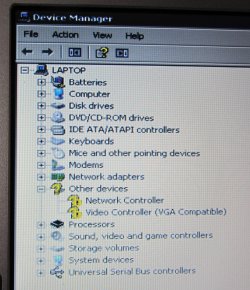
I have gone into device manager
and it has a Broadcom 440x 10/100 Interrated cotroller
under that it has
other devices
network controller
video Controller (VGA compatible)
Next to other devices is a yellow ?
Next to the other two is a yellow ? with a ! on it
also on the tool bar at the top is two monitors
one with a red x over it, when Cursor over it (says uninstall
and the other one has a O with / though it and says disable
Also has a yellow ? over the help icon on tool bar.

Claire
 

My Computer

Computer type
Laptop
Computer Manufacturer/Model Number
samsung N150
OS
WINDOWS 7 STARTER
Antivirus
AVAST
Browser
CHROME
What we are doing may be futile, network is failing both under both Linux and Windows.

As a last effort, post a screenshot of Device Management.

You can get a USB or PCI-e network card possibly for 10USD.

I am open to listening to any input from experienced members. Am I missing anything.
 

My Computer

Computer type
PC/Desktop
Computer Manufacturer/Model Number
Custom Build
OS
Windows 7 Ultimate x64 SP1
CPU
AMD Phenom 2 1090T
Motherboard
Gigabyte GA-890FXA-UD5
Memory
2x8GB Kingston HyperX Fury Black 1600Mhz Unganged
Graphics Card(s)
MSI GTX 970 Gaming 4G
Sound Card
Realtek On-Board HD 7.1 Audio / Logitech G35
Monitor(s) Displays
3xAcer GD245HQ
Screen Resolution
1920x1080
Hard Drives
Samsung 850 Pro 512GB SSD - OS /
WD Caviar Black SATA 3 - 1 TBx2 - Dynamic RAID 0 /
WD Caviar Green SATA 2 - 640GBx2 - Dynamic RAID 0 /
WD Caviar Green SATA 2 - 640GB - Internal Backup /
Seagate Barracude SATA 3 - 3TB - External Backup/ Sync
PSU
HighPower 1000W
Case
Cooler Master HAF 932
Cooling
Noctua NH-D14
Keyboard
Logitech G19
Mouse
Logitech G500
Internet Speed
100/4 Mbit Cable (100GB quota)
Antivirus
ZoneAlarm Extreme Security / MBAM Pro / MBAE Free / SAS Free
Browser
IE 11 - Firefox - Chrome
Other Info
Logitech F710/ G27/ G940/ Z5500 // TrackIR 5 // Nvidia 3D Surround Vision
Hi GokAy
Please find attached screen shoot of device manager. (dell 1501)
This is how it was returned to me after repair (Taken back to factory settings ??)
I don'now how to enable these things.

Claire
 

Attachments

  • IMG_2488.jpg
    IMG_2488.jpg
    1,010.2 KB · Views: 0

My Computer

Computer type
Laptop
Computer Manufacturer/Model Number
samsung N150
OS
WINDOWS 7 STARTER
Antivirus
AVAST
Browser
CHROME
Unfortunately, you are in a "Catch-22" type situation. It appears you need drivers in order to connect to the internet but you can't connect to the internet because you need drivers.

I would take your computer back to whomever fixed it and ask them to finish what they started. Returning a computer as fixed that can't connect to the internet is pretty flaky.

If that's nt possible then you may need to buy an inexpensive network card that will come with drivers on a disk that you can install without being connected to the internet.
 

My Computer

Computer type
PC/Desktop
Computer Manufacturer/Model Number
Home Built desktop, Dell G15 5511 Gaming laptop,MS Surface Pro 7 tablet
OS
W10 Pro desktop, W11 laptop, W11 Pro tablet (all 64-bit)
CPU
3.7Ghz 8700K i7, i7-11800H, i7-1065G7
Motherboard
ASUS TUF Z370-Pro Gaming in desktop
Memory
16G desktop, 16G laptop, 4G tablet
Graphics Card(s)
AMD Radeon RX580, RTX 3060, Intel Iris Plus
Sound Card
High Definition Audio (Built-in to mobo)
Monitor(s) Displays
Samsung U32J59 32" (2x), 15.6", 12"
Screen Resolution
3840x2160, 3840x2160, 1920x1080, 2160x1440
Hard Drives
500G SSD for OS; 2T, 10T & 15T HDDs for Data on Desktop, 1TB SSD laptop, 128G SSD tablet.
PSU
Corsair CX 750M
Case
Antec 100
Cooling
CM 212+
Keyboard
IBM Model M - used continuously since 1986
Mouse
Microsoft Pro IntelliMouse
Internet Speed
400M down 8M up
Antivirus
Windows Defender
Browser
FireFox
Other Info
Built my first computer (8Mhz 8088cpu, 640K RAM, 20MB HDD, 2 360K floppy drives) in 1985 and have been building them for myself, relatives and friends ever since.
Open Device Management once again, and right click the yellow ones - properties - details tab - in the dropdown list select "Hardware Ids" and in the box right below, right click and copy. Paste here.

You should be able to get the drivers from Dell Support site for your model.

Strollin: He could carry drivers with a USB drive if that's the only issue, but I am with you on returning the PC to the repair person.
 

My Computer

Computer type
PC/Desktop
Computer Manufacturer/Model Number
Custom Build
OS
Windows 7 Ultimate x64 SP1
CPU
AMD Phenom 2 1090T
Motherboard
Gigabyte GA-890FXA-UD5
Memory
2x8GB Kingston HyperX Fury Black 1600Mhz Unganged
Graphics Card(s)
MSI GTX 970 Gaming 4G
Sound Card
Realtek On-Board HD 7.1 Audio / Logitech G35
Monitor(s) Displays
3xAcer GD245HQ
Screen Resolution
1920x1080
Hard Drives
Samsung 850 Pro 512GB SSD - OS /
WD Caviar Black SATA 3 - 1 TBx2 - Dynamic RAID 0 /
WD Caviar Green SATA 2 - 640GBx2 - Dynamic RAID 0 /
WD Caviar Green SATA 2 - 640GB - Internal Backup /
Seagate Barracude SATA 3 - 3TB - External Backup/ Sync
PSU
HighPower 1000W
Case
Cooler Master HAF 932
Cooling
Noctua NH-D14
Keyboard
Logitech G19
Mouse
Logitech G500
Internet Speed
100/4 Mbit Cable (100GB quota)
Antivirus
ZoneAlarm Extreme Security / MBAM Pro / MBAE Free / SAS Free
Browser
IE 11 - Firefox - Chrome
Other Info
Logitech F710/ G27/ G940/ Z5500 // TrackIR 5 // Nvidia 3D Surround Vision
Hi
Thank you both for your reply's.
unfortunately it is not possible for me to take it back to the person who repaired it.
I have a small note book that I am using, at the moment, so could you tell me what drivers I need, and what section of the dell site I can get them from, as when I looked for them I could not find them.

Claire
 

My Computer

Computer type
Laptop
Computer Manufacturer/Model Number
samsung N150
OS
WINDOWS 7 STARTER
Antivirus
AVAST
Browser
CHROME
Hi Claire here is your website for Dell downloads.
Look down the list for Network and expand. Yours is the first in the list.
Download it and via usb drive transfer it to your Dell. It is an .exe file so just double click and it will install.
If you have an issue then it maybe that it is the third in the list to download from Dell.
There is not enough information for me to access the situation.
Good luck
Wayne
 

My Computer

Computer type
PC/Desktop
Computer Manufacturer/Model Number
Owner Builder
OS
Windows 7 Ultimate x64 SP1 OEM
CPU
Intel i7 3930K
Motherboard
Asus X79 Deluxe
Memory
Kingston Genesis KHX2133C11D3K4/32G
Graphics Card(s)
Asus RTX 2070 Ti Turbo fan series
Sound Card
Creative Sound Blaster ZXR
Monitor(s) Displays
Samsung U32J39 UHD
Screen Resolution
3840 x 2160
Hard Drives
Samsung 860 Pro 256 GB
OCZ Vertex 4 512GB
Western Digital Black 4TB
PSU
Corsair AX850
Case
Gigabyte
Cooling
Push - Pull 120 mm Noctua PWM, Scythe Big Shuriken 2 Rev. B
Keyboard
Logitech K800 Backlit
Mouse
Logitech MX2 Master
Internet Speed
NBN 25 Mbps
Antivirus
Kaspersky Internet Security
Browser
Mozilla FireFox
Other Info
TP-Link Archer VR600v
Sennheiser TR220 WiFi Head Phones.
Thank you Wayne
for that link and info.
Found it straight away.
Do I download driver to my note book / then put it on a usb stick / then load it in the dell.
Or can I down load it directly from dell site to usb stick ???

Claire
 

My Computer

Computer type
Laptop
Computer Manufacturer/Model Number
samsung N150
OS
WINDOWS 7 STARTER
Antivirus
AVAST
Browser
CHROME
It makes no real difference.
Load it to your note book so you have a copy of it until you are finished or keep it for future use.
While you are there download the video driver also.
 

My Computer

Computer type
PC/Desktop
Computer Manufacturer/Model Number
Owner Builder
OS
Windows 7 Ultimate x64 SP1 OEM
CPU
Intel i7 3930K
Motherboard
Asus X79 Deluxe
Memory
Kingston Genesis KHX2133C11D3K4/32G
Graphics Card(s)
Asus RTX 2070 Ti Turbo fan series
Sound Card
Creative Sound Blaster ZXR
Monitor(s) Displays
Samsung U32J39 UHD
Screen Resolution
3840 x 2160
Hard Drives
Samsung 860 Pro 256 GB
OCZ Vertex 4 512GB
Western Digital Black 4TB
PSU
Corsair AX850
Case
Gigabyte
Cooling
Push - Pull 120 mm Noctua PWM, Scythe Big Shuriken 2 Rev. B
Keyboard
Logitech K800 Backlit
Mouse
Logitech MX2 Master
Internet Speed
NBN 25 Mbps
Antivirus
Kaspersky Internet Security
Browser
Mozilla FireFox
Other Info
TP-Link Archer VR600v
Sennheiser TR220 WiFi Head Phones.
Back
Top