No Internet Connectivity At Some Wifi Locations

scoostraw

New member
Local time
11:58 AM
Messages
32
I am having a problem with my Toshiba NB505 Netbook - running Windows 7 Starter. I can connect fine at home to wifi- and also at my local public library. However I was unable to connect at a motel I was at recently - and had the same problem when I visited a different local library.

To be more exact, I was able to connect ok at these 2 locations - but there was no internet access. From reading, I suspect a 'DNS' issue of some sort, but I don't know how to go about remedying it.

Can someone please help?

Thank you.
 

My Computer My Computer

At a glance

Windows 7 32bit
Computer Manufacturer/Model Number
Toshiba NB505 Netbook
OS
Windows 7 32bit
If you have DNS failures at certain spots, you can fill in some known good DNS hosts like 8.8.8.8 (Google) to get around whatever the broken value is.

You'll have to hand fill in the rest of the stuff that DHCP from the WiFi unit gave you by hand as well. You can get that by opening a dos prompt and typing in "ipconfig"

Then hand fill in the ip address, netmask and gateway, but use 8.8.8.8 for the DNS in your adapter TCP/IP settings it should work.

You can also do it entirely from the command line using this to get interface names:
netsh interface ip show config

Then use this to set just the DNS:
netsh interface ip set dns "WiFi Connection" static 8.8.8.8

The "WiFi Connection" value will be the name of your wifi adapter, whatever that is, change it to match what you found using the first command...
 

My Computer My Computer

At a glance

Windows 7 x64 Ultimatei7 96012 Gig Corsair DominatorNvidia 480
Computer Manufacturer/Model Number
Scratch built
OS
Windows 7 x64 Ultimate
CPU
i7 960
Motherboard
Asus P6X58D
Memory
12 Gig Corsair Dominator
Graphics Card(s)
Nvidia 480
Sound Card
Maudio Delta 44 + breakout box
Monitor(s) Displays
Dell UltraSharp U2410 24in and Samsung 21 dual monitors
Screen Resolution
1920x1200 and 1280x1024
Hard Drives
Primary: Intel X-25M G2 160G SSD
Secondary: Segate baracuda 1.0 TB
HDs in AHCI mode.
PSU
Corasair TX850
Case
Cooler Master HAF
Cooling
Corsair H50
Keyboard
Logitech G15 + N52 game pad
Mouse
Logitech MX518
Internet Speed
15kbs down 4.5kbps up
Other Info
WEI 7.6
CPU & RAM 7.6
Graphics 7.9
Hard disk 7.7
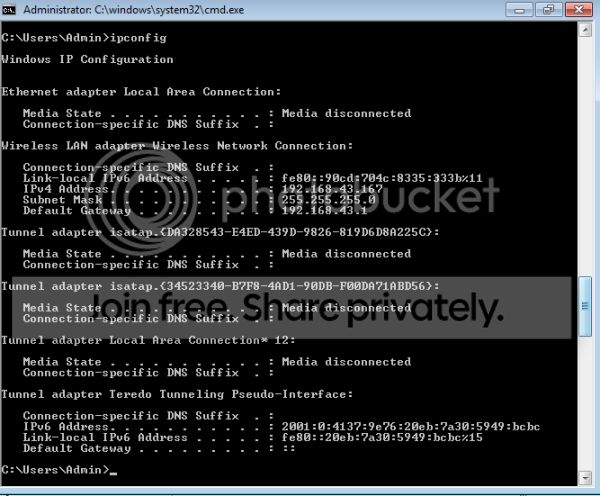
Thanks fseal. Below is what returned from my ipconfig:

commandline.jpg


Which one is the value for my WiFi Connection?
 
Last edited:

My Computer My Computer

At a glance

Windows 7 32bit
Computer Manufacturer/Model Number
Toshiba NB505 Netbook
OS
Windows 7 32bit
The one labelled "Wireless LAN Adapter". it's name for setting DNS would be "Wireless Network Connection"
 

My Computer My Computer

At a glance

Windows 7 x64 Ultimatei7 96012 Gig Corsair DominatorNvidia 480
Computer Manufacturer/Model Number
Scratch built
OS
Windows 7 x64 Ultimate
CPU
i7 960
Motherboard
Asus P6X58D
Memory
12 Gig Corsair Dominator
Graphics Card(s)
Nvidia 480
Sound Card
Maudio Delta 44 + breakout box
Monitor(s) Displays
Dell UltraSharp U2410 24in and Samsung 21 dual monitors
Screen Resolution
1920x1200 and 1280x1024
Hard Drives
Primary: Intel X-25M G2 160G SSD
Secondary: Segate baracuda 1.0 TB
HDs in AHCI mode.
PSU
Corasair TX850
Case
Cooler Master HAF
Cooling
Corsair H50
Keyboard
Logitech G15 + N52 game pad
Mouse
Logitech MX518
Internet Speed
15kbs down 4.5kbps up
Other Info
WEI 7.6
CPU & RAM 7.6
Graphics 7.9
Hard disk 7.7
Thanks fseal. I'll give it a try.

I was hoping that there was a way to change a setting somewhere so that this would be resolved on the fly automatically somehow.
 

My Computer My Computer

At a glance

Windows 7 32bit
Computer Manufacturer/Model Number
Toshiba NB505 Netbook
OS
Windows 7 32bit
Well still not sure that that's the problem...

If it is, then no, everywhere you go there is the chance that someone has their DHCP set up wrong or badly or is on an ISP that's crap and makes using it difficult. Though I do find that DNS issues abound using random connections at hotels and such and using 8.8.8.8 (easy to remember) fixes the problem right quick sometimes :)
 

My Computer My Computer

At a glance

Windows 7 x64 Ultimatei7 96012 Gig Corsair DominatorNvidia 480
Computer Manufacturer/Model Number
Scratch built
OS
Windows 7 x64 Ultimate
CPU
i7 960
Motherboard
Asus P6X58D
Memory
12 Gig Corsair Dominator
Graphics Card(s)
Nvidia 480
Sound Card
Maudio Delta 44 + breakout box
Monitor(s) Displays
Dell UltraSharp U2410 24in and Samsung 21 dual monitors
Screen Resolution
1920x1200 and 1280x1024
Hard Drives
Primary: Intel X-25M G2 160G SSD
Secondary: Segate baracuda 1.0 TB
HDs in AHCI mode.
PSU
Corasair TX850
Case
Cooler Master HAF
Cooling
Corsair H50
Keyboard
Logitech G15 + N52 game pad
Mouse
Logitech MX518
Internet Speed
15kbs down 4.5kbps up
Other Info
WEI 7.6
CPU & RAM 7.6
Graphics 7.9
Hard disk 7.7
So I typed: netsh interface ip set dns "Wireless Network Connection" static 8.8.8.8

Did I do it right (including the quotes etc.)? After I did this, I did end up having internet access, but as soon as I attempted to open a site - BOOM - "No Internet Access".

Make any sense?
 

My Computer My Computer

At a glance

Windows 7 32bit
Computer Manufacturer/Model Number
Toshiba NB505 Netbook
OS
Windows 7 32bit
Well it could be so many things. Possibly by using the google dns the wifi ping to test for connectivity started working (pings Microsoft Corporation: Software, Smartphones, Online, Games, Cloud Computing, IT Business Technology, Downloads or something, I don't know for sure). But then after that if the WiFi hotspot you are using has any other sort of filtering on it it could cause all kinds of other issues :/

If you can "ping www.microsoft.com" or "ping www.google.com", then your net connection (and DNS) are ok. But routers or ISPs can block anything they want to based on destination or source as they see fit :/

I assume that your signal strength is good? A signal strength of 2 bars or less can be iffy any time, coming and going minute by minute...
 

My Computer My Computer

At a glance

Windows 7 x64 Ultimatei7 96012 Gig Corsair DominatorNvidia 480
Computer Manufacturer/Model Number
Scratch built
OS
Windows 7 x64 Ultimate
CPU
i7 960
Motherboard
Asus P6X58D
Memory
12 Gig Corsair Dominator
Graphics Card(s)
Nvidia 480
Sound Card
Maudio Delta 44 + breakout box
Monitor(s) Displays
Dell UltraSharp U2410 24in and Samsung 21 dual monitors
Screen Resolution
1920x1200 and 1280x1024
Hard Drives
Primary: Intel X-25M G2 160G SSD
Secondary: Segate baracuda 1.0 TB
HDs in AHCI mode.
PSU
Corasair TX850
Case
Cooler Master HAF
Cooling
Corsair H50
Keyboard
Logitech G15 + N52 game pad
Mouse
Logitech MX518
Internet Speed
15kbs down 4.5kbps up
Other Info
WEI 7.6
CPU & RAM 7.6
Graphics 7.9
Hard disk 7.7

My Computer My Computer

At a glance

Windows 7 32bit
Computer Manufacturer/Model Number
Toshiba NB505 Netbook
OS
Windows 7 32bit
Well that setting should be the normal setting for your wifi adapter already.

You could check your IP settings for your wifi connection to make sure that you don't have a fixed DNS already entered (OR you could set a fixed DNS to 8.8.8.8 and it'll work everywhere).

What was happening to that other guy was he probably had the fixed DNS of his home ISP set in his wifi (Somehow) and so of course that wouldn't work anywhere away from home. I wouldn't expect that to be a very common problem though...
 

My Computer My Computer

At a glance

Windows 7 x64 Ultimatei7 96012 Gig Corsair DominatorNvidia 480
Computer Manufacturer/Model Number
Scratch built
OS
Windows 7 x64 Ultimate
CPU
i7 960
Motherboard
Asus P6X58D
Memory
12 Gig Corsair Dominator
Graphics Card(s)
Nvidia 480
Sound Card
Maudio Delta 44 + breakout box
Monitor(s) Displays
Dell UltraSharp U2410 24in and Samsung 21 dual monitors
Screen Resolution
1920x1200 and 1280x1024
Hard Drives
Primary: Intel X-25M G2 160G SSD
Secondary: Segate baracuda 1.0 TB
HDs in AHCI mode.
PSU
Corasair TX850
Case
Cooler Master HAF
Cooling
Corsair H50
Keyboard
Logitech G15 + N52 game pad
Mouse
Logitech MX518
Internet Speed
15kbs down 4.5kbps up
Other Info
WEI 7.6
CPU & RAM 7.6
Graphics 7.9
Hard disk 7.7
Back
Top