
WIFI connected but no internet connection

fansgirl

New member
Member
Local time
1:37 AM
Messages
42
Hello, I need some help.

Today when I turn on my pc and open chrome I got internet no Connection error, when I try other browser it have the same result, MEGAsync not connected too. But other device like my phones can connected to the Wifi and it's working.

I have tried uninstall driver but it not working, I tried reset Winsock it's only work for a few minutes then it back to no connection.

weirdly when I using VPN I can connect the internet just fine

when i tried look at "ipconfig /all" this is the result
 

Attachments
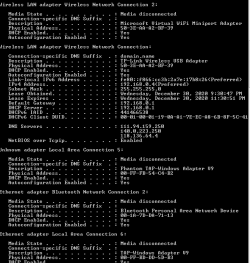
  • Capture6.PNG
    Capture6.PNG
    7.8 KB · Views: 15

My Computer My Computer

Computer type
Laptop
Computer Manufacturer/Model Number
Sony Vaio/ VPCEA36FG
OS
Windows 7 home premium 64bit
CPU
Intel(R) Core (TM) i5CPU M 560 @2.67GHz
Motherboard
Sony Corporation VAIO
Memory
4gb
Graphics Card(s)
ATI Mobility Radeon HD 5650
Sound Card
(1) ATI HDMI Audio(2) Bluetooth Hands-free Audio(3) Realtek
Hard Drives
Hitachi HTS545050B9SA00 (500GB)
Browser
Mozila Firefox, IE
1) What was the last thing you did before this happened?

2) Does a direct Ethernet cable work to the modem or router?

3) in command prompt run ipconfig /flushdns

4) Uninstall the TP-Link driver with Revouninstaller and delete its registry entries. Just make sure the registry entries are related to the WiFi driver. Revo Uninstaller Free - Remove unwanted programs easily Reboot the computer and reinstall the current driver.
 

My Computer My Computer

Computer type
PC/Desktop
OS
Windows 7 Ultimate x64
Sorry for my late reply.

1) I just browsing site from chrome with my vpn on and when I power off my pc I forgot to turn my vpn off

2) the router and my pc is too far, and I didn't have Ethernet cable so I still not try it, but I tried with hotspot from my phone and it's worked

3) I tried but it still not working

4) Yesterday before I went to sleep I tried it, and it work for 10-20 mins but today when I turn on my PC again my Internet can't connect again, althought I don't know which registry related to my wifi driver so I just deleted registry contained name of my wifi (TP-Link).

5) It's looks like when I download something while it still download and I turn my VPN off the download still working but when I tried to browse site it immediatly turn to no connection page
 
Last edited:

My Computer My Computer

Computer type
Laptop
Computer Manufacturer/Model Number
Sony Vaio/ VPCEA36FG
OS
Windows 7 home premium 64bit
CPU
Intel(R) Core (TM) i5CPU M 560 @2.67GHz
Motherboard
Sony Corporation VAIO
Memory
4gb
Graphics Card(s)
ATI Mobility Radeon HD 5650
Sound Card
(1) ATI HDMI Audio(2) Bluetooth Hands-free Audio(3) Realtek
Hard Drives
Hitachi HTS545050B9SA00 (500GB)
Browser
Mozila Firefox, IE
after I resetting my router I can somehow browsing without VPN but it's take too much time to open a website, and I can't skip ads web like adf.ly etc
 

My Computer My Computer

Computer type
Laptop
Computer Manufacturer/Model Number
Sony Vaio/ VPCEA36FG
OS
Windows 7 home premium 64bit
CPU
Intel(R) Core (TM) i5CPU M 560 @2.67GHz
Motherboard
Sony Corporation VAIO
Memory
4gb
Graphics Card(s)
ATI Mobility Radeon HD 5650
Sound Card
(1) ATI HDMI Audio(2) Bluetooth Hands-free Audio(3) Realtek
Hard Drives
Hitachi HTS545050B9SA00 (500GB)
Browser
Mozila Firefox, IE
If a hotspot from your phone works, then I'm suspecting your router.
 

My Computer My Computer

Computer type
PC/Desktop
OS
Windows 7 Ultimate x64
my router? but my phone can connect wifi just fine
 

My Computer My Computer

Computer type
Laptop
Computer Manufacturer/Model Number
Sony Vaio/ VPCEA36FG
OS
Windows 7 home premium 64bit
CPU
Intel(R) Core (TM) i5CPU M 560 @2.67GHz
Motherboard
Sony Corporation VAIO
Memory
4gb
Graphics Card(s)
ATI Mobility Radeon HD 5650
Sound Card
(1) ATI HDMI Audio(2) Bluetooth Hands-free Audio(3) Realtek
Hard Drives
Hitachi HTS545050B9SA00 (500GB)
Browser
Mozila Firefox, IE
Does your VPN have a built in kill switch by chance?

Go to the Windows firewall and chose the option to restore defaults.

If it still doesn't work, uninstall the VPN software with Revouninstaller and then try the Internet again. Make sure you first download the VPN software to reinstall should you still find yourself without an Internet connection.

It's looking like your VPN might be the reason why there's no Internet without the VPN. It could be the TCP/IP stack or the VPN's built-in kill switch.

Which VPN do you have?
 

My Computer My Computer

Computer type
PC/Desktop
OS
Windows 7 Ultimate x64
Does your VPN have a built in kill switch by chance?
Sorry I don't know

my VPN is Avira Phantom VPN

yesterday I scan my PC and found 2 viruses but before that I didn't get Virus notification thought, but for now my Internet back to normal since yesterday, I'm going to look for a few days if the problem back again
 

My Computer My Computer

Computer type
Laptop
Computer Manufacturer/Model Number
Sony Vaio/ VPCEA36FG
OS
Windows 7 home premium 64bit
CPU
Intel(R) Core (TM) i5CPU M 560 @2.67GHz
Motherboard
Sony Corporation VAIO
Memory
4gb
Graphics Card(s)
ATI Mobility Radeon HD 5650
Sound Card
(1) ATI HDMI Audio(2) Bluetooth Hands-free Audio(3) Realtek
Hard Drives
Hitachi HTS545050B9SA00 (500GB)
Browser
Mozila Firefox, IE
Back
Top