No internet in Win 7

Irunongames

New member
Local time
3:37 PM
Messages
64
Location
Look behind you....
Hello,

I just installed a new PSU + graphics card (yay). But now when ever I boot to windows 7 I can't connect to the Internet. Right now your thinking "Wow, what a waste of time, all this guy needs is a new network adapter" I would like to point out that I am on that computer but in Ubuntu (please save me from this hideous beast). So what could the issue be and how do I solve it?

Thanks!
 

My Computer

Computer Manufacturer/Model Number
Gateway: GM5472
OS
Windows 7 Home Premium 64 bit
CPU
AMD Athlon(tm) 64 X2 Dual Core Processor 5000+ (2 CPUs), ~2.
Memory
4gb
Graphics Card(s)
ATI Radeon HD 3650 1GB Ram
Monitor(s) Displays
LG Flatron W2252TQ
Have you tried updating the driver?
 

My Computer

Computer type
PC/Desktop
Computer Manufacturer/Model Number
Custom built Desktop(Myself) Specs below - Also Asus G53SW-A1 laptop
OS
Windows 10 Pro / OpenSUSE
CPU
Intel Core i7 4790K
Motherboard
Asus Z97-A
Memory
32GB DDR3
Graphics Card(s)
EVGA GTX 1070
Sound Card
OnBoard
Monitor(s) Displays
3 X 1080P 24" displays
Screen Resolution
1280x1050 & 1920x1080
Hard Drives
SSD: Crucial M500 128GB
HD 1: WD Caviar Black 1TB
HD 2: WD Caviar Black 2TB
HD 3: WD Caviar Blue 500GB
PSU
Corsair CX650M
Case
Corsair Obisidian 450D
Cooling
Noctua NH-D14
Keyboard
Corsair K70 Vengeance (blue switches)
Mouse
Logitech M500
Internet Speed
65/10
Antivirus
Kaskersky Internet Securty
Browser
Opera
I don't have the drivers for the network adapter, it's integrated. Also the PSU and GPU can be taken out and the Internet is still broken for windows 7.
 

My Computer

Computer Manufacturer/Model Number
Gateway: GM5472
OS
Windows 7 Home Premium 64 bit
CPU
AMD Athlon(tm) 64 X2 Dual Core Processor 5000+ (2 CPUs), ~2.
Memory
4gb
Graphics Card(s)
ATI Radeon HD 3650 1GB Ram
Monitor(s) Displays
LG Flatron W2252TQ
Any thing flagged in device manager as having a problem? What does the Networking and Sharing Center show for connectivity? Have you tried the Troubleshot problems option in the Networking and Sharing Center?
 

My Computer

Computer type
PC/Desktop
Computer Manufacturer/Model Number
Home Built
OS
Windows 10 Education 64 bit
CPU
AMD Phenom II X4 980 Black Edition Deneb 3.7GHz
Motherboard
Asus M4N68T-M V2 µATX Motherboard
Memory
8GB 4GBx2 Kingston PC10600 DDR3 1333 Memory
Graphics Card(s)
Zotac NVIDIA Geforce GT640 2 Gig DDR3 PCIe
Sound Card
VIA VT1708s High Definition Audio 8-channel Onboard
Monitor(s) Displays
22" LG E2242 1080p and 2 19" I-INC AG191D
Screen Resolution
1280x1024 - 1920x1080 - 1280x1024
Hard Drives
Crucial M100 256 GB SSD and 500 GB WD Blue SATA
PSU
Thermaltake TR 620
Case
Power Up Black ATX Mid-Tower Case
Cooling
Stock heatsink and fan
Keyboard
Logitech Wireless K350 Wave
Mouse
Logitech Wireless M570 Trackman Wheel
Internet Speed
80 Mbps Down 30 Mbps Up
Antivirus
Windows Defender
Browser
Internet Explorer 11
Other Info
HP DVD1040e Lightscribe - External USB2
It it's integrated you can find the driver on the Motherboard manufacturers website. It may also be on the driver CD that should have come with your motherboard/PC. It just depends on how old the drivers are on the CD. If there are vista drivers there they may work.
 

My Computer

Computer type
PC/Desktop
Computer Manufacturer/Model Number
Home Built
OS
Windows 10 Education 64 bit
CPU
AMD Phenom II X4 980 Black Edition Deneb 3.7GHz
Motherboard
Asus M4N68T-M V2 µATX Motherboard
Memory
8GB 4GBx2 Kingston PC10600 DDR3 1333 Memory
Graphics Card(s)
Zotac NVIDIA Geforce GT640 2 Gig DDR3 PCIe
Sound Card
VIA VT1708s High Definition Audio 8-channel Onboard
Monitor(s) Displays
22" LG E2242 1080p and 2 19" I-INC AG191D
Screen Resolution
1280x1024 - 1920x1080 - 1280x1024
Hard Drives
Crucial M100 256 GB SSD and 500 GB WD Blue SATA
PSU
Thermaltake TR 620
Case
Power Up Black ATX Mid-Tower Case
Cooling
Stock heatsink and fan
Keyboard
Logitech Wireless K350 Wave
Mouse
Logitech Wireless M570 Trackman Wheel
Internet Speed
80 Mbps Down 30 Mbps Up
Antivirus
Windows Defender
Browser
Internet Explorer 11
Other Info
HP DVD1040e Lightscribe - External USB2
It says it is disconnected and it says the adapter is not working properly (which is wrong because I am using the adapter now)
 

My Computer

Computer Manufacturer/Model Number
Gateway: GM5472
OS
Windows 7 Home Premium 64 bit
CPU
AMD Athlon(tm) 64 X2 Dual Core Processor 5000+ (2 CPUs), ~2.
Memory
4gb
Graphics Card(s)
ATI Radeon HD 3650 1GB Ram
Monitor(s) Displays
LG Flatron W2252TQ
Not working doesn't necessarily mean it's broken or defective. A device can be not working if it's drivers aren't installed or have been corrupted. There are lots of other things that can cause a device to not work in one OS but work in another. The fact that yours works in Linux but not in windows points to a software problem not a hardware problem. What does device manager show when you look at that device?
 

My Computer

Computer type
PC/Desktop
Computer Manufacturer/Model Number
Home Built
OS
Windows 10 Education 64 bit
CPU
AMD Phenom II X4 980 Black Edition Deneb 3.7GHz
Motherboard
Asus M4N68T-M V2 µATX Motherboard
Memory
8GB 4GBx2 Kingston PC10600 DDR3 1333 Memory
Graphics Card(s)
Zotac NVIDIA Geforce GT640 2 Gig DDR3 PCIe
Sound Card
VIA VT1708s High Definition Audio 8-channel Onboard
Monitor(s) Displays
22" LG E2242 1080p and 2 19" I-INC AG191D
Screen Resolution
1280x1024 - 1920x1080 - 1280x1024
Hard Drives
Crucial M100 256 GB SSD and 500 GB WD Blue SATA
PSU
Thermaltake TR 620
Case
Power Up Black ATX Mid-Tower Case
Cooling
Stock heatsink and fan
Keyboard
Logitech Wireless K350 Wave
Mouse
Logitech Wireless M570 Trackman Wheel
Internet Speed
80 Mbps Down 30 Mbps Up
Antivirus
Windows Defender
Browser
Internet Explorer 11
Other Info
HP DVD1040e Lightscribe - External USB2
It says that the adapter is not working properly. Would a new adapter fix it?
 

My Computer

Computer Manufacturer/Model Number
Gateway: GM5472
OS
Windows 7 Home Premium 64 bit
CPU
AMD Athlon(tm) 64 X2 Dual Core Processor 5000+ (2 CPUs), ~2.
Memory
4gb
Graphics Card(s)
ATI Radeon HD 3650 1GB Ram
Monitor(s) Displays
LG Flatron W2252TQ
It might or might not, it depends on whats preventing the current one from working normally. If you right click it in device manager and go to properties what does it say in the device status window? Is there any error code mentioned?
 

My Computer

Computer type
PC/Desktop
Computer Manufacturer/Model Number
Home Built
OS
Windows 10 Education 64 bit
CPU
AMD Phenom II X4 980 Black Edition Deneb 3.7GHz
Motherboard
Asus M4N68T-M V2 µATX Motherboard
Memory
8GB 4GBx2 Kingston PC10600 DDR3 1333 Memory
Graphics Card(s)
Zotac NVIDIA Geforce GT640 2 Gig DDR3 PCIe
Sound Card
VIA VT1708s High Definition Audio 8-channel Onboard
Monitor(s) Displays
22" LG E2242 1080p and 2 19" I-INC AG191D
Screen Resolution
1280x1024 - 1920x1080 - 1280x1024
Hard Drives
Crucial M100 256 GB SSD and 500 GB WD Blue SATA
PSU
Thermaltake TR 620
Case
Power Up Black ATX Mid-Tower Case
Cooling
Stock heatsink and fan
Keyboard
Logitech Wireless K350 Wave
Mouse
Logitech Wireless M570 Trackman Wheel
Internet Speed
80 Mbps Down 30 Mbps Up
Antivirus
Windows Defender
Browser
Internet Explorer 11
Other Info
HP DVD1040e Lightscribe - External USB2
Here is a diog get's me - "Windows cannot auto bind the ip protocol stack to a network". I click "solve issue" and it ends up with " Wired net adapter is experiencing issues."
 

My Computer

Computer Manufacturer/Model Number
Gateway: GM5472
OS
Windows 7 Home Premium 64 bit
CPU
AMD Athlon(tm) 64 X2 Dual Core Processor 5000+ (2 CPUs), ~2.
Memory
4gb
Graphics Card(s)
ATI Radeon HD 3650 1GB Ram
Monitor(s) Displays
LG Flatron W2252TQ

My Computer

Computer type
PC/Desktop
Computer Manufacturer/Model Number
Home Built
OS
Windows 10 Education 64 bit
CPU
AMD Phenom II X4 980 Black Edition Deneb 3.7GHz
Motherboard
Asus M4N68T-M V2 µATX Motherboard
Memory
8GB 4GBx2 Kingston PC10600 DDR3 1333 Memory
Graphics Card(s)
Zotac NVIDIA Geforce GT640 2 Gig DDR3 PCIe
Sound Card
VIA VT1708s High Definition Audio 8-channel Onboard
Monitor(s) Displays
22" LG E2242 1080p and 2 19" I-INC AG191D
Screen Resolution
1280x1024 - 1920x1080 - 1280x1024
Hard Drives
Crucial M100 256 GB SSD and 500 GB WD Blue SATA
PSU
Thermaltake TR 620
Case
Power Up Black ATX Mid-Tower Case
Cooling
Stock heatsink and fan
Keyboard
Logitech Wireless K350 Wave
Mouse
Logitech Wireless M570 Trackman Wheel
Internet Speed
80 Mbps Down 30 Mbps Up
Antivirus
Windows Defender
Browser
Internet Explorer 11
Other Info
HP DVD1040e Lightscribe - External USB2
Follow this Link

Welcome to the Windows 7 Support forums,
somthing changed after you installed the new PSU and GFX and I'm guessing that your nic card drivers were corrupted or fried as you only get intermittent service.
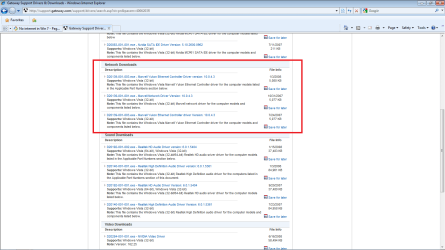
Also the issue of incomplete data subjects this troubleshooter to speculate on a resolution. Without knowing if you are connected to a WAN/LAN and if you are using a router please follow this link and select your appropriate driver, attached is a image so you can determine the appropriate link, as always please report back the results in order to mark this issue resolved or if we need to continue trouble shooting.
Here is the Link: Gateway Support Drivers & Downloads

For review here is the image:
 

Attachments

  • nic.png
    nic.png
    52.7 KB · Views: 7

My Computer

Computer Manufacturer/Model Number
Custom Build
OS
Windows 7 7600 1 X64
CPU
AMD PHENOM II X 550 PROCESSOR 3.1 ghz
Motherboard
ASUS M4A78-TE
Memory
Corsair 4 gig ddr 3
Graphics Card(s)
ati radeon 3300
Sound Card
ati hd
Monitor(s) Displays
syncmaster 2033sw
Screen Resolution
1600X900 60 hz refresh
Hard Drives
twin_seagates SATA's 1 TB & 500 Gig, hitachi_slimline 160 gig
PSU
antec_550 watt
Case
cooler master GLite
Cooling
stock_heat sink
Internet Speed
20mbs up/ 1.5mbs down
Other Info
favorite child "stewie"
favorite dog "brian"
Ok the driver will not install, would a new internet card be a solution?
 

My Computer

Computer Manufacturer/Model Number
Gateway: GM5472
OS
Windows 7 Home Premium 64 bit
CPU
AMD Athlon(tm) 64 X2 Dual Core Processor 5000+ (2 CPUs), ~2.
Memory
4gb
Graphics Card(s)
ATI Radeon HD 3650 1GB Ram
Monitor(s) Displays
LG Flatron W2252TQ
A new card might work, it depends on whats not working correctly. It's possible you may end up no better off than you are now. You won't know until you try it.
 

My Computer

Computer type
PC/Desktop
Computer Manufacturer/Model Number
Home Built
OS
Windows 10 Education 64 bit
CPU
AMD Phenom II X4 980 Black Edition Deneb 3.7GHz
Motherboard
Asus M4N68T-M V2 µATX Motherboard
Memory
8GB 4GBx2 Kingston PC10600 DDR3 1333 Memory
Graphics Card(s)
Zotac NVIDIA Geforce GT640 2 Gig DDR3 PCIe
Sound Card
VIA VT1708s High Definition Audio 8-channel Onboard
Monitor(s) Displays
22" LG E2242 1080p and 2 19" I-INC AG191D
Screen Resolution
1280x1024 - 1920x1080 - 1280x1024
Hard Drives
Crucial M100 256 GB SSD and 500 GB WD Blue SATA
PSU
Thermaltake TR 620
Case
Power Up Black ATX Mid-Tower Case
Cooling
Stock heatsink and fan
Keyboard
Logitech Wireless K350 Wave
Mouse
Logitech Wireless M570 Trackman Wheel
Internet Speed
80 Mbps Down 30 Mbps Up
Antivirus
Windows Defender
Browser
Internet Explorer 11
Other Info
HP DVD1040e Lightscribe - External USB2
Ok installed new adapter and it is still not working, I still get driver is experiencing issues though, what now?
 

My Computer

Computer Manufacturer/Model Number
Gateway: GM5472
OS
Windows 7 Home Premium 64 bit
CPU
AMD Athlon(tm) 64 X2 Dual Core Processor 5000+ (2 CPUs), ~2.
Memory
4gb
Graphics Card(s)
ATI Radeon HD 3650 1GB Ram
Monitor(s) Displays
LG Flatron W2252TQ
When you say you installed the new adapter, did you also install the drivers for "that" adapter?
 

My Computer

Computer type
PC/Desktop
Computer Manufacturer/Model Number
Home Built
OS
Windows 10 Education 64 bit
CPU
AMD Phenom II X4 980 Black Edition Deneb 3.7GHz
Motherboard
Asus M4N68T-M V2 µATX Motherboard
Memory
8GB 4GBx2 Kingston PC10600 DDR3 1333 Memory
Graphics Card(s)
Zotac NVIDIA Geforce GT640 2 Gig DDR3 PCIe
Sound Card
VIA VT1708s High Definition Audio 8-channel Onboard
Monitor(s) Displays
22" LG E2242 1080p and 2 19" I-INC AG191D
Screen Resolution
1280x1024 - 1920x1080 - 1280x1024
Hard Drives
Crucial M100 256 GB SSD and 500 GB WD Blue SATA
PSU
Thermaltake TR 620
Case
Power Up Black ATX Mid-Tower Case
Cooling
Stock heatsink and fan
Keyboard
Logitech Wireless K350 Wave
Mouse
Logitech Wireless M570 Trackman Wheel
Internet Speed
80 Mbps Down 30 Mbps Up
Antivirus
Windows Defender
Browser
Internet Explorer 11
Other Info
HP DVD1040e Lightscribe - External USB2
Did this PC come with windows 7 x64 installed? The web site lists Vista x86, but that could be out of date. Also it doesn't list any x64 bit drivers? Did you install 7 x64, and if you did was everything working before you installed the new components? When you installed the new ATI card did you un-install the drivers for the on-board video first and disable it in BIOS? Also, you may want to go into device manager and disable the on-board NIC just to make sure its not interfering with the new one you installed.
 

My Computer

Computer type
PC/Desktop
Computer Manufacturer/Model Number
Home Built
OS
Windows 10 Education 64 bit
CPU
AMD Phenom II X4 980 Black Edition Deneb 3.7GHz
Motherboard
Asus M4N68T-M V2 µATX Motherboard
Memory
8GB 4GBx2 Kingston PC10600 DDR3 1333 Memory
Graphics Card(s)
Zotac NVIDIA Geforce GT640 2 Gig DDR3 PCIe
Sound Card
VIA VT1708s High Definition Audio 8-channel Onboard
Monitor(s) Displays
22" LG E2242 1080p and 2 19" I-INC AG191D
Screen Resolution
1280x1024 - 1920x1080 - 1280x1024
Hard Drives
Crucial M100 256 GB SSD and 500 GB WD Blue SATA
PSU
Thermaltake TR 620
Case
Power Up Black ATX Mid-Tower Case
Cooling
Stock heatsink and fan
Keyboard
Logitech Wireless K350 Wave
Mouse
Logitech Wireless M570 Trackman Wheel
Internet Speed
80 Mbps Down 30 Mbps Up
Antivirus
Windows Defender
Browser
Internet Explorer 11
Other Info
HP DVD1040e Lightscribe - External USB2
The drivers were auto-installed. I installed win 7 x64 on a fresh HD drive 1 week after it came out. I did not install the ati drivers because I did not know how to same answer for the adapter.
 

My Computer

Computer Manufacturer/Model Number
Gateway: GM5472
OS
Windows 7 Home Premium 64 bit
CPU
AMD Athlon(tm) 64 X2 Dual Core Processor 5000+ (2 CPUs), ~2.
Memory
4gb
Graphics Card(s)
ATI Radeon HD 3650 1GB Ram
Monitor(s) Displays
LG Flatron W2252TQ
Did everything work after installing windows 7? You added the ATI graphics card after that correct, and thats when the trouble started? I just want to nail down the sequence of events and go from there.
Also, when you install the dedicated graphics card you usually have to go into the BIOS and make sure the onboard is disabled and or the primary graphics is set to the add in card.
Also, just about every piece of computer hardware requires a driver (software) for it to function properly. Windows may or may not have one that works. If it doesn't that device won't work. Your NIC should have come with a driver CD. Your video card should have one too. If you run the setup on the disk that came with your NIC it should install the driver. That is if it has a windows 7 64 bit driver. If it doesn't you may out of luck.
You might want to download and run this. Download details: Windows 7 Upgrade Advisor
 

My Computer

Computer type
PC/Desktop
Computer Manufacturer/Model Number
Home Built
OS
Windows 10 Education 64 bit
CPU
AMD Phenom II X4 980 Black Edition Deneb 3.7GHz
Motherboard
Asus M4N68T-M V2 µATX Motherboard
Memory
8GB 4GBx2 Kingston PC10600 DDR3 1333 Memory
Graphics Card(s)
Zotac NVIDIA Geforce GT640 2 Gig DDR3 PCIe
Sound Card
VIA VT1708s High Definition Audio 8-channel Onboard
Monitor(s) Displays
22" LG E2242 1080p and 2 19" I-INC AG191D
Screen Resolution
1280x1024 - 1920x1080 - 1280x1024
Hard Drives
Crucial M100 256 GB SSD and 500 GB WD Blue SATA
PSU
Thermaltake TR 620
Case
Power Up Black ATX Mid-Tower Case
Cooling
Stock heatsink and fan
Keyboard
Logitech Wireless K350 Wave
Mouse
Logitech Wireless M570 Trackman Wheel
Internet Speed
80 Mbps Down 30 Mbps Up
Antivirus
Windows Defender
Browser
Internet Explorer 11
Other Info
HP DVD1040e Lightscribe - External USB2
Ok here is a time like of events:
1) New HD + New Windows 7 everything is nominal
2) A few months later I am mad at my 3650 card and I buy a 5750
3) Install 5750 - have PSU issues - install the card and order a new PSU
4) Install PSU + 5750 - Still have PSU issues but i have a great card so I don't mind
5) Internet won't work
6) Come here

Does this help?
 

My Computer

Computer Manufacturer/Model Number
Gateway: GM5472
OS
Windows 7 Home Premium 64 bit
CPU
AMD Athlon(tm) 64 X2 Dual Core Processor 5000+ (2 CPUs), ~2.
Memory
4gb
Graphics Card(s)
ATI Radeon HD 3650 1GB Ram
Monitor(s) Displays
LG Flatron W2252TQ
Back
Top