no internet

realtek driver is installed, done :P
now i tried to install modem driver, is aks me if i want to remove, i said yes, and it gave me an error saying "NetRCAcm has been removed before" , and i rebooted pc and error still everytime i try to install modem drivers.
 

My Computer

OS
windows 7
Hello darkpt. Sorry this is not working for you. Did you set the compatibility for your modem drivers to xp?
 

My Computer

Computer Manufacturer/Model Number
Gateway GT5692
OS
Windows 7 Ulti. x64
CPU
AMD Phenom 8450 triple-core 2.10 ghz
Memory
4GB
Graphics Card(s)
ATI Radion HD 3200
Monitor(s) Displays
Gateway FPD1775W
Screen Resolution
1280x720
Hard Drives
465.6613 Gibibytes
i did that, but i dont know how to install it, the only .exe files i vlivk on them and it ask if i want ro remove cable modem

You need to click on the one thats right for your system. not the file that starts with a "u".

Ken
 
Last edited:

My Computer

Computer Manufacturer/Model Number
HP Pavillion dv-7 1005 Tx
OS
Win 8 Release candidate 8400
CPU
[email protected]
Memory
4 gigs
Graphics Card(s)
Nvidia 9600M
Sound Card
HD built-in
Monitor(s) Displays
17" Wxga
Screen Resolution
1440x900
Cooling
none
Internet Speed
45Mb down 5Mb up

My Computer

Computer Manufacturer/Model Number
HP Pavillion dv-7 1005 Tx
OS
Win 8 Release candidate 8400
CPU
[email protected]
Memory
4 gigs
Graphics Card(s)
Nvidia 9600M
Sound Card
HD built-in
Monitor(s) Displays
17" Wxga
Screen Resolution
1440x900
Cooling
none
Internet Speed
45Mb down 5Mb up
the one i launch is - RmCable - , and it ask me to remove the driver also, and i click ok, and than it gives the error
 

My Computer

OS
windows 7
the one i launch is - RmCable - , and it ask me to remove the driver also, and i click ok, and than it gives the error

go into device manager and find the modem and un-install from there.

Ken
 

My Computer

Computer Manufacturer/Model Number
HP Pavillion dv-7 1005 Tx
OS
Win 8 Release candidate 8400
CPU
[email protected]
Memory
4 gigs
Graphics Card(s)
Nvidia 9600M
Sound Card
HD built-in
Monitor(s) Displays
17" Wxga
Screen Resolution
1440x900
Cooling
none
Internet Speed
45Mb down 5Mb up
the one i launch is - RmCable - , and it ask me to remove the driver also, and i click ok, and than it gives the error

I´m happy you finally succeeded with Realtek drivers.

I downloaded this Thomson modem driver and tested. RmCable is for uninstalling Thomson drivers. Install file is RCAUSBCM.inf. It is a INF-file, meaning you install it by choosing "Install" from context (right click) menu. First, unzip driver files to a folder and then inside this folder right click the mentioned INF-file and choose "Install".

You could also try this method:

1. Unzip modem driver packet you downloaded (Thomson_V2.2.5.zip)
2. Extract files to a folder, for example C:\Thomson
3. Open Device Manager
4. Double click "Network adapters"
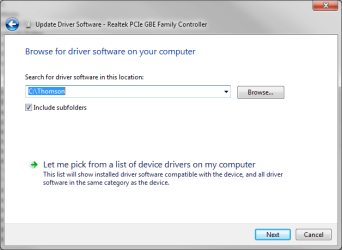
5. Right click your Thomson modem, choose "Update driver software"
6. Choose "Browse my computer for driver software"
7. Insert the name of the folder where you unzipped drivers. You can also click browse and choose folder from there.
Update2.PNG

Windows should now install drivers for your cable modem.

Kari
 

My Computer

Computer type
Laptop
Computer Manufacturer/Model Number
HP ENVY 17-1150eg
OS
Windows 10 Pro x64 EN-GB
CPU
1.6 GHz Intel Core i7-720QM Processor
Memory
6 GB
Graphics Card(s)
ATI Mobility Radeon HD 5850 Graphics
Sound Card
Beats sound system with integrated subwoofer
Monitor(s) Displays
17" laptop display, 22" LED and 32" Full HD TV through HDMI
Screen Resolution
1600*900 (1), 1920*1080 (2&3)
Hard Drives
Internal: 2 x 500 GB SATA Hard Disk Drive 7200 rpm
External: 2TB for backups, 3TB USB3 network drive for media
Cooling
As Envy runs a bit warm, I have it on a Cooler Master pad
Keyboard
Logitech diNovo Media Desktop Laser (bluetooth)
Mouse
Logitech Performance Mouse MX
Internet Speed
50/10 Mbps VDSL
Antivirus
Windows Defender 4.3.9431.0
Browser
Maxthon 3.5.2., IE11
i tried right click and install , and i got a error saying "the selected inf file doesnt suport this instalation method" , ( something like that, i got the error in portuguese :P )

than i tried on device manager, but cant find network adapter
 

My Computer

OS
windows 7
i tried right click and install , and i got a error saying "the selected inf file doesnt suport this instalation method" , ( something like that, i got the error in portuguese :P )

than i tried on device manager, but cant find network adapter

Are there any "unkown" device with a yellow triangle in deveice manager?

Ken
 

My Computer

Computer Manufacturer/Model Number
HP Pavillion dv-7 1005 Tx
OS
Win 8 Release candidate 8400
CPU
[email protected]
Memory
4 gigs
Graphics Card(s)
Nvidia 9600M
Sound Card
HD built-in
Monitor(s) Displays
17" Wxga
Screen Resolution
1440x900
Cooling
none
Internet Speed
45Mb down 5Mb up

My Computer

Computer Manufacturer/Model Number
HP Pavillion dv-7 1005 Tx
OS
Win 8 Release candidate 8400
CPU
[email protected]
Memory
4 gigs
Graphics Card(s)
Nvidia 9600M
Sound Card
HD built-in
Monitor(s) Displays
17" Wxga
Screen Resolution
1440x900
Cooling
none
Internet Speed
45Mb down 5Mb up
i tried right click and install , and i got a error saying "the selected inf file doesnt suport this instalation method" , ( something like that, i got the error in portuguese :P )

than i tried on device manager, but cant find network adapter
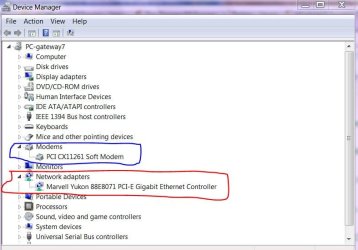
If you are connected from your modem by usb cable and not rj45 nic cable then you will need to concentrate on the modem drivers. A network card driver does no good if you are not connected to it. Can you post a picture of your device manager for us. good luck to you.
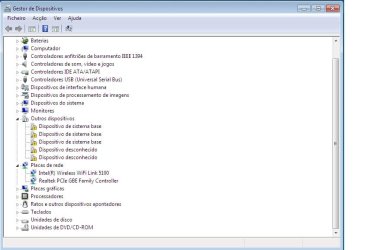
device manager.JPG
 

My Computer

Computer Manufacturer/Model Number
Gateway GT5692
OS
Windows 7 Ulti. x64
CPU
AMD Phenom 8450 triple-core 2.10 ghz
Memory
4GB
Graphics Card(s)
ATI Radion HD 3200
Monitor(s) Displays
Gateway FPD1775W
Screen Resolution
1280x720
Hard Drives
465.6613 Gibibytes
Desconhecido = unknown, I´ll bet it is one of these two unknown devices. I really hope Ken or myzr7 or somebody else can find you a solution, I have no more ideas. Maybe you could try the method I described here, just right click one of the unknown devices and follow the "Update driver software" procedure.

Our rig specs are so similar I was sure I could help you, now I´m feeling I might only confuse you some more. Sorry and good luck.
 

My Computer

Computer type
Laptop
Computer Manufacturer/Model Number
HP ENVY 17-1150eg
OS
Windows 10 Pro x64 EN-GB
CPU
1.6 GHz Intel Core i7-720QM Processor
Memory
6 GB
Graphics Card(s)
ATI Mobility Radeon HD 5850 Graphics
Sound Card
Beats sound system with integrated subwoofer
Monitor(s) Displays
17" laptop display, 22" LED and 32" Full HD TV through HDMI
Screen Resolution
1600*900 (1), 1920*1080 (2&3)
Hard Drives
Internal: 2 x 500 GB SATA Hard Disk Drive 7200 rpm
External: 2TB for backups, 3TB USB3 network drive for media
Cooling
As Envy runs a bit warm, I have it on a Cooler Master pad
Keyboard
Logitech diNovo Media Desktop Laser (bluetooth)
Mouse
Logitech Performance Mouse MX
Internet Speed
50/10 Mbps VDSL
Antivirus
Windows Defender 4.3.9431.0
Browser
Maxthon 3.5.2., IE11
Try This

Un-install all the unknown devices. then try installing the correct one.

k
 

My Computer

Computer Manufacturer/Model Number
HP Pavillion dv-7 1005 Tx
OS
Win 8 Release candidate 8400
CPU
[email protected]
Memory
4 gigs
Graphics Card(s)
Nvidia 9600M
Sound Card
HD built-in
Monitor(s) Displays
17" Wxga
Screen Resolution
1440x900
Cooling
none
Internet Speed
45Mb down 5Mb up
i tried that, but on the uknown devices says that windows couldnt install it,
and i appreciate ur help and everyone else :)
 

My Computer

OS
windows 7
i tried that, but on the uknown devices says that windows couldnt install it,
and i appreciate ur help and everyone else :)

OK so you ininstalled all the unknowns and now there are no unknowns in device manager right? could you show us a snip?

Ken
 

My Computer

Computer Manufacturer/Model Number
HP Pavillion dv-7 1005 Tx
OS
Win 8 Release candidate 8400
CPU
[email protected]
Memory
4 gigs
Graphics Card(s)
Nvidia 9600M
Sound Card
HD built-in
Monitor(s) Displays
17" Wxga
Screen Resolution
1440x900
Cooling
none
Internet Speed
45Mb down 5Mb up
Back
Top