No matter what i try Catalyst Control Center Wont Install

kid2als3

New member
Local time
1:51 PM
Messages
2
Hey guys, Recently ive been trying to use my graphic card for a certain program but it was not detecting it.
No biggie. Then i realized i couldn't even open my Catalyst Control Center. So i uninstalled it completely using Driver Sweeper, manually deleting file, and Clearing my registry, yadayadayada. You know, the "right way" to do it.
Well after try downloading the latest ATI Software Suite, the install would tell me it failed and to check logs. Cleared data, tryed again, same issue.
So i cleaned up any files, and decided to try and older version. Now i wouldnt have any issues installing but The Catalyst Control Center would never be option. Just and audio driver and sdk. As a result of that, the install manager would be listed under programs, but CCC was no where to be found and the ATI Technologies Folder was present but empty. Now after multiple Attempts of clearing data and trying different softwares, no luck.

I have An Alienware M15x with a HD5770 Card.
one odd thing is my windows 7 OS is 32bit which is uncommon for alienwares.

Trying to update driver with device manager only said that my standard vga adapter or w/e was up to date
Please Can Somebody help me. im getting very frustrated and am running out of faith.
Would very much appreciate a solution.:cry::cry:
 

My Computer My Computer

At a glance

WIndows 7 32bitIntel(R) Core4096mb ramRadeon HD 5770
Computer type
PC/Desktop
Computer Manufacturer/Model Number
Alienware
OS
WIndows 7 32bit
CPU
Intel(R) Core
Memory
4096mb ram
Graphics Card(s)
Radeon HD 5770
Hard Drives
ATA Hitachi HTS54755
Antivirus
Avast
Browser
Chrom
Can a mod move this thread to drivers please
 

My Computer My Computer

At a glance

WIndows 7 32bitIntel(R) Core4096mb ramRadeon HD 5770
Computer type
PC/Desktop
Computer Manufacturer/Model Number
Alienware
OS
WIndows 7 32bit
CPU
Intel(R) Core
Memory
4096mb ram
Graphics Card(s)
Radeon HD 5770
Hard Drives
ATA Hitachi HTS54755
Antivirus
Avast
Browser
Chrom
Hi, Welcome to Seven forums.

First thing which comes to my mind after all the steps performed by you is, did you install .NET framework. latest CCC needs that. You can get it from here.

Just to be sure. Run SFC /SCANNOW.

Keep us posted.
 

My Computer My Computer

At a glance

Windows 11 x64i5 2500K @ 3.3 GHz16 GB DDR 3 @ 1600MhzMSI 1050TI 4GB OC version
Computer type
PC/Desktop
Computer Manufacturer/Model Number
Custom Bulid/Self made
OS
Windows 11 x64
CPU
i5 2500K @ 3.3 GHz
Motherboard
ASUS P8 Z77 V pro
Memory
16 GB DDR 3 @ 1600Mhz
Graphics Card(s)
MSI 1050TI 4GB OC version
Sound Card
On Board (Realtek HD audio)
Monitor(s) Displays
Samsung 22" LCD
Screen Resolution
1920*1080
Hard Drives
Seagate 1 TB, WD 1TB, Seagate 2 TB ( I use a lot of space)
PSU
coolermaster 750 W
Case
Coolermaster HAF912
Cooling
Coolermaster hyper 212 EVO
Keyboard
Samsung
Mouse
Dell Wireless
Internet Speed
Wireless 50 Mbps
Antivirus
AVG 2016 Internet Security
Browser
Google Chrome
Hey guys, Recently ive been trying to use my graphic card for a certain program but it was not detecting it.
No biggie. Then i realized i couldn't even open my Catalyst Control Center. So i uninstalled it completely using Driver Sweeper, manually deleting file, and Clearing my registry, yadayadayada. You know, the "right way" to do it.
Well after try downloading the latest ATI Software Suite, the install would tell me it failed and to check logs. Cleared data, tryed again, same issue.
So i cleaned up any files, and decided to try and older version. Now i wouldnt have any issues installing but The Catalyst Control Center would never be option. Just and audio driver and sdk. As a result of that, the install manager would be listed under programs, but CCC was no where to be found and the ATI Technologies Folder was present but empty. Now after multiple Attempts of clearing data and trying different softwares, no luck.

I have An Alienware M15x with a HD5770 Card.
one odd thing is my windows 7 OS is 32bit which is uncommon for alienwares.

Trying to update driver with device manager only said that my standard vga adapter or w/e was up to date
Please Can Somebody help me. im getting very frustrated and am running out of faith.
Would very much appreciate a solution.:cry::cry:

Hi kid2als3,

Welcome to Seven forums.

I don't think you are correct about the system specifications. As M15X was never shipped with the ATI video card there were only Nvidia cards on this system, also with 64 bit version of windows only.

Kindly update your system specs here by following this.

Also, it seems there might be drivers that are not installed on the system. Kindly post the screenshot for your device manager:

http://www.sevenforums.com/tutorials/9733-screenshots-files-upload-post-seven-forums.html

If you unsure about the system then you can use the service tag to update the drivers:

Updating Dell Drivers

Keep us posted with the results so we can advise you further.
 

My Computer My Computer

At a glance

Winndows 7 32 bit
Computer type
PC/Desktop
OS
Winndows 7 32 bit
Hello

I am sorry to highjack this thread but I am having the same issue. I can not install CCC no matter what I try. I have removed all instances of ATI software from Control Panel. I have deleted any folders created on. No matter which version of ATI CCC I now try to install it always reports a fault on the install log and then CCC cannot be opened.

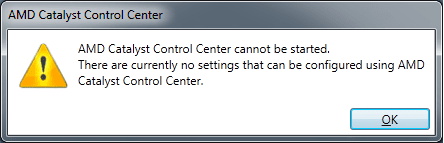
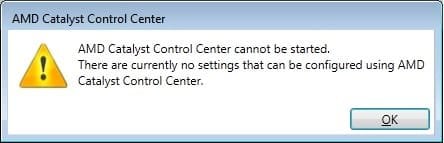
I have attached the error message I get when trying to run CCC
 

Attachments

  • CCC error.png
    CCC error.png
    7 KB · Views: 24
Last edited:

My Computer My Computer

At a glance

Windows 7 Ultimate x64AMD Phenom II x4 965 BE12gb corsairMSI R9 280x
Computer type
PC/Desktop
OS
Windows 7 Ultimate x64
CPU
AMD Phenom II x4 965 BE
Motherboard
Asus Crosshair Formula IV
Memory
12gb corsair
Graphics Card(s)
MSI R9 280x
Hiya Gazmatron - welcome aboard..


- which AMD driver version are you trying to install??
 

My Computer My Computer

At a glance

Windows10 Pro - 64Bit vs.10547i7-965 Extreme Edition (8 Cores) at 3.3GHz (n...12G Corsair Dominator DDR3 - tripled2xAMD SapphireNITRO R9 380(4G) crossfire
Computer type
PC/Desktop
Computer Manufacturer/Model Number
benchtec, built to personal specs
OS
Windows10 Pro - 64Bit vs.10547
CPU
i7-965 Extreme Edition (8 Cores) at 3.3GHz (no OC)
Motherboard
BloodRageX58 (Socket1366)
Memory
12G Corsair Dominator DDR3 - tripled
Graphics Card(s)
2xAMD SapphireNITRO R9 380(4G) crossfire
Sound Card
Sonar(SB)X-Fi onboard
Monitor(s) Displays
SyncMaster P2050 20"
Screen Resolution
1600x900 (widescreen)
Hard Drives
480G\OCZSolid3SSD, 64G\OCZVertex3SSD,60G\OCZVertex2SSD, 1TB\spinpointF1SATAHDD
PSU
1200w Power Station Gold
Case
ANTEC 900/2 all blue lights, etc..
Cooling
Noctua SE1366 NH-U12P - a tight fit, but a monster cooler!!
Keyboard
Logitech G19 (wired)
Mouse
Logitech G9 Laser (wired)
Internet Speed
150mb unlimited
Browser
IE11(RP)
Other Info
Xbox One, Nokia735 Windows10 mobile, LG HD/DVD/Blu-Ray r/w, CyberlinkPowerDVD15, LogitechZ5500-SS(5.1), LogitechG35Phones-SS(7.1),MSOffice 2007,CorelDrawX7,Painter2016, Wacom Intuos Pro-SE
Hey BugMeister

Let me give you a bit of background on this issue. I rebuilt my PC about two months ago, I own an MSI Frozr 6870 graphics card so at that time I went to the AMD website and downloaded the latest drivers and CCC software. I could not get the software to install. At that stage there was no Catalyst software installed so the PC should have been clean. When I installed at the end of the process the software told me there had been an error. The drivers seem to install ok but CCC software will not run. When I try to run I get the error in the attach screenshot.

At that time I uninstalled the AMD graphics software. Before I rebuilt my machine I knew the drivers and CCC software that came with the card worked. So I sourced that software from the AMD website archives. I believe the software dated from the end of 2011. Here is the name:

12-10_vista_win7_win8_64_dd_ccc_whql_net4

Those drivers installed and worked ok. However I wanted to have the latest software to make sure I was not missing out on any improvements in the newer software. I downloaded the latest drivers from this very site on this page:

http://www.sevenforums.com/graphic-cards/329659-latest-amd-catalyst-video-driver-windows-7-a.html

I believe they are the most recent. So I stripped out the previous software and then installed the new software. The exact same thing happened again. The install told me that there were errors in the install. When its complete CCC will not open. It shows the same error again.

Now frustratingly I tried to uninstall the most recent software and re-install the old software that I know works. But now the old software will not work either. Installs with an error and then CCC won't load. So I cant set my screen resolution higher than 1400 x 1050, or play games properly.

I am at my wits end. Can you please help?
 

Attachments

  • CCC error.jpg
    CCC error.jpg
    10.9 KB · Views: 18

My Computer My Computer

At a glance

Windows 7 Ultimate x64AMD Phenom II x4 965 BE12gb corsairMSI R9 280x
Computer type
PC/Desktop
OS
Windows 7 Ultimate x64
CPU
AMD Phenom II x4 965 BE
Motherboard
Asus Crosshair Formula IV
Memory
12gb corsair
Graphics Card(s)
MSI R9 280x
@Gazmatron


you need to get rid of all traces of your current driver
before you attempt to install the very latest BETA (v14.11.1)
- even then you may have hiccups
- it's par for the course when you're using BETA's
- they are, after all, test versions..


- you'd be best off aiming for a WHQL version, that has been accepted by Microsoft
- that's the Windows Hardware Quality Licence, they give to a driver that they've passed for general use..
- even then there might be snags.. AMD are using some pretty nifty hardware these days..
- can't be 100% sure which is best for your 280X, a bit of research may be needed


with BETA's, it's always going to be a bit hit-or-miss
sometimes they're excellent, sometimes rubbish
- depends on your hardware, really..


have you checked with your current card's manufacturer for their recommended driver?
their Support section should be able to assist with your model..


BTW - I use DDU by Wagnard to remove existing drivers
it's a bit aggressive, so tread carefully if you're going to give it a try
- there's more info here: Display Driver Uninstaller Thread - Guru3D.com Forums


- follow the instructions to the letter, as it's a work in progress..
- it will request that you run Win7 in SafeMode for the removal procedure


I always install a new driver in SafeMode as well, without an internet connection
as during the re-boot sequence Windows will attempt to go online and load a default set
- which can get in the way of the new driver..
 

My Computer My Computer

At a glance

Windows10 Pro - 64Bit vs.10547i7-965 Extreme Edition (8 Cores) at 3.3GHz (n...12G Corsair Dominator DDR3 - tripled2xAMD SapphireNITRO R9 380(4G) crossfire
Computer type
PC/Desktop
Computer Manufacturer/Model Number
benchtec, built to personal specs
OS
Windows10 Pro - 64Bit vs.10547
CPU
i7-965 Extreme Edition (8 Cores) at 3.3GHz (no OC)
Motherboard
BloodRageX58 (Socket1366)
Memory
12G Corsair Dominator DDR3 - tripled
Graphics Card(s)
2xAMD SapphireNITRO R9 380(4G) crossfire
Sound Card
Sonar(SB)X-Fi onboard
Monitor(s) Displays
SyncMaster P2050 20"
Screen Resolution
1600x900 (widescreen)
Hard Drives
480G\OCZSolid3SSD, 64G\OCZVertex3SSD,60G\OCZVertex2SSD, 1TB\spinpointF1SATAHDD
PSU
1200w Power Station Gold
Case
ANTEC 900/2 all blue lights, etc..
Cooling
Noctua SE1366 NH-U12P - a tight fit, but a monster cooler!!
Keyboard
Logitech G19 (wired)
Mouse
Logitech G9 Laser (wired)
Internet Speed
150mb unlimited
Browser
IE11(RP)
Other Info
Xbox One, Nokia735 Windows10 mobile, LG HD/DVD/Blu-Ray r/w, CyberlinkPowerDVD15, LogitechZ5500-SS(5.1), LogitechG35Phones-SS(7.1),MSOffice 2007,CorelDrawX7,Painter2016, Wacom Intuos Pro-SE
BugMeister

Thanks for all your advice but alas none of it worked on this occasion. The 'new to me' Asus R9 280x simply would not get recognized by my PC. No matter how many times I stripped out the old drivers, used DDU (which seems like great software so thanks for that), tried to install in safe mode etc. The AMD CCC install package kept saying it could not detect the hardware and therefore could not install the drivers.

I started to think that the new to me card was faulty. At that stage I removed Asus card and tried to put my old card back in, I know that card works fine, however my PC would now that recognize that either. So I guess some piece of software buried somewhere in the bowels of my PC was causing the issue. So I just flashed the entire PC and installed windows from scratch. After that the Asus card installed just fine.

In this instance I don't think anything was going to solve this issue. Perhaps I had just tried to install too many different versions of the CCC software and some part of the install was hidden somewhere causing this issue.

Thanks for your help!
 

My Computer My Computer

At a glance

Windows 7 Ultimate x64AMD Phenom II x4 965 BE12gb corsairMSI R9 280x
Computer type
PC/Desktop
OS
Windows 7 Ultimate x64
CPU
AMD Phenom II x4 965 BE
Motherboard
Asus Crosshair Formula IV
Memory
12gb corsair
Graphics Card(s)
MSI R9 280x
Back
Top