No Microphone Icon in Sound Menu

trainingwheelz

New member
Local time
12:07 AM
Messages
2
Hi,
My windows 7 64 bit system does not show a headphones icon in the sount->playback tab. It only shows my speakers and realtek digital output and disabled HDMI device. Show disabled devices is ticked.
The headphones work perfectly as do my speakers. The headphone jack disables the read sound output as it should.
I would really just like to have the headphones option to configure them more carefully. I have downloaded and installed the latest realtek HD audio codecs.
Any ideas? I've searched the forum and google but I haven't found a solution to actually getting the icon to appear when everything else works fine.
Thanks.
 

My Computer My Computer

OS
Windows 7 Home Premium 64 bit
CPU
i7 2600K
Motherboard
Asrock Z68 Extreme 4
Memory
8gb
Graphics Card(s)
Asus eah5670
What you see is correct. The "Speakers" are your sound card and when you plug your headphones in they mute the speaker sound. There are no special "configurations" that I know of for headphones. Some add on sound cards may have some special functions (but I've never seen any), but not the internal Integrated Audio such as RealTek/IDT, etc.
 

My Computer My Computer

Computer type
PC/Desktop
Computer Manufacturer/Model Number
My Own Build
OS
Windows 10 64 bit
CPU
Intel i7 6700K
Motherboard
ASUS ROG Maximus VIII Hero
Memory
16GB Corsair Dominator
Graphics Card(s)
Intel CPU Graphics
Sound Card
RealTek
Monitor(s) Displays
27" Dell S2719dgf
Screen Resolution
2560X1440
Hard Drives
1 TB Samsung 850 EVO SSD for Win 10 Pro
500GB Samsung 850 EVO SSD for Win 10 Insider
2 TB drive for backup
PSU
EVGA Supernova 750G2
Case
BeQuiet Silent Base 600
Cooling
Deepcool Captain 120EX
Keyboard
Microsoft Wireless 2000
Mouse
Microsoft wireless
Internet Speed
100 MB/sec (Cable)
Antivirus
Microsoft Defender and Malwarebytes
Browser
Edge/Firefox
Other Info
Cakewalk (Sonar) by BandLab and Studio One 4.1 Pro recording studio software. MOTU 896Mk3 Hybrid recording interface, Frontier Tranzport wireless control unit, Behringer X-Touch Control Surface.
Five USB connected optical drives for CD Audio production using Nero BurningROM
Fireberd is correct in saying that when headphones are connected they will mute any monitor or external speakers.

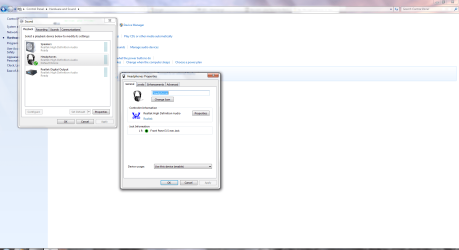
However, you should be able to configure headphone settings in Control Panel's sound settings.


HP1.PNG
 

My Computer My Computer

Computer Manufacturer/Model Number
HP Pavilion Elite 495UK
OS
Windows 7 Ultimate SP1 64-Bit
CPU
Intel Core i7 870 @ 2.93GHz
Motherboard
MSI 2A9C (CPU1)
Memory
8Gb Dual-Channel DDR3 @ 664MHz
Graphics Card(s)
nVidia GeForce GTX 460 1024MB dedicated RAM
Sound Card
Realtek HD Audio
Monitor(s) Displays
HP2310i
Screen Resolution
1920 x 1080
Hard Drives
1x1954GB Hitachi HDS22020ALA 330 (RAID), 1x1954GB Hitachi External for backup and storage
PSU
460W
Case
HP Elite
Cooling
Air cooled
Keyboard
Logitech K750 solar-powered keyboard
Mouse
Logitech Wireless M180 mouse
Internet Speed
2Mb
Other Info
Pure Avanti Flow Internet Radio with iPod Dock, 64Gb iPod, HP USB Speakers, Sony MDR-V500 Headphones, Sony Vaio F-Series Laptop
Thanks for your replies. What I would like is to actually have the 'headphones' icon available to see in the menu. I'm jealous when you post pictures of what I'm only dreaming of! No one seems to be able to help. I even tried changing the connector on my asrock extreme 4 m/b from HD audio jack to AC 97 audio. No dice. I also notice that I get notifications about having 'unplugged an audio device' from the headphones jack when I haven't even plugged anything into it for hours!
So the headphones work, but I have no icon and no control over them.
 

My Computer My Computer

OS
Windows 7 Home Premium 64 bit
CPU
i7 2600K
Motherboard
Asrock Z68 Extreme 4
Memory
8gb
Graphics Card(s)
Asus eah5670
Back
Top