No mouse b4 booting into windows.

A320

New member
Power User
VIP
Local time
9:01 PM
Messages
353
I just bought a new mouse (The Microsoft/Razer Habu) and I can't use it in my boot loader (Acronis OS Selector) as I used to be able to before with my old Microsoft Optical mouse. I have to wait until I am in Windows before the mouse is functional.

After some googling, similar problems are attributed to USB legacy settings in the BIOS but mine have always been on Auto.

During boot up, when USB devices start receiving their power as is evident by LED's, numlock, etc, it's apparent that the power to the Habu mouse is intermittent during post as it has a lot of Blue lighting on it. Sometimes, the mouse lights up during post, other times it flickers, or lights up partially, in any case though, it won't work in my bootloader.
 

My Computer My Computer

OS
Win 7 Ultimate x64
CPU
Intel i7 950 OC'd @ 4.0Ghz (SpeedStep ON)
Motherboard
ASUS P6X58D-E BIOS 0303
Memory
3x2GB Patriot Extreme Viper II Sector 7 DDR3 @ 1600mhz
Graphics Card(s)
ATI MSI 5870 900mhz/1300mhz
Sound Card
Onboard Realtek ALC889
Monitor(s) Displays
2 X 24" BenQ G2412HD
Screen Resolution
1920x1080p
Hard Drives
Intel X25-M 80 GB (SSD)
W.D. Caviar Black 1TB (SATA)
Seagate Barricuda 1TB (SATA)
Seagate Barricuda 80GB (SATA)
PSU
Corsair AX850
Case
Antec 1200
Cooling
Lots and Lots of Air!
Keyboard
Razer Lycosa
Mouse
Microsoft Sidewinder
Internet Speed
25Mbps/1Mbps
ya I tried them all, Auto, Enabled, Disabled. And also, I tried switching the EHCI handoff option ON/OFF to see if it was related with no success either.
 

My Computer My Computer

OS
Win 7 Ultimate x64
CPU
Intel i7 950 OC'd @ 4.0Ghz (SpeedStep ON)
Motherboard
ASUS P6X58D-E BIOS 0303
Memory
3x2GB Patriot Extreme Viper II Sector 7 DDR3 @ 1600mhz
Graphics Card(s)
ATI MSI 5870 900mhz/1300mhz
Sound Card
Onboard Realtek ALC889
Monitor(s) Displays
2 X 24" BenQ G2412HD
Screen Resolution
1920x1080p
Hard Drives
Intel X25-M 80 GB (SSD)
W.D. Caviar Black 1TB (SATA)
Seagate Barricuda 1TB (SATA)
Seagate Barricuda 80GB (SATA)
PSU
Corsair AX850
Case
Antec 1200
Cooling
Lots and Lots of Air!
Keyboard
Razer Lycosa
Mouse
Microsoft Sidewinder
Internet Speed
25Mbps/1Mbps
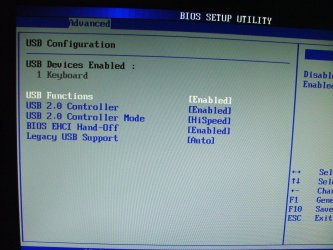
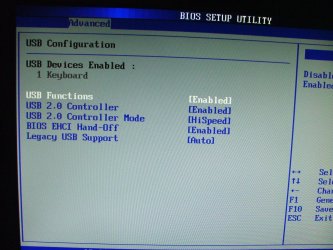
This is how I've always had it. When you switch from 'Auto' to 'Enabled' you see the extra option for the EHCI Handoff to be turned ON/OFF.
 

Attachments

  • DSCF7824.JPG
    DSCF7824.JPG
    646.2 KB · Views: 40

My Computer My Computer

OS
Win 7 Ultimate x64
CPU
Intel i7 950 OC'd @ 4.0Ghz (SpeedStep ON)
Motherboard
ASUS P6X58D-E BIOS 0303
Memory
3x2GB Patriot Extreme Viper II Sector 7 DDR3 @ 1600mhz
Graphics Card(s)
ATI MSI 5870 900mhz/1300mhz
Sound Card
Onboard Realtek ALC889
Monitor(s) Displays
2 X 24" BenQ G2412HD
Screen Resolution
1920x1080p
Hard Drives
Intel X25-M 80 GB (SSD)
W.D. Caviar Black 1TB (SATA)
Seagate Barricuda 1TB (SATA)
Seagate Barricuda 80GB (SATA)
PSU
Corsair AX850
Case
Antec 1200
Cooling
Lots and Lots of Air!
Keyboard
Razer Lycosa
Mouse
Microsoft Sidewinder
Internet Speed
25Mbps/1Mbps
The only input I have here is:

There are three combos -
Legacy ON, EHCI ON
Legacy ON, EHCI OFF
Legacy AUTO

Try each, as if you didn't think of that.

Another possibility - try boosting the Northbridge voltage up one notch. Maybe two notches. A digital system, light on code and lacking any variable input, is not likely to do something "sometimes". Unless there is an underlying cause. Like power.

Or a BIOS update. Yes. Check BIOS update.
 
The only input I have here is:

There are three combos -
Legacy ON, EHCI ON
Legacy ON, EHCI OFF
Legacy AUTO

Try each, as if you didn't think of that. Have Tried them already

Another possibility - try boosting the Northbridge voltage up one notch. Maybe two notches. A digital system, light on code and lacking any variable input, is not likely to do something "sometimes". Unless there is an underlying cause. Like power. Will try this now and reboot.

Or a BIOS update. Yes. Check BIOS update. I have the latest Bios 1705


:huh:
 

My Computer My Computer

OS
Win 7 Ultimate x64
CPU
Intel i7 950 OC'd @ 4.0Ghz (SpeedStep ON)
Motherboard
ASUS P6X58D-E BIOS 0303
Memory
3x2GB Patriot Extreme Viper II Sector 7 DDR3 @ 1600mhz
Graphics Card(s)
ATI MSI 5870 900mhz/1300mhz
Sound Card
Onboard Realtek ALC889
Monitor(s) Displays
2 X 24" BenQ G2412HD
Screen Resolution
1920x1080p
Hard Drives
Intel X25-M 80 GB (SSD)
W.D. Caviar Black 1TB (SATA)
Seagate Barricuda 1TB (SATA)
Seagate Barricuda 80GB (SATA)
PSU
Corsair AX850
Case
Antec 1200
Cooling
Lots and Lots of Air!
Keyboard
Razer Lycosa
Mouse
Microsoft Sidewinder
Internet Speed
25Mbps/1Mbps
Called Microsoft support, they are troubleshooting and will get back to me. They were supposed to call an hour ago :huh:

I'll be real dissapointed if this is some glitch with my bios/mobo and this mouse, because otherwise, it's a great device, and although not having my mouse during my bootloaders GUI sounds minute, I had this convenience before and with a cheap mouse so it leads me to believe something is wrong with their device if it can't be recognized by the Bios as a USB device.

I tried my laptop but unfortunately it's BIOS is very simple and doesn't have any menu or tab in there for USB devices (it's an AMD Sempron) BUT once thing I noticed is that at power up of the laptop, the mouse get full power immediately and all LED's go full on unlike the behavior I described above where it flickers. So maybe the mouse is good, just no good with my mobo :sa:
 

My Computer My Computer

OS
Win 7 Ultimate x64
CPU
Intel i7 950 OC'd @ 4.0Ghz (SpeedStep ON)
Motherboard
ASUS P6X58D-E BIOS 0303
Memory
3x2GB Patriot Extreme Viper II Sector 7 DDR3 @ 1600mhz
Graphics Card(s)
ATI MSI 5870 900mhz/1300mhz
Sound Card
Onboard Realtek ALC889
Monitor(s) Displays
2 X 24" BenQ G2412HD
Screen Resolution
1920x1080p
Hard Drives
Intel X25-M 80 GB (SSD)
W.D. Caviar Black 1TB (SATA)
Seagate Barricuda 1TB (SATA)
Seagate Barricuda 80GB (SATA)
PSU
Corsair AX850
Case
Antec 1200
Cooling
Lots and Lots of Air!
Keyboard
Razer Lycosa
Mouse
Microsoft Sidewinder
Internet Speed
25Mbps/1Mbps
USB at Boot

I have the same problem with an Asus board. Sometimes it spends an eon looking at the USB controllers during boot. Occasionally I Don't have a mouse. I have to reboot or call up the mouse panel to get it to work. My board and bios are in my specs. I have a Logitech wireless trackball (UBS)

Other USB hardware gives me problems intermittently. I think Asus needs to work on the bios. Also to be fair it could be a combo of Win 7 and Asus.
 

My Computer My Computer

Computer Manufacturer/Model Number
BGC (Bob's Garage Crew)
OS
win 7 X64 Ultimate SP1
CPU
I3770K
Motherboard
Asus P8Z77-V Deluxe
Memory
G Skill F3-14900CL9-4GBXL x 4
Graphics Card(s)
NVIDIA GeForce GTX670 + Intel 4000
Sound Card
Realtek HD 5.1 (MOB)
Monitor(s) Displays
Asus VW224T (1)
Screen Resolution
1920 x 1080
Hard Drives
SATA Corsair Force GT 2.5" 180GB (System) Sata 3
OCZ Vertex3 120GB
OCZ Vertex 2 120GB 2.5" SATA II
ST31000524AS 1000.2GB
WD15EARS (External)
PSU
CoolerMaster 1000 Watt
Case
CoolerMaster HAF X
Cooling
CPU -- CoolerMaster 520N
Keyboard
MS Wireless 3000 V2
Mouse
MS Wireless 3000 V2
Internet Speed
Cable
Antivirus
Norton Internet Security
Browser
IE9
Other Info
AMI Bios 1805
OC'd 3%
I have the same problem with an Asus board. Sometimes it spends an eon looking at the USB controllers during boot. Occasionally I Don't have a mouse. I have to reboot or call up the mouse panel to get it to work. My board and bios are in my specs. I have a Logitech wireless trackball (UBS)

Other USB hardware gives me problems intermittently. I think Asus needs to work on the bios. Also to be fair it could be a combo of Win 7 and Asus.

The sentence I highlighted above just gave me an idea. Naturally I have it on 'quick boot' skips the long drawn out ram count, etc, maybe if I switch it to normal boot, it see's the mouse properly. Sounds like a long shot but I will try it right now.

Thanks for the input.
 

My Computer My Computer

OS
Win 7 Ultimate x64
CPU
Intel i7 950 OC'd @ 4.0Ghz (SpeedStep ON)
Motherboard
ASUS P6X58D-E BIOS 0303
Memory
3x2GB Patriot Extreme Viper II Sector 7 DDR3 @ 1600mhz
Graphics Card(s)
ATI MSI 5870 900mhz/1300mhz
Sound Card
Onboard Realtek ALC889
Monitor(s) Displays
2 X 24" BenQ G2412HD
Screen Resolution
1920x1080p
Hard Drives
Intel X25-M 80 GB (SSD)
W.D. Caviar Black 1TB (SATA)
Seagate Barricuda 1TB (SATA)
Seagate Barricuda 80GB (SATA)
PSU
Corsair AX850
Case
Antec 1200
Cooling
Lots and Lots of Air!
Keyboard
Razer Lycosa
Mouse
Microsoft Sidewinder
Internet Speed
25Mbps/1Mbps
Nope it just doesn't like this mouse. That's too bad because I do but may have to part with it.

With my old mouse plugged in, I went into the bios and went to USB devices (see screen below) and right beside where it says "1 keyboard" it says "1 mouse" I tried plugging and unplugging my regular mouse to see what happens and I was surprised that the BIOS recognizes and displays the changes immediately (like plug n play), the "1 mouse" would appear/disappear actively.

So I tried the new "habu" mouse again while on this screen, tried all variations of the settings you see in the image, and no matter what, I can't get it to display "1 mouse" oddly, the mouse's led's would light up only some of the times I would unplug/replug it in.

PS - hammerhead, I have zero issues with the mouse running once in windows expect for windows 7, the mouse software does not detect the mouse when launching it (their site says there will be a win7 version released Wednesday so I suspect this is the fix) but it still functions as a regular mouse with I'm assuming the generic driver, just can't adjust the bells&Whistles on it without that software.
 

Attachments

  • DSCF7824.JPG
    DSCF7824.JPG
    646.2 KB · Views: 6

My Computer My Computer

OS
Win 7 Ultimate x64
CPU
Intel i7 950 OC'd @ 4.0Ghz (SpeedStep ON)
Motherboard
ASUS P6X58D-E BIOS 0303
Memory
3x2GB Patriot Extreme Viper II Sector 7 DDR3 @ 1600mhz
Graphics Card(s)
ATI MSI 5870 900mhz/1300mhz
Sound Card
Onboard Realtek ALC889
Monitor(s) Displays
2 X 24" BenQ G2412HD
Screen Resolution
1920x1080p
Hard Drives
Intel X25-M 80 GB (SSD)
W.D. Caviar Black 1TB (SATA)
Seagate Barricuda 1TB (SATA)
Seagate Barricuda 80GB (SATA)
PSU
Corsair AX850
Case
Antec 1200
Cooling
Lots and Lots of Air!
Keyboard
Razer Lycosa
Mouse
Microsoft Sidewinder
Internet Speed
25Mbps/1Mbps
Back
Top