JavaScript is disabled. For a better experience, please enable JavaScript in your browser before proceeding.
You are using an out of date browser. It may not display this or other websites correctly.
You should upgrade or use an
alternative browser .
Solved No network adapter driver. Even after reinstalling it.
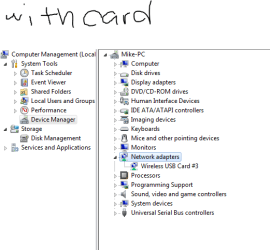
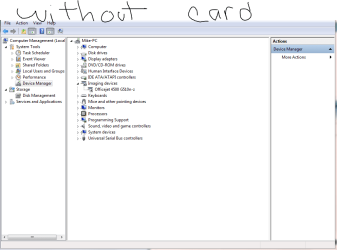
So I use to use an Ethernet cable and it worked fine until yesterday. Don't know what happened but this is how it went down. My brother was using the computer one night and the overclock I was testing failed on him. So he said he changed a few things in the BIOS without success and just turned it off. He has no clue what he did so in the morning I turned it on and reset the BIOS to its stock settings. It started up and the internet just wouldn't connect, says the drivers are not installed. I connect a wireless card and download the drivers then install them but they still don't appear when i go to the device manager. There is no "Network Adapters" option unless the wireless usb card is plugged in. I have no idea what happened. How can I fix this missing driver problem?
Windows 7 ultimate x64 Intel i7 2700k 16gb Gskill MSI GeForce 560ti twin frozr Asus Windows 7 ultimate x64 Intel i7 2700k ASUS MAXIMUS IV EXTREME 16gb Gskill MSI GeForce 560ti twin frozr
New member
Thread Starter
Let me know if that was too confusing.
Windows 7 ultimate x64 Intel i7 2700k 16gb Gskill MSI GeForce 560ti twin frozr Asus Windows 7 ultimate x64 Intel i7 2700k ASUS MAXIMUS IV EXTREME 16gb Gskill MSI GeForce 560ti twin frozr
R.I.P.
Guru
Gold Member
VIP
Did you run windows update ? Usually that`s all you have to do. Check the bios again for anything about the onboard network adaptor enabling or disabling.
Windows 10 Pro x64 Intel Core i7 6700K GSkill TridentZ RGB 16GB 3600 16-16-16-36 EVGA GTX 980 Ti SC x2 PC/Desktop Skylake Special #666 Windows 10 Pro x64 Intel Core i7 6700K Asus Sabertooth Z170 Mark 1 GSkill TridentZ RGB 16GB 3600 16-16-16-36 EVGA GTX 980 Ti SC x2 Realtek High Definition AOC G2460PG 1920 x 1080 144Hz Samsung 860 Pro 256GB, Seagate Barracuda 4TB x2 EVGA 1000 P2, EVGA White Custom Braided Cables Corsair Vengeance C70 Gunmetal Black Corsair H100i v2, Corsair ML120 x2, Thermal Grizzly Kryonaut Logitech G910 Orion Spectrum Logitech G700s Verizon Fios Quantum Gateway 75/75 Windows Defender, Malwarebytes Free 3.8.3 Chrome Corsair SP120 x4, LG Blu-ray Drive, Durabrand HT-395 100 Watt Dolby Digital Amp, Corsair H2100 Wireless 7.1 Headset
New member
Thread Starter
Yes I did. I checked for new updates as well. It only updated my wireless card adapter. Checked for new updates and none were found.
Windows 7 ultimate x64 Intel i7 2700k 16gb Gskill MSI GeForce 560ti twin frozr Asus Windows 7 ultimate x64 Intel i7 2700k ASUS MAXIMUS IV EXTREME 16gb Gskill MSI GeForce 560ti twin frozr
New member
Thread Starter
I don't want to keep using the wireless card because it cuts off randomly and I lose connection for a little while.
Windows 7 ultimate x64 Intel i7 2700k 16gb Gskill MSI GeForce 560ti twin frozr Asus Windows 7 ultimate x64 Intel i7 2700k ASUS MAXIMUS IV EXTREME 16gb Gskill MSI GeForce 560ti twin frozr
R.I.P.
Guru
Gold Member
VIP
If you can`t figure it out, you could buy a pci network adaptor.
Windows 10 Pro x64 Intel Core i7 6700K GSkill TridentZ RGB 16GB 3600 16-16-16-36 EVGA GTX 980 Ti SC x2 PC/Desktop Skylake Special #666 Windows 10 Pro x64 Intel Core i7 6700K Asus Sabertooth Z170 Mark 1 GSkill TridentZ RGB 16GB 3600 16-16-16-36 EVGA GTX 980 Ti SC x2 Realtek High Definition AOC G2460PG 1920 x 1080 144Hz Samsung 860 Pro 256GB, Seagate Barracuda 4TB x2 EVGA 1000 P2, EVGA White Custom Braided Cables Corsair Vengeance C70 Gunmetal Black Corsair H100i v2, Corsair ML120 x2, Thermal Grizzly Kryonaut Logitech G910 Orion Spectrum Logitech G700s Verizon Fios Quantum Gateway 75/75 Windows Defender, Malwarebytes Free 3.8.3 Chrome Corsair SP120 x4, LG Blu-ray Drive, Durabrand HT-395 100 Watt Dolby Digital Amp, Corsair H2100 Wireless 7.1 Headset
New member
Thread Starter
Yup. That's definitely what I'll end up doing if I can't get help through this website figuring out why my motherboard's adapter stopped working.
Windows 7 ultimate x64 Intel i7 2700k 16gb Gskill MSI GeForce 560ti twin frozr Asus Windows 7 ultimate x64 Intel i7 2700k ASUS MAXIMUS IV EXTREME 16gb Gskill MSI GeForce 560ti twin frozr
R.I.P.
Guru
Gold Member
VIP
Could you post a snip of your network and sharing center ?
Windows 10 Pro x64 Intel Core i7 6700K GSkill TridentZ RGB 16GB 3600 16-16-16-36 EVGA GTX 980 Ti SC x2 PC/Desktop Skylake Special #666 Windows 10 Pro x64 Intel Core i7 6700K Asus Sabertooth Z170 Mark 1 GSkill TridentZ RGB 16GB 3600 16-16-16-36 EVGA GTX 980 Ti SC x2 Realtek High Definition AOC G2460PG 1920 x 1080 144Hz Samsung 860 Pro 256GB, Seagate Barracuda 4TB x2 EVGA 1000 P2, EVGA White Custom Braided Cables Corsair Vengeance C70 Gunmetal Black Corsair H100i v2, Corsair ML120 x2, Thermal Grizzly Kryonaut Logitech G910 Orion Spectrum Logitech G700s Verizon Fios Quantum Gateway 75/75 Windows Defender, Malwarebytes Free 3.8.3 Chrome Corsair SP120 x4, LG Blu-ray Drive, Durabrand HT-395 100 Watt Dolby Digital Amp, Corsair H2100 Wireless 7.1 Headset
New member
Thread Starter
Here is both with the wireless card and without
Windows 7 ultimate x64 Intel i7 2700k 16gb Gskill MSI GeForce 560ti twin frozr Asus Windows 7 ultimate x64 Intel i7 2700k ASUS MAXIMUS IV EXTREME 16gb Gskill MSI GeForce 560ti twin frozr
New member
Thread Starter
Capture.PNG
19.1 KB
· Views: 18
Capture1.PNG
26.7 KB
· Views: 20
Windows 7 ultimate x64 Intel i7 2700k 16gb Gskill MSI GeForce 560ti twin frozr Asus Windows 7 ultimate x64 Intel i7 2700k ASUS MAXIMUS IV EXTREME 16gb Gskill MSI GeForce 560ti twin frozr
New member
Thread Starter
here is the images of my problem.
Capture.PNG
15 KB
· Views: 11
Capture1.PNG
23.1 KB
· Views: 14
Windows 7 ultimate x64 Intel i7 2700k 16gb Gskill MSI GeForce 560ti twin frozr Asus Windows 7 ultimate x64 Intel i7 2700k ASUS MAXIMUS IV EXTREME 16gb Gskill MSI GeForce 560ti twin frozr
R.I.P.
Guru
Gold Member
VIP
Did you check the bios for what i mentioned above ?
Windows 10 Pro x64 Intel Core i7 6700K GSkill TridentZ RGB 16GB 3600 16-16-16-36 EVGA GTX 980 Ti SC x2 PC/Desktop Skylake Special #666 Windows 10 Pro x64 Intel Core i7 6700K Asus Sabertooth Z170 Mark 1 GSkill TridentZ RGB 16GB 3600 16-16-16-36 EVGA GTX 980 Ti SC x2 Realtek High Definition AOC G2460PG 1920 x 1080 144Hz Samsung 860 Pro 256GB, Seagate Barracuda 4TB x2 EVGA 1000 P2, EVGA White Custom Braided Cables Corsair Vengeance C70 Gunmetal Black Corsair H100i v2, Corsair ML120 x2, Thermal Grizzly Kryonaut Logitech G910 Orion Spectrum Logitech G700s Verizon Fios Quantum Gateway 75/75 Windows Defender, Malwarebytes Free 3.8.3 Chrome Corsair SP120 x4, LG Blu-ray Drive, Durabrand HT-395 100 Watt Dolby Digital Amp, Corsair H2100 Wireless 7.1 Headset
New member
Thread Starter
Did you run windows update ? Usually that`s all you have to do. Check the bios again for anything about the onboard network adaptor enabling or disabling.
about that. When I boot up the computer, it doesn't give me an option to enter the bios anymore. Just goes straight into windows. Don't know why or what is going on.
I thought the same thing but can't get in the bios.
Windows 7 ultimate x64 Intel i7 2700k 16gb Gskill MSI GeForce 560ti twin frozr Asus Windows 7 ultimate x64 Intel i7 2700k ASUS MAXIMUS IV EXTREME 16gb Gskill MSI GeForce 560ti twin frozr
R.I.P.
Guru
Gold Member
VIP
It doesn`t show you what key to punch to get into your bios, during post ?
Windows 10 Pro x64 Intel Core i7 6700K GSkill TridentZ RGB 16GB 3600 16-16-16-36 EVGA GTX 980 Ti SC x2 PC/Desktop Skylake Special #666 Windows 10 Pro x64 Intel Core i7 6700K Asus Sabertooth Z170 Mark 1 GSkill TridentZ RGB 16GB 3600 16-16-16-36 EVGA GTX 980 Ti SC x2 Realtek High Definition AOC G2460PG 1920 x 1080 144Hz Samsung 860 Pro 256GB, Seagate Barracuda 4TB x2 EVGA 1000 P2, EVGA White Custom Braided Cables Corsair Vengeance C70 Gunmetal Black Corsair H100i v2, Corsair ML120 x2, Thermal Grizzly Kryonaut Logitech G910 Orion Spectrum Logitech G700s Verizon Fios Quantum Gateway 75/75 Windows Defender, Malwarebytes Free 3.8.3 Chrome Corsair SP120 x4, LG Blu-ray Drive, Durabrand HT-395 100 Watt Dolby Digital Amp, Corsair H2100 Wireless 7.1 Headset
New member
Thread Starter
And yes. I used the cd again but as i mention in the first post, the driver isn't even listed on the menu when i run the cd.
Windows 7 ultimate x64 Intel i7 2700k 16gb Gskill MSI GeForce 560ti twin frozr Asus Windows 7 ultimate x64 Intel i7 2700k ASUS MAXIMUS IV EXTREME 16gb Gskill MSI GeForce 560ti twin frozr
New member
Thread Starter
It doesn't show any buttons. Usually i hold backspace but that doesn't work anymore.
Windows 7 ultimate x64 Intel i7 2700k 16gb Gskill MSI GeForce 560ti twin frozr Asus Windows 7 ultimate x64 Intel i7 2700k ASUS MAXIMUS IV EXTREME 16gb Gskill MSI GeForce 560ti twin frozr
R.I.P.
Guru
Gold Member
VIP
No it should be, F2 or delete or esc. reboot and keep watching the screen, it will tell you what key to hit to enter setup. It has to be there.
Windows 10 Pro x64 Intel Core i7 6700K GSkill TridentZ RGB 16GB 3600 16-16-16-36 EVGA GTX 980 Ti SC x2 PC/Desktop Skylake Special #666 Windows 10 Pro x64 Intel Core i7 6700K Asus Sabertooth Z170 Mark 1 GSkill TridentZ RGB 16GB 3600 16-16-16-36 EVGA GTX 980 Ti SC x2 Realtek High Definition AOC G2460PG 1920 x 1080 144Hz Samsung 860 Pro 256GB, Seagate Barracuda 4TB x2 EVGA 1000 P2, EVGA White Custom Braided Cables Corsair Vengeance C70 Gunmetal Black Corsair H100i v2, Corsair ML120 x2, Thermal Grizzly Kryonaut Logitech G910 Orion Spectrum Logitech G700s Verizon Fios Quantum Gateway 75/75 Windows Defender, Malwarebytes Free 3.8.3 Chrome Corsair SP120 x4, LG Blu-ray Drive, Durabrand HT-395 100 Watt Dolby Digital Amp, Corsair H2100 Wireless 7.1 Headset
New member
Thread Starter
Even on the ROG Motherboards? I remember i had to hold backspace or enter or space but i tried all three and it didnt work. Lemme try that now.
Windows 7 ultimate x64 Intel i7 2700k 16gb Gskill MSI GeForce 560ti twin frozr Asus Windows 7 ultimate x64 Intel i7 2700k ASUS MAXIMUS IV EXTREME 16gb Gskill MSI GeForce 560ti twin frozr
New member
Thread Starter
OMG! It was disabled...I wonder why though if i had reset everything to original with F5. Thanks a lot for the help AddRAM! I wouldn't have ever gotten into my bios without your help.
Windows 7 ultimate x64 Intel i7 2700k 16gb Gskill MSI GeForce 560ti twin frozr Asus Windows 7 ultimate x64 Intel i7 2700k ASUS MAXIMUS IV EXTREME 16gb Gskill MSI GeForce 560ti twin frozr
R.I.P.
Guru
Gold Member
VIP
Awesome, Glad to help.
Windows 10 Pro x64 Intel Core i7 6700K GSkill TridentZ RGB 16GB 3600 16-16-16-36 EVGA GTX 980 Ti SC x2 PC/Desktop Skylake Special #666 Windows 10 Pro x64 Intel Core i7 6700K Asus Sabertooth Z170 Mark 1 GSkill TridentZ RGB 16GB 3600 16-16-16-36 EVGA GTX 980 Ti SC x2 Realtek High Definition AOC G2460PG 1920 x 1080 144Hz Samsung 860 Pro 256GB, Seagate Barracuda 4TB x2 EVGA 1000 P2, EVGA White Custom Braided Cables Corsair Vengeance C70 Gunmetal Black Corsair H100i v2, Corsair ML120 x2, Thermal Grizzly Kryonaut Logitech G910 Orion Spectrum Logitech G700s Verizon Fios Quantum Gateway 75/75 Windows Defender, Malwarebytes Free 3.8.3 Chrome Corsair SP120 x4, LG Blu-ray Drive, Durabrand HT-395 100 Watt Dolby Digital Amp, Corsair H2100 Wireless 7.1 Headset



 I thought the same thing but can't get in the bios.

