

murphybro
New member
- Local time
- 7:08 AM
- Messages
- 20
Hi all
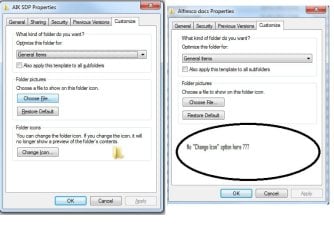
I'm after some help, I have a shared folder on a Windows 7 machine within a small home network. When connecting to this shared folder from an XP machine and right clicking and taking the customize option there is no option to "Change Icon"
This option is available when trying from the local (W7) machine. Anyone know if there is a way of enabling this ?
see icon.jpg attached for example
Thanks in advance
I'm after some help, I have a shared folder on a Windows 7 machine within a small home network. When connecting to this shared folder from an XP machine and right clicking and taking the customize option there is no option to "Change Icon"
This option is available when trying from the local (W7) machine. Anyone know if there is a way of enabling this ?
see icon.jpg attached for example
Thanks in advance
Attachments
My Computer
At a glance
Microsoft Windows 7 Home Premium 64-bit 7600 ...Pentium(R) Dual-Core CPU T4400 @ 2.20GHz4.00 GB(1) Mobile Intel(R) 4 Series Express Chipset ...
- Computer type
- PC/Desktop
- OS
- Microsoft Windows 7 Home Premium 64-bit 7600 Multiprocessor Free
- CPU
- Pentium(R) Dual-Core CPU T4400 @ 2.20GHz
- Motherboard
- Packard Bell SJV50MV
- Memory
- 4.00 GB
- Graphics Card(s)
- (1) Mobile Intel(R) 4 Series Express Chipset Family (2) Mo
- Sound Card
- (1) Conexant High Definition Audio (2) Intel(R) High Defin
- Screen Resolution
- 1366 x 768 x 32 bits (4294967296 colors) @ 59 Hz
- Hard Drives
- WDC WD5000BEVT-22A0RT0


