Solved Unable to change folder icons

RDA1959

New member
Local time
10:38 PM
Messages
12
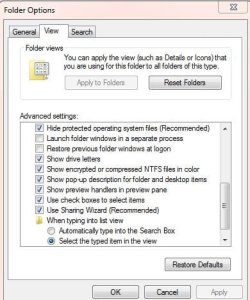
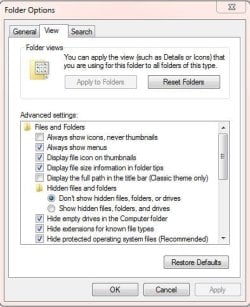
I recently had to do a fresh reinstall of Windows 7 Ultimate, 64-bit, & am now having problems changing any folder's image in the customary way (Properties >> Customize >> Choose File (to show on this folder icon)). After choosing & opening a file image, I "Apply" & click "OK". However, the selected image does not show up immediately as before (& as it should). I now have to add an empty "TEST" folder to the folder whose image I'm trying to change. Once this "TEST" folder has been added, the new image appears (sometimes I need to re-boot), & I can then delete the empty "TEST" folder. Furthermore, this method can be inconsistent, & a folder may revert to another image (especially in my backup drive). I have attached 2 screenshots of my Folder Options. Any help/recommendations to solve this maddening problem would be greatly appreciated. Many thanks.
 

Attachments
  • Folder Options-1.JPG
    Folder Options-1.JPG
    54.8 KB · Views: 45
  • Folder Options-2.JPG
    Folder Options-2.JPG
    55.3 KB · Views: 36

My Computer

OS
Windows 7 Ultimate
as its an image you want to show in the folder and not actually change the folder icon to a different one.
then rename the image inside the folder to "folder", it will show then ,or at least it should, this is only a workaround im afraid and doesnt really answer your problem, i wonder if rebuilding the icons cache may help


Icon Cache - Rebuild - Windows 7 Forums
 

My Computer

Computer Manufacturer/Model Number
Hewlett packard/p6512uk
OS
Microsoft Windows 7 Home Premium 64-bit 7600
CPU
IIx4 amd athelon 635 processor
Motherboard
FOXCONN 2AA9
Memory
2x2gb
Graphics Card(s)
ati radeon HD 5450
Sound Card
(1) Realtek High Definition Audio (2) AMD High Definition
Monitor(s) Displays
samsung lcd tv 32"
Screen Resolution
1360x 768
Hard Drives
(1) WDC WD10 01FAES-60Z2A0 SATA Disk Device (2) Maxtor OneTouch USB Device (3) ST310003 33AS USB Device (4) WD My Book 1111 USB Device
PSU
?
Cooling
air!
Keyboard
wireless hp
Mouse
wireless Hp,optical
Internet Speed
1.10mb/s
Antivirus
MSE
Browser
Firefox
Boohbah, Thank you for responding. I am really hoping, though, for a fix to this quirk, rather than another workaround... I tried to change a folder's image on my husband's laptop (same O/S), & sure enough, it worked as it should (Properties >> Customize >> Choose File (to show on this folder icon). Choose & Open file image, "Apply", & "OK".) The folder image appeared immediately, & no reboot was necessary. I compared our Folder Options, but there was no significant difference between them. I'm reluctant to rebuild my icon cache, as I don't know how this will impact the many folders I have already customized with my kooky workaround. I'm hoping that it's just some setting I've overlooked, or some "broken" command that can be easily repaired... Keeping my fingers crossed that someone can help...
 

My Computer

OS
Windows 7 Ultimate
did you try renaming the image that you want to display to "folder"

i find this way quicker as its just a quick title change rather than navigate to the folder properties and selecting customise then selecting the image etc.
not so much a workaround but an alternate way to achieve the same ...(quicker!) :D
 

My Computer

Computer Manufacturer/Model Number
Hewlett packard/p6512uk
OS
Microsoft Windows 7 Home Premium 64-bit 7600
CPU
IIx4 amd athelon 635 processor
Motherboard
FOXCONN 2AA9
Memory
2x2gb
Graphics Card(s)
ati radeon HD 5450
Sound Card
(1) Realtek High Definition Audio (2) AMD High Definition
Monitor(s) Displays
samsung lcd tv 32"
Screen Resolution
1360x 768
Hard Drives
(1) WDC WD10 01FAES-60Z2A0 SATA Disk Device (2) Maxtor OneTouch USB Device (3) ST310003 33AS USB Device (4) WD My Book 1111 USB Device
PSU
?
Cooling
air!
Keyboard
wireless hp
Mouse
wireless Hp,optical
Internet Speed
1.10mb/s
Antivirus
MSE
Browser
Firefox
Thanks for this tip, Boohbah. It would be a quicker alternative, but each of my many (video/photo) folders has a different identifying image. I'm just really stumped as to why I can no longer get this feature to behave as it should....?????
 

My Computer

OS
Windows 7 Ultimate
I had the same issue as you a few years ago when using vista, the folders on my external hd stopped showing the images i chose via customize,
the funny thing was that when i did an upgrade install to win 7, it started working again and has since, and ive had a new computer since that upgrade install.
 

My Computer

Computer Manufacturer/Model Number
Hewlett packard/p6512uk
OS
Microsoft Windows 7 Home Premium 64-bit 7600
CPU
IIx4 amd athelon 635 processor
Motherboard
FOXCONN 2AA9
Memory
2x2gb
Graphics Card(s)
ati radeon HD 5450
Sound Card
(1) Realtek High Definition Audio (2) AMD High Definition
Monitor(s) Displays
samsung lcd tv 32"
Screen Resolution
1360x 768
Hard Drives
(1) WDC WD10 01FAES-60Z2A0 SATA Disk Device (2) Maxtor OneTouch USB Device (3) ST310003 33AS USB Device (4) WD My Book 1111 USB Device
PSU
?
Cooling
air!
Keyboard
wireless hp
Mouse
wireless Hp,optical
Internet Speed
1.10mb/s
Antivirus
MSE
Browser
Firefox
I'm really, really hoping that I can avoid another reinstall. This last reinstall (I had a failing hard drive, which was replaced with an SSD) was only 3 weeks ago, & it's taken me since then to get my computer set back up & running the way I'm used to working. Surely, there must be some kind of "tweak" tool...???
 

My Computer

OS
Windows 7 Ultimate

My Computer

Computer Manufacturer/Model Number
Hewlett packard/p6512uk
OS
Microsoft Windows 7 Home Premium 64-bit 7600
CPU
IIx4 amd athelon 635 processor
Motherboard
FOXCONN 2AA9
Memory
2x2gb
Graphics Card(s)
ati radeon HD 5450
Sound Card
(1) Realtek High Definition Audio (2) AMD High Definition
Monitor(s) Displays
samsung lcd tv 32"
Screen Resolution
1360x 768
Hard Drives
(1) WDC WD10 01FAES-60Z2A0 SATA Disk Device (2) Maxtor OneTouch USB Device (3) ST310003 33AS USB Device (4) WD My Book 1111 USB Device
PSU
?
Cooling
air!
Keyboard
wireless hp
Mouse
wireless Hp,optical
Internet Speed
1.10mb/s
Antivirus
MSE
Browser
Firefox

My Computer

OS
Windows 7 Ultimate 32bit
CPU
Intel Core i3 540 @ 3.07GHz
Motherboard
MSI H55M-E23
Memory
DDR3 2048MB
Graphics Card(s)
NVIDIA GeForce GT 430 1024MB
Monitor(s) Displays
18.5'' AOC N941Sw display
Screen Resolution
1366x768
Internet Speed
Download : 2.7Mbps Upload : 0.27Mbps
Dear Boohbah & Hybrid,

Shortly after our last exchange, my computer started behaving really erratically, & I ended up having to have yet another fresh reinstall of Windows & everything else. I just got it back this week, so I wanted to reply & thank you again for all your suggestions--it was very much appreciated. This latest reinstall seems to have resolved a lot of the issues I described in this thread. I'm keeping my fingers crossed that my computer will continue to behave itself!

Thanks again, Regina

PS: Marking this thread as "Solved".
 

My Computer

OS
Windows 7 Ultimate
ok , glad you have a happy system now.:D
 

My Computer

Computer Manufacturer/Model Number
Hewlett packard/p6512uk
OS
Microsoft Windows 7 Home Premium 64-bit 7600
CPU
IIx4 amd athelon 635 processor
Motherboard
FOXCONN 2AA9
Memory
2x2gb
Graphics Card(s)
ati radeon HD 5450
Sound Card
(1) Realtek High Definition Audio (2) AMD High Definition
Monitor(s) Displays
samsung lcd tv 32"
Screen Resolution
1360x 768
Hard Drives
(1) WDC WD10 01FAES-60Z2A0 SATA Disk Device (2) Maxtor OneTouch USB Device (3) ST310003 33AS USB Device (4) WD My Book 1111 USB Device
PSU
?
Cooling
air!
Keyboard
wireless hp
Mouse
wireless Hp,optical
Internet Speed
1.10mb/s
Antivirus
MSE
Browser
Firefox
Back
Top