
- Local time
- 3:01 AM
- Messages
- 182
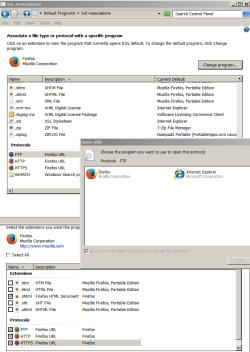
I need to change the protocols of;
FTP, HTTP, & HTTPS
When I go to Default Programs/Set Associations and right click on those the pop up box only has FF & IE, the option to "Browse" is not there as it is with Extensions.
I have changed the specific Extensions ok, but can't here.
This causing a weird problem of opening up some other version of FF that I have no idea where it is since all the versions/folders of FF are 'Portable' and none are actually installed. This is when clicking on links in e-mails.
Using Start Menu or Desktop shortcuts open the intended program version.
Is there a way I can find where 'eM Client' (the actual name of the program) mail link is pointing to? I looked at all FF folders, opened each .exe up and none are the same that the mail link opens.
Note the two different names; the ones with Mozilla are the corrected entries.
FTP, HTTP, & HTTPS
When I go to Default Programs/Set Associations and right click on those the pop up box only has FF & IE, the option to "Browse" is not there as it is with Extensions.
I have changed the specific Extensions ok, but can't here.
This causing a weird problem of opening up some other version of FF that I have no idea where it is since all the versions/folders of FF are 'Portable' and none are actually installed. This is when clicking on links in e-mails.
Using Start Menu or Desktop shortcuts open the intended program version.
Is there a way I can find where 'eM Client' (the actual name of the program) mail link is pointing to? I looked at all FF folders, opened each .exe up and none are the same that the mail link opens.
Note the two different names; the ones with Mozilla are the corrected entries.
Attachments
My Computers
-
At a glance
Win7 x64AMD- Computer type
- Laptop
- Computer Manufacturer/Model Number
- Toshiba
- OS
- Win7 x64
- CPU
- AMD
-
At a glance
Win 7 Pro x64AMD FX-835016GBnVidia GeForce 1060- Computer type
- PC/Desktop
- System Manufacturer/Model Number
- AMD based MB
- OS
- Win 7 Pro x64
- CPU
- AMD FX-8350
- Motherboard
- Gigabyte GA-970A-D3P
- Memory
- 16GB
- Graphics Card(s)
- nVidia GeForce 1060
- Monitor(s) Displays
- 25"
- Screen Resolution
- 1920x1200
- Hard Drives
- two SSD;
two 4TB HDD
- PSU
- 700watt Seasonic
- Internet Speed
- 300MB up & down
- Browser
- Firefox
- Other Info
- BD Recorder


