No programs load on main account, system must be shut down manually

nmayer80

New member
Local time
8:36 PM
Messages
19
Running windows 7 home premium 64bit, my administrator account is completely unusable. Following login, I occasionally have time to open one program or window before all programs stop responding, and new ones fail to open. No error codes are given. Trying to shut down normally clears everything except my background, and then proceeds no further. My mouse is free to move, but shutdown can only be performed by holding the power button down.
Fixes I have tried:
1. System restore: no change
2. sfc /scannow: Cannot perform as administrator, doesn't make it past verification stage.
3. msconfig: The startup services, not startup programs, are the source of my issue. The problem seems to be related to startup services related to network and internet access. I could not narrow it down to one file, it may be multiple files causing the problem.

Note: My guest account works fine, as I am typing this message from that account. I am not sure what other options I have as far as my original account goes. Are there any fixes for malfunctioning startup services? Thank you in advance for any help you can give, I am at a loss.
 

My Computer My Computer

Computer type
Laptop
Computer Manufacturer/Model Number
Compaq Presario CQ62
OS
Windows 7 Home Premium 64bit
Antivirus
McAfee Security Scan Plus
Browser
Chrome

My Computer My Computer

Computer type
PC/Desktop
OS
Windows 7 Home Premium x64
The services causing the problem are microsoft, not 3rd party. So the clean boot wasnt helpful. The malware scan found a large amount (around 70) objects, and was able to delete all of them, so many thanks for that suggestion. It still was not able to fix my problem, however. As far as the repair install, I am somewhat confused:
1. Do I need a disk to perform the repair install? The tutorial hinted at some way of downloading the proper materials onto a flashdrive, but I am not sure if this works, as I do not have a disk containing windows 7.
2. If I cannot do this, are there any other options? (Such as transferring administrative power to a new account, and deleting my old one).
Again, thanks for the help!
 

My Computer My Computer

Computer type
Laptop
Computer Manufacturer/Model Number
Compaq Presario CQ62
OS
Windows 7 Home Premium 64bit
Antivirus
McAfee Security Scan Plus
Browser
Chrome
Thanks for reporting back. :)

Yes, you need the Windows 7 installation media in order to do a repair install. If you don't have that, you can legally download Windows 7 ISO file. Once you download, you'll need to burn the ISO to a DVD or make a bootable pendrive using a software such as UltraISO. If you are interested in doing so, please download it first and then tell me, I'll help you out.

You will need to run the setup from within Windows to perform a repair install.

Also, as you said, create a new account and see if things work there. If yes, then set it up the way you want and delete the old account though I strongly recommend you to perform a repair install since the condition of your system does seem to be ill.

Thanks,
Robo
 

My Computer My Computer

Computer type
PC/Desktop
OS
Windows 7 Home Premium x64
My I suggest that before you do any thing that you check and make sure you system is clean of all infections.
You stated that Malwarebytes Anti Malware was able to remove around 70 infection found.
Malwarebytes Anti Malware doesn't remove other types of infections. Virus, torjans, rootkits ect.

My suggestion would be to go to this part of our Forum for help with infections first.
http://www.sevenforums.com/system-security/

Link this thread so they know why you are there.

http://www.sevenforums.com/general-...n-account-system-must-shut-down-manually.html
 

My Computer My Computer

Computer type
PC/Desktop
Computer Manufacturer/Model Number
Home made Desktop
OS
Windows 10 Pro. 64/ version 1709 Windows 7 Pro/64
CPU
Intel i7-6800K @ 4.3
Motherboard
ASUS X-99 Deluxe II
Memory
Corsair Platinum 16 gig @2400
Graphics Card(s)
EVGA GTX 1070 OC
Monitor(s) Displays
Asus 27" LED LCD/VE278Q
Screen Resolution
1920-1080 or 1280-720 HDMI
Hard Drives
INTEL SSD 730-240 Gb Sata 3.0/
PSU
EVGA Platium 1200W
Case
Phanteks Luxe Tempered Glass 8 fans/ one radiator
Cooling
XSPC/ Water Cooled CPU
Keyboard
Das 4 Professional
Mouse
Logitech M705/MX Anywhere 2-S
Internet Speed
100 mbits
Antivirus
Microsoft Security Essentials/ Malwarebytes Premium 3.0/ SAS
Browser
I.E. 11 default/Firefox/ ISP Time Warner Cable/Spectrum
Other Info
LG BluRay Burner/
Sound system-KLipsch-THX/
Icy Dock ssd Hot Swap bays.
Layback Bear: have already done a scan using mcafee, it did not detect any problems

RoboticArm: With regard to the Windows 7 iso, will I have to pay for the new software in order for it to function past the 30 day free trial? Or is there some way of finding/using my current activation key in order to avoid the rather large expense?
 

My Computer My Computer

Computer type
Laptop
Computer Manufacturer/Model Number
Compaq Presario CQ62
OS
Windows 7 Home Premium 64bit
Antivirus
McAfee Security Scan Plus
Browser
Chrome
Layback Bear: have already done a scan using mcafee, it did not detect any problems

RoboticArm: With regard to the Windows 7 iso, will I have to pay for the new software in order for it to function past the 30 day free trial? Or is there some way of finding/using my current activation key in order to avoid the rather large expense?

If you have a legal license (activation key) with you, then no worries. You just need to make sure you download the correct version for which you have a license.

Go here, this page's looks pretty nice: Windows 7 (SP1 Included) Download - Softpedia

   Note
See brother, I can't guarantee you if repair install would work, but has lot of chances it will, you might even end up with the need to do a clean install, so be prepared! Your system's ill! :sick:
 

My Computer My Computer

Computer type
PC/Desktop
OS
Windows 7 Home Premium x64
RoboticArm: If the activation key is not contained on the computer, then I don't have an activation key. I purchased the computer from a friend a few years back, fairly certain he threw away the box long before he sold it to me. Is it possible to find the key without having any physical copy?
 

My Computer My Computer

Computer type
Laptop
Computer Manufacturer/Model Number
Compaq Presario CQ62
OS
Windows 7 Home Premium 64bit
Antivirus
McAfee Security Scan Plus
Browser
Chrome

My Computer My Computer

Computer type
PC/Desktop
Computer Manufacturer/Model Number
Bruce ... somewhere in his 40's
OS
Windows 7 Ultimate 32bit SP1
CPU
Intel(R) Core(TM)2 Quad CPU @ 2.40GHz, 2400 MHz
Motherboard
INTEL/D975XBX2
Memory
4 GB
Graphics Card(s)
ATI Radeon HD 2600 Pro
Monitor(s) Displays
Samsung SyncMaster 914v
Screen Resolution
1280 x 1024
Hard Drives
2/500GB each ... ST3500630AS ATA Device.
One is not connected
PSU
Rocketfish 700 W
Case
G.Skill Gigabyte Chassis
Keyboard
Standard PS/2 Keyboard
Mouse
Microsoft PS/2 Mouse
Internet Speed
DSL
Antivirus
Avira Internet Security
Browser
IE 11
Other Info
ATI HDMI Audio
You need to have an activation key. Look for a rectangular Microsoft sticker somewhere underside your laptop, it can even be hidden behind the battery. Remove the battery and check if it's there. If it is, it should have a key printed on it.
 

My Computer My Computer

Computer type
PC/Desktop
OS
Windows 7 Home Premium x64
Jacee and RoboticArm: Thanks, it was in fact on the bottom of my laptop. I'll post back here when I have downloaded the iso. That won't be until later tonight, so until then, thanks for your help!
RoboticArm: You are a wonderful human being. Seriously. Thank you for the sound advice and quick replies. It has made this unpleasant ordeal surprisingly educational, and much less frustrating.
 

My Computer My Computer

Computer type
Laptop
Computer Manufacturer/Model Number
Compaq Presario CQ62
OS
Windows 7 Home Premium 64bit
Antivirus
McAfee Security Scan Plus
Browser
Chrome
Jacee and RoboticArm: Thanks, it was in fact on the bottom of my laptop. I'll post back here when I have downloaded the iso. That won't be until later tonight, so until then, thanks for your help!
RoboticArm: You are a wonderful human being. Seriously. Thank you for the sound advice and quick replies. It has made this unpleasant ordeal surprisingly educational, and much less frustrating.

Thankyou so much for the kind words and you're most welcome. After you download the ISO, I can tell you how to make a bootable pendrive if you want, or a DVD would be even better - it would be permanently stored there - a legal licensed copy of Windows. :)

...and don't forget to download the correct version. Time to sleep is nearing...Good night. :)
 

My Computer My Computer

Computer type
PC/Desktop
OS
Windows 7 Home Premium x64
So sorry nmayer80 I missed the post about scanning with your anti virus.
A clean install surly will take care of any concerns of infection I mentioned.
 

My Computer My Computer

Computer type
PC/Desktop
Computer Manufacturer/Model Number
Home made Desktop
OS
Windows 10 Pro. 64/ version 1709 Windows 7 Pro/64
CPU
Intel i7-6800K @ 4.3
Motherboard
ASUS X-99 Deluxe II
Memory
Corsair Platinum 16 gig @2400
Graphics Card(s)
EVGA GTX 1070 OC
Monitor(s) Displays
Asus 27" LED LCD/VE278Q
Screen Resolution
1920-1080 or 1280-720 HDMI
Hard Drives
INTEL SSD 730-240 Gb Sata 3.0/
PSU
EVGA Platium 1200W
Case
Phanteks Luxe Tempered Glass 8 fans/ one radiator
Cooling
XSPC/ Water Cooled CPU
Keyboard
Das 4 Professional
Mouse
Logitech M705/MX Anywhere 2-S
Internet Speed
100 mbits
Antivirus
Microsoft Security Essentials/ Malwarebytes Premium 3.0/ SAS
Browser
I.E. 11 default/Firefox/ ISP Time Warner Cable/Spectrum
Other Info
LG BluRay Burner/
Sound system-KLipsch-THX/
Icy Dock ssd Hot Swap bays.
Alright, so I have downloaded the windows 7 home premium 64bit iso, and am using Ultra ISO to write the iso onto my flash drive (no DVDs available), Write method USB-HDD+. After that, what happens?
 

My Computer My Computer

Computer type
Laptop
Computer Manufacturer/Model Number
Compaq Presario CQ62
OS
Windows 7 Home Premium 64bit
Antivirus
McAfee Security Scan Plus
Browser
Chrome
So sorry nmayer80 I missed the post about scanning with your anti virus.
A clean install surly will take care of any concerns of infection I mentioned.

Layback Bear: Never apologize for having offered help, at least not to me. You may have some standard which you hold yourself to, but as far as I am concerned, you're all heroes. So thank you for being the kind of person who is willing to help strangers anonymously free of charge. I'm going to have some serious Karma to pay back after all the help I have been given.
 

My Computer My Computer

Computer type
Laptop
Computer Manufacturer/Model Number
Compaq Presario CQ62
OS
Windows 7 Home Premium 64bit
Antivirus
McAfee Security Scan Plus
Browser
Chrome
Alright, so I have downloaded the windows 7 home premium 64bit iso, and am using Ultra ISO to write the iso onto my flash drive (no DVDs available), Write method USB-HDD+. After that, what happens?

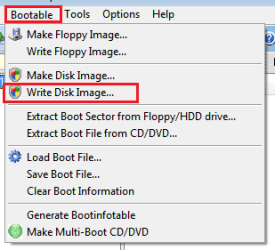
Assuming that you opened the ISO with UltraISO and did this:

1.png

Now you have a bootable disk ready incase you end up having to clean install, but first attempt a repair install:

:ar: Open your thumbdrive through explorer and run Setup.exe and rest of the process is described here: http://www.sevenforums.com/tutorials/3413-repair-install.html (Start with step 5)
http://www.sevenforums.com/tutorials/3413-repair-install.html
 

My Computer My Computer

Computer type
PC/Desktop
OS
Windows 7 Home Premium x64
So, the repair install didn't fix it. It installed properly, but my main account functions the same. What now?
 

My Computer My Computer

Computer type
Laptop
Computer Manufacturer/Model Number
Compaq Presario CQ62
OS
Windows 7 Home Premium 64bit
Antivirus
McAfee Security Scan Plus
Browser
Chrome
Hi nmayer80

Lets download AdwCleaner

Name|Operating System|Download
AdwCleaner|Windows XP/Vista/7/8 32-bit and 64-bit operating systems|
Download


:ar: Save to the Desktop

:ar: Right-click on adwcleaner.exe and choose Run as administrator

:ar: Click the Search button

:ar: Upload the AdwCleaner[Sn].txt in your reply.

   Note
The log file is at C:\AdwCleaner[Sn].txt
 

My Computer My Computer

Computer Manufacturer/Model Number
Custom Built
OS
Windows 7 Ultimate 32-Bit & Windows 7 Ultimate 64-Bit
CPU
Intel Core i7 CPU 950 @ 3.07GHz
Motherboard
ASUS P6T DELUXE V2
Memory
OCZ 6GB (3 x 2GB) 240-Pin DDR3 SDRAM DDR3 1600 OCZ3X1600R2
Graphics Card(s)
ATI Radeon HD 5700 Series
Sound Card
OnBoard
Hard Drives
WD6400AACS-00M3B0 (640GB SATA )
PSU
CORSAIR 850w
Case
NZXT LEXA
Cooling
Intel Stock Heatsink Fan
Keyboard
Microsoft Wireless Laser Keyboard 7000
Mouse
Microsoft Wireless Laser Mouse 7000
Yikes. That didnt look good. Results are attached.
 

Attachments

My Computer My Computer

Computer type
Laptop
Computer Manufacturer/Model Number
Compaq Presario CQ62
OS
Windows 7 Home Premium 64bit
Antivirus
McAfee Security Scan Plus
Browser
Chrome
Run the tool one more time . This time click on Delete button and upload the log

:ar: Close all open programs.
:ar: To run the program, right-click AdwCleaner.exe and select "Run as Administrator
:ar: Click on Delete and confirm the prompt.
:ar: After it finishes, the computer is restarted.

Upload the log saved at C:\AdwCleaner[S1].txt
 

My Computer My Computer

Computer Manufacturer/Model Number
Custom Built
OS
Windows 7 Ultimate 32-Bit & Windows 7 Ultimate 64-Bit
CPU
Intel Core i7 CPU 950 @ 3.07GHz
Motherboard
ASUS P6T DELUXE V2
Memory
OCZ 6GB (3 x 2GB) 240-Pin DDR3 SDRAM DDR3 1600 OCZ3X1600R2
Graphics Card(s)
ATI Radeon HD 5700 Series
Sound Card
OnBoard
Hard Drives
WD6400AACS-00M3B0 (640GB SATA )
PSU
CORSAIR 850w
Case
NZXT LEXA
Cooling
Intel Stock Heatsink Fan
Keyboard
Microsoft Wireless Laser Keyboard 7000
Mouse
Microsoft Wireless Laser Mouse 7000
Back
Top