No response when 0 free memory (all cached)

flano77

New member
Local time
4:09 AM
Messages
16
G'Day All,
New to this forum & replies seen are of high quality so hoping you can help.
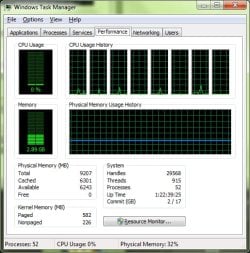
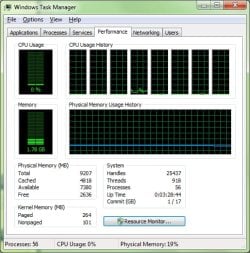
I bought my PC 12 months ago & it ran well for 12 months until some random BSOD, etc. So I reinstalled from scratch & everything was perfect for about 3-4 weeks until it kept freezing. We mainly use PC for PSE Organiser & Editor - nothing else of any substance. So in PSE8 when scrolling through lots of photos or doing lots of editing it works great for a while then stops. It seems the cached memory is NOT being released & so free = 0. What could cause this & why would I only have problem this install & not last? The only other app's installed are GoodSync, N360 & MS Office 2010. Screen shots attached of;
1 & 2 - Task Manager showing the 10min of non response & no cached memory released.
3 - Task Manager showing that if while frozen I try to page up or down through PSE CPU jumps to 100% then drops back to near nil again. Whole PC freezes too, not just PSE.
I could always reinstall again (per Dell or Adobe's great help) but certain there is another answer or things to try first.
Hoping PC specs post automatically - if not I'll put in next post.
Cheers All,
Flano..
 

Attachments

  • tm1.jpg
    tm1.jpg
    79.7 KB · Views: 49
  • tm2.jpg
    tm2.jpg
    80.5 KB · Views: 35
  • tm3.jpg
    tm3.jpg
    79.7 KB · Views: 52

My Computer My Computer

Computer Manufacturer/Model Number
Dell XPS 8500 (& XPS435MT)
OS
Win7 Pro 64 SP1 (& Win7 Home Pr 64 SP1)
CPU
Intel i7-3770 (& Intel i7-920)
Memory
16GB Dual DDR3 (& 9GB Tri DDR3)
Graphics Card(s)
2GB Radeon HD 7770 (& 1GB GeForce GT220)
Sound Card
Integrated 7.1 (both)
Monitor(s) Displays
Dell ST2310 23"W (both)
Screen Resolution
1920 x 1080 (both)
Hard Drives
C:\ 256GB OCZ SSD (& 120GB OCA SSD)
E:\ 3TB WD30EZRX (& 2TB WD20EARS)
Internet Speed
NBN 100MB

My Computer My Computer

Computer type
Laptop
Computer Manufacturer/Model Number
Sony Vaio VPCEB47GM Laptop
OS
Win 7 Pro 64-bit
CPU
Intel i5 2.4 Ghz
Memory
8GB DDR3
Graphics Card(s)
Intel HD 3000
Sound Card
IDT High Definition
Monitor(s) Displays
15.6 WGXA Anti-Glare LED
Screen Resolution
1280x800
Hard Drives
640Gb 7200rpm
Antivirus
MSE
Browser
Opera (primary) with IE9 backup
Hi marsmimar - yep - have now :D No bad sectors or similar found though.
 

My Computer My Computer

Computer Manufacturer/Model Number
Dell XPS 8500 (& XPS435MT)
OS
Win7 Pro 64 SP1 (& Win7 Home Pr 64 SP1)
CPU
Intel i7-3770 (& Intel i7-920)
Memory
16GB Dual DDR3 (& 9GB Tri DDR3)
Graphics Card(s)
2GB Radeon HD 7770 (& 1GB GeForce GT220)
Sound Card
Integrated 7.1 (both)
Monitor(s) Displays
Dell ST2310 23"W (both)
Screen Resolution
1920 x 1080 (both)
Hard Drives
C:\ 256GB OCZ SSD (& 120GB OCA SSD)
E:\ 3TB WD30EZRX (& 2TB WD20EARS)
Internet Speed
NBN 100MB

My Computer My Computer

Computer type
PC/Desktop
Computer Manufacturer/Model Number
Dwarf Dwf/11/2012 r09/2013
OS
Windows 8.1 Pro RTM x64
CPU
Intel Core-i5-3570K 4-core @ 3.4GHz (Ivy Bridge) (OC 4.4GHz)
Motherboard
ASRock Z77 Extreme4-M
Memory
4 x 4GB DDR3-1600 Corsair Vengeance CMZ8GX3M2A1600C9B (16GB)
Graphics Card(s)
MSI GeForce GTX770 Gaming OC 2GB
Sound Card
Realtek High Definition on board solution (ALC 898)
Monitor(s) Displays
ViewSonic VA1912w Widescreen (VGA)
Screen Resolution
1440x900
Hard Drives
OCZ Agility 3 SSD 120GB SATA III x2 (RAID 0)
Samsung HD501LJ 500GB SATA II x2
Hitachi HDS721010CLA332 1TB SATA II
Iomega 1.5TB Ext USB 2.0
WD 2.0TB Ext USB 3.0
PSU
XFX Pro Series 850W Semi-Modular
Case
Gigabyte IF233
Cooling
1 x 120mm Front Inlet 1 x 120mm Rear Exhaust
Keyboard
Microsoft Comfort Curve Keyboard 3000 (USB)
Mouse
Microsoft Comfort Mouse 3000 for Business (USB)
Internet Speed
NetGear DG834Gv3 ADSL Modem/Router (Ethernet) ~4.0 Mb/s (O2)
Antivirus
Avast! 8.0.1497
Browser
IE 11
Other Info
Optical Drive: HL-DT-ST BD-RE BH10LS30 SATA Bluray
Lexmark S305 Printer/Scanner/Copier (USB)
WEI Score: 8.1/8.1/8.5/8.5/8.25
Asus Eee PC 1011PX Netbook (Windows 7 x86 Starter)
Hi Dwarf - 2. Nope paging file not disabled - enabled for 9GB. 1. Yeh we only notice it after using PSE for a while. But we have nothing else on the PC to use any sort of RAM or CPU!! Outlook & Internet are only other remaining things used a lot. PSE was working perfect for past 12 months on exact same hardware (pre reinstall).
 

My Computer My Computer

Computer Manufacturer/Model Number
Dell XPS 8500 (& XPS435MT)
OS
Win7 Pro 64 SP1 (& Win7 Home Pr 64 SP1)
CPU
Intel i7-3770 (& Intel i7-920)
Memory
16GB Dual DDR3 (& 9GB Tri DDR3)
Graphics Card(s)
2GB Radeon HD 7770 (& 1GB GeForce GT220)
Sound Card
Integrated 7.1 (both)
Monitor(s) Displays
Dell ST2310 23"W (both)
Screen Resolution
1920 x 1080 (both)
Hard Drives
C:\ 256GB OCZ SSD (& 120GB OCA SSD)
E:\ 3TB WD30EZRX (& 2TB WD20EARS)
Internet Speed
NBN 100MB
Is the paging using automatic or manual settings? If manual, set to automatic and see if that makes a difference.

Have you checked to see whether there is an update for PSE which might help? By PSE I take it that you mean PhotoShop Elements? If so, PSE9 is available (I notice you are using version 8) which might address this issue.
 

My Computer My Computer

Computer type
PC/Desktop
Computer Manufacturer/Model Number
Dwarf Dwf/11/2012 r09/2013
OS
Windows 8.1 Pro RTM x64
CPU
Intel Core-i5-3570K 4-core @ 3.4GHz (Ivy Bridge) (OC 4.4GHz)
Motherboard
ASRock Z77 Extreme4-M
Memory
4 x 4GB DDR3-1600 Corsair Vengeance CMZ8GX3M2A1600C9B (16GB)
Graphics Card(s)
MSI GeForce GTX770 Gaming OC 2GB
Sound Card
Realtek High Definition on board solution (ALC 898)
Monitor(s) Displays
ViewSonic VA1912w Widescreen (VGA)
Screen Resolution
1440x900
Hard Drives
OCZ Agility 3 SSD 120GB SATA III x2 (RAID 0)
Samsung HD501LJ 500GB SATA II x2
Hitachi HDS721010CLA332 1TB SATA II
Iomega 1.5TB Ext USB 2.0
WD 2.0TB Ext USB 3.0
PSU
XFX Pro Series 850W Semi-Modular
Case
Gigabyte IF233
Cooling
1 x 120mm Front Inlet 1 x 120mm Rear Exhaust
Keyboard
Microsoft Comfort Curve Keyboard 3000 (USB)
Mouse
Microsoft Comfort Mouse 3000 for Business (USB)
Internet Speed
NetGear DG834Gv3 ADSL Modem/Router (Ethernet) ~4.0 Mb/s (O2)
Antivirus
Avast! 8.0.1497
Browser
IE 11
Other Info
Optical Drive: HL-DT-ST BD-RE BH10LS30 SATA Bluray
Lexmark S305 Printer/Scanner/Copier (USB)
WEI Score: 8.1/8.1/8.5/8.5/8.25
Asus Eee PC 1011PX Netbook (Windows 7 x86 Starter)
Thanks Dwarf - Yep paging is Auto - Yep I mean PhotoShop Elements 8. There are no updates for PSE but yes new version. PSE8 worked fine til now though. Not buying PSE9 just to see if that works. Could it be something completely unrelated to the cached memory, etc causing it to freeze? Just seems to work fine until Free Memory gets down to 0 (time to get there depends on what I'm doing - editing photos I get there quicker).
 

My Computer My Computer

Computer Manufacturer/Model Number
Dell XPS 8500 (& XPS435MT)
OS
Win7 Pro 64 SP1 (& Win7 Home Pr 64 SP1)
CPU
Intel i7-3770 (& Intel i7-920)
Memory
16GB Dual DDR3 (& 9GB Tri DDR3)
Graphics Card(s)
2GB Radeon HD 7770 (& 1GB GeForce GT220)
Sound Card
Integrated 7.1 (both)
Monitor(s) Displays
Dell ST2310 23"W (both)
Screen Resolution
1920 x 1080 (both)
Hard Drives
C:\ 256GB OCZ SSD (& 120GB OCA SSD)
E:\ 3TB WD30EZRX (& 2TB WD20EARS)
Internet Speed
NBN 100MB
How are the internal temps? Try running free speccy to monitor temps, especially for GPU.
 

My Computer My Computer

Computer type
Laptop
Computer Manufacturer/Model Number
Sony Vaio VPCEB47GM Laptop
OS
Win 7 Pro 64-bit
CPU
Intel i5 2.4 Ghz
Memory
8GB DDR3
Graphics Card(s)
Intel HD 3000
Sound Card
IDT High Definition
Monitor(s) Displays
15.6 WGXA Anti-Glare LED
Screen Resolution
1280x800
Hard Drives
640Gb 7200rpm
Antivirus
MSE
Browser
Opera (primary) with IE9 backup
CPU 43, HDD 33 - these are OK aren't they?
 

My Computer My Computer

Computer Manufacturer/Model Number
Dell XPS 8500 (& XPS435MT)
OS
Win7 Pro 64 SP1 (& Win7 Home Pr 64 SP1)
CPU
Intel i7-3770 (& Intel i7-920)
Memory
16GB Dual DDR3 (& 9GB Tri DDR3)
Graphics Card(s)
2GB Radeon HD 7770 (& 1GB GeForce GT220)
Sound Card
Integrated 7.1 (both)
Monitor(s) Displays
Dell ST2310 23"W (both)
Screen Resolution
1920 x 1080 (both)
Hard Drives
C:\ 256GB OCZ SSD (& 120GB OCA SSD)
E:\ 3TB WD30EZRX (& 2TB WD20EARS)
Internet Speed
NBN 100MB
Has nothing to do with your RAM.

Why in the third screenshot does it show "PhotoshopElements.exe" using about 100% of your CPU?
 

My Computer My Computer

Computer type
PC/Desktop
Computer Manufacturer/Model Number
Alienware Aurora ALX R4
OS
Windows 10 Pro (x64)
CPU
Intel Core i7-3930K (3.2GHz - 4.5GHz)
Motherboard
Alienware Aurora-R4 x79
Memory
4x Samsung 4GB PC3-12800 DDR3 (16GB 1600MHz)
Graphics Card(s)
Nvidia Geforce GTX 690
Sound Card
SteelSeries Siberia Elite
Monitor(s) Displays
Dell UltraSharp U3011
Screen Resolution
2560x1600
Hard Drives
Samsung 850 Pro 256 GB, Seagate 1TB Desktop Hybrid HDD, 2x Western Digital 4TB Green HDD
PSU
875W Some Dell PSU <.<
Case
Alienware Aurora ALX
Cooling
Custom Liquid Cooling (EK CPU & GPU blocks) dual EK 480RAD
Keyboard
Logitech G710+ Mechanical
Mouse
Logitech G700s
Internet Speed
Verizon Fios (50 mbps average)
Other Info
Server: Intel NUC D54250WYK: i5-4250U, 16GB, 256 GB mSATA, Windows Server 2012 R2
Hi logicearth - from my limited knowledge normally when my PC freezes for a period I go into Task Manager & it would show CPU 100% or so by 1 or more processes. But this time it does not. It was like 1% CPU. However I noticed that if I continued to try to use anything while it was frozen then CPU would spike to 100% while doing so (just during keystrokes, etc) then would drop back off again. Was not sure if that was relevant or not, so included in the post. It only shows 100% when I was trying to do more while frozen.
 
Last edited:

My Computer My Computer

Computer Manufacturer/Model Number
Dell XPS 8500 (& XPS435MT)
OS
Win7 Pro 64 SP1 (& Win7 Home Pr 64 SP1)
CPU
Intel i7-3770 (& Intel i7-920)
Memory
16GB Dual DDR3 (& 9GB Tri DDR3)
Graphics Card(s)
2GB Radeon HD 7770 (& 1GB GeForce GT220)
Sound Card
Integrated 7.1 (both)
Monitor(s) Displays
Dell ST2310 23"W (both)
Screen Resolution
1920 x 1080 (both)
Hard Drives
C:\ 256GB OCZ SSD (& 120GB OCA SSD)
E:\ 3TB WD30EZRX (& 2TB WD20EARS)
Internet Speed
NBN 100MB
Last edited:

My Computer My Computer

Computer type
Laptop
Computer Manufacturer/Model Number
Sony Vaio VPCEB47GM Laptop
OS
Win 7 Pro 64-bit
CPU
Intel i5 2.4 Ghz
Memory
8GB DDR3
Graphics Card(s)
Intel HD 3000
Sound Card
IDT High Definition
Monitor(s) Displays
15.6 WGXA Anti-Glare LED
Screen Resolution
1280x800
Hard Drives
640Gb 7200rpm
Antivirus
MSE
Browser
Opera (primary) with IE9 backup
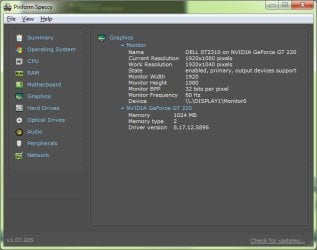
Thanks marsmimar - looks like I don't have temp for GPU. gpu.jpg
 

My Computer My Computer

Computer Manufacturer/Model Number
Dell XPS 8500 (& XPS435MT)
OS
Win7 Pro 64 SP1 (& Win7 Home Pr 64 SP1)
CPU
Intel i7-3770 (& Intel i7-920)
Memory
16GB Dual DDR3 (& 9GB Tri DDR3)
Graphics Card(s)
2GB Radeon HD 7770 (& 1GB GeForce GT220)
Sound Card
Integrated 7.1 (both)
Monitor(s) Displays
Dell ST2310 23"W (both)
Screen Resolution
1920 x 1080 (both)
Hard Drives
C:\ 256GB OCZ SSD (& 120GB OCA SSD)
E:\ 3TB WD30EZRX (& 2TB WD20EARS)
Internet Speed
NBN 100MB
Well I've just been surfing net for hours now & cached memory has eased back off. It sits at about this 4-5GB more often than not when we are not doing much other than net & email. So if Win7 is happy to sit with 4-5Gb cached & 2-3Gb Free most of the time, why does it then cache 'more' memory when we are trying to use more.... Seems odd..
 

Attachments

  • tm.jpg
    tm.jpg
    79.3 KB · Views: 18

My Computer My Computer

Computer Manufacturer/Model Number
Dell XPS 8500 (& XPS435MT)
OS
Win7 Pro 64 SP1 (& Win7 Home Pr 64 SP1)
CPU
Intel i7-3770 (& Intel i7-920)
Memory
16GB Dual DDR3 (& 9GB Tri DDR3)
Graphics Card(s)
2GB Radeon HD 7770 (& 1GB GeForce GT220)
Sound Card
Integrated 7.1 (both)
Monitor(s) Displays
Dell ST2310 23"W (both)
Screen Resolution
1920 x 1080 (both)
Hard Drives
C:\ 256GB OCZ SSD (& 120GB OCA SSD)
E:\ 3TB WD30EZRX (& 2TB WD20EARS)
Internet Speed
NBN 100MB
Thanks marsmimar - looks like I don't have temp for GPU.

That's strange. Don't have an explanation for that as Speccy is pretty good compiling info. Looks like you're missing some additional info as well.

View attachment 116471

Well I've just been surfing net for hours now & cached memory has eased back off. It sits at about this 4-5GB more often than not when we are not doing much other than net & email. So if Win7 is happy to sit with 4-5Gb cached & 2-3Gb Free most of the time, why does it then cache 'more' memory when we are trying to use more.... Seems odd..

If you click on the Resource Monitor button you'll get a better picture of how your memory is being allocated. 7 seems to anticipate what various programs might need and allocates memory accordingly. From a Microsoft forum: "...empty cache memory is wasted cache memory."

how to reduce memory usage
 
Last edited:

My Computer My Computer

Computer type
Laptop
Computer Manufacturer/Model Number
Sony Vaio VPCEB47GM Laptop
OS
Win 7 Pro 64-bit
CPU
Intel i5 2.4 Ghz
Memory
8GB DDR3
Graphics Card(s)
Intel HD 3000
Sound Card
IDT High Definition
Monitor(s) Displays
15.6 WGXA Anti-Glare LED
Screen Resolution
1280x800
Hard Drives
640Gb 7200rpm
Antivirus
MSE
Browser
Opera (primary) with IE9 backup
Thanks again marsmimar - Yeh I've seen the famous quote about cached memory & don't have a problem with it. Concept sounds OK to me (for what I know). I read that post & now wonder if PSE8 (& many other apps by the sound) simply have yet to adapt. If they are looking for Free memory to perform an action & it ain't there do they just die rather than asking Win7 to release more (maybe). I have no idea but something ain't right still.

My only issue is that it worked perfectly for 12 months. The only 1 thing that did change when I reinstalled was I put the OS to a new drive. It was on a Samsung 1TB (HD103UJ) & I reinstalled to a WD 2TB (20EARS). Both same speed, etc but could that be the issue for me (why it's different experience to before)? I have run chkdsk & all OK.
 

My Computer My Computer

Computer Manufacturer/Model Number
Dell XPS 8500 (& XPS435MT)
OS
Win7 Pro 64 SP1 (& Win7 Home Pr 64 SP1)
CPU
Intel i7-3770 (& Intel i7-920)
Memory
16GB Dual DDR3 (& 9GB Tri DDR3)
Graphics Card(s)
2GB Radeon HD 7770 (& 1GB GeForce GT220)
Sound Card
Integrated 7.1 (both)
Monitor(s) Displays
Dell ST2310 23"W (both)
Screen Resolution
1920 x 1080 (both)
Hard Drives
C:\ 256GB OCZ SSD (& 120GB OCA SSD)
E:\ 3TB WD30EZRX (& 2TB WD20EARS)
Internet Speed
NBN 100MB
First and foremost, are you using any kind of 3rd party program for memory management?

Can you install another version of PSE8, just to see if there's an issue with the program? Like a trial, or if not, maybe you have an older version?

This may seem unecessary, but just because this is so odd, I would do these two things, just for the heck of it because they're so simple.

sfc /scannow

Then a smart and/or quick scan using an anti-malware/spyware tool, and then a second quick scan of just the program folder for PSE8. Very unlikely, but takes 2 minutes so why not.
 
Last edited:

My Computer My Computer

Computer Manufacturer/Model Number
HPE-112y Custom + Custom Build
OS
HP Win7 Pro x64 | Custom Win7 Pro x64
CPU
HP PhII X4 965 Black Ed. 3.4Ghz | PhII X6 1100T 3.3/3.7
Motherboard
OEM HP | ASUS Crosshair IV Extreme 890FX
Memory
8GB DDR3 1333 OC Black Edition x2
Graphics Card(s)
HP XFX Radeon HD4890 1GB | AMD Radeon HD 6990
Sound Card
Realtek 7.1 Digital HDMI x2
Monitor(s) Displays
HP 20" 1680x1050 LCD | Samsung 23" 2ms 1920x1200 LED
Screen Resolution
1680x1050 + 1920x1200 & HDTV for Gaming/TV
Hard Drives
1TB WD "Green" 5,400 RPM SCSI W/ AMD RAID/Xpert
Custom 2x 128GB OCZ Enyo SSD
PSU
Thermaltake Black Widow 850watt Modular x2
Case
HP HPE- 112y OEM Modded | Custom Xclio A380S
Cooling
HP Antec120mm | Custom Antec 360mm/250mm/200mm/120mm
Keyboard
HP G15 | G19
Mouse
G500 x2
Internet Speed
15mb down, 2mb up
Other Info
2x DVD-RAM | 2x BD-ROM
Hi Rhammstein - NO I certainly don't have anything else managing memory - clean install plus literally only the few apps I've mentioned. Not sure what you mean by earlier version of PSE8 & do you mean install again to different prog files folder or similar? I can try installing trial as well but I think it will detect other version & want to repair. I did run sfc /scannow & there were 0 problems reported. Also installed & ran scan using Ad-Aware with nothing but a couple of cookies disabled/removed. I'll try installing trial as well & see what it does.
 

My Computer My Computer

Computer Manufacturer/Model Number
Dell XPS 8500 (& XPS435MT)
OS
Win7 Pro 64 SP1 (& Win7 Home Pr 64 SP1)
CPU
Intel i7-3770 (& Intel i7-920)
Memory
16GB Dual DDR3 (& 9GB Tri DDR3)
Graphics Card(s)
2GB Radeon HD 7770 (& 1GB GeForce GT220)
Sound Card
Integrated 7.1 (both)
Monitor(s) Displays
Dell ST2310 23"W (both)
Screen Resolution
1920 x 1080 (both)
Hard Drives
C:\ 256GB OCZ SSD (& 120GB OCA SSD)
E:\ 3TB WD30EZRX (& 2TB WD20EARS)
Internet Speed
NBN 100MB
Back
Top