All memory used when copying files from Truecrypt container

morph000

New member
Member
Local time
1:34 PM
Messages
46
I'm in the process of moving data from a WD 3TB USB drive to a larger WD 5TB USB drive, so there is a LOT of data to move around.
While this is in all probability a Truecrypt (TC) issue, it doesn't hurt to ask anyway!
I have a quad core i7 pc with Win 7 Home and 16GB RAM, which is the limit for that OS.
When I copy or move files TO the encrypted container file FROM the main pc, all is well. I can move huge files no problem. Today for example I copied a 130 Gigabye file no problem. RAM sat at around 8GB used.
When I copy or move files FROM the encrypted container on the 3TB drive TO the pc, RAM usage climbs rapidly eventually consuming all system RAM, which slows the pc to almost being unresponsive. If I keep the size of the file being moved to around 5-8GB, I can stop the pc going as unresponsive but somewhat sluggish.
The problem is that I have a LOT of files to move.
This is a one-way issue (from encrypted source to unencrypted destination) and even Truecrypt's successor of Veracrypt is getting reports of the same issue. Other Truecrypt users have reported the same issue too. It looks to be a bug, but of course TC is defunct now.I tried Veracrypt and it suffered the same problem.


I disabled caching for C: but that just made copying VERY slow and the memory usage climbed to full as before albeit slowly.
The best "solution" I have so far is to mount the TC file as removable and shutdown all non essential running programs to conserve RAM and help stability.
There seems to be no shortage of people suffering from "full ram while copying" issues across different OS'es so maybe no answer is forthcoming...
I tried 3rd party copying apps but no solution there either.


Is there a way of limiting how much RAM can be used for caching?


Any ideas
 

My Computer

Computer type
Laptop
Computer Manufacturer/Model Number
Toshiba
OS
Windows 7 64 bit
CPU
i7
Memory
16GB
Antivirus
Kaspersky IS 2013
I looked at it and increased it 50% as Windows suggested.
Made no difference...
 

My Computer

Computer type
Laptop
Computer Manufacturer/Model Number
Toshiba
OS
Windows 7 64 bit
CPU
i7
Memory
16GB
Antivirus
Kaspersky IS 2013

My Computer

Computer type
Laptop
Computer Manufacturer/Model Number
ASUS
OS
Microsoft Windows 7 Home Premium 64-bit 7601 Multiprocessor Free Service Pack 1
CPU
AMD C-60 APU with Radeon(tm) HD Graphics
Motherboard
ASUSTeK COMPUTER INC. X501U
Memory
4.00 GB
Graphics Card(s)
AMD Radeon HD 6290 Graphics
Sound Card
(1) AMD High Definition Audio Device (2) Realtek High Defi
Screen Resolution
1366 x 768 x 32 bits (4294967296 colors) @ 60 Hz
Hard Drives
Hitachi HTS545050A7E380 SATA Disk Device
Antivirus
Comodo CIS & FW, SecureAplus App Whitelisting, Threatfire
Browser
Cyberfox 64bit, Opera 64bit, Airfox
Other Info
Spy-The-Spy, HitmanPro.Alert, Norton Connect Safe, MJRegWatcher, BitDefender TrafficLight, Voodoo Shield, Zemana AntiMalware
Thanks.

I have however seen that thread and countless others. I do use cascading encryption, but the strange thing is that, as per my original description, this memory usage is strictly one way.
If cascading encryption was the cause then you'd reasonably expect it to cause problems when writing to the encrypted container too. Similarly for file caching etc etc.
It's another "too hard basket" one by the looks of it...
 

My Computer

Computer type
Laptop
Computer Manufacturer/Model Number
Toshiba
OS
Windows 7 64 bit
CPU
i7
Memory
16GB
Antivirus
Kaspersky IS 2013
The thing is that I have both TrueCrypt and VeraCrypt installed and both work without problems. If I could reproduce the problem it might help. I wonder if you have any "process taming" types of software installed?

Will check RAM usage (RAMMap) when copying large files later as I'm using a different machine at the moment.
 

My Computer

Computer type
Laptop
Computer Manufacturer/Model Number
ASUS
OS
Microsoft Windows 7 Home Premium 64-bit 7601 Multiprocessor Free Service Pack 1
CPU
AMD C-60 APU with Radeon(tm) HD Graphics
Motherboard
ASUSTeK COMPUTER INC. X501U
Memory
4.00 GB
Graphics Card(s)
AMD Radeon HD 6290 Graphics
Sound Card
(1) AMD High Definition Audio Device (2) Realtek High Defi
Screen Resolution
1366 x 768 x 32 bits (4294967296 colors) @ 60 Hz
Hard Drives
Hitachi HTS545050A7E380 SATA Disk Device
Antivirus
Comodo CIS & FW, SecureAplus App Whitelisting, Threatfire
Browser
Cyberfox 64bit, Opera 64bit, Airfox
Other Info
Spy-The-Spy, HitmanPro.Alert, Norton Connect Safe, MJRegWatcher, BitDefender TrafficLight, Voodoo Shield, Zemana AntiMalware
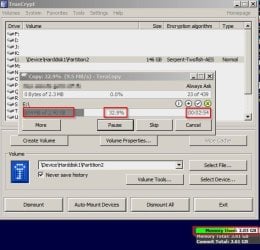
So Truecrypt 7.1a and Veracrypt 1.0f are working fine for me. Both are 64bit versions.

Copying a 2.4 GB folder. Memory used is steady at 2.03Gb (usage is usually 1.69Gb with only background programs running)
TC Memory.jpg

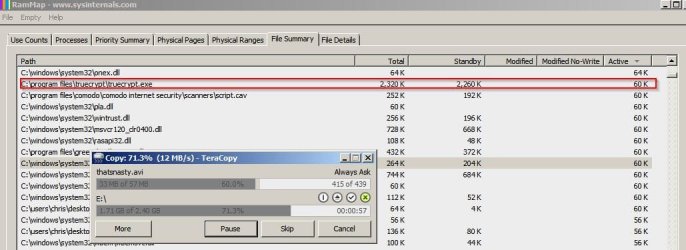
Nothing shows up anywhere in RAMMap as using an increasing amount of RAM.
TC RamMap.jpg

That's probably not much help.
 

My Computer

Computer type
Laptop
Computer Manufacturer/Model Number
ASUS
OS
Microsoft Windows 7 Home Premium 64-bit 7601 Multiprocessor Free Service Pack 1
CPU
AMD C-60 APU with Radeon(tm) HD Graphics
Motherboard
ASUSTeK COMPUTER INC. X501U
Memory
4.00 GB
Graphics Card(s)
AMD Radeon HD 6290 Graphics
Sound Card
(1) AMD High Definition Audio Device (2) Realtek High Defi
Screen Resolution
1366 x 768 x 32 bits (4294967296 colors) @ 60 Hz
Hard Drives
Hitachi HTS545050A7E380 SATA Disk Device
Antivirus
Comodo CIS & FW, SecureAplus App Whitelisting, Threatfire
Browser
Cyberfox 64bit, Opera 64bit, Airfox
Other Info
Spy-The-Spy, HitmanPro.Alert, Norton Connect Safe, MJRegWatcher, BitDefender TrafficLight, Voodoo Shield, Zemana AntiMalware
Ok.. try copying say a 40GB file and see what happens... a few GB are nothing for me too...
 

My Computer

Computer type
Laptop
Computer Manufacturer/Model Number
Toshiba
OS
Windows 7 64 bit
CPU
i7
Memory
16GB
Antivirus
Kaspersky IS 2013
Sorry but the largest single file that I can find to copy is only 1GB so can't test very large files.
 

My Computer

Computer type
Laptop
Computer Manufacturer/Model Number
ASUS
OS
Microsoft Windows 7 Home Premium 64-bit 7601 Multiprocessor Free Service Pack 1
CPU
AMD C-60 APU with Radeon(tm) HD Graphics
Motherboard
ASUSTeK COMPUTER INC. X501U
Memory
4.00 GB
Graphics Card(s)
AMD Radeon HD 6290 Graphics
Sound Card
(1) AMD High Definition Audio Device (2) Realtek High Defi
Screen Resolution
1366 x 768 x 32 bits (4294967296 colors) @ 60 Hz
Hard Drives
Hitachi HTS545050A7E380 SATA Disk Device
Antivirus
Comodo CIS & FW, SecureAplus App Whitelisting, Threatfire
Browser
Cyberfox 64bit, Opera 64bit, Airfox
Other Info
Spy-The-Spy, HitmanPro.Alert, Norton Connect Safe, MJRegWatcher, BitDefender TrafficLight, Voodoo Shield, Zemana AntiMalware
I don't know if this will work but try copying files using FastCopy and change the buffer size. For me increasing buffer size to the maximum also increases RAM usage drastically. So a lower buffer size should result in less RAM usage but slower transfer rates. I can't find a way to adjust buffer size in TC or VC so I suppose it depends upon the application used to do the file copy.

FastCopy ver3.13.jpg
 

My Computer

Computer type
Laptop
Computer Manufacturer/Model Number
ASUS
OS
Microsoft Windows 7 Home Premium 64-bit 7601 Multiprocessor Free Service Pack 1
CPU
AMD C-60 APU with Radeon(tm) HD Graphics
Motherboard
ASUSTeK COMPUTER INC. X501U
Memory
4.00 GB
Graphics Card(s)
AMD Radeon HD 6290 Graphics
Sound Card
(1) AMD High Definition Audio Device (2) Realtek High Defi
Screen Resolution
1366 x 768 x 32 bits (4294967296 colors) @ 60 Hz
Hard Drives
Hitachi HTS545050A7E380 SATA Disk Device
Antivirus
Comodo CIS & FW, SecureAplus App Whitelisting, Threatfire
Browser
Cyberfox 64bit, Opera 64bit, Airfox
Other Info
Spy-The-Spy, HitmanPro.Alert, Norton Connect Safe, MJRegWatcher, BitDefender TrafficLight, Voodoo Shield, Zemana AntiMalware
Thanks. Tried that approach and changed buffer sizes,speeds etc to no avail.
System RAM filled up albeit more slowly...
RAMMAP shows that TC is hogging a lot of the RAM, but what to do?
 

My Computer

Computer type
Laptop
Computer Manufacturer/Model Number
Toshiba
OS
Windows 7 64 bit
CPU
i7
Memory
16GB
Antivirus
Kaspersky IS 2013
Since I don't have the problem it's hard to say. If you copy some files and look at RAMMap "File Summary" tab sort highest at top and see if TC is listed. Try looking at how many open handles the TC process has open. There are a couple of settings on my machine that I have changed in the past and I will look at them later. Currently I'm using a different machine.

Another suggestion would be a full removal and reinstall of TC and VC including deleting any leftovers like drivers.
 

My Computer

Computer type
Laptop
Computer Manufacturer/Model Number
ASUS
OS
Microsoft Windows 7 Home Premium 64-bit 7601 Multiprocessor Free Service Pack 1
CPU
AMD C-60 APU with Radeon(tm) HD Graphics
Motherboard
ASUSTeK COMPUTER INC. X501U
Memory
4.00 GB
Graphics Card(s)
AMD Radeon HD 6290 Graphics
Sound Card
(1) AMD High Definition Audio Device (2) Realtek High Defi
Screen Resolution
1366 x 768 x 32 bits (4294967296 colors) @ 60 Hz
Hard Drives
Hitachi HTS545050A7E380 SATA Disk Device
Antivirus
Comodo CIS & FW, SecureAplus App Whitelisting, Threatfire
Browser
Cyberfox 64bit, Opera 64bit, Airfox
Other Info
Spy-The-Spy, HitmanPro.Alert, Norton Connect Safe, MJRegWatcher, BitDefender TrafficLight, Voodoo Shield, Zemana AntiMalware

My Computer

Computer type
Laptop
Computer Manufacturer/Model Number
ASUS
OS
Microsoft Windows 7 Home Premium 64-bit 7601 Multiprocessor Free Service Pack 1
CPU
AMD C-60 APU with Radeon(tm) HD Graphics
Motherboard
ASUSTeK COMPUTER INC. X501U
Memory
4.00 GB
Graphics Card(s)
AMD Radeon HD 6290 Graphics
Sound Card
(1) AMD High Definition Audio Device (2) Realtek High Defi
Screen Resolution
1366 x 768 x 32 bits (4294967296 colors) @ 60 Hz
Hard Drives
Hitachi HTS545050A7E380 SATA Disk Device
Antivirus
Comodo CIS & FW, SecureAplus App Whitelisting, Threatfire
Browser
Cyberfox 64bit, Opera 64bit, Airfox
Other Info
Spy-The-Spy, HitmanPro.Alert, Norton Connect Safe, MJRegWatcher, BitDefender TrafficLight, Voodoo Shield, Zemana AntiMalware
Yes, I've also seen Cleanmem.

..and Sysinternals Cacheset, but it's somewhat dated.
The most promising seems to be "SetSystemFileCacheSize", an OS function, by Uwe Sieber.


The problem is that the initial values aren't defined and there's no clear way of restoring the original values if it doesn't work.
Apart from that it may well do the job as it limits system cache to a specific maximum portion of RAM.


At the moment, I'm dismounting the TC volume when I hit 12GB used, then remount it.
Slower to get the job done, but not by that much.
I'm still transferring 300GB/day...
 

My Computer

Computer type
Laptop
Computer Manufacturer/Model Number
Toshiba
OS
Windows 7 64 bit
CPU
i7
Memory
16GB
Antivirus
Kaspersky IS 2013
Those settings I mentioned but not sure if it helps:

[Tune] _- SIV64X - System Information Viewer V4.44 PC__Chris.jpg

When you use RAMMap (when copying files) what does file summary tab (Active) show is using RAM? Window needs to be refreshed (F5) as RAM usage increases.
 

My Computer

Computer type
Laptop
Computer Manufacturer/Model Number
ASUS
OS
Microsoft Windows 7 Home Premium 64-bit 7601 Multiprocessor Free Service Pack 1
CPU
AMD C-60 APU with Radeon(tm) HD Graphics
Motherboard
ASUSTeK COMPUTER INC. X501U
Memory
4.00 GB
Graphics Card(s)
AMD Radeon HD 6290 Graphics
Sound Card
(1) AMD High Definition Audio Device (2) Realtek High Defi
Screen Resolution
1366 x 768 x 32 bits (4294967296 colors) @ 60 Hz
Hard Drives
Hitachi HTS545050A7E380 SATA Disk Device
Antivirus
Comodo CIS & FW, SecureAplus App Whitelisting, Threatfire
Browser
Cyberfox 64bit, Opera 64bit, Airfox
Other Info
Spy-The-Spy, HitmanPro.Alert, Norton Connect Safe, MJRegWatcher, BitDefender TrafficLight, Voodoo Shield, Zemana AntiMalware
Back
Top