No Sound after XP to Windows 7 Upgrade

Crsteady

New member
Local time
5:32 PM
Messages
6
Alright, so here's my problem.

I decided to upgrade to Windows 7 after using XP for what seemed like forever. I picked up a copy only to find out that I couldn't simply upgrade, rather I had to do a custom install. So I transferred my files to an external hard drive and proceeded to install 7. Everything went smoothly, I transferred over my original files and things were great. Until I realized my sound wasn't working.

I looked up solutions to my problem, most pointed towards downloading Realtek's new W7 driver. I followed some guides I found in my searches but after checking and rechecking my device manager, I saw that my sound driver wasn't updating.

Realizing my efforts weren't enough, I gave up and decided to revert to XP. I popped in my XP installation disc and rebooted. However, another issue came up. When choosing which partition to install the OS onto, my hard drive doesn't show up.

So now I'm stuck between a rock and a hard place. I'd much rather solve my sound issue, as I'm eager to try out Windows 7. But if that doesn't work out, I'll settle for a downgrade to XP.

I'm getting desperate. I'll take any help I can get. If you need any of my hardware info, just ask.
 

My Computer My Computer

At a glance

Windows 7Intel Pentium D 2.80ghz4gbsNvidia GeForce 9500 GT
Computer Manufacturer/Model Number
Sony Vaio VGC-RB57G
OS
Windows 7
CPU
Intel Pentium D 2.80ghz
Motherboard
Intel Corporation PRAGUE AAD12395-206
Memory
4gbs
Graphics Card(s)
Nvidia GeForce 9500 GT
Sound Card
N/A

My Computer My Computer

At a glance

Windows 7 ultimate 64 bit / XP Home sp3intel Core 2 Duo E8400 3.0ghz8 gigs 1066 OCZ Fata1tyEVGA GTX 580 Call of Duty Black Ops Edition
Computer Manufacturer/Model Number
Self Built
OS
Windows 7 ultimate 64 bit / XP Home sp3
CPU
intel Core 2 Duo E8400 3.0ghz
Motherboard
Asus P5ND bios 1401
Memory
8 gigs 1066 OCZ Fata1ty
Graphics Card(s)
EVGA GTX 580 Call of Duty Black Ops Edition
Sound Card
Creative Soundblaster Audigy 2zs
Monitor(s) Displays
Asus 24in LCD's 2MS X2
Screen Resolution
1920x1080p @60Hz
Hard Drives
WD Caviar 500 Black/ WD Caviar 200 Blue
PSU
OCZ 700W GameXtreme
Case
NZXT Apollo
Cooling
Corsair H50 CPU/120mm x3 /60mm x2 /Corsair Dominator Ram
Keyboard
Logitech Bluetooth Wireless MX5000
Mouse
Logitech Bluetooth Wireless MX1000
Internet Speed
Download 19.83 Upload 0.97
Other Info
Logitech Z2300 Speakers/ Bose Noise Cancelling Headphones/Avermedia PCI-e Hybrid TV Bravo/Epson NX415 all in one/ 4 Port Powered USB Hub/ LG 10x Bluray Burner /TSST Corp DVDRW External
Alright, so here's my problem.

I decided to upgrade to Windows 7 after using XP for what seemed like forever. I picked up a copy only to find out that I couldn't simply upgrade, rather I had to do a custom install. So I transferred my files to an external hard drive and proceeded to install 7. Everything went smoothly, I transferred over my original files and things were great. Until I realized my sound wasn't working.

I looked up solutions to my problem, most pointed towards downloading Realtek's new W7 driver. I followed some guides I found in my searches but after checking and rechecking my device manager, I saw that my sound driver wasn't updating.

Realizing my efforts weren't enough, I gave up and decided to revert to XP. I popped in my XP installation disc and rebooted. However, another issue came up. When choosing which partition to install the OS onto, my hard drive doesn't show up.

So now I'm stuck between a rock and a hard place. I'd much rather solve my sound issue, as I'm eager to try out Windows 7. But if that doesn't work out, I'll settle for a downgrade to XP.

I'm getting desperate. I'll take any help I can get. If you need any of my hardware info, just ask.

Hi

Check out thefade post in this thread:

http://www.sevenforums.com/sound-audio/49122-my-msi-motherbord-drivers-not-supported.html
 

My Computer My Computer

At a glance

ME/XP/Vista/Win7
OS
ME/XP/Vista/Win7
Welcome to seven forums you have sigmatel audio High definition with Vista drivers Avalible Sony eSupport - VGC-RB57G - Software Updates & Drivers You can try and install them in compatibility mode. http://www.sevenforums.com/tutorials/316-compatibility-mode.html Hope this will help . Fabe

I had tried that driver before, and I just did again to make sure. Both times I received this error. "This update is not intended for use with your computer model". I ran it under administrator in compatibility for Windows Vista (Service Pack 2).
 

My Computer My Computer

At a glance

Windows 7Intel Pentium D 2.80ghz4gbsNvidia GeForce 9500 GT
Computer Manufacturer/Model Number
Sony Vaio VGC-RB57G
OS
Windows 7
CPU
Intel Pentium D 2.80ghz
Motherboard
Intel Corporation PRAGUE AAD12395-206
Memory
4gbs
Graphics Card(s)
Nvidia GeForce 9500 GT
Sound Card
N/A
Ok lets try this. Go to device manager>sound device>properties>details tab>drop down menu>hardware id. Copy and Paste the id string. And we'll see if we can find a driver fo you.
 

My Computer My Computer

At a glance

Windows 7 ultimate 64 bit / XP Home sp3intel Core 2 Duo E8400 3.0ghz8 gigs 1066 OCZ Fata1tyEVGA GTX 580 Call of Duty Black Ops Edition
Computer Manufacturer/Model Number
Self Built
OS
Windows 7 ultimate 64 bit / XP Home sp3
CPU
intel Core 2 Duo E8400 3.0ghz
Motherboard
Asus P5ND bios 1401
Memory
8 gigs 1066 OCZ Fata1ty
Graphics Card(s)
EVGA GTX 580 Call of Duty Black Ops Edition
Sound Card
Creative Soundblaster Audigy 2zs
Monitor(s) Displays
Asus 24in LCD's 2MS X2
Screen Resolution
1920x1080p @60Hz
Hard Drives
WD Caviar 500 Black/ WD Caviar 200 Blue
PSU
OCZ 700W GameXtreme
Case
NZXT Apollo
Cooling
Corsair H50 CPU/120mm x3 /60mm x2 /Corsair Dominator Ram
Keyboard
Logitech Bluetooth Wireless MX5000
Mouse
Logitech Bluetooth Wireless MX1000
Internet Speed
Download 19.83 Upload 0.97
Other Info
Logitech Z2300 Speakers/ Bose Noise Cancelling Headphones/Avermedia PCI-e Hybrid TV Bravo/Epson NX415 all in one/ 4 Port Powered USB Hub/ LG 10x Bluray Burner /TSST Corp DVDRW External
Check in Audio Properties and make sure that you have selected speakers for your default playback device..
 

My Computer My Computer

At a glance

64-bit Windows 8.1 ProCore(TM) i5 CPU 4330 Haswell @ 3.20GHz12.00 GBIntel(R) HD Graphics
Computer type
PC/Desktop
Computer Manufacturer/Model Number
LENOVO K450 @3.0GHZ
OS
64-bit Windows 8.1 Pro
CPU
Core(TM) i5 CPU 4330 Haswell @ 3.20GHz
Motherboard
LENOVO
Memory
12.00 GB
Graphics Card(s)
Intel(R) HD Graphics
Sound Card
Intel HD integtrated
Monitor(s) Displays
HP 25' ISP Monitor
Screen Resolution
1900/1020
Hard Drives
(1) ST1000DM003-1CH162 (2) Generic STORAGE DEVICE USB Device (3) Generic STORAGE DEVICE USB Device
Internet Speed
100mb down/10mb up
Ok lets try this. Go to device manager>sound device>properties>details tab>drop down menu>hardware id. Copy and Paste the id string. And we'll see if we can find a driver fo you.

HDAUDIO\FUNC_01&VEN_8384&DEV_7661&SUBSYS_00000100&REV_1042
HDAUDIO\FUNC_01&VEN_8384&DEV_7661&SUBSYS_00000100

Check in Audio Properties and make sure that you have selected speakers for your default playback device..

In my playback menu, the field is empty. There's simply a note that says "No audio devices are installed."
 

My Computer My Computer

At a glance

Windows 7Intel Pentium D 2.80ghz4gbsNvidia GeForce 9500 GT
Computer Manufacturer/Model Number
Sony Vaio VGC-RB57G
OS
Windows 7
CPU
Intel Pentium D 2.80ghz
Motherboard
Intel Corporation PRAGUE AAD12395-206
Memory
4gbs
Graphics Card(s)
Nvidia GeForce 9500 GT
Sound Card
N/A
Here is the driver for your Sony laptop -=> download
 

My Computer My Computer

At a glance

64-bit Windows 8.1 ProCore(TM) i5 CPU 4330 Haswell @ 3.20GHz12.00 GBIntel(R) HD Graphics
Computer type
PC/Desktop
Computer Manufacturer/Model Number
LENOVO K450 @3.0GHZ
OS
64-bit Windows 8.1 Pro
CPU
Core(TM) i5 CPU 4330 Haswell @ 3.20GHz
Motherboard
LENOVO
Memory
12.00 GB
Graphics Card(s)
Intel(R) HD Graphics
Sound Card
Intel HD integtrated
Monitor(s) Displays
HP 25' ISP Monitor
Screen Resolution
1900/1020
Hard Drives
(1) ST1000DM003-1CH162 (2) Generic STORAGE DEVICE USB Device (3) Generic STORAGE DEVICE USB Device
Internet Speed
100mb down/10mb up
Well it's defenitly Sigmatel, But in windows update cataloge it lists it as Realtek AC97 Audio controller. You can try the second from the bottom date 2/15.2008 version 6.10.5866.0 Still would have to use compatibility mode. Vista.W.U.C. click on add> then view basket>choose where to download it and download it. If this doesn't work we can try some of the Realtek drivers. Microsoft Update Catalog
 

My Computer My Computer

At a glance

Windows 7 ultimate 64 bit / XP Home sp3intel Core 2 Duo E8400 3.0ghz8 gigs 1066 OCZ Fata1tyEVGA GTX 580 Call of Duty Black Ops Edition
Computer Manufacturer/Model Number
Self Built
OS
Windows 7 ultimate 64 bit / XP Home sp3
CPU
intel Core 2 Duo E8400 3.0ghz
Motherboard
Asus P5ND bios 1401
Memory
8 gigs 1066 OCZ Fata1ty
Graphics Card(s)
EVGA GTX 580 Call of Duty Black Ops Edition
Sound Card
Creative Soundblaster Audigy 2zs
Monitor(s) Displays
Asus 24in LCD's 2MS X2
Screen Resolution
1920x1080p @60Hz
Hard Drives
WD Caviar 500 Black/ WD Caviar 200 Blue
PSU
OCZ 700W GameXtreme
Case
NZXT Apollo
Cooling
Corsair H50 CPU/120mm x3 /60mm x2 /Corsair Dominator Ram
Keyboard
Logitech Bluetooth Wireless MX5000
Mouse
Logitech Bluetooth Wireless MX1000
Internet Speed
Download 19.83 Upload 0.97
Other Info
Logitech Z2300 Speakers/ Bose Noise Cancelling Headphones/Avermedia PCI-e Hybrid TV Bravo/Epson NX415 all in one/ 4 Port Powered USB Hub/ LG 10x Bluray Burner /TSST Corp DVDRW External
Here is the driver for your Sony laptop -=> download
Went to the site but the download link it provided 404'd. Quick google search gave me a working download. Sadly I got this same error. "This update is not intended for use with your computer model."

Well it's defenitly Sigmatel, But in windows update cataloge it lists it as Realtek AC97 Audio controller. You can try the second from the bottom date 2/15.2008 version 6.10.5866.0 Still would have to use compatibility mode. Vista. click on add> then view basket>choose where to download it and download it. If this doesn't work we can try some of the Realtek drivers. Microsoft Update Catalog

Well the installation went fine, but I'm not sure it did much. Checked device manager, it doesn't look like it updated the driver. Still no sound.
 

My Computer My Computer

At a glance

Windows 7Intel Pentium D 2.80ghz4gbsNvidia GeForce 9500 GT
Computer Manufacturer/Model Number
Sony Vaio VGC-RB57G
OS
Windows 7
CPU
Intel Pentium D 2.80ghz
Motherboard
Intel Corporation PRAGUE AAD12395-206
Memory
4gbs
Graphics Card(s)
Nvidia GeForce 9500 GT
Sound Card
N/A

My Computer My Computer

At a glance

Windows 7 ultimate 64 bit / XP Home sp3intel Core 2 Duo E8400 3.0ghz8 gigs 1066 OCZ Fata1tyEVGA GTX 580 Call of Duty Black Ops Edition
Computer Manufacturer/Model Number
Self Built
OS
Windows 7 ultimate 64 bit / XP Home sp3
CPU
intel Core 2 Duo E8400 3.0ghz
Motherboard
Asus P5ND bios 1401
Memory
8 gigs 1066 OCZ Fata1ty
Graphics Card(s)
EVGA GTX 580 Call of Duty Black Ops Edition
Sound Card
Creative Soundblaster Audigy 2zs
Monitor(s) Displays
Asus 24in LCD's 2MS X2
Screen Resolution
1920x1080p @60Hz
Hard Drives
WD Caviar 500 Black/ WD Caviar 200 Blue
PSU
OCZ 700W GameXtreme
Case
NZXT Apollo
Cooling
Corsair H50 CPU/120mm x3 /60mm x2 /Corsair Dominator Ram
Keyboard
Logitech Bluetooth Wireless MX5000
Mouse
Logitech Bluetooth Wireless MX1000
Internet Speed
Download 19.83 Upload 0.97
Other Info
Logitech Z2300 Speakers/ Bose Noise Cancelling Headphones/Avermedia PCI-e Hybrid TV Bravo/Epson NX415 all in one/ 4 Port Powered USB Hub/ LG 10x Bluray Burner /TSST Corp DVDRW External
Is their a yellow triangel next to your sound device? Could you copy and paste a expanded view of you sound device in device manager for us? I fell your frustration. Could give this a shot. Download Realtek AC 97 Audio Driver for Windows 7 Driver for Windows 7 - Softpedia You have to sign up and make an account so I usualy avoid third party sites for this reason but getting desperate. Fabe

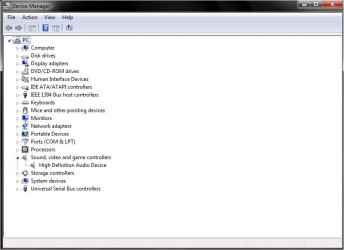
Here's a screenshot. Trying the driver now. Will edit post with results.

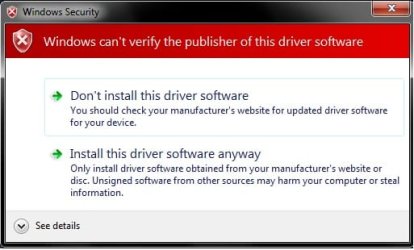
(EDIT)While trying to install the driver, I keep getting a pop-up that says "Windows can't verify the publisher of this software." (See screenshot attached) I click the option "Install this driver software anyway" but the error message keeps showing up. Is there some way to disable this security?
 

Attachments

  • Untitled.jpg
    Untitled.jpg
    32.7 KB · Views: 77
  • Untitled1.jpg
    Untitled1.jpg
    26.1 KB · Views: 33

My Computer My Computer

At a glance

Windows 7Intel Pentium D 2.80ghz4gbsNvidia GeForce 9500 GT
Computer Manufacturer/Model Number
Sony Vaio VGC-RB57G
OS
Windows 7
CPU
Intel Pentium D 2.80ghz
Motherboard
Intel Corporation PRAGUE AAD12395-206
Memory
4gbs
Graphics Card(s)
Nvidia GeForce 9500 GT
Sound Card
N/A
From your screen shot it appears the driver installed. You can click on it and properties to see if it says it is working properly. If so we can go into sound devices in control panel and check the settings. On the other screen shot you can click on see detials and the reason why.
 
Last edited:

My Computer My Computer

At a glance

Windows 7 ultimate 64 bit / XP Home sp3intel Core 2 Duo E8400 3.0ghz8 gigs 1066 OCZ Fata1tyEVGA GTX 580 Call of Duty Black Ops Edition
Computer Manufacturer/Model Number
Self Built
OS
Windows 7 ultimate 64 bit / XP Home sp3
CPU
intel Core 2 Duo E8400 3.0ghz
Motherboard
Asus P5ND bios 1401
Memory
8 gigs 1066 OCZ Fata1ty
Graphics Card(s)
EVGA GTX 580 Call of Duty Black Ops Edition
Sound Card
Creative Soundblaster Audigy 2zs
Monitor(s) Displays
Asus 24in LCD's 2MS X2
Screen Resolution
1920x1080p @60Hz
Hard Drives
WD Caviar 500 Black/ WD Caviar 200 Blue
PSU
OCZ 700W GameXtreme
Case
NZXT Apollo
Cooling
Corsair H50 CPU/120mm x3 /60mm x2 /Corsair Dominator Ram
Keyboard
Logitech Bluetooth Wireless MX5000
Mouse
Logitech Bluetooth Wireless MX1000
Internet Speed
Download 19.83 Upload 0.97
Other Info
Logitech Z2300 Speakers/ Bose Noise Cancelling Headphones/Avermedia PCI-e Hybrid TV Bravo/Epson NX415 all in one/ 4 Port Powered USB Hub/ LG 10x Bluray Burner /TSST Corp DVDRW External
From your screen shot it appears the driver installed. You can click on it and properties to see if ti says it is working properly. If so we can go into sound devices in control panel and check the settings.

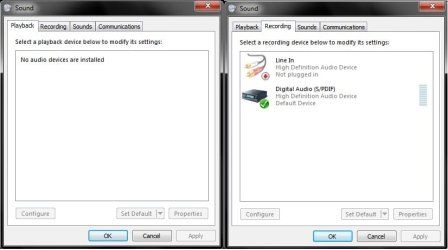
Everything looks fine in the device manager, but I've still got no sound. No devices show up in the Playback tab. There is a High Definition Audio Device in the Recording tab, however. Although it shows up as unplugged. See attached screenshot.
 

Attachments

  • Untitled2.jpg
    Untitled2.jpg
    37.8 KB · Views: 89

My Computer My Computer

At a glance

Windows 7Intel Pentium D 2.80ghz4gbsNvidia GeForce 9500 GT
Computer Manufacturer/Model Number
Sony Vaio VGC-RB57G
OS
Windows 7
CPU
Intel Pentium D 2.80ghz
Motherboard
Intel Corporation PRAGUE AAD12395-206
Memory
4gbs
Graphics Card(s)
Nvidia GeForce 9500 GT
Sound Card
N/A
Well we tried forcing the driver through update driver>browse my computer>let me pick>have disk>browse>navigate to downloaded file>click (or double click).inf file>click ok>next and let it install which updated driver but produced a yellow triangel.The only other suggestion I have is to try one of the latest XP drivers in the W.U.C. in compatiblity mode XP. Or find a AC97 audio driver. Sorry I couldn't have been of more help. Fabe
 

My Computer My Computer

At a glance

Windows 7 ultimate 64 bit / XP Home sp3intel Core 2 Duo E8400 3.0ghz8 gigs 1066 OCZ Fata1tyEVGA GTX 580 Call of Duty Black Ops Edition
Computer Manufacturer/Model Number
Self Built
OS
Windows 7 ultimate 64 bit / XP Home sp3
CPU
intel Core 2 Duo E8400 3.0ghz
Motherboard
Asus P5ND bios 1401
Memory
8 gigs 1066 OCZ Fata1ty
Graphics Card(s)
EVGA GTX 580 Call of Duty Black Ops Edition
Sound Card
Creative Soundblaster Audigy 2zs
Monitor(s) Displays
Asus 24in LCD's 2MS X2
Screen Resolution
1920x1080p @60Hz
Hard Drives
WD Caviar 500 Black/ WD Caviar 200 Blue
PSU
OCZ 700W GameXtreme
Case
NZXT Apollo
Cooling
Corsair H50 CPU/120mm x3 /60mm x2 /Corsair Dominator Ram
Keyboard
Logitech Bluetooth Wireless MX5000
Mouse
Logitech Bluetooth Wireless MX1000
Internet Speed
Download 19.83 Upload 0.97
Other Info
Logitech Z2300 Speakers/ Bose Noise Cancelling Headphones/Avermedia PCI-e Hybrid TV Bravo/Epson NX415 all in one/ 4 Port Powered USB Hub/ LG 10x Bluray Burner /TSST Corp DVDRW External
Hello!
I really need a help!
I also upgrade from widows xp sp2 to windows 7 ultimate 7600, and now having a sound problem!
i try many audio drivers but they didin.t help me!

The device manager said: This device cannot start. (Code 10)
my configuration is:
  1. Procesor AMD Athlon XP, 1800 MHz (13.5 x 133) 2200+
  2. Matsonic MS8147C/C+/CR (5 PCI, 1 AGP, 1 CNR, 3 DIMM, Audio, LAN)
  3. VIA VT8377 Apollo KT400
  4. C-Media CMI9738 @ VIA AC'97 Enhanced Audio Controller

    Please help me!
 

My Computer My Computer

At a glance

7AMD Athlon XP, 1800 MHz (13.5 x 133) 2200+1,25 GBRadeon X1650 Series 512MB
Computer Manufacturer/Model Number
ACPI x86-based PC
OS
7
CPU
AMD Athlon XP, 1800 MHz (13.5 x 133) 2200+
Motherboard
Matsonic MS8147C/C+/CR (5 PCI, 1 AGP, 1
Memory
1,25 GB
Graphics Card(s)
Radeon X1650 Series 512MB
Sound Card
-
Monitor(s) Displays
ADI MicroScan 4P/4P+ [15" CRT]
Hard Drives
Tvrdi disk Hitachi HDP725016GLAT80 ATA Device (160 GB, 7200 RPM, Ultra-ATA/133)
PSU
-
Case
-
Cooling
-
also i forgot to mention that in control panel-sounds-playback says that there is no audio device installed
 

My Computer My Computer

At a glance

7AMD Athlon XP, 1800 MHz (13.5 x 133) 2200+1,25 GBRadeon X1650 Series 512MB
Computer Manufacturer/Model Number
ACPI x86-based PC
OS
7
CPU
AMD Athlon XP, 1800 MHz (13.5 x 133) 2200+
Motherboard
Matsonic MS8147C/C+/CR (5 PCI, 1 AGP, 1
Memory
1,25 GB
Graphics Card(s)
Radeon X1650 Series 512MB
Sound Card
-
Monitor(s) Displays
ADI MicroScan 4P/4P+ [15" CRT]
Hard Drives
Tvrdi disk Hitachi HDP725016GLAT80 ATA Device (160 GB, 7200 RPM, Ultra-ATA/133)
PSU
-
Case
-
Cooling
-
To bozidarbelavic

Hello there,
I know this might be a bit obvious, but have you got the built in sound device turned on in the BIOS ? My brothers computer has an identical motherboard and we had problems with the internal devices so I turned them off and bought a plug in card, a Sweex 5.1 PCI sound card, that installed OK in Windows 7, and works fine.
Just to check things, I just pulled the PCI Sound card and turned the internal sound device on and let Windows 7 try and find and set it up, started OK, went to the Winodws Update thing and downloaded something, but the installation failed and rather unhelpfully told me to contact the manufacturer. I don't think there are any Windows 7 drivers for the internal sound device.
Get a plug in card, it's easier :)
>
On a seperate note, if you don't mind, about your Graphics card. Brothers machine has an Nvidia Maxi Gamer Phoenix 2 installed, which runs Win 7 but with no Aero. I did get a PNY Verto GeForce 6200 AGPx8 256Mb 64bit card as I thought it would be OK, but it won't install, I get one long beep from the computer and nothing on the screen, so obviously it's not the right card. Your Radeon X1650 Series 512MB, does it work OK with Win 7 and allow Aero to run ? We have more or less the same system specs as you [note, not the ones listed on my profile, that's my computer]. If you can spare the time to pass on any thoughts about your Graphics card I'd be real greatful as all we need is Aero working and we are away :)
All the best,
Mick C.
 

My Computer My Computer

At a glance

Windows 7 Home Premium 64 bit - SP1Intel Core i7 920 (2.66GHz 8MB L2 Cache)6Gb (3 x Kingston 2Gb PC12800 DDR3 1600MHZ)ATI Radeon HD 5850 1Gb
Computer type
PC/Desktop
Computer Manufacturer/Model Number
Arbico i7 PC
OS
Windows 7 Home Premium 64 bit - SP1
CPU
Intel Core i7 920 (2.66GHz 8MB L2 Cache)
Motherboard
Asus P6X58D-E
Memory
6Gb (3 x Kingston 2Gb PC12800 DDR3 1600MHZ)
Graphics Card(s)
ATI Radeon HD 5850 1Gb
Sound Card
AMD HIgh Def HDMI
Monitor(s) Displays
LG 24EB23 Digital
Screen Resolution
1920x1080 (32bit) (60Hz)
Hard Drives
Samsung HD103SJ
Samsung HD5021J
Samsung HD204UI
Samsung M3 External USB 3
PSU
Nexus RX-8500 850w
Case
NZXT Hush Black ATA
Cooling
3 x Xilence Red Wing 120mm Case Fans
Keyboard
Microsoft Wireless Keyboard 6000 v3.0
Mouse
Microsoft Wireless Laser Mouse 6000 v 2.0
Internet Speed
60.0 Mbps Average
Antivirus
Spybot Search & Destroy
Browser
Avant Browser
Back
Top