No sound again. Help me.

angelinaxx

New member
Local time
3:29 AM
Messages
17
Location
california
So i recently just got a new laptop
It's a gateway 7326gz

It's designed for Windows XP BUT I downloaded a clean copy of Windows 7.
Everything is working, but the sound. Last time i upgraded and my dell didn't have sound there was a red line going through the sound icon. This time there is not. When i am on youtube or any other place i can click on the sound icon on the taskbar and it will have the bar moving up and down like the sound is working. When i start up windows the sound even works as i sign in. What is going on?

Here is a screen shot. :rolleyes:

http://i35.tinypic.com/2la7v3s.png

Thank you in advance.
 

My Computer My Computer

Computer Manufacturer/Model Number
Gateway 7326 Notebook
OS
MS windows 7 home premium
Monitor(s) Displays
generic pnp monitor
Screen Resolution
1280x1054
Hard Drives
60GB FUJITSU MVH2060AH ATA device

hmm, weird, so you can't hear sound after you log in?
 

My Computer My Computer

Computer Manufacturer/Model Number
Custom Build #2
OS
Windows 7 Ultimate 32-Bit
CPU
Intel Core 2 Duo E6300 O.C.'d to 2.80 GHz (For Now >:) )
Motherboard
Gigabyte P43-ES3G
Memory
4x1GB OCZ Dual Channel RAM
Graphics Card(s)
HIS ATI Radeon HD 5770 1GB
Sound Card
Onboard Sound
Monitor(s) Displays
Asus VH-236
Screen Resolution
1920x1080
Hard Drives
WD Caviar-Blue 250 GB SATA
WD Caviar-Green 1.5 TB SATA
PSU
Raidmax RX-630SS
Case
Apevia X-Dreamer
Cooling
Case: Arctic Cooling CPU:Rosewill RCX Z2
If you open the sound options panel from the task bar, what is your system volume set to?

Also, you might wanna take a look at that video driver hiccup I saw in your screen shot. It looks like a problem.
 

My Computer My Computer

Computer type
PC/Desktop
Computer Manufacturer/Model Number
Mellon Labs (custom build)
OS
Win 7 Pro x64/Win 10 Pro x64 dual boot
CPU
AMD FX 8350 Vishera @ 4200
Motherboard
ASUS M5A97 R2.0
Memory
16 GB Mushkin Blackline DDR3-2400 @ 1866 (9-10-10-10-31)
Graphics Card(s)
XFX Radeon R9 280 Double D Black Edition
Sound Card
Realtek HD Audio on MB. Sounds great.
Monitor(s) Displays
Acer 24", Acer 22"
Screen Resolution
3840 x 1080
Hard Drives
1 x Mushkin Chronos 120 GB SSD (Win 10)
1 x Samsung 850 EVO 250 GB SSD (Win 7)
1 x WD 1TB SATA Blue
1 x WD 1TB SATA Green
PSU
Corsair TX-750
Case
CoolerMaster HAF 912+
Cooling
Coolermaster Seidon 240M Liquid AIO. 6 case fans
Keyboard
Logitech G710+
Mouse
Logitech G500s
Internet Speed
Much better since I got fiber, but still way overpriced.
Antivirus
MSE, Malware Bytes for scanning
Browser
Firefox
Other Info
Corsair VOID USB headphones.

A Mellon Labs X-1 - LCD Smartie driven system status display.

Brought to you by the letter E
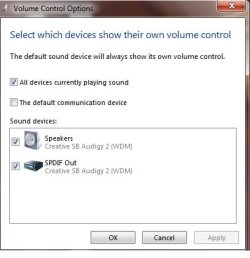
Volume control options - plus like Mellon, I'm wondering about that video controller.
 

Attachments

  • sound.jpg
    sound.jpg
    19.6 KB · Views: 5

My Computer My Computer

Computer Manufacturer/Model Number
Dell and Custom
OS
Systems 1 and 2: Windows 7 Enterprise x64, Win 8 Developer
CPU
System 1: i7 [email protected], System 2: AMD FX-4100 Zambezi 3.6G
Motherboard
System 1:Dell 06NWYK System 2: ASUS M5A97 AM3+
Memory
System 1: 8GB System 2: 8GB
Graphics Card(s)
System 1: ATI FirePro V4800 System 2: Radeon HD 6850
Sound Card
System 1: onboard System 2: onboard
Monitor(s) Displays
System1: Viewsonic HDMI 24"
Screen Resolution
System 1: 1920x1080 System 2: 1920x1080
Hard Drives
System 1: Mirrored .5B drives System 2: Seagate Barracuda ST1000DM003 1TB 7200 RPM 64MB Cache SATA 6.0Gb/s
Case
System 1: Dell System 2: Cooler Master
Internet Speed
10 MBPS
This is for all the forum members !

As this is the new product launched and I just want to introduce this on forum
specially for the electronics crazy forums.

This, I got after the extensive research on internet and I think that they are good and affordable.

Please have a look if it suits you. Thanks for the cooperation

-----------------
[FONT=&quot]eken m001 [/FONT]
Please do not hijack this thread, it is rude and inconsiderate.
Start your own thread if you want to talk about something
 

My Computer My Computer

Computer Manufacturer/Model Number
Custom Build #2
OS
Windows 7 Ultimate 32-Bit
CPU
Intel Core 2 Duo E6300 O.C.'d to 2.80 GHz (For Now >:) )
Motherboard
Gigabyte P43-ES3G
Memory
4x1GB OCZ Dual Channel RAM
Graphics Card(s)
HIS ATI Radeon HD 5770 1GB
Sound Card
Onboard Sound
Monitor(s) Displays
Asus VH-236
Screen Resolution
1920x1080
Hard Drives
WD Caviar-Blue 250 GB SATA
WD Caviar-Green 1.5 TB SATA
PSU
Raidmax RX-630SS
Case
Apevia X-Dreamer
Cooling
Case: Arctic Cooling CPU:Rosewill RCX Z2
This is for all the forum members !

As this is the new product launched and I just want to introduce this on forum
specially for the electronics crazy forums.

This, I got after the extensive research on internet and I think that they are good and affordable.

Please have a look if it suits you. Thanks for the cooperation

-----------------
[FONT=&quot]eken m001 [/FONT]
Please do not hijack this thread, it is rude and inconsiderate.
Start your own thread if you want to talk about something
I reported it as spam already.
 

My Computer My Computer

Computer type
PC/Desktop
Computer Manufacturer/Model Number
Mellon Labs (custom build)
OS
Win 7 Pro x64/Win 10 Pro x64 dual boot
CPU
AMD FX 8350 Vishera @ 4200
Motherboard
ASUS M5A97 R2.0
Memory
16 GB Mushkin Blackline DDR3-2400 @ 1866 (9-10-10-10-31)
Graphics Card(s)
XFX Radeon R9 280 Double D Black Edition
Sound Card
Realtek HD Audio on MB. Sounds great.
Monitor(s) Displays
Acer 24", Acer 22"
Screen Resolution
3840 x 1080
Hard Drives
1 x Mushkin Chronos 120 GB SSD (Win 10)
1 x Samsung 850 EVO 250 GB SSD (Win 7)
1 x WD 1TB SATA Blue
1 x WD 1TB SATA Green
PSU
Corsair TX-750
Case
CoolerMaster HAF 912+
Cooling
Coolermaster Seidon 240M Liquid AIO. 6 case fans
Keyboard
Logitech G710+
Mouse
Logitech G500s
Internet Speed
Much better since I got fiber, but still way overpriced.
Antivirus
MSE, Malware Bytes for scanning
Browser
Firefox
Other Info
Corsair VOID USB headphones.

A Mellon Labs X-1 - LCD Smartie driven system status display.

Brought to you by the letter E
so did i
 

My Computer My Computer

Computer Manufacturer/Model Number
Custom Build #2
OS
Windows 7 Ultimate 32-Bit
CPU
Intel Core 2 Duo E6300 O.C.'d to 2.80 GHz (For Now >:) )
Motherboard
Gigabyte P43-ES3G
Memory
4x1GB OCZ Dual Channel RAM
Graphics Card(s)
HIS ATI Radeon HD 5770 1GB
Sound Card
Onboard Sound
Monitor(s) Displays
Asus VH-236
Screen Resolution
1920x1080
Hard Drives
WD Caviar-Blue 250 GB SATA
WD Caviar-Green 1.5 TB SATA
PSU
Raidmax RX-630SS
Case
Apevia X-Dreamer
Cooling
Case: Arctic Cooling CPU:Rosewill RCX Z2
Untitled.png


it also shows this moving up and down but no sound... ugh

j.png
 

My Computer My Computer

Computer Manufacturer/Model Number
Gateway 7326 Notebook
OS
MS windows 7 home premium
Monitor(s) Displays
generic pnp monitor
Screen Resolution
1280x1054
Hard Drives
60GB FUJITSU MVH2060AH ATA device
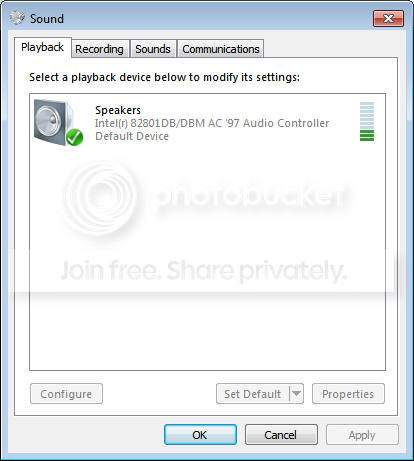
it seems that speakers isn't checked
 

My Computer My Computer

Computer Manufacturer/Model Number
Custom Build #2
OS
Windows 7 Ultimate 32-Bit
CPU
Intel Core 2 Duo E6300 O.C.'d to 2.80 GHz (For Now >:) )
Motherboard
Gigabyte P43-ES3G
Memory
4x1GB OCZ Dual Channel RAM
Graphics Card(s)
HIS ATI Radeon HD 5770 1GB
Sound Card
Onboard Sound
Monitor(s) Displays
Asus VH-236
Screen Resolution
1920x1080
Hard Drives
WD Caviar-Blue 250 GB SATA
WD Caviar-Green 1.5 TB SATA
PSU
Raidmax RX-630SS
Case
Apevia X-Dreamer
Cooling
Case: Arctic Cooling CPU:Rosewill RCX Z2

My Computer My Computer

Computer Manufacturer/Model Number
Gateway 7326 Notebook
OS
MS windows 7 home premium
Monitor(s) Displays
generic pnp monitor
Screen Resolution
1280x1054
Hard Drives
60GB FUJITSU MVH2060AH ATA device
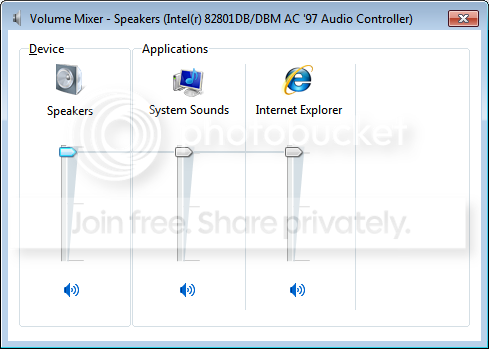
What happens if you go to the sound mixer and go to the levels tab?
 

My Computer My Computer

Computer Manufacturer/Model Number
Custom Build #2
OS
Windows 7 Ultimate 32-Bit
CPU
Intel Core 2 Duo E6300 O.C.'d to 2.80 GHz (For Now >:) )
Motherboard
Gigabyte P43-ES3G
Memory
4x1GB OCZ Dual Channel RAM
Graphics Card(s)
HIS ATI Radeon HD 5770 1GB
Sound Card
Onboard Sound
Monitor(s) Displays
Asus VH-236
Screen Resolution
1920x1080
Hard Drives
WD Caviar-Blue 250 GB SATA
WD Caviar-Green 1.5 TB SATA
PSU
Raidmax RX-630SS
Case
Apevia X-Dreamer
Cooling
Case: Arctic Cooling CPU:Rosewill RCX Z2
Untitled-1.png


so confused on why it wont work :/ ugh

Untitled-2.png
 

My Computer My Computer

Computer Manufacturer/Model Number
Gateway 7326 Notebook
OS
MS windows 7 home premium
Monitor(s) Displays
generic pnp monitor
Screen Resolution
1280x1054
Hard Drives
60GB FUJITSU MVH2060AH ATA device
did you try the sounds tab?
 

My Computer My Computer

Computer Manufacturer/Model Number
Custom Build #2
OS
Windows 7 Ultimate 32-Bit
CPU
Intel Core 2 Duo E6300 O.C.'d to 2.80 GHz (For Now >:) )
Motherboard
Gigabyte P43-ES3G
Memory
4x1GB OCZ Dual Channel RAM
Graphics Card(s)
HIS ATI Radeon HD 5770 1GB
Sound Card
Onboard Sound
Monitor(s) Displays
Asus VH-236
Screen Resolution
1920x1080
Hard Drives
WD Caviar-Blue 250 GB SATA
WD Caviar-Green 1.5 TB SATA
PSU
Raidmax RX-630SS
Case
Apevia X-Dreamer
Cooling
Case: Arctic Cooling CPU:Rosewill RCX Z2
Untitled-3.png
 

My Computer My Computer

Computer Manufacturer/Model Number
Gateway 7326 Notebook
OS
MS windows 7 home premium
Monitor(s) Displays
generic pnp monitor
Screen Resolution
1280x1054
Hard Drives
60GB FUJITSU MVH2060AH ATA device
ok, have you tried using headphones vs. the onboard speakers?
 

My Computer My Computer

Computer Manufacturer/Model Number
Custom Build #2
OS
Windows 7 Ultimate 32-Bit
CPU
Intel Core 2 Duo E6300 O.C.'d to 2.80 GHz (For Now >:) )
Motherboard
Gigabyte P43-ES3G
Memory
4x1GB OCZ Dual Channel RAM
Graphics Card(s)
HIS ATI Radeon HD 5770 1GB
Sound Card
Onboard Sound
Monitor(s) Displays
Asus VH-236
Screen Resolution
1920x1080
Hard Drives
WD Caviar-Blue 250 GB SATA
WD Caviar-Green 1.5 TB SATA
PSU
Raidmax RX-630SS
Case
Apevia X-Dreamer
Cooling
Case: Arctic Cooling CPU:Rosewill RCX Z2
no sounds ugh

Look at my other thread for more info. but basically i upgraded from windows XP to windows 7, on my gateway laptop and now there is no sound. it says the its installed and everything and when i play videos and click on the sound icon the bar moves up and down like the sounds works. i tried youtube everything NO sound. it does have sound when the machine starts up though.

just thought posting in this forum would help me get better answers.
 

My Computer My Computer

Computer Manufacturer/Model Number
Gateway 7326 Notebook
OS
MS windows 7 home premium
Monitor(s) Displays
generic pnp monitor
Screen Resolution
1280x1054
Hard Drives
60GB FUJITSU MVH2060AH ATA device
You said it has sound when starting up. When specifically do you hear sound from the computer?
 

My Computer My Computer

Computer type
Laptop
Computer Manufacturer/Model Number
Toshiba P775-S7100
OS
Windows 7 Professional SP1 64-bit
CPU
Intel Core i5-2450M @2.5 GHz
Memory
6 GB DDR3 1333MHz
Graphics Card(s)
Intel HD 3000
Monitor(s) Displays
Built-in 17.3" LED; 22" Insignia NS-L22Q-10A
Screen Resolution
1600x900; 1360x768
Hard Drives
750 GB Hitachi
1TB Seagate FreeAgent External
Internet Speed
Verizon DSL Speed(Down/Up): 3360 Kbps / 800 Kbps
Antivirus
MSE and MBAM Pro
Browser
IE10

My Computer My Computer

Computer Manufacturer/Model Number
Dell and Custom
OS
Systems 1 and 2: Windows 7 Enterprise x64, Win 8 Developer
CPU
System 1: i7 [email protected], System 2: AMD FX-4100 Zambezi 3.6G
Motherboard
System 1:Dell 06NWYK System 2: ASUS M5A97 AM3+
Memory
System 1: 8GB System 2: 8GB
Graphics Card(s)
System 1: ATI FirePro V4800 System 2: Radeon HD 6850
Sound Card
System 1: onboard System 2: onboard
Monitor(s) Displays
System1: Viewsonic HDMI 24"
Screen Resolution
System 1: 1920x1080 System 2: 1920x1080
Hard Drives
System 1: Mirrored .5B drives System 2: Seagate Barracuda ST1000DM003 1TB 7200 RPM 64MB Cache SATA 6.0Gb/s
Case
System 1: Dell System 2: Cooler Master
Internet Speed
10 MBPS
Also, right click Microsoft speaker icon in task bar, slect Playback Devices, make sure Speakers is set as your default device, select speakers and then the properties button at the lower right, if you have the Enhancements tab, select it then disable all enhancements select "Apply" and reboot.

Ap
 

My Computer My Computer

Computer Manufacturer/Model Number
Assembled in my workshop
OS
Windows 7 Home Premium
CPU
Intel Core 2 Duo @ 3.00gHz
Motherboard
Gigabyte GA-P35-S3G
Memory
4 GB
Graphics Card(s)
ATI Radeon HD 2600 XT
Sound Card
RME 24/96 Card, Realtek Internal Audio PreSonus FireStudio
Monitor(s) Displays
Acer 1917 (x2)
Screen Resolution
1280 x 1024 on both monitors
Hard Drives
Three 250GB Seagate SATA Barracuda 7200rpm
PSU
Rosewill 500-watt
Case
Rosewill mid-tower
Cooling
Noctua NH-U9B (CPU), PwrSupply fan + single large case Fan
Keyboard
Macally w/2/USB ports.
Mouse
Trackman Wheel
Other Info
Event 20/20 bas studio monitors, Yamaha sub.
Rackmount Korg/Roland/Yamaha synthesizers,
Cubase MIDI/audio recording. Sony Soundforge audio/mastering software. CD Architect Mastering. RME & Presonus audio interfaces.
I had the same problem with no sound on a clean install of windows 7 on a 7326gz and had all the same screens that were shown in the replys. I could see everything should be working and just couldn't hear any sound. So here's what I did:

1. Download the xp audio driver 9528156 from Gateway Support Gateway Conexant Audio Driver Version: 6.13.10.8240 and save it to a folder or the desktop

2. Go to where ever you saved it and double click on the zipped file. This will extract the files to C:\cabs\9528156

3. Go to C:\cabs\9528156, right click HFXsetup and click on Run as Administrator. Clicking the Run as Administrator is the key here.

Once I did that I restarted my laptop and got sound.

The only thing I didn't get working as well is the video driver. My device manager still does not recognize the video controller but I'm quite happy with the default video driver that's in Windows 7.
 
Last edited:

My Computer My Computer

OS
windows 7 home premium x32
Back
Top