No sound at all for Inspiron e1705 with Windows 7

pbler

New member
Local time
6:48 PM
Messages
7
I just installed Windows 7 on my Dell Inspiron e1705 laptop and now have no sound at all, either on the www or playing CDs. I can't find anything anywhere that says there's a specific compatibility problem. Has anyone heard of this issue, and possibly of a solution? Thanks!
 

My Computer My Computer

At a glance

Windows 7
OS
Windows 7
Hi pbler..Welcome to the Forums...

For some reason the default playback device is set for headphones... reset it for speakers... Hope this helps...
 

My Computer My Computer

At a glance

64-bit Windows 8.1 ProCore(TM) i5 CPU 4330 Haswell @ 3.20GHz12.00 GBIntel(R) HD Graphics
Computer type
PC/Desktop
Computer Manufacturer/Model Number
LENOVO K450 @3.0GHZ
OS
64-bit Windows 8.1 Pro
CPU
Core(TM) i5 CPU 4330 Haswell @ 3.20GHz
Motherboard
LENOVO
Memory
12.00 GB
Graphics Card(s)
Intel(R) HD Graphics
Sound Card
Intel HD integtrated
Monitor(s) Displays
HP 25' ISP Monitor
Screen Resolution
1900/1020
Hard Drives
(1) ST1000DM003-1CH162 (2) Generic STORAGE DEVICE USB Device (3) Generic STORAGE DEVICE USB Device
Internet Speed
100mb down/10mb up
thanks a lot for the quick reply. and...sorry to sound ignorant...but where do I reset that? I can't seem to find it in the control panel. thanks
 

My Computer My Computer

At a glance

Windows 7
OS
Windows 7
To set it as default it would be under Hardware and Sound, Then Sound a window should pop up and you would then be able to change it to the default speakers..

Hope this Helps..
 

My Computer My Computer

At a glance

Windows Seven x642.2 GHz Dual Core4GBATI Mobility RADEON HD 3470
Computer Manufacturer/Model Number
HP Pavilion dv5 Notebook PC
OS
Windows Seven x64
CPU
2.2 GHz Dual Core
Motherboard
Quanta 3600
Memory
4GB
Graphics Card(s)
ATI Mobility RADEON HD 3470
Sound Card
ATI
Monitor(s) Displays
Laptop
Hard Drives
ATA Hitachi HTS543215 (5400RPM)
Case
Laptop
Cooling
Fan
Internet Speed
Basic DSL 1.5 up and Down
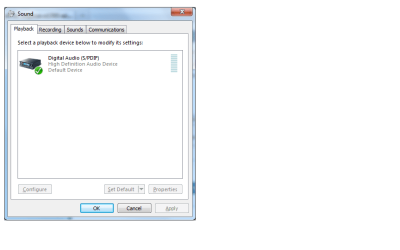
thanks...unfortunately it doesn't give me an option for speakers...just a high-definition audio device that doesn't seem to be working
 

My Computer My Computer

At a glance

Windows 7
OS
Windows 7

My Computer My Computer

At a glance

Windows 7 ultimate 64 bit / XP Home sp3intel Core 2 Duo E8400 3.0ghz8 gigs 1066 OCZ Fata1tyEVGA GTX 580 Call of Duty Black Ops Edition
Computer Manufacturer/Model Number
Self Built
OS
Windows 7 ultimate 64 bit / XP Home sp3
CPU
intel Core 2 Duo E8400 3.0ghz
Motherboard
Asus P5ND bios 1401
Memory
8 gigs 1066 OCZ Fata1ty
Graphics Card(s)
EVGA GTX 580 Call of Duty Black Ops Edition
Sound Card
Creative Soundblaster Audigy 2zs
Monitor(s) Displays
Asus 24in LCD's 2MS X2
Screen Resolution
1920x1080p @60Hz
Hard Drives
WD Caviar 500 Black/ WD Caviar 200 Blue
PSU
OCZ 700W GameXtreme
Case
NZXT Apollo
Cooling
Corsair H50 CPU/120mm x3 /60mm x2 /Corsair Dominator Ram
Keyboard
Logitech Bluetooth Wireless MX5000
Mouse
Logitech Bluetooth Wireless MX1000
Internet Speed
Download 19.83 Upload 0.97
Other Info
Logitech Z2300 Speakers/ Bose Noise Cancelling Headphones/Avermedia PCI-e Hybrid TV Bravo/Epson NX415 all in one/ 4 Port Powered USB Hub/ LG 10x Bluray Burner /TSST Corp DVDRW External
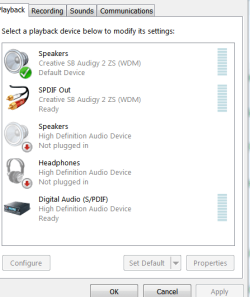
Is this what you mean?
moz-screenshot-2.png
moz-screenshot.png
moz-screenshot-1.png
 

Attachments

  • sound screen shot.png
    sound screen shot.png
    12.8 KB · Views: 144

My Computer My Computer

At a glance

Windows 7
OS
Windows 7
I just installed Windows 7 on my Dell Inspiron e1705 laptop and now have no sound at all, either on the www or playing CDs. I can't find anything anywhere that says there's a specific compatibility problem. Has anyone heard of this issue, and possibly of a solution? Thanks!

yes I have heard of and had it on my inspiron 1525. I tried every dell driver known to man. no good. I finally tried an older driver from MS. Presto. Mine is 32bit. If your Hardware Id in device manger match these it should work Pictures to follow.
 
Last edited:

My Computer My Computer

At a glance

Win 8 Release candidate 8400[email protected]4 gigsNvidia 9600M
Computer Manufacturer/Model Number
HP Pavillion dv-7 1005 Tx
OS
Win 8 Release candidate 8400
CPU
[email protected]
Memory
4 gigs
Graphics Card(s)
Nvidia 9600M
Sound Card
HD built-in
Monitor(s) Displays
17" Wxga
Screen Resolution
1440x900
Cooling
none
Internet Speed
45Mb down 5Mb up
I apologize I wasn't clear on my request. Go to your device manager. start menu> computer right click it then manage(this is how I do it) then click left device manager. go down the list to sound video and game controllers left click the arrow this will expand that heading and post a snip. I'm looking for your sound device, to try and figure out why your only getting the HD window in control panel>sound. this is what mine looks like sound devices.PNG

device manager sound.PNG
 

My Computer My Computer

At a glance

Windows 7 ultimate 64 bit / XP Home sp3intel Core 2 Duo E8400 3.0ghz8 gigs 1066 OCZ Fata1tyEVGA GTX 580 Call of Duty Black Ops Edition
Computer Manufacturer/Model Number
Self Built
OS
Windows 7 ultimate 64 bit / XP Home sp3
CPU
intel Core 2 Duo E8400 3.0ghz
Motherboard
Asus P5ND bios 1401
Memory
8 gigs 1066 OCZ Fata1ty
Graphics Card(s)
EVGA GTX 580 Call of Duty Black Ops Edition
Sound Card
Creative Soundblaster Audigy 2zs
Monitor(s) Displays
Asus 24in LCD's 2MS X2
Screen Resolution
1920x1080p @60Hz
Hard Drives
WD Caviar 500 Black/ WD Caviar 200 Blue
PSU
OCZ 700W GameXtreme
Case
NZXT Apollo
Cooling
Corsair H50 CPU/120mm x3 /60mm x2 /Corsair Dominator Ram
Keyboard
Logitech Bluetooth Wireless MX5000
Mouse
Logitech Bluetooth Wireless MX1000
Internet Speed
Download 19.83 Upload 0.97
Other Info
Logitech Z2300 Speakers/ Bose Noise Cancelling Headphones/Avermedia PCI-e Hybrid TV Bravo/Epson NX415 all in one/ 4 Port Powered USB Hub/ LG 10x Bluray Burner /TSST Corp DVDRW External
Thank you...you folks are all being really helpful. I don't see anything in Window 7's control panels that is labeled "high definition audio device". just the screen shot I posted earlier. maybe I'm not looking in the right place?
 

My Computer My Computer

At a glance

Windows 7
OS
Windows 7
I use the Vista driver from Dell's website for my e1705, Sigmatel.
Drivers and Downloads

However if you don't have the Sigmatel...
 

My Computer My Computer

At a glance

Windows 10 Pro (x64)Intel Core i7-3930K (3.2GHz - 4.5GHz)4x Samsung 4GB PC3-12800 DDR3 (16GB 1600MHz)Nvidia Geforce GTX 690
Computer type
PC/Desktop
Computer Manufacturer/Model Number
Alienware Aurora ALX R4
OS
Windows 10 Pro (x64)
CPU
Intel Core i7-3930K (3.2GHz - 4.5GHz)
Motherboard
Alienware Aurora-R4 x79
Memory
4x Samsung 4GB PC3-12800 DDR3 (16GB 1600MHz)
Graphics Card(s)
Nvidia Geforce GTX 690
Sound Card
SteelSeries Siberia Elite
Monitor(s) Displays
Dell UltraSharp U3011
Screen Resolution
2560x1600
Hard Drives
Samsung 850 Pro 256 GB, Seagate 1TB Desktop Hybrid HDD, 2x Western Digital 4TB Green HDD
PSU
875W Some Dell PSU <.<
Case
Alienware Aurora ALX
Cooling
Custom Liquid Cooling (EK CPU & GPU blocks) dual EK 480RAD
Keyboard
Logitech G710+ Mechanical
Mouse
Logitech G700s
Internet Speed
Verizon Fios (50 mbps average)
Other Info
Server: Intel NUC D54250WYK: i5-4250U, 16GB, 256 GB mSATA, Windows Server 2012 R2
I've tried downloading that as well but there's also something screwy with the Dell drivers and downloads site (in other words it's not letting me download it...even with an account). Ugh...
 

My Computer My Computer

At a glance

Windows 7
OS
Windows 7
Htiberius, you were right...IT WORKED! Thanks A LOT to everyone that tried to help. You're all great!
 

My Computer My Computer

At a glance

Windows 7
OS
Windows 7
Sweet...glad the link worked! Other than the sound, the only other driver I had to download was for the touchpad. The whole "clicking by touching" and not being able to scroll was driving me mad!

Cheers! Now I can watch Netflix again!
 

My Computer My Computer

At a glance

Windows 7
OS
Windows 7
Back
Top