crossfireltd
New member
- Local time
- 12:49 AM
- Messages
- 29
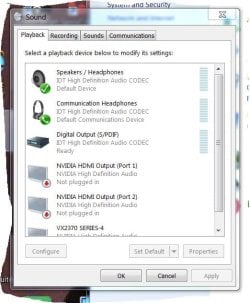
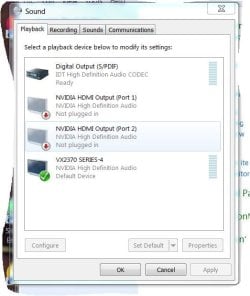
The sound on my HP Envy Pheonix 810-135qe was working fine yesterday, turn on the machine and there is no sound from any device at this time. I cannot get sound from the monitor speakers, external PC speakers or the headphone jack. Also I cannot see the speakers in the device manager. Would a system restore to a previous date correct the problem? I have performed all the tests that Windows provides, but to no avail. Any help will be greatly appreciated.
System info:
HP Envy Phoenix 810-135qe
10GB RAM
OS Version: Microsoft Windows 7 Professional, Service Pack 1, 64 bit
Processor: Intel(R) Core(TM) i7-4770 CPU @ 3.40GHz, Intel64 Family 6 Model 60 Stepping 3
Processor Count: 8
RAM: 10193 Mb
Graphics Card: NVIDIA GeForce GT 640, -1 Mb
Hard Drives: C: 1846 GB (1707 GB Free); D: 16 GB (1 GB Free); F: 931 GB (0 GB Free);
Motherboard: Hewlett-Packard, 2AF3
Antivirus: Spybot - Search and Destroy, Enabled and Updated
Windows 7 Professional 64-bit Service Pack 1
System info:
HP Envy Phoenix 810-135qe
10GB RAM
OS Version: Microsoft Windows 7 Professional, Service Pack 1, 64 bit
Processor: Intel(R) Core(TM) i7-4770 CPU @ 3.40GHz, Intel64 Family 6 Model 60 Stepping 3
Processor Count: 8
RAM: 10193 Mb
Graphics Card: NVIDIA GeForce GT 640, -1 Mb
Hard Drives: C: 1846 GB (1707 GB Free); D: 16 GB (1 GB Free); F: 931 GB (0 GB Free);
Motherboard: Hewlett-Packard, 2AF3
Antivirus: Spybot - Search and Destroy, Enabled and Updated
Windows 7 Professional 64-bit Service Pack 1
Attachments
Last edited:
My Computer
At a glance
Windows 7 Professional 64-bit Service Pack 1Intel(R) Core(TM) i7-4770 CPU @ 3.40GHz10GBNVIDIA High Definition Audio
- Computer type
- PC/Desktop
- Computer Manufacturer/Model Number
- HP ENVY Phoenix 810-135qe
- OS
- Windows 7 Professional 64-bit Service Pack 1
- CPU
- Intel(R) Core(TM) i7-4770 CPU @ 3.40GHz
- Motherboard
- 2AF3 1.0
- Memory
- 10GB
- Graphics Card(s)
- NVIDIA High Definition Audio
- Hard Drives
- San Disk SDSA6DM-016G-100 SCSI
ST2000DM-001-1CH164 SCSI
- Antivirus
- Norton Security Suite, Spy Bot Pro - S&D+AV ver. 2.5.42.0
- Browser
- Mozilla Firefox, Google Chrome