Sound from some programs, no sound from others

perkinw

New member
Member
Local time
8:56 AM
Messages
83
I have speakers attached to the 3.5mm jack on the rear panel of my PC. No other sound devices are attached.

[EDIT: I can't figure out how to get google photos links to display inline]

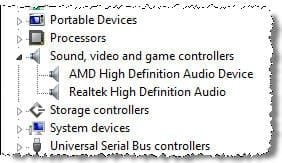
In Device Manager, I see two sound cards:

K2Qbm7UZxS2CCHZh9


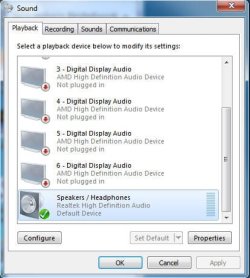
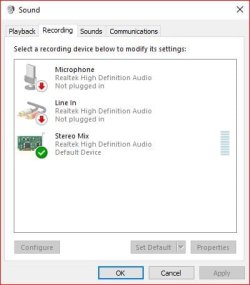
In Control Panel -> Sound I see this:

jnbmZ3zqVerQ9Ctc9


The properties for the "not plugged in" devices all give Jack Information as "HDMI Digital Jack." Nothing is plugged into the HDMI jack.

Here's the problem:

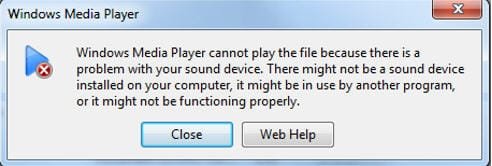
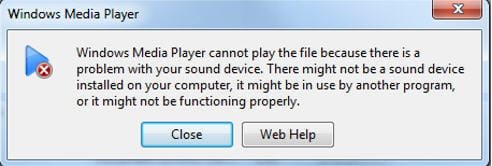
If I play an mp3 file in Windows Media player, there's no sound. I get an error message:
SKS66RxQi6wpY1vB8


If I try to play the same mp3 in VLC, there's no sound.

I get sound in from the following: iTunes, audio and video in the browser, and all system sounds.

Is the problem that VLC and Windows Media Player are somehow trying to send sound to the AMD audio? If so, how do I tell them to use Realtek audio so I get sound from the speakers?
 

Attachments
  • device manager sound.jpg
    device manager sound.jpg
    13 KB · Views: 17
  • sound.jpg
    sound.jpg
    33.2 KB · Views: 17
  • windows media player error.jpg
    windows media player error.jpg
    17.4 KB · Views: 17
Last edited:

My Computer My Computer

Computer type
PC/Desktop
Computer Manufacturer/Model Number
Dell Studio MT
OS
Microsoft Windows 7 Professional 64-bit 7601 Multiprocessor Free Service Pack 1
CPU
Intel(R) Core(TM) i7-4790 CPU @ 3.60GHz
Motherboard
Dell Inc. 0KWVT8
Memory
24.00 GB
Graphics Card(s)
AMD Radeon(TM) R9 270
Sound Card
(1) AMD High Definition Audio Device (2) Realtek High Defi
Monitor(s) Displays
Sun CRT
Screen Resolution
1920 x 1200 x 32 bits (4294967296 colors) @ 60 Hz
Hard Drives
(1) Crucial_ CT256MX100SSD1 SCSI Disk Device (2) Intel Raid 1 Volume SCSI Disk Device (3) SK hynix SC210 mSAT SCSI Disk Device (4) CF/MD Card (5) MS/Pro/Duo Card (6) SD/mini-MMC/RS Card (7) SM/xD Card
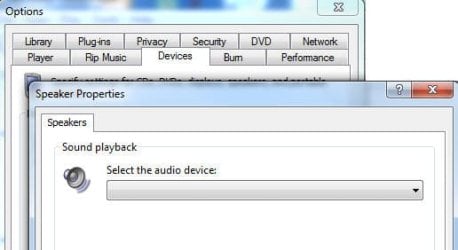
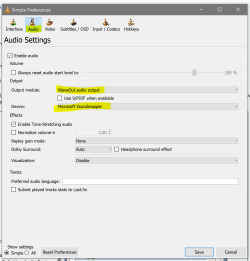
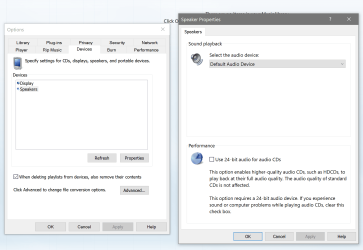
Windows media player should be using the one selected in windows. For VLC though go to tools/preferences and pick audio then Wave out and select the device you want. For WMP hit alt then tools/options and under devices go to the properties of speakers and pick your device.
 

Attachments

  • sound.PNG
    sound.PNG
    37.9 KB · Views: 1
  • sound 2.PNG
    sound 2.PNG
    101.4 KB · Views: 1

My Computer My Computer

Computer type
PC/Desktop
Computer Manufacturer/Model Number
Custom
OS
10 Pro x64
CPU
Ryzen 9 3900X
Motherboard
Asrock x370 Tachi
Memory
64GB(4x16GB) DDR4
Graphics Card(s)
EVGA 1080ti FTW3
Sound Card
ASUS Xonar Essence STX (V4 Bursons), ODAC rev B, NFB-11, O2
Monitor(s) Displays
3xASUS PB278Q/R, Optoma HD142X
Screen Resolution
3x1440p, 1080p
Hard Drives
512GB 850 EVO(OS, Programs)
4TB (Movies)
3TB (Downloads)
3TB (Programs)
1TB HDD (Games)
2x6TB R1 (videos)
PSU
AX760
Case
Fractal Define R5
Cooling
NH-D15S
Keyboard
Massdrop Ctrl with Box Navy's
Mouse
G903, Alioth XXL Mat
Internet Speed
280/40
Antivirus
MBAM, ESET
Browser
Canary 64 Bit
Other Info
I also own a Thinkpad P50 Xeon 4K, X220T, X1C5
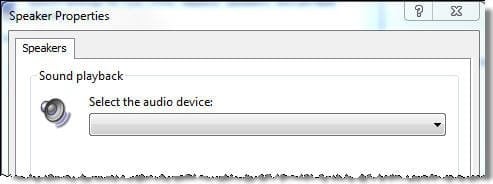
Your solution solved my problem with VLC. Thanks! However in WMP, the "Select the audio device" menu in Speaker Properties is empty.
 

Attachments

  • speaker properties.jpg
    speaker properties.jpg
    11.8 KB · Views: 12

My Computer My Computer

Computer type
PC/Desktop
Computer Manufacturer/Model Number
Dell Studio MT
OS
Microsoft Windows 7 Professional 64-bit 7601 Multiprocessor Free Service Pack 1
CPU
Intel(R) Core(TM) i7-4790 CPU @ 3.60GHz
Motherboard
Dell Inc. 0KWVT8
Memory
24.00 GB
Graphics Card(s)
AMD Radeon(TM) R9 270
Sound Card
(1) AMD High Definition Audio Device (2) Realtek High Defi
Monitor(s) Displays
Sun CRT
Screen Resolution
1920 x 1200 x 32 bits (4294967296 colors) @ 60 Hz
Hard Drives
(1) Crucial_ CT256MX100SSD1 SCSI Disk Device (2) Intel Raid 1 Volume SCSI Disk Device (3) SK hynix SC210 mSAT SCSI Disk Device (4) CF/MD Card (5) MS/Pro/Duo Card (6) SD/mini-MMC/RS Card (7) SM/xD Card
"Normally" the Default "Recording" device is set to Stereo Mix (could be labeled System Mixer on some older systems), or if you are using Creative SoundBlaster they call it "What You Hear". Most programs will default to that with options for other recording sources.

"Speakers" (PC sound card) should be set as default Playback Device.

In Device Manager, if you have a video card with an HDMI option, you will see the entry for the HDMI Audio and also one entry for the PC sound card driver, such as Realtek, Conexant, etc. If you only see "High Definition Audio" that is the generic, basic function, Windows installed sound driver and if that is the case you need to install the correct hardware sound driver (which may fix your problems).

Here is my Control Panel/Hardware and Sound/Sound Panel, Recording Tab section, which is common on many systems.
 

Attachments

  • Capture.JPG
    Capture.JPG
    26.9 KB · Views: 10

My Computer My Computer

Computer type
PC/Desktop
Computer Manufacturer/Model Number
My Own Build
OS
Windows 10 64 bit
CPU
Intel i7 6700K
Motherboard
ASUS ROG Maximus VIII Hero
Memory
16GB Corsair Dominator
Graphics Card(s)
Intel CPU Graphics
Sound Card
RealTek
Monitor(s) Displays
27" Dell S2719dgf
Screen Resolution
2560X1440
Hard Drives
1 TB Samsung 850 EVO SSD for Win 10 Pro
500GB Samsung 850 EVO SSD for Win 10 Insider
2 TB drive for backup
PSU
EVGA Supernova 750G2
Case
BeQuiet Silent Base 600
Cooling
Deepcool Captain 120EX
Keyboard
Microsoft Wireless 2000
Mouse
Microsoft wireless
Internet Speed
100 MB/sec (Cable)
Antivirus
Microsoft Defender and Malwarebytes
Browser
Edge/Firefox
Other Info
Cakewalk (Sonar) by BandLab and Studio One 4.1 Pro recording studio software. MOTU 896Mk3 Hybrid recording interface, Frontier Tranzport wireless control unit, Behringer X-Touch Control Surface.
Five USB connected optical drives for CD Audio production using Nero BurningROM
Hi Fireberd, thanks for replying. In my OP I included screenshots of the Device Manager and Sound. I do have two drivers in Device Manager (AMD and Realtek) exactly as you described. In Sound, the Playback tab shows Speakers / Heaphones (Realtek) is enabled and the default and the Digital Display Audio (AMD) is not plugged in. But I do not get sound from Windows Media player.

FYI I am not recording, only trying play back sound. But just to be safe, I set my Recording device to Stereo Mix as you did.
 

My Computer My Computer

Computer type
PC/Desktop
Computer Manufacturer/Model Number
Dell Studio MT
OS
Microsoft Windows 7 Professional 64-bit 7601 Multiprocessor Free Service Pack 1
CPU
Intel(R) Core(TM) i7-4790 CPU @ 3.60GHz
Motherboard
Dell Inc. 0KWVT8
Memory
24.00 GB
Graphics Card(s)
AMD Radeon(TM) R9 270
Sound Card
(1) AMD High Definition Audio Device (2) Realtek High Defi
Monitor(s) Displays
Sun CRT
Screen Resolution
1920 x 1200 x 32 bits (4294967296 colors) @ 60 Hz
Hard Drives
(1) Crucial_ CT256MX100SSD1 SCSI Disk Device (2) Intel Raid 1 Volume SCSI Disk Device (3) SK hynix SC210 mSAT SCSI Disk Device (4) CF/MD Card (5) MS/Pro/Duo Card (6) SD/mini-MMC/RS Card (7) SM/xD Card
Stereo Mix is used as the default audio source for many programs. Its basically "what you are hearing on the speakers". Its sort of a misnomer to call it a "Recording" device. If you wanted to record audio from the Internet, you must have Stereo Mix and that is the source for recording.

On my WMP (I have Win 10) there is a speaker icon to the right of the Play button, and you can mute and also control volume. Check that its not muted and that the volume is not at "off".
 

My Computer My Computer

Computer type
PC/Desktop
Computer Manufacturer/Model Number
My Own Build
OS
Windows 10 64 bit
CPU
Intel i7 6700K
Motherboard
ASUS ROG Maximus VIII Hero
Memory
16GB Corsair Dominator
Graphics Card(s)
Intel CPU Graphics
Sound Card
RealTek
Monitor(s) Displays
27" Dell S2719dgf
Screen Resolution
2560X1440
Hard Drives
1 TB Samsung 850 EVO SSD for Win 10 Pro
500GB Samsung 850 EVO SSD for Win 10 Insider
2 TB drive for backup
PSU
EVGA Supernova 750G2
Case
BeQuiet Silent Base 600
Cooling
Deepcool Captain 120EX
Keyboard
Microsoft Wireless 2000
Mouse
Microsoft wireless
Internet Speed
100 MB/sec (Cable)
Antivirus
Microsoft Defender and Malwarebytes
Browser
Edge/Firefox
Other Info
Cakewalk (Sonar) by BandLab and Studio One 4.1 Pro recording studio software. MOTU 896Mk3 Hybrid recording interface, Frontier Tranzport wireless control unit, Behringer X-Touch Control Surface.
Five USB connected optical drives for CD Audio production using Nero BurningROM
Muting or volume is not the problem. When I try to play an mp3 in WMP, I get the attached "There is a problem with your sound device" error message. Could the problem be that "the sound device is in use by another program?"
 

Attachments

  • windows media player error.jpg
    windows media player error.jpg
    17.4 KB · Views: 8

My Computer My Computer

Computer type
PC/Desktop
Computer Manufacturer/Model Number
Dell Studio MT
OS
Microsoft Windows 7 Professional 64-bit 7601 Multiprocessor Free Service Pack 1
CPU
Intel(R) Core(TM) i7-4790 CPU @ 3.60GHz
Motherboard
Dell Inc. 0KWVT8
Memory
24.00 GB
Graphics Card(s)
AMD Radeon(TM) R9 270
Sound Card
(1) AMD High Definition Audio Device (2) Realtek High Defi
Monitor(s) Displays
Sun CRT
Screen Resolution
1920 x 1200 x 32 bits (4294967296 colors) @ 60 Hz
Hard Drives
(1) Crucial_ CT256MX100SSD1 SCSI Disk Device (2) Intel Raid 1 Volume SCSI Disk Device (3) SK hynix SC210 mSAT SCSI Disk Device (4) CF/MD Card (5) MS/Pro/Duo Card (6) SD/mini-MMC/RS Card (7) SM/xD Card

My Computer My Computer

Computer type
PC/Desktop
Computer Manufacturer/Model Number
My Own Build
OS
Windows 10 64 bit
CPU
Intel i7 6700K
Motherboard
ASUS ROG Maximus VIII Hero
Memory
16GB Corsair Dominator
Graphics Card(s)
Intel CPU Graphics
Sound Card
RealTek
Monitor(s) Displays
27" Dell S2719dgf
Screen Resolution
2560X1440
Hard Drives
1 TB Samsung 850 EVO SSD for Win 10 Pro
500GB Samsung 850 EVO SSD for Win 10 Insider
2 TB drive for backup
PSU
EVGA Supernova 750G2
Case
BeQuiet Silent Base 600
Cooling
Deepcool Captain 120EX
Keyboard
Microsoft Wireless 2000
Mouse
Microsoft wireless
Internet Speed
100 MB/sec (Cable)
Antivirus
Microsoft Defender and Malwarebytes
Browser
Edge/Firefox
Other Info
Cakewalk (Sonar) by BandLab and Studio One 4.1 Pro recording studio software. MOTU 896Mk3 Hybrid recording interface, Frontier Tranzport wireless control unit, Behringer X-Touch Control Surface.
Five USB connected optical drives for CD Audio production using Nero BurningROM
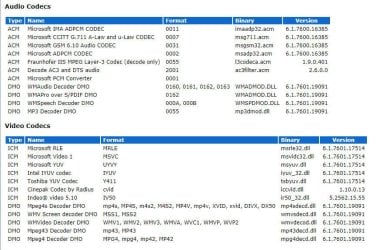
Hi fireberd, These are the codecs which are reported by Windows Media Player. Am I missing one that I need? Or should I just go ahead and install KLite codec pack (assuming it won't interfere with any of the codecs already installed ). In my original post, I mentioned that I can play mp3's in iTunes. I can also play them in VLC after I made your fix. WMP is the only program still not able to play mp3's. Thanks.
 

Attachments

  • audio and video codecs (from Microsoft Media Player).jpg
    audio and video codecs (from Microsoft Media Player).jpg
    89.1 KB · Views: 1

My Computer My Computer

Computer type
PC/Desktop
Computer Manufacturer/Model Number
Dell Studio MT
OS
Microsoft Windows 7 Professional 64-bit 7601 Multiprocessor Free Service Pack 1
CPU
Intel(R) Core(TM) i7-4790 CPU @ 3.60GHz
Motherboard
Dell Inc. 0KWVT8
Memory
24.00 GB
Graphics Card(s)
AMD Radeon(TM) R9 270
Sound Card
(1) AMD High Definition Audio Device (2) Realtek High Defi
Monitor(s) Displays
Sun CRT
Screen Resolution
1920 x 1200 x 32 bits (4294967296 colors) @ 60 Hz
Hard Drives
(1) Crucial_ CT256MX100SSD1 SCSI Disk Device (2) Intel Raid 1 Volume SCSI Disk Device (3) SK hynix SC210 mSAT SCSI Disk Device (4) CF/MD Card (5) MS/Pro/Duo Card (6) SD/mini-MMC/RS Card (7) SM/xD Card
The AMD sound device is the digital audio of your GPU, if you don't want that conflicting if your not using audio over HDMI then I suggest you disable that sound device in device manager leaving just the realtek one then install the newest driver by extracting the cab file you download from the section front page for realtek on windows 7.

Latest Realtek HD Audio Driver Version - Windows 7 Help Forums (June 27th one)
 

My Computer My Computer

Computer type
PC/Desktop
Computer Manufacturer/Model Number
Custom
OS
10 Pro x64
CPU
Ryzen 9 3900X
Motherboard
Asrock x370 Tachi
Memory
64GB(4x16GB) DDR4
Graphics Card(s)
EVGA 1080ti FTW3
Sound Card
ASUS Xonar Essence STX (V4 Bursons), ODAC rev B, NFB-11, O2
Monitor(s) Displays
3xASUS PB278Q/R, Optoma HD142X
Screen Resolution
3x1440p, 1080p
Hard Drives
512GB 850 EVO(OS, Programs)
4TB (Movies)
3TB (Downloads)
3TB (Programs)
1TB HDD (Games)
2x6TB R1 (videos)
PSU
AX760
Case
Fractal Define R5
Cooling
NH-D15S
Keyboard
Massdrop Ctrl with Box Navy's
Mouse
G903, Alioth XXL Mat
Internet Speed
280/40
Antivirus
MBAM, ESET
Browser
Canary 64 Bit
Other Info
I also own a Thinkpad P50 Xeon 4K, X220T, X1C5
I see an MP3 decoder, but it may be specifically for one program. I would install the K-Lite Codec pack and see if that fixes it. It won't hurt. I used to use that when I had Vista and Win 7.
 

My Computer My Computer

Computer type
PC/Desktop
Computer Manufacturer/Model Number
My Own Build
OS
Windows 10 64 bit
CPU
Intel i7 6700K
Motherboard
ASUS ROG Maximus VIII Hero
Memory
16GB Corsair Dominator
Graphics Card(s)
Intel CPU Graphics
Sound Card
RealTek
Monitor(s) Displays
27" Dell S2719dgf
Screen Resolution
2560X1440
Hard Drives
1 TB Samsung 850 EVO SSD for Win 10 Pro
500GB Samsung 850 EVO SSD for Win 10 Insider
2 TB drive for backup
PSU
EVGA Supernova 750G2
Case
BeQuiet Silent Base 600
Cooling
Deepcool Captain 120EX
Keyboard
Microsoft Wireless 2000
Mouse
Microsoft wireless
Internet Speed
100 MB/sec (Cable)
Antivirus
Microsoft Defender and Malwarebytes
Browser
Edge/Firefox
Other Info
Cakewalk (Sonar) by BandLab and Studio One 4.1 Pro recording studio software. MOTU 896Mk3 Hybrid recording interface, Frontier Tranzport wireless control unit, Behringer X-Touch Control Surface.
Five USB connected optical drives for CD Audio production using Nero BurningROM
I disabled AMD, but no change in results.

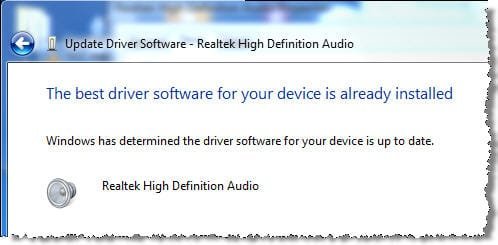
I downloaded the latest driver by following the link you sent. It is version 6.0.1.8199 dated 6/27/2017. My current RealTek driver is version 6.0.1.7560 dated 7/15/2015. I extracted the contents of the cab file into a folder. I used the Update Driver... button in the Realtek driver properties to browse to the folder. But hen I clicked Next, Windows gave me the message below.
 

Attachments

  • update driver software.jpg
    update driver software.jpg
    18.3 KB · Views: 7

My Computer My Computer

Computer type
PC/Desktop
Computer Manufacturer/Model Number
Dell Studio MT
OS
Microsoft Windows 7 Professional 64-bit 7601 Multiprocessor Free Service Pack 1
CPU
Intel(R) Core(TM) i7-4790 CPU @ 3.60GHz
Motherboard
Dell Inc. 0KWVT8
Memory
24.00 GB
Graphics Card(s)
AMD Radeon(TM) R9 270
Sound Card
(1) AMD High Definition Audio Device (2) Realtek High Defi
Monitor(s) Displays
Sun CRT
Screen Resolution
1920 x 1200 x 32 bits (4294967296 colors) @ 60 Hz
Hard Drives
(1) Crucial_ CT256MX100SSD1 SCSI Disk Device (2) Intel Raid 1 Volume SCSI Disk Device (3) SK hynix SC210 mSAT SCSI Disk Device (4) CF/MD Card (5) MS/Pro/Duo Card (6) SD/mini-MMC/RS Card (7) SM/xD Card
IMHO I don't think the sound drivers have anything to do with the problem. It has to be more a specific problem such as a missing codec.. The sound works fine with other applications.
 

My Computer My Computer

Computer type
PC/Desktop
Computer Manufacturer/Model Number
My Own Build
OS
Windows 10 64 bit
CPU
Intel i7 6700K
Motherboard
ASUS ROG Maximus VIII Hero
Memory
16GB Corsair Dominator
Graphics Card(s)
Intel CPU Graphics
Sound Card
RealTek
Monitor(s) Displays
27" Dell S2719dgf
Screen Resolution
2560X1440
Hard Drives
1 TB Samsung 850 EVO SSD for Win 10 Pro
500GB Samsung 850 EVO SSD for Win 10 Insider
2 TB drive for backup
PSU
EVGA Supernova 750G2
Case
BeQuiet Silent Base 600
Cooling
Deepcool Captain 120EX
Keyboard
Microsoft Wireless 2000
Mouse
Microsoft wireless
Internet Speed
100 MB/sec (Cable)
Antivirus
Microsoft Defender and Malwarebytes
Browser
Edge/Firefox
Other Info
Cakewalk (Sonar) by BandLab and Studio One 4.1 Pro recording studio software. MOTU 896Mk3 Hybrid recording interface, Frontier Tranzport wireless control unit, Behringer X-Touch Control Surface.
Five USB connected optical drives for CD Audio production using Nero BurningROM
I installed the K-Lite codec pack. Still no sound from WMP, and still the error message. Interestingly, the codecs displayed by WMP show NO CHANGES whatsoever after installing the codec pack! All versions and dates are the same as before.

What continues to bother me is that in WMP, Speaker Properties shows an empty menu for audio devices. I would expect to see Realtek in the menu.
 

Attachments

  • audio and video codecs from WMP after installing K-Lite Codec pack.jpg
    audio and video codecs from WMP after installing K-Lite Codec pack.jpg
    89.7 KB · Views: 1
  • WMP - no audio device.jpg
    WMP - no audio device.jpg
    19.4 KB · Views: 7

My Computer My Computer

Computer type
PC/Desktop
Computer Manufacturer/Model Number
Dell Studio MT
OS
Microsoft Windows 7 Professional 64-bit 7601 Multiprocessor Free Service Pack 1
CPU
Intel(R) Core(TM) i7-4790 CPU @ 3.60GHz
Motherboard
Dell Inc. 0KWVT8
Memory
24.00 GB
Graphics Card(s)
AMD Radeon(TM) R9 270
Sound Card
(1) AMD High Definition Audio Device (2) Realtek High Defi
Monitor(s) Displays
Sun CRT
Screen Resolution
1920 x 1200 x 32 bits (4294967296 colors) @ 60 Hz
Hard Drives
(1) Crucial_ CT256MX100SSD1 SCSI Disk Device (2) Intel Raid 1 Volume SCSI Disk Device (3) SK hynix SC210 mSAT SCSI Disk Device (4) CF/MD Card (5) MS/Pro/Duo Card (6) SD/mini-MMC/RS Card (7) SM/xD Card
I found someone else with the identical problem to mine here. The discussion went on for many posts, but no solution was found.

I ran dxdiag.exe. It says "No sound card was found." That probably explains the empty audio device menu.
 

Attachments

  • dxdiag - no sound card was found.jpg
    dxdiag - no sound card was found.jpg
    31 KB · Views: 7

My Computer My Computer

Computer type
PC/Desktop
Computer Manufacturer/Model Number
Dell Studio MT
OS
Microsoft Windows 7 Professional 64-bit 7601 Multiprocessor Free Service Pack 1
CPU
Intel(R) Core(TM) i7-4790 CPU @ 3.60GHz
Motherboard
Dell Inc. 0KWVT8
Memory
24.00 GB
Graphics Card(s)
AMD Radeon(TM) R9 270
Sound Card
(1) AMD High Definition Audio Device (2) Realtek High Defi
Monitor(s) Displays
Sun CRT
Screen Resolution
1920 x 1200 x 32 bits (4294967296 colors) @ 60 Hz
Hard Drives
(1) Crucial_ CT256MX100SSD1 SCSI Disk Device (2) Intel Raid 1 Volume SCSI Disk Device (3) SK hynix SC210 mSAT SCSI Disk Device (4) CF/MD Card (5) MS/Pro/Duo Card (6) SD/mini-MMC/RS Card (7) SM/xD Card
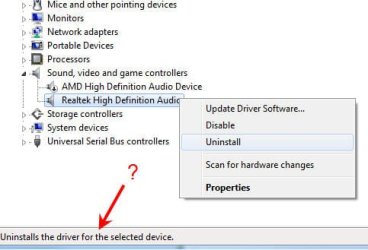
"Refresh" the Realtek. Go to the Device Manager. RIGHT click on the entry for the RealTek and then LEFT click "Uninstall". DO NOT uninstall the drivers. Restart the PC and when Windows starts it will detect and reinstall the sound. This is one of my "stock fixes" as this corrects any corruptions between Windows and the sound, and many flakey problems. If you are lucky it will fix yours.
 

My Computer My Computer

Computer type
PC/Desktop
Computer Manufacturer/Model Number
My Own Build
OS
Windows 10 64 bit
CPU
Intel i7 6700K
Motherboard
ASUS ROG Maximus VIII Hero
Memory
16GB Corsair Dominator
Graphics Card(s)
Intel CPU Graphics
Sound Card
RealTek
Monitor(s) Displays
27" Dell S2719dgf
Screen Resolution
2560X1440
Hard Drives
1 TB Samsung 850 EVO SSD for Win 10 Pro
500GB Samsung 850 EVO SSD for Win 10 Insider
2 TB drive for backup
PSU
EVGA Supernova 750G2
Case
BeQuiet Silent Base 600
Cooling
Deepcool Captain 120EX
Keyboard
Microsoft Wireless 2000
Mouse
Microsoft wireless
Internet Speed
100 MB/sec (Cable)
Antivirus
Microsoft Defender and Malwarebytes
Browser
Edge/Firefox
Other Info
Cakewalk (Sonar) by BandLab and Studio One 4.1 Pro recording studio software. MOTU 896Mk3 Hybrid recording interface, Frontier Tranzport wireless control unit, Behringer X-Touch Control Surface.
Five USB connected optical drives for CD Audio production using Nero BurningROM
I'm confused because the context menu for Uninstall says it will uninstall the drivers!
 

Attachments

  • uninstall Realtek High Definition Audio.jpg
    uninstall Realtek High Definition Audio.jpg
    22.9 KB · Views: 7

My Computer My Computer

Computer type
PC/Desktop
Computer Manufacturer/Model Number
Dell Studio MT
OS
Microsoft Windows 7 Professional 64-bit 7601 Multiprocessor Free Service Pack 1
CPU
Intel(R) Core(TM) i7-4790 CPU @ 3.60GHz
Motherboard
Dell Inc. 0KWVT8
Memory
24.00 GB
Graphics Card(s)
AMD Radeon(TM) R9 270
Sound Card
(1) AMD High Definition Audio Device (2) Realtek High Defi
Monitor(s) Displays
Sun CRT
Screen Resolution
1920 x 1200 x 32 bits (4294967296 colors) @ 60 Hz
Hard Drives
(1) Crucial_ CT256MX100SSD1 SCSI Disk Device (2) Intel Raid 1 Volume SCSI Disk Device (3) SK hynix SC210 mSAT SCSI Disk Device (4) CF/MD Card (5) MS/Pro/Duo Card (6) SD/mini-MMC/RS Card (7) SM/xD Card
On phone sorry for crappy formatting , after you hit uninstall it will have a separate check box for drivers, do not check it. Then hit okay and reboot.
 

My Computer My Computer

Computer type
PC/Desktop
Computer Manufacturer/Model Number
Custom
OS
10 Pro x64
CPU
Ryzen 9 3900X
Motherboard
Asrock x370 Tachi
Memory
64GB(4x16GB) DDR4
Graphics Card(s)
EVGA 1080ti FTW3
Sound Card
ASUS Xonar Essence STX (V4 Bursons), ODAC rev B, NFB-11, O2
Monitor(s) Displays
3xASUS PB278Q/R, Optoma HD142X
Screen Resolution
3x1440p, 1080p
Hard Drives
512GB 850 EVO(OS, Programs)
4TB (Movies)
3TB (Downloads)
3TB (Programs)
1TB HDD (Games)
2x6TB R1 (videos)
PSU
AX760
Case
Fractal Define R5
Cooling
NH-D15S
Keyboard
Massdrop Ctrl with Box Navy's
Mouse
G903, Alioth XXL Mat
Internet Speed
280/40
Antivirus
MBAM, ESET
Browser
Canary 64 Bit
Other Info
I also own a Thinkpad P50 Xeon 4K, X220T, X1C5
I refreshed the Realtek as you instructed. After restart, I saw "installing device driver software." Problem in Windows Media Player persists. WMP still does not see an audio device. Dxdiag.exe reports "No sound card was found." The problem seems unique to WMP, since I can play mp3's in VLC and iTunes. And I get all system sounds, sounds in browser (YouTube, etc.). Nothing has changed since refreshing Realtek.
 

Attachments

  • WMP - no audio device.jpg
    WMP - no audio device.jpg
    19.4 KB · Views: 6

My Computer My Computer

Computer type
PC/Desktop
Computer Manufacturer/Model Number
Dell Studio MT
OS
Microsoft Windows 7 Professional 64-bit 7601 Multiprocessor Free Service Pack 1
CPU
Intel(R) Core(TM) i7-4790 CPU @ 3.60GHz
Motherboard
Dell Inc. 0KWVT8
Memory
24.00 GB
Graphics Card(s)
AMD Radeon(TM) R9 270
Sound Card
(1) AMD High Definition Audio Device (2) Realtek High Defi
Monitor(s) Displays
Sun CRT
Screen Resolution
1920 x 1200 x 32 bits (4294967296 colors) @ 60 Hz
Hard Drives
(1) Crucial_ CT256MX100SSD1 SCSI Disk Device (2) Intel Raid 1 Volume SCSI Disk Device (3) SK hynix SC210 mSAT SCSI Disk Device (4) CF/MD Card (5) MS/Pro/Duo Card (6) SD/mini-MMC/RS Card (7) SM/xD Card
What about uninstalling Realtek (with "delete the driver software for this device" checked) and then reinstalling the driver from the manufacturer's web site? Earlier I tried doing an "update driver" but Windows told me the driver was already up-to-date.
 

My Computer My Computer

Computer type
PC/Desktop
Computer Manufacturer/Model Number
Dell Studio MT
OS
Microsoft Windows 7 Professional 64-bit 7601 Multiprocessor Free Service Pack 1
CPU
Intel(R) Core(TM) i7-4790 CPU @ 3.60GHz
Motherboard
Dell Inc. 0KWVT8
Memory
24.00 GB
Graphics Card(s)
AMD Radeon(TM) R9 270
Sound Card
(1) AMD High Definition Audio Device (2) Realtek High Defi
Monitor(s) Displays
Sun CRT
Screen Resolution
1920 x 1200 x 32 bits (4294967296 colors) @ 60 Hz
Hard Drives
(1) Crucial_ CT256MX100SSD1 SCSI Disk Device (2) Intel Raid 1 Volume SCSI Disk Device (3) SK hynix SC210 mSAT SCSI Disk Device (4) CF/MD Card (5) MS/Pro/Duo Card (6) SD/mini-MMC/RS Card (7) SM/xD Card
Back
Top