
BarraCuda93
New member
- Local time
- 2:18 PM
- Messages
- 4
Hi there, first of all nice job on this forum, as it seems this one is one of the most active for windows 7 help. I hope you guys can help me out.
My problems began after I clean re-installed W7. My rear audio jacks are not being recognised in device manager, and plugging in my headphones won't help. I disabled my front audio panels, because the front and rear jacks cant be used at the same time and my rear jacks have surround sound options, so I'm using those.
This setup has been working fine for 4 years, with me using the rear jacks for my 5.1 surround sound headset.
Specs:
- Windows 7 Ultimate x64
- ASRock P55M PRO motherboard ASRock > P55M Pro
According to ASRock: Audio - 7.1 CH HD Audio (VIA® VT1708S Audio Codec)
What I've tried to do / done already:
- Checked volume, sound ON/OFF and all that basic stuff
- Looked at Device Manager, see screenshot.
- Updated windows with windows updater
- Checked my headphones, they still work on other devices
- I enabled the on board sound in BIOS (maybe I did it wrong?)
- Downloaded the drivers from the asrock website, however, after using the setup.exe for the driver and restarting my computer, it's as if nothing changed.
- Did the same for the drivers from the VIA website.
NOTE sometimes after restarting after setting up a driver I get a black screen prior to logging onto my desktop saying: 'General Serial ATA Driver diskette (Y/N)?', saying NO will restart the pc, and then into the black screen with the question again, YES will say that it's not possible and restart all over again.
Screenshots
See how there's only 2 devices listed, where there I guess should be 6 jacks listed as well. This doesnt change when plugging in my headphones.
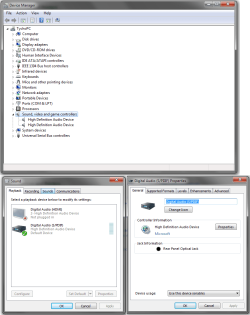
The fact that nothing shows up in my device manager and audio device manager is something I haven't seen yet when googling my problems. Also the fact that the downloaded drivers don't seem to work bothers me, maybe I'm using them wrong? I usually extract them from .zip files and then run setup.exe
I hope you guys may know what I can do next. I will check this thread as often as I can to provide more information if necessary.
My problems began after I clean re-installed W7. My rear audio jacks are not being recognised in device manager, and plugging in my headphones won't help. I disabled my front audio panels, because the front and rear jacks cant be used at the same time and my rear jacks have surround sound options, so I'm using those.
This setup has been working fine for 4 years, with me using the rear jacks for my 5.1 surround sound headset.
Specs:
- Windows 7 Ultimate x64
- ASRock P55M PRO motherboard ASRock > P55M Pro
According to ASRock: Audio - 7.1 CH HD Audio (VIA® VT1708S Audio Codec)
What I've tried to do / done already:
- Checked volume, sound ON/OFF and all that basic stuff
- Looked at Device Manager, see screenshot.
- Updated windows with windows updater
- Checked my headphones, they still work on other devices
- I enabled the on board sound in BIOS (maybe I did it wrong?)
- Downloaded the drivers from the asrock website, however, after using the setup.exe for the driver and restarting my computer, it's as if nothing changed.
- Did the same for the drivers from the VIA website.
NOTE sometimes after restarting after setting up a driver I get a black screen prior to logging onto my desktop saying: 'General Serial ATA Driver diskette (Y/N)?', saying NO will restart the pc, and then into the black screen with the question again, YES will say that it's not possible and restart all over again.
Screenshots
See how there's only 2 devices listed, where there I guess should be 6 jacks listed as well. This doesnt change when plugging in my headphones.
The fact that nothing shows up in my device manager and audio device manager is something I haven't seen yet when googling my problems.
Also the fact that the downloaded drivers don't seem to work bothers me, maybe I'm using them wrong? I usually extract them from .zip files and then run setup.exeI hope you guys may know what I can do next. I will check this thread as often as I can to provide more information if necessary.
My Computer
At a glance
Windows 7 Ultimate x64
- Computer type
- PC/Desktop
- Computer Manufacturer/Model Number
- Custom
- OS
- Windows 7 Ultimate x64
- Motherboard
- ASRock P55M Pro
- Antivirus
- Eset Smart Security
- Browser
- Chrome


