No sound in front panel jack

ckwoo1208

New member
Local time
7:43 AM
Messages
4
Hi, I recently upgraded from WXP to Win7 and ever since, I was not able to get any audio coming through my headphone which is plugged to the speaker port on the front panel of the PC. Speakers connected to the rear port works fine though. Can someone help?
 

My Computer My Computer

Computer type
PC/Desktop
Computer Manufacturer/Model Number
custom build
OS
Windows 7 Professional 64-bit SP1
CPU
Intel Pentium G645 @ 2.90GHz
Motherboard
ASUSTeK COMPUTER INC. P8B75-M LX (LGA1155)
Memory
8.00GB Dual-Channel DDR3 @ 665MHz (9-9-9-24)
Graphics Card(s)
Intel HD Graphics (ASUStek Computer Inc)
Sound Card
High Definition Audio Device
Monitor(s) Displays
SyncMaster
Screen Resolution
1280x1024@60Hz
Hard Drives
931GB Western Digital WDC WD10EZEX-00KUWA0 ATA Device (SATA)
298GB Seagate ST3320620AS ATA Device (SATA)
Antivirus
AVG
Hi, I recently upgraded from WXP to Win7 and ever since, I was not able to get any audio coming through my headphone which is plugged to the speaker port on the front panel of the PC. Speakers connected to the rear port works fine though. Can someone help?

Hello , when you unplug your headphone can you hear sound coming from your speaker?
 

My Computer My Computer

Computer type
Laptop
Computer Manufacturer/Model Number
Acer Aspire M5100
OS
Windows 8.1 64 bit
CPU
Windows 8.1 64-bit
Motherboard
Toshiba L745D
Memory
4096 MB RAM
Graphics Card(s)
Microsoft Basic Display Adapter
Sound Card
High Definition Audio Device
Monitor(s) Displays
1366x768
Screen Resolution
1366x768
Keyboard
Logitech Keyboard K800
Antivirus
MalwareBytes
Browser
Google Chrome
Hello , when you unplug your headphone can you hear sound coming from your speaker?

Hi, yes I am able to hear sound coming from my speaker regardless of whether the headphone is plugged into the front panel port or not. But no sound coming through my headphone at all.
 

My Computer My Computer

Computer type
PC/Desktop
Computer Manufacturer/Model Number
custom build
OS
Windows 7 Professional 64-bit SP1
CPU
Intel Pentium G645 @ 2.90GHz
Motherboard
ASUSTeK COMPUTER INC. P8B75-M LX (LGA1155)
Memory
8.00GB Dual-Channel DDR3 @ 665MHz (9-9-9-24)
Graphics Card(s)
Intel HD Graphics (ASUStek Computer Inc)
Sound Card
High Definition Audio Device
Monitor(s) Displays
SyncMaster
Screen Resolution
1280x1024@60Hz
Hard Drives
931GB Western Digital WDC WD10EZEX-00KUWA0 ATA Device (SATA)
298GB Seagate ST3320620AS ATA Device (SATA)
Antivirus
AVG
Hello , when you unplug your headphone can you hear sound coming from your speaker?

Hi, yes I am able to hear sound coming from my speaker regardless of whether the headphone is plugged into the front panel port or not. But no sound coming through my headphone at all.

You can try this tool from Microsoft, let me know if that fixes your problem.
Microsoft Fix It

Or you can try doing this:
1.) Right Click the volume speaker in the system tray
2.) Select playback devices
3.) Right click on the headphones and select Set as Default device
 

My Computer My Computer

Computer type
Laptop
Computer Manufacturer/Model Number
Acer Aspire M5100
OS
Windows 8.1 64 bit
CPU
Windows 8.1 64-bit
Motherboard
Toshiba L745D
Memory
4096 MB RAM
Graphics Card(s)
Microsoft Basic Display Adapter
Sound Card
High Definition Audio Device
Monitor(s) Displays
1366x768
Screen Resolution
1366x768
Keyboard
Logitech Keyboard K800
Antivirus
MalwareBytes
Browser
Google Chrome
Thanks for your prompt response Rawad. I tried the Microsoft Fix It tool as well as right-clicking the volume speaker icon in the system. Both ways, the PC was not able to detect any headphone device connected. It couldn't be a faulty hardware cos it was still working before my upgrade from WXP to W7 last week.

i saw there was a similar problem reported some time ago and tried following through, but the driver software provided in that thread don't seem to be detected on my machine.

http://www.sevenforums.com/sound-audio/115516-no-sound-front-panel-jack.html

really helpless... :(
 

My Computer My Computer

Computer type
PC/Desktop
Computer Manufacturer/Model Number
custom build
OS
Windows 7 Professional 64-bit SP1
CPU
Intel Pentium G645 @ 2.90GHz
Motherboard
ASUSTeK COMPUTER INC. P8B75-M LX (LGA1155)
Memory
8.00GB Dual-Channel DDR3 @ 665MHz (9-9-9-24)
Graphics Card(s)
Intel HD Graphics (ASUStek Computer Inc)
Sound Card
High Definition Audio Device
Monitor(s) Displays
SyncMaster
Screen Resolution
1280x1024@60Hz
Hard Drives
931GB Western Digital WDC WD10EZEX-00KUWA0 ATA Device (SATA)
298GB Seagate ST3320620AS ATA Device (SATA)
Antivirus
AVG
Thanks for your prompt response Rawad. I tried the Microsoft Fix It tool as well as right-clicking the volume speaker icon in the system. Both ways, the PC was not able to detect any headphone device connected. It couldn't be a faulty hardware cos it was still working before my upgrade from WXP to W7 last week.

i saw there was a similar problem reported some time ago and tried following through, but the driver software provided in that thread don't seem to be detected on my machine.

http://www.sevenforums.com/sound-audio/115516-no-sound-front-panel-jack.html

really helpless... :(

Try this method I found, if that method doesn't work I will do my best to contact somebody on this forum who can help you resolve your issue.

a. In the notification area, right click on the sound icon and select Playback devices.
b. Now, click on Speakers and then click Properties button.
c. In the Speaker Properties dialog box select “Don’t use this device” to disable Speakers in the Device usage dropdown list at the bottom.
d. Click Apply and then OK button
Note: Once you disable the speakers they will no more be visible on the Sound window.


Would you be able to provide a picture?
 

My Computer My Computer

Computer type
Laptop
Computer Manufacturer/Model Number
Acer Aspire M5100
OS
Windows 8.1 64 bit
CPU
Windows 8.1 64-bit
Motherboard
Toshiba L745D
Memory
4096 MB RAM
Graphics Card(s)
Microsoft Basic Display Adapter
Sound Card
High Definition Audio Device
Monitor(s) Displays
1366x768
Screen Resolution
1366x768
Keyboard
Logitech Keyboard K800
Antivirus
MalwareBytes
Browser
Google Chrome
Try this method I found, if that method doesn't work I will do my best to contact somebody on this forum who can help you resolve your issue.

a. In the notification area, right click on the sound icon and select Playback devices.
b. Now, click on Speakers and then click Properties button.
c. In the Speaker Properties dialog box select “Don’t use this device” to disable Speakers in the Device usage dropdown list at the bottom.
d. Click Apply and then OK button
Note: Once you disable the speakers they will no more be visible on the Sound window.


Would you be able to provide a picture?

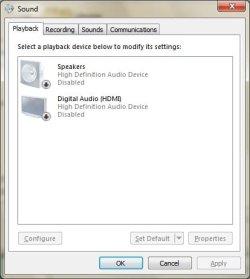
Thanks Rawad for helping. There are 2 devices showing up in the Playback devices window - Speakers and Digital Audio (HDMI). What I have done
PIC 1. disable Speakers, play an audio and attempt to listen through my headphone connected to the front panel - fail. no sound
PIC 2. disable both Speakers and Digital Audio (HDMI), play an audio and attempt to listen through my headphone connected to the front panel - fail. no sound
PIC 3. display on my audio system tray when both playback devices have been disabled.

Do let me know what else i can provide to help understand and solve the problem. Appreciated as always.
 

Attachments

  • 1.jpg
    1.jpg
    21 KB · Views: 12
  • 2.jpg
    2.jpg
    20.9 KB · Views: 12
  • 3.jpg
    3.jpg
    11.8 KB · Views: 0

My Computer My Computer

Computer type
PC/Desktop
Computer Manufacturer/Model Number
custom build
OS
Windows 7 Professional 64-bit SP1
CPU
Intel Pentium G645 @ 2.90GHz
Motherboard
ASUSTeK COMPUTER INC. P8B75-M LX (LGA1155)
Memory
8.00GB Dual-Channel DDR3 @ 665MHz (9-9-9-24)
Graphics Card(s)
Intel HD Graphics (ASUStek Computer Inc)
Sound Card
High Definition Audio Device
Monitor(s) Displays
SyncMaster
Screen Resolution
1280x1024@60Hz
Hard Drives
931GB Western Digital WDC WD10EZEX-00KUWA0 ATA Device (SATA)
298GB Seagate ST3320620AS ATA Device (SATA)
Antivirus
AVG
Back
Top