
Solved No sound - Windows only showing front jack and not rear jack

bobsy

New member
Local time
1:39 PM
Messages
3
Hi everyone,

I recently reinstalled Windows 7 pro on my PC. Sound was working fine before. Now Windows only shows a front jack in the sound playback device settings. There is no front jack, however, only a rear jack and it is not working. If I play music the levels monitor shows sound playing, but nothing comes out the rear 3.5mm headphones jack. Drivers all claim to be correct and up to date. I tried disabling the "Audio legacy front panel" in BIOS, and left audio set to enabled, to no avail. I attach a screenshot. Any suggestions?

Many thanks for any ideas!
 

Attachments
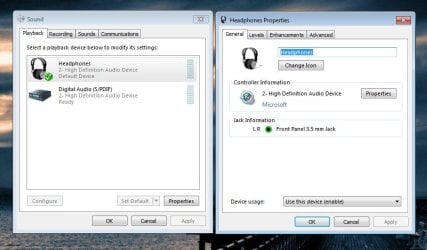
  • sound issues.jpg
    sound issues.jpg
    54.4 KB · Views: 50

My Computer My Computer

At a glance

Windows 7 Professional x64Intel core i3 550 @ 3.2GHz 3.2GHz
Computer Manufacturer/Model Number
na
OS
Windows 7 Professional x64
CPU
Intel core i3 550 @ 3.2GHz 3.2GHz
bobsy welcome to the Seven Forums.

You need to install the driver for your sound, as it is currently running on the default Windows audio driver. Can;t tell you what it is you need as you didn't include the make and model of either the computer or motherboard.
 

My Computer My Computer

At a glance

Win 7 Ultimate x64FX-8350 @ 4.6 GHz so farADATA XPG V1 Series Black 8GB DDR3 1600Sapphire R9 270x Dual-X
Computer type
PC/Desktop
Computer Manufacturer/Model Number
Me
OS
Win 7 Ultimate x64
CPU
FX-8350 @ 4.6 GHz so far
Motherboard
Asus M5A97 EVO
Memory
ADATA XPG V1 Series Black 8GB DDR3 1600
Graphics Card(s)
Sapphire R9 270x Dual-X
Sound Card
Xonar DGX w/ Corsair Vengence 1300
Monitor(s) Displays
Acer S232HL Abid
Screen Resolution
1920x1080
Hard Drives
120 GB OCZ Vertex 3
500 GB Seagate 7200.12
PSU
Antec Earthwatts 650W Green
Case
Antec Three Hundred
Cooling
Cooler Master 212 EVO
Keyboard
Logitech G510
Mouse
Logitech G500s
Internet Speed
35000/3000
Hi stormy13, many thanks for your reply. My PC was custom built and so doesn't have a make. It has an Intel Desktop Board. I can't find a model number written on it, unfortunately. Anyway - Intel has a driver update utility so I will try that and let you know how it goes. My Ethernet connection (also on-board) is also showing up as not working properly in Device Manager. I don't use it so it wasn't bothering me and I hadn't made the connection until now... :huh:
 

My Computer My Computer

At a glance

Windows 7 Professional x64Intel core i3 550 @ 3.2GHz 3.2GHz
Computer Manufacturer/Model Number
na
OS
Windows 7 Professional x64
CPU
Intel core i3 550 @ 3.2GHz 3.2GHz
And... bingo! Two problems solved in one go. A whole bunch of drivers needed updating. Moral of the story: Just because Windows says the drivers are up to date, it doesn't mean they are. Many thanks stormy13 for your help. By the way, it turns out I have a DQ57TM board.
 

My Computer My Computer

At a glance

Windows 7 Professional x64Intel core i3 550 @ 3.2GHz 3.2GHz
Computer Manufacturer/Model Number
na
OS
Windows 7 Professional x64
CPU
Intel core i3 550 @ 3.2GHz 3.2GHz

My Computer My Computer

At a glance

Win 7 Ultimate x64FX-8350 @ 4.6 GHz so farADATA XPG V1 Series Black 8GB DDR3 1600Sapphire R9 270x Dual-X
Computer type
PC/Desktop
Computer Manufacturer/Model Number
Me
OS
Win 7 Ultimate x64
CPU
FX-8350 @ 4.6 GHz so far
Motherboard
Asus M5A97 EVO
Memory
ADATA XPG V1 Series Black 8GB DDR3 1600
Graphics Card(s)
Sapphire R9 270x Dual-X
Sound Card
Xonar DGX w/ Corsair Vengence 1300
Monitor(s) Displays
Acer S232HL Abid
Screen Resolution
1920x1080
Hard Drives
120 GB OCZ Vertex 3
500 GB Seagate 7200.12
PSU
Antec Earthwatts 650W Green
Case
Antec Three Hundred
Cooling
Cooler Master 212 EVO
Keyboard
Logitech G510
Mouse
Logitech G500s
Internet Speed
35000/3000
Back
Top