
No sound in windows 7 after BSOD, tested with 3 different soundcards

peterenton

New member
Local time
10:48 PM
Messages
4
i think i posted thisd in the wrong place (under drivers)
After an update last night (but not SP1 - this is now installing) there was a BSOD on bootup and then no sound at all. I have an external card (Fast Track) for recording, an internal card for watching movies (x-Fi titanium) and the onboard which i have disabled. None of these are picked up by Windows 7 - the audio in the taskbar says "No Audio Output Device Available." They appear in Device Manager, but with a little yellow ! sign by them, and it says driver installed but "Code 39." This is definately a Windows error - I plugged the fasttrack into a mac and it worked fine, so the soundcard is not burnt out.
I tried rolling back the drivers - this did nothing, and it only gave me one choice to roll back with. I have a deadline to export music by and its giving me a major headache.
Anyone have any idea why Windows would suddenly decide not to see sound cards?
i have tried reinstalling drivers, unplugging the internal and external soundcards, scanning for new hardware and nothing works.
Any help would be appreciated, Pete
 

My Computer My Computer

At a glance

Windows & Home Premium 64biti7 9206 gigRadeon HD4870
OS
Windows & Home Premium 64bit
CPU
i7 920
Motherboard
Asus
Memory
6 gig
Graphics Card(s)
Radeon HD4870
Sound Card
Creative XFI titanium and Fast TRack usb

My Computer My Computer

At a glance

Windows 7 Ultimate x64 Service Pack 1 (Build ...Intel Core 2 Quad Q6600 (G0 Kentsfield) LGA77...Corsair TW3X4G1333C9A 4GB PC-10600 (2x XMS3 2GB)ASUS nVIDIA GeForce 560
OS
Windows 7 Ultimate x64 Service Pack 1 (Build 6.1.7601)
CPU
Intel Core 2 Quad Q6600 (G0 Kentsfield) LGA775 (FC-LGA6)
Motherboard
GIGABYTE GA-EP35C-DS3R (Rev. 2.1)
Memory
Corsair TW3X4G1333C9A 4GB PC-10600 (2x XMS3 2GB)
Graphics Card(s)
ASUS nVIDIA GeForce 560
Sound Card
RealTek ALC885/889A/890
Monitor(s) Displays
ChiMei CMV CT-730D 17inch (LCD Monitor)
Screen Resolution
1280-1024 60Hertz (Ture Colour 32bit)
Hard Drives
2x Barracuda 7200.10 SATA 3.0Gb/s 160-GB Hard Drive ST3160815AS (AHCI)
PSU
ANTEC 750w Earthwatts
Case
Thermaltake Shark (VA7000SWA ATX) Full Tower
Cooling
Front 120mm fan (1400 RPM) /Rear 120mm (1400 RPM) blue LED
Keyboard
Labtec Media Desktop Y-SAD65
Mouse
Razer DeathAdder 3G Infrared Sensor (1800DPI)
Internet Speed
Telstra BigPond Elite Liberty ADSL2+ 24Mbps/256kbps
Other Info
ASUS PCE-N13 802.11n Wireless LAN card
There are two separate issues here. First the Fast Track (I have an MAudio Fastrack Ultra 8R that I use with Sonar) should be disconnected until you get your PC audio fixed. Second, since you are using a separate sound card, the Integrated audio needs to be disabled in the BIOS as conflicts between devices can also cause a Code 39 error (along with a driver problem).

After disabling the Integrated audio, boot up and check the Device Manager. If you still have the Code 39 for the SoundBlaster, uninstall the SoundBlaster (DO NOT check the box to uninstall the drivers) in the Device Manager and then restart and when Windows starts it should detect and reinstall it. If there was a corruption between the SoundBlaster and Windows this will usually fix it. If it's still bad after this, reinstall the SoundBlaster drivers. If you are still having problems, reinstall the motherboard chipset drivers, restart the PC and check the status.
 

My Computer My Computer

At a glance

Windows 10 64 bitIntel i7 6700K16GB Corsair DominatorIntel CPU Graphics
Computer type
PC/Desktop
Computer Manufacturer/Model Number
My Own Build
OS
Windows 10 64 bit
CPU
Intel i7 6700K
Motherboard
ASUS ROG Maximus VIII Hero
Memory
16GB Corsair Dominator
Graphics Card(s)
Intel CPU Graphics
Sound Card
RealTek
Monitor(s) Displays
27" Dell S2719dgf
Screen Resolution
2560X1440
Hard Drives
1 TB Samsung 850 EVO SSD for Win 10 Pro
500GB Samsung 850 EVO SSD for Win 10 Insider
2 TB drive for backup
PSU
EVGA Supernova 750G2
Case
BeQuiet Silent Base 600
Cooling
Deepcool Captain 120EX
Keyboard
Microsoft Wireless 2000
Mouse
Microsoft wireless
Internet Speed
100 MB/sec (Cable)
Antivirus
Microsoft Defender and Malwarebytes
Browser
Edge/Firefox
Other Info
Cakewalk (Sonar) by BandLab and Studio One 4.1 Pro recording studio software. MOTU 896Mk3 Hybrid recording interface, Frontier Tranzport wireless control unit, Behringer X-Touch Control Surface.
Five USB connected optical drives for CD Audio production using Nero BurningROM
Yes, the fast track is removed at present. Onboard has been disabled - this set up has been working fine until the last update, in which the above happened. I have done all you have recommended except reinstalling the motherboard chipset drivers. I still think its related to the last windows update - though have no idea how. Its just very weird how Windows doesnt recognise anything at all sound related. a quick google revealed that I am not alone, but couldnt not find any threads on this forum so thought i would start my own. Thanks for the help, will reinstall the motherboard chipset drivers.

Just one thing - I did check the box to uninstall the drivers at one point in one of my many attempts, then reinstalled them. Is there a reason that should not be checked (i tried with and without, thought a fresh look might help.)

Im fairly sure this is a windows update issue, on google people were reverting back using system restore and not installing the updates, and this solved the issue. however, due to ( i think lack of space) there not being that option im kinda stuck. would prefer not to have to reinstall windows. However, I habe got my music program to work so have managed to export my work, so at least Its not so much of a hurry.
Thanks again, pete
 

My Computer My Computer

At a glance

Windows & Home Premium 64biti7 9206 gigRadeon HD4870
OS
Windows & Home Premium 64bit
CPU
i7 920
Motherboard
Asus
Memory
6 gig
Graphics Card(s)
Radeon HD4870
Sound Card
Creative XFI titanium and Fast TRack usb
Sorry - didnt see the BSOD post. Here is the info you asked for:

Thanks again, Pete
 

Attachments

My Computer My Computer

At a glance

Windows & Home Premium 64biti7 9206 gigRadeon HD4870
OS
Windows & Home Premium 64bit
CPU
i7 920
Motherboard
Asus
Memory
6 gig
Graphics Card(s)
Radeon HD4870
Sound Card
Creative XFI titanium and Fast TRack usb
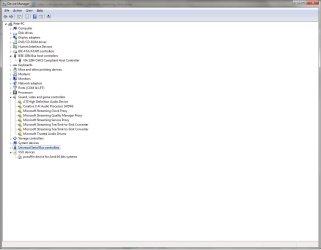
Another odd thing - devices showing up now include a whole host of bizarre things ive never seen before:
 

Attachments

  • weirdsounddevices.jpg
    weirdsounddevices.jpg
    63.5 KB · Views: 75

My Computer My Computer

At a glance

Windows & Home Premium 64biti7 9206 gigRadeon HD4870
OS
Windows & Home Premium 64bit
CPU
i7 920
Motherboard
Asus
Memory
6 gig
Graphics Card(s)
Radeon HD4870
Sound Card
Creative XFI titanium and Fast TRack usb
The Microsoft stuff appears, from google searches, to be related to possibly a web cam. I've never seen those entries before.

You should have a list of updates that were installed. You could try uninstalling them, one at a time, if one of those did cause the problems - if you can't do a System Restore.

When I "uninstall" a device in the Device Manager I don't normally uninstall the drivers too. The uninstall/reinstall by Windows is a "catchall" that fixes a lot of flakey problems. If that doesn't do it then an uninstall along with drivers is a next step then reinstall - but do not let Windows install drivers - install the manufacturers drivers.
 

My Computer My Computer

At a glance

Windows 10 64 bitIntel i7 6700K16GB Corsair DominatorIntel CPU Graphics
Computer type
PC/Desktop
Computer Manufacturer/Model Number
My Own Build
OS
Windows 10 64 bit
CPU
Intel i7 6700K
Motherboard
ASUS ROG Maximus VIII Hero
Memory
16GB Corsair Dominator
Graphics Card(s)
Intel CPU Graphics
Sound Card
RealTek
Monitor(s) Displays
27" Dell S2719dgf
Screen Resolution
2560X1440
Hard Drives
1 TB Samsung 850 EVO SSD for Win 10 Pro
500GB Samsung 850 EVO SSD for Win 10 Insider
2 TB drive for backup
PSU
EVGA Supernova 750G2
Case
BeQuiet Silent Base 600
Cooling
Deepcool Captain 120EX
Keyboard
Microsoft Wireless 2000
Mouse
Microsoft wireless
Internet Speed
100 MB/sec (Cable)
Antivirus
Microsoft Defender and Malwarebytes
Browser
Edge/Firefox
Other Info
Cakewalk (Sonar) by BandLab and Studio One 4.1 Pro recording studio software. MOTU 896Mk3 Hybrid recording interface, Frontier Tranzport wireless control unit, Behringer X-Touch Control Surface.
Five USB connected optical drives for CD Audio production using Nero BurningROM
Back
Top