Solved No sound on Acer Aspire desktop X3400

Dali362

New member
Member
VIP
Local time
1:09 AM
Messages
114
My wife´s Acer X3400 desktop has WIN64. After an update (when WIN 7 was still supported) the sound was lost. Clicking on the speaker icon, sound volume adjustment works (but no sound either on the desktop or external speaker), checking out sound function, everything says it is working normally. Reinstalled the driver and still no sound.

It may be a hardware fault, but I suspect the problem was caused by the update. A solutin migt be to reset the computer (have all rset discs) to factory condition. Thisd would mean that several hundrads of updates would have to be downloaded. Since Microsoft has terminated WIN7 updates, I suspect that even the updates prior to WIN 7 update termination are not available. Any experience with this, or advice, how to remedy the no sound problem? I´m now tired of having my wife using my computer all the time:(
 

My Computer My Computer

At a glance

Windows 7 Home Premium
OS
Windows 7 Home Premium
What is the exact SNID number and serial number on that Acer Aspire X3400?

Is it still running Windows 7 64-bit, or is it now running Windows 10 64-bit?
 
Last edited:

My Computer My Computer

At a glance

Windows 7 Professional SP1 64-bitIntel Core i7-4790 3.60 GHz32 GB DDR3-1600 MHzIntegrated Intel HD Graphics 4600
Computer type
PC/Desktop
Computer Manufacturer/Model Number
Dell OptiPlex 9020
OS
Windows 7 Professional SP1 64-bit
CPU
Intel Core i7-4790 3.60 GHz
Memory
32 GB DDR3-1600 MHz
Graphics Card(s)
Integrated Intel HD Graphics 4600
Monitor(s) Displays
Viewsonic 32" LCD
Hard Drives
Kingston SATA 3 240 GB SSD
Internet Speed
Spectrum Internet 1000 Mbps
If you want to do a reinstall, win7 updates are still available and almost certainly will be for many years.

FYI even vista updates are still on the ms servers.

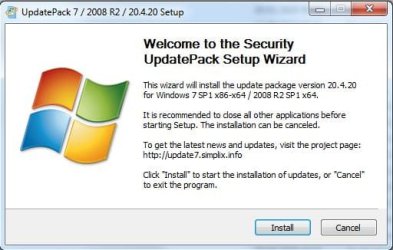
Easiest way is to download simplix update pack and run it. It will scan the sytem, install relevant updates,avoiding telemetry, rebooting and cleaning up when required.

You can get simplix downloader from this post

Update your Win 7 installation media


simplixCapture.JPG
 

My Computers My Computers

  • At a glance

    7 X64i5 84002x8gb 3200mhz
    Computer type
    PC/Desktop
    OS
    7 X64
    CPU
    i5 8400
    Motherboard
    gigabyte b365m ds3h
    Memory
    2x8gb 3200mhz
    Hard Drives
    various
    PSU
    pure power 11 400w cm
    Case
    Coolermaster
    Cooling
    cryorig m9i
  • At a glance

    7x64g54008gb ddr4 2400
    Computer type
    PC/Desktop
    OS
    7x64
    CPU
    g5400
    Motherboard
    ga b365m ds3h
    Memory
    8gb ddr4 2400
    PSU
    xfx pro 450w
What is the exact SNID number and serial number on that Acer Aspire X3400?

Is it still running Windows 7 64-bit, or is it now running Windows 10 64-bit?

It is still running WIN 7 the exact SNID number is 05001358230

The funny thing is that both the sreail numbre and the SNID number no longer work on Acer drivers download side.
 

My Computer My Computer

At a glance

Windows 7 Home Premium
OS
Windows 7 Home Premium
If you want to do a reinstall, win7 updates are still available and almost certainly will be for many years.

FYI even vista updates are still on the ms servers.

Easiest way is to download simplix update pack and run it. It will scan the sytem, install relevant updates,avoiding telemetry, rebooting and cleaning up when required.

You can get simplix downloader from this post

Update your Win 7 installation media


View attachment 411693

Thanks a lot for your encouraging advice. WEe´ll retturn home tomorrow in the evening, I´ll do a clean install and then will let you know here how things went.
 

My Computer My Computer

At a glance

Windows 7 Home Premium
OS
Windows 7 Home Premium
You can export the third party drivers from your current installation first. You could also backup the activation.

Easy to do with dism++

then you can clean install, restore the drivers and activation, run simplix.

SEE HERE
 
Last edited:

My Computers My Computers

  • At a glance

    7 X64i5 84002x8gb 3200mhz
    Computer type
    PC/Desktop
    OS
    7 X64
    CPU
    i5 8400
    Motherboard
    gigabyte b365m ds3h
    Memory
    2x8gb 3200mhz
    Hard Drives
    various
    PSU
    pure power 11 400w cm
    Case
    Coolermaster
    Cooling
    cryorig m9i
  • At a glance

    7x64g54008gb ddr4 2400
    Computer type
    PC/Desktop
    OS
    7x64
    CPU
    g5400
    Motherboard
    ga b365m ds3h
    Memory
    8gb ddr4 2400
    PSU
    xfx pro 450w
You're right about the SNID number.
I also got a "not found" at the Acer support site, so I wasn't able to determine what hardware yours has.

Acer Aspire X3400 Desktop PC (Windows 7 64-bit drivers)
Unfortunately, they're all very outdated versions.
 

My Computer My Computer

At a glance

Windows 7 Professional SP1 64-bitIntel Core i7-4790 3.60 GHz32 GB DDR3-1600 MHzIntegrated Intel HD Graphics 4600
Computer type
PC/Desktop
Computer Manufacturer/Model Number
Dell OptiPlex 9020
OS
Windows 7 Professional SP1 64-bit
CPU
Intel Core i7-4790 3.60 GHz
Memory
32 GB DDR3-1600 MHz
Graphics Card(s)
Integrated Intel HD Graphics 4600
Monitor(s) Displays
Viewsonic 32" LCD
Hard Drives
Kingston SATA 3 240 GB SSD
Internet Speed
Spectrum Internet 1000 Mbps
You're right about the SNID number.
I also got a "not found" at the Acer support site, so I wasn't able to determine what hardware yours has.

Acer Aspire X3400 Desktop PC (Windows 7 64-bit drivers)
Unfortunately, they're all very outdated versions.

I suspected that, my wife´s desktop was manufactured almost 10 years ago, so it is in grandfather´s age, but consdidering her (well our) age, my wife means that her desktop is o. k. for all her needs and does not need a more recent replacemnet.

Still, I have discovered that filling in the exact type and WIN7 version on the ACER driver update site, a driver site even with drivers for this outdated model turns up. However, I´ll follow SIW´s advice and first export the current drivers before reinstalling the system, rather than downloading and installing anew the drivers it will be much easier so.
 

My Computer My Computer

At a glance

Windows 7 Home Premium
OS
Windows 7 Home Premium
You can export the third party drivers from your current installation first. You could also backup the activation.

Easy to do with dism++

then you can clean install, restore the drivers and activation, run simplix.

SEE HERE
to
I did the dism++ procedure according to the instruction, backup was indicated as succesfull, I did a clean install, but restoring the drivers does unfortunately not work. I click on tools, activation backup, highlight the system name, then click restore, almost immediately it says Successfull, but the drivers arte not there, restaring the computer does not help. Do I perhaps do something wrong? I would not mind downloading and installing the drivers again, but there´s no driver for the wireless USB stick and I do not know the name of the maker, it is a tiny USB stick with no mark on it, so I´m in a fix. Any ideas?
 

My Computer My Computer

At a glance

Windows 7 Home Premium
OS
Windows 7 Home Premium
Did you back up the drivers?

Click drivers in the left pane,tick the ones you want, then click export.


If you didn't back them up, then you can search by PNP Device ID.

to get the ids:

type msinfo32 in start search box.

Click it when it pops.

Look under components>problem devices and the id's will be there.
You can then click file>export and output those ids to a text file.

the drivers can be found by searching tinternet using the ids.

Another way - probably simpler for you- is to use SDI online version ( assuming you have net connection). get it to download definitions/indexes first Download
 

My Computers My Computers

  • At a glance

    7 X64i5 84002x8gb 3200mhz
    Computer type
    PC/Desktop
    OS
    7 X64
    CPU
    i5 8400
    Motherboard
    gigabyte b365m ds3h
    Memory
    2x8gb 3200mhz
    Hard Drives
    various
    PSU
    pure power 11 400w cm
    Case
    Coolermaster
    Cooling
    cryorig m9i
  • At a glance

    7x64g54008gb ddr4 2400
    Computer type
    PC/Desktop
    OS
    7x64
    CPU
    g5400
    Motherboard
    ga b365m ds3h
    Memory
    8gb ddr4 2400
    PSU
    xfx pro 450w
Did you back up the drivers?

Click drivers in the left pane, then click export.

If you didn't back them up, you can search by PNP Device ID .

type msinfo32 in start search box.

Click it when it pops.

Look under components>problem devices and the id's will be there.
You can then click file>export and output those ids to a text file.

the drivers can be found by searching tinternet using the ids.

Another way is to use SDI online version ( assuming you have net connection). get it to download definitions first Download

My fault, being a great grandpa, I apparently haven´t saved the drivers especially, I had thought that clicking on the backupo it would save the drivers automatically.

Thanks to your advice, I´ve found the name and make of the USB wifi adapter, it is realtek RTL8188CU. I tried to download it from the Realtek driver side, this driver is not listed, so I tried with RTL8188EE, but there is a sort of CATCH22, as the download, or rather the verification does not work. Well, I´ll search for another options. Thanks for all your advices. When I have solved the net access, I´ll do the updates according to your advice.
 

My Computer My Computer

At a glance

Windows 7 Home Premium
OS
Windows 7 Home Premium
USB wifi adapter driver found and installed, wi fi now working, I´ll install all drivers and tomorrow I´ll work with the updates.
 

My Computer My Computer

At a glance

Windows 7 Home Premium
OS
Windows 7 Home Premium
:-)
 

My Computers My Computers

  • At a glance

    7 X64i5 84002x8gb 3200mhz
    Computer type
    PC/Desktop
    OS
    7 X64
    CPU
    i5 8400
    Motherboard
    gigabyte b365m ds3h
    Memory
    2x8gb 3200mhz
    Hard Drives
    various
    PSU
    pure power 11 400w cm
    Case
    Coolermaster
    Cooling
    cryorig m9i
  • At a glance

    7x64g54008gb ddr4 2400
    Computer type
    PC/Desktop
    OS
    7x64
    CPU
    g5400
    Motherboard
    ga b365m ds3h
    Memory
    8gb ddr4 2400
    PSU
    xfx pro 450w
Thanks to your advice, I´ve found the name and make of the USB wifi adapter, it is realtek RTL8188CU. I tried to download it from the Realtek driver side, this driver is not listed, so I tried with RTL8188EE, but there is a sort of CATCH22, as the download, or rather the verification does not work.

the Captcha verification on the Realtek web site only works in Chromium based browsers like Google Chrome & Chromium Edge, Dali36. It doesn't work with Mozilla Firefox (captcha does not show up there). I tested this myself. so use Chrome on Realtek site, not Firefox or any Mozilla based browsers.
 

My Computer My Computer

At a glance

Windows 7 SP1 Home Premium 64bit [x64]Intel(R) Core(TM) i5-2310 CPU @ 2.90GHz6 GBIntel HD Graphics 2000
Computer type
PC/Desktop
Computer Manufacturer/Model Number
Dell Inspiron 620
OS
Windows 7 SP1 Home Premium 64bit [x64]
CPU
Intel(R) Core(TM) i5-2310 CPU @ 2.90GHz
Memory
6 GB
Graphics Card(s)
Intel HD Graphics 2000
Sound Card
Conexant CX20641 HD Audio
Hard Drives
Western Digital 1TB (1024GB) WD10EALX-759BA1
Internet Speed
Spectrum Cable Internet up to 100Mbps
the Captcha verification on the Realtek web site only works in Chromium based browsers like Google Chrome & Chromium Edge, Dali36. It doesn't work with Mozilla Firefox (captcha does not show up there). I tested this myself. so use Chrome on Realtek site, not Firefox or any Mozilla based browsers.

I actually run Chrome and the Captcha did not work,. maybe I run an outdated version of Chrome?
 

My Computer My Computer

At a glance

Windows 7 Home Premium
OS
Windows 7 Home Premium

Everything woeks o. k. so far, the sound is back. I try to install updates in batches, because here is an update that must have "destroyed" the sound, so after every batch of some updates I check if the sound is still working, so that in case the sound stops, I can identify the wrong update and remove it. Thanks again for your advices.
 

My Computer My Computer

At a glance

Windows 7 Home Premium
OS
Windows 7 Home Premium
I actually run Chrome and the Captcha did not work,. maybe I run an outdated version of Chrome?


I'm running Google Chrome 81 (v81.0.4044.129) and the captcha pic shows up on my end for the realtek site after entering an email address (even a fake one).
what version of Chrome are you using, Dali362?


maybe disable ad-blocker (ublock origin or adblock plus) or script blocker (ex. noscript) or both on realtek web site and reload Chrome
 

My Computer My Computer

At a glance

Windows 7 SP1 Home Premium 64bit [x64]Intel(R) Core(TM) i5-2310 CPU @ 2.90GHz6 GBIntel HD Graphics 2000
Computer type
PC/Desktop
Computer Manufacturer/Model Number
Dell Inspiron 620
OS
Windows 7 SP1 Home Premium 64bit [x64]
CPU
Intel(R) Core(TM) i5-2310 CPU @ 2.90GHz
Memory
6 GB
Graphics Card(s)
Intel HD Graphics 2000
Sound Card
Conexant CX20641 HD Audio
Hard Drives
Western Digital 1TB (1024GB) WD10EALX-759BA1
Internet Speed
Spectrum Cable Internet up to 100Mbps
Back
Top