Sound on Acer Aspire 4830T Laptop not working at all

karra1

New member
Local time
7:48 AM
Messages
5
Hi Guys,

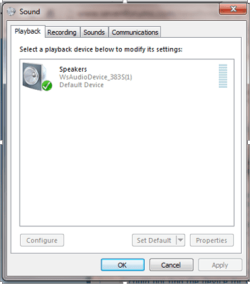
I'm currently facing some issues with my Acer Aspire 4830T laptop, Windows 7 Ultimate (64 bit). Currently the sound on the laptop does not work at all. The playback device I am currently using is '(WsAudioDevice_383S(1))'. I have tried everything to try and fix the issue and no solution has come up to fix it. Sometimes, when i boot up the laptop 2 playback device appear on startup. This is called Conexant High Definition audio driver but it is only available sometimes and doesn't even appear on the playback devices section. I have tried going to device manager but it doesn't even appear there as well.

As well as this I have tried to reinstall it by using the Acer eRecovery tool which allows me to install default driver for my laptop. However, every time I try to install the Conexant High Definition audio driver, it says 'could not find the device for this driver'. Has anybody got an idea of how to fix this. BTW I also tried installing other sound drivers like Realtek HD audio but it just said the same thing.

This is what my Device manager screen and my playback device screen is currently showing:
 

Attachments

  • sound issue 3.png
    sound issue 3.png
    19.3 KB · Views: 15
  • sound issue 4.PNG
    sound issue 4.PNG
    16.8 KB · Views: 15

My Computer My Computer

At a glance

Windows 7 Ultimate x64
Computer type
Laptop
Computer Manufacturer/Model Number
Acer Aspire 4830T
OS
Windows 7 Ultimate x64
Browser
Chrome
Conexant is correct according to Acer, what you have is wrong and I'm not sure how it got there.

If there is no direct hardware driver installed (e.g. Conexant) Windows will install the generic, basic function, High Definition Audio Device. This system should also have HDMI Audio (Possibly Intel HDMI Audio).

Suggest you uninstall the WsAudio Device, in the Device Manager. In the Device Manager, RIGHT click on the WsAudio entry to highlight it and then LEFT click "Uninstall". Also check the box to uninstall the drivers. Then restart the PC and when Windows starts, assuming there is no hardware problem, Windows should install the High Definition Audio Device. This is not a full featured sound driver but should give you PC speaker sound. If this works OK you can then install the Conexent driver (what is listed on the Acer site for this model).

Download Drivers and Manuals | Acer Official Site
 

My Computer My Computer

At a glance

Windows 10 64 bitIntel i7 6700K16GB Corsair DominatorIntel CPU Graphics
Computer type
PC/Desktop
Computer Manufacturer/Model Number
My Own Build
OS
Windows 10 64 bit
CPU
Intel i7 6700K
Motherboard
ASUS ROG Maximus VIII Hero
Memory
16GB Corsair Dominator
Graphics Card(s)
Intel CPU Graphics
Sound Card
RealTek
Monitor(s) Displays
27" Dell S2719dgf
Screen Resolution
2560X1440
Hard Drives
1 TB Samsung 850 EVO SSD for Win 10 Pro
500GB Samsung 850 EVO SSD for Win 10 Insider
2 TB drive for backup
PSU
EVGA Supernova 750G2
Case
BeQuiet Silent Base 600
Cooling
Deepcool Captain 120EX
Keyboard
Microsoft Wireless 2000
Mouse
Microsoft wireless
Internet Speed
100 MB/sec (Cable)
Antivirus
Microsoft Defender and Malwarebytes
Browser
Edge/Firefox
Other Info
Cakewalk (Sonar) by BandLab and Studio One 4.1 Pro recording studio software. MOTU 896Mk3 Hybrid recording interface, Frontier Tranzport wireless control unit, Behringer X-Touch Control Surface.
Five USB connected optical drives for CD Audio production using Nero BurningROM
In Device Manager - right click - properties - Details - Property (Hardware
Ids) - right click on value box and copy

Then paste here


Do as Fireberd tell you :) If it fails copy paste above info
 

My Computer My Computer

At a glance

Windows 7 Ultimate x64 SP1AMD Phenom 2 1090T2x8GB Kingston HyperX Fury Black 1600Mhz Unga...MSI GTX 970 Gaming 4G
Computer type
PC/Desktop
Computer Manufacturer/Model Number
Custom Build
OS
Windows 7 Ultimate x64 SP1
CPU
AMD Phenom 2 1090T
Motherboard
Gigabyte GA-890FXA-UD5
Memory
2x8GB Kingston HyperX Fury Black 1600Mhz Unganged
Graphics Card(s)
MSI GTX 970 Gaming 4G
Sound Card
Realtek On-Board HD 7.1 Audio / Logitech G35
Monitor(s) Displays
3xAcer GD245HQ
Screen Resolution
1920x1080
Hard Drives
Samsung 850 Pro 512GB SSD - OS /
WD Caviar Black SATA 3 - 1 TBx2 - Dynamic RAID 0 /
WD Caviar Green SATA 2 - 640GBx2 - Dynamic RAID 0 /
WD Caviar Green SATA 2 - 640GB - Internal Backup /
Seagate Barracude SATA 3 - 3TB - External Backup/ Sync
PSU
HighPower 1000W
Case
Cooler Master HAF 932
Cooling
Noctua NH-D14
Keyboard
Logitech G19
Mouse
Logitech G500
Internet Speed
100/4 Mbit Cable (100GB quota)
Antivirus
ZoneAlarm Extreme Security / MBAM Pro / MBAE Free / SAS Free
Browser
IE 11 - Firefox - Chrome
Other Info
Logitech F710/ G27/ G940/ Z5500 // TrackIR 5 // Nvidia 3D Surround Vision
Conexant is correct according to Acer, what you have is wrong and I'm not sure how it got there.

If there is no direct hardware driver installed (e.g. Conexant) Windows will install the generic, basic function, High Definition Audio Device. This system should also have HDMI Audio (Possibly Intel HDMI Audio).

Suggest you uninstall the WsAudio Device, in the Device Manager. In the Device Manager, RIGHT click on the WsAudio entry to highlight it and then LEFT click "Uninstall". Also check the box to uninstall the drivers. Then restart the PC and when Windows starts, assuming there is no hardware problem, Windows should install the High Definition Audio Device. This is not a full featured sound driver but should give you PC speaker sound. If this works OK you can then install the Conexent driver (what is listed on the Acer site for this model).

Download Drivers and Manuals | Acer Official Site

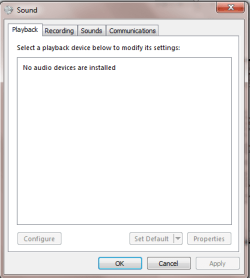
This worked for 2 days and then it just stopped working completely after. I checked Device Manager to see what the issue is and it has a yellow exclamation mark next to the Intel(R) Display Audio. I therefore decided to update the driver software (which was no good) and reinstall the device. When I tried reinstalling, it kept saying 'installation failed'. I even updated my BIOS to see if anything would change. Anybody have any ideas, screenshots below:
 

Attachments

  • new error.png
    new error.png
    34.8 KB · Views: 0
  • new error2.png
    new error2.png
    9.4 KB · Views: 9

My Computer My Computer

At a glance

Windows 7 Ultimate x64
Computer type
Laptop
Computer Manufacturer/Model Number
Acer Aspire 4830T
OS
Windows 7 Ultimate x64
Browser
Chrome
Perhaps it is showing a wrong entry again?

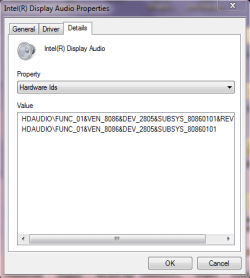
In Device Manager - right click Intel Display Audio - properties - Details - Property (Hardware Ids) - right click on value box and copy

Then paste here
 

My Computer My Computer

At a glance

Windows 7 Ultimate x64 SP1AMD Phenom 2 1090T2x8GB Kingston HyperX Fury Black 1600Mhz Unga...MSI GTX 970 Gaming 4G
Computer type
PC/Desktop
Computer Manufacturer/Model Number
Custom Build
OS
Windows 7 Ultimate x64 SP1
CPU
AMD Phenom 2 1090T
Motherboard
Gigabyte GA-890FXA-UD5
Memory
2x8GB Kingston HyperX Fury Black 1600Mhz Unganged
Graphics Card(s)
MSI GTX 970 Gaming 4G
Sound Card
Realtek On-Board HD 7.1 Audio / Logitech G35
Monitor(s) Displays
3xAcer GD245HQ
Screen Resolution
1920x1080
Hard Drives
Samsung 850 Pro 512GB SSD - OS /
WD Caviar Black SATA 3 - 1 TBx2 - Dynamic RAID 0 /
WD Caviar Green SATA 2 - 640GBx2 - Dynamic RAID 0 /
WD Caviar Green SATA 2 - 640GB - Internal Backup /
Seagate Barracude SATA 3 - 3TB - External Backup/ Sync
PSU
HighPower 1000W
Case
Cooler Master HAF 932
Cooling
Noctua NH-D14
Keyboard
Logitech G19
Mouse
Logitech G500
Internet Speed
100/4 Mbit Cable (100GB quota)
Antivirus
ZoneAlarm Extreme Security / MBAM Pro / MBAE Free / SAS Free
Browser
IE 11 - Firefox - Chrome
Other Info
Logitech F710/ G27/ G940/ Z5500 // TrackIR 5 // Nvidia 3D Surround Vision
Hdaudio\func_01&ven_8086&dev_2805&subsys_80860101&rev_1000

hdaudio\func_01&ven_8086&dev_2805&subsys_80860101
 

Attachments

  • hardware ids.PNG
    hardware ids.PNG
    11.8 KB · Views: 6

My Computer My Computer

At a glance

Windows 7 Ultimate x64
Computer type
Laptop
Computer Manufacturer/Model Number
Acer Aspire 4830T
OS
Windows 7 Ultimate x64
Browser
Chrome
Why not download the driver from the link provided by fireberd and install the audio driver manually?
Download Drivers and Manuals | Acer Official Site

Just put in your model (aspire 4830T) in the "Search by Product" field and make sure you have selected drivers for "Windows x64". I just looked and the driver is available (audio - version 8.54.6.0)
 

My Computer My Computer

At a glance

Windows 7 Home Premiumi3 2100T
OS
Windows 7 Home Premium
CPU
i3 2100T
Motherboard
ASRock H67M-ITX
This looks like HDMI audio for the Intel VGA driver? Unfortunately, I don't get a reasonable result from PCI Vendor and Device Lists

Open Download Drivers and Manuals | Acer Official Site, and search by product model 4830T, then download Intel VGA, see if that will install this.

The driver mentioned above is Conexant and vendor id should be 14F1.

It is as if sound card is missing. Do laptops have a disable sound card option in BIOS? Or any Fn keys?
 

My Computer My Computer

At a glance

Windows 7 Ultimate x64 SP1AMD Phenom 2 1090T2x8GB Kingston HyperX Fury Black 1600Mhz Unga...MSI GTX 970 Gaming 4G
Computer type
PC/Desktop
Computer Manufacturer/Model Number
Custom Build
OS
Windows 7 Ultimate x64 SP1
CPU
AMD Phenom 2 1090T
Motherboard
Gigabyte GA-890FXA-UD5
Memory
2x8GB Kingston HyperX Fury Black 1600Mhz Unganged
Graphics Card(s)
MSI GTX 970 Gaming 4G
Sound Card
Realtek On-Board HD 7.1 Audio / Logitech G35
Monitor(s) Displays
3xAcer GD245HQ
Screen Resolution
1920x1080
Hard Drives
Samsung 850 Pro 512GB SSD - OS /
WD Caviar Black SATA 3 - 1 TBx2 - Dynamic RAID 0 /
WD Caviar Green SATA 2 - 640GBx2 - Dynamic RAID 0 /
WD Caviar Green SATA 2 - 640GB - Internal Backup /
Seagate Barracude SATA 3 - 3TB - External Backup/ Sync
PSU
HighPower 1000W
Case
Cooler Master HAF 932
Cooling
Noctua NH-D14
Keyboard
Logitech G19
Mouse
Logitech G500
Internet Speed
100/4 Mbit Cable (100GB quota)
Antivirus
ZoneAlarm Extreme Security / MBAM Pro / MBAE Free / SAS Free
Browser
IE 11 - Firefox - Chrome
Other Info
Logitech F710/ G27/ G940/ Z5500 // TrackIR 5 // Nvidia 3D Surround Vision
Why not download the driver from the link provided by fireberd and install the audio driver manually?
Download Drivers and Manuals | Acer Official Site

Just put in your model (aspire 4830T) in the "Search by Product" field and make sure you have selected drivers for "Windows x64". I just looked and the driver is available (audio - version 8.54.6.0)

I tried this and it says 'Could not find the device for this driver'.
 

My Computer My Computer

At a glance

Windows 7 Ultimate x64
Computer type
Laptop
Computer Manufacturer/Model Number
Acer Aspire 4830T
OS
Windows 7 Ultimate x64
Browser
Chrome
This looks like HDMI audio for the Intel VGA driver? Unfortunately, I don't get a reasonable result from PCI Vendor and Device Lists

Open Download Drivers and Manuals | Acer Official Site, and search by product model 4830T, then download Intel VGA, see if that will install this.

The driver mentioned above is Conexant and vendor id should be 14F1.

It is as if sound card is missing. Do laptops have a disable sound card option in BIOS? Or any Fn keys?

I tried this and it said 'Are you sure you want to overwrite the following driver with the older versions'
 

Attachments

  • question.PNG
    question.PNG
    6.1 KB · Views: 3

My Computer My Computer

At a glance

Windows 7 Ultimate x64
Computer type
Laptop
Computer Manufacturer/Model Number
Acer Aspire 4830T
OS
Windows 7 Ultimate x64
Browser
Chrome
Back
Top