
No sound on my Dell Inspiron running Windows 7 64-bit

ArtMurphy

New member
Local time
11:20 AM
Messages
27
Had sound this morning but I noticed that when I listened to podcasts my speakers would not let me adjust the volume. Now I have no sound after downloading and installing Realtek audio several times from different sources, the last being this forum. Nothing seems to bring back the sound - any ideas?
 

My Computer My Computer

At a glance

Windows 7 Home Premium 64 bitIntel Core2 Quad 2.33Ghz4Gb 1066 MHz DDR3 SDRAM (non-ECC only)PCI Express x16 graphics adapter
Computer type
PC/Desktop
Computer Manufacturer/Model Number
Dell Optiplex 780
OS
Windows 7 Home Premium 64 bit
CPU
Intel Core2 Quad 2.33Ghz
Motherboard
intel Q45 Express chipset w/ICH10DO
Memory
4Gb 1066 MHz DDR3 SDRAM (non-ECC only)
Graphics Card(s)
PCI Express x16 graphics adapter
Hard Drives
SATA hard drive
ST 3250310AS ATA
Antivirus
Microsoft Security essentials
Browser
Mozilla Firefox (primary), Windows IE (use sometimes)
Go into your sound properties, is headphone selected instead of speakers? Had this happen to me once.
 

My Computer My Computer

At a glance

Windows 7 Professional 64bitIntel i7-5960X64GB Corsair Dominator 2400MHz3 EVGA GTX980's
Computer type
PC/Desktop
Computer Manufacturer/Model Number
custom build
OS
Windows 7 Professional 64bit
CPU
Intel i7-5960X
Motherboard
EVGA X99 Classified
Memory
64GB Corsair Dominator 2400MHz
Graphics Card(s)
3 EVGA GTX980's
Sound Card
on board
Monitor(s) Displays
3 Dell E2715H 27"
Screen Resolution
1920x1080 (5760x1080)
Hard Drives
Samsung 950 Pro 1TB M.2 SSD,
Western Digital Black 2TB HDD's x5
Western Digital Black 1TB HDD's x3
PSU
Corsair AX1200i
Case
Corsair 750D
Cooling
Corsair H110i GT
Keyboard
Corsair K70
Mouse
Corsair M45
Internet Speed
250 down/10 up
Antivirus
Microsoft Security Essentials
Browser
IE 11, Google Chrome
No, I've never used headphones and my Realtek Audio just lists speakers/headphones - can't separate the two. Thanks for idea though!
 

My Computer My Computer

At a glance

Windows 7 Home Premium 64 bitIntel Core2 Quad 2.33Ghz4Gb 1066 MHz DDR3 SDRAM (non-ECC only)PCI Express x16 graphics adapter
Computer type
PC/Desktop
Computer Manufacturer/Model Number
Dell Optiplex 780
OS
Windows 7 Home Premium 64 bit
CPU
Intel Core2 Quad 2.33Ghz
Motherboard
intel Q45 Express chipset w/ICH10DO
Memory
4Gb 1066 MHz DDR3 SDRAM (non-ECC only)
Graphics Card(s)
PCI Express x16 graphics adapter
Hard Drives
SATA hard drive
ST 3250310AS ATA
Antivirus
Microsoft Security essentials
Browser
Mozilla Firefox (primary), Windows IE (use sometimes)
Click on the Sound icon in your notification area. Select Mixer. What is the volume set to for whatever software you're using to play audio?
 

My Computer My Computer

At a glance

Windows 7 Pro SP1 64 bit8 GB
Computer type
Laptop
Computer Manufacturer/Model Number
Dell M6500 Precision Work Station
OS
Windows 7 Pro SP1 64 bit
Memory
8 GB
Screen Resolution
1920x
Internet Speed
30 Mbps
Antivirus
Norton Security
Browser
IE 11
sound at max all around
 

My Computer My Computer

At a glance

Windows 7 Home Premium 64 bitIntel Core2 Quad 2.33Ghz4Gb 1066 MHz DDR3 SDRAM (non-ECC only)PCI Express x16 graphics adapter
Computer type
PC/Desktop
Computer Manufacturer/Model Number
Dell Optiplex 780
OS
Windows 7 Home Premium 64 bit
CPU
Intel Core2 Quad 2.33Ghz
Motherboard
intel Q45 Express chipset w/ICH10DO
Memory
4Gb 1066 MHz DDR3 SDRAM (non-ECC only)
Graphics Card(s)
PCI Express x16 graphics adapter
Hard Drives
SATA hard drive
ST 3250310AS ATA
Antivirus
Microsoft Security essentials
Browser
Mozilla Firefox (primary), Windows IE (use sometimes)
If I did that they'd be blowing me out.

In Control Panel, Sound, click on your speakers and select Configure. Do you get any test sound with the different available configurations?
 

My Computer My Computer

At a glance

Windows 7 Pro SP1 64 bit8 GB
Computer type
Laptop
Computer Manufacturer/Model Number
Dell M6500 Precision Work Station
OS
Windows 7 Pro SP1 64 bit
Memory
8 GB
Screen Resolution
1920x
Internet Speed
30 Mbps
Antivirus
Norton Security
Browser
IE 11
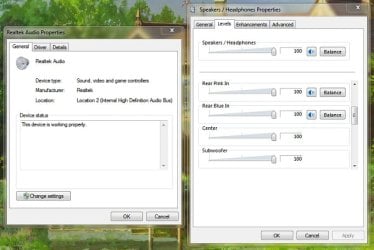
No, but I do have a curious problem. In my Realtek Audio properties under sound it lists the location as Location 2, and when I go into Levels under Speakers/Headphones Properties it only shows one of those speaker icons for the Microphone, Rear Pink In and Rear Blue In. I don't know what those are, but I do not have an icon for Center, Subwoofer, Rear, or Front.


So maybe I need to switch to Location 1 ??? How do I do that?
 

My Computer My Computer

At a glance

Windows 7 Home Premium 64 bitIntel Core2 Quad 2.33Ghz4Gb 1066 MHz DDR3 SDRAM (non-ECC only)PCI Express x16 graphics adapter
Computer type
PC/Desktop
Computer Manufacturer/Model Number
Dell Optiplex 780
OS
Windows 7 Home Premium 64 bit
CPU
Intel Core2 Quad 2.33Ghz
Motherboard
intel Q45 Express chipset w/ICH10DO
Memory
4Gb 1066 MHz DDR3 SDRAM (non-ECC only)
Graphics Card(s)
PCI Express x16 graphics adapter
Hard Drives
SATA hard drive
ST 3250310AS ATA
Antivirus
Microsoft Security essentials
Browser
Mozilla Firefox (primary), Windows IE (use sometimes)
In the Control Panel, Sound, when you click on Speakers and select Properties, which jacks are shown as connected? Are these the correct ones per the speaker manual? Ordinarily, the color of the speaker plugs are the ones you use. I don't know what motherboard you're using but, I'm not familiar with a pink speaker jack. On my motherboard, pink is used for the microphone.

Also, where do I go to get to the realtek audio properties? I'm using a sound card.
 

My Computer My Computer

At a glance

Windows 7 Pro SP1 64 bit8 GB
Computer type
Laptop
Computer Manufacturer/Model Number
Dell M6500 Precision Work Station
OS
Windows 7 Pro SP1 64 bit
Memory
8 GB
Screen Resolution
1920x
Internet Speed
30 Mbps
Antivirus
Norton Security
Browser
IE 11

My Computer My Computer

At a glance

Windows 7 Pro SP1 64 bit8 GB
Computer type
Laptop
Computer Manufacturer/Model Number
Dell M6500 Precision Work Station
OS
Windows 7 Pro SP1 64 bit
Memory
8 GB
Screen Resolution
1920x
Internet Speed
30 Mbps
Antivirus
Norton Security
Browser
IE 11
I have 3 colors in a row Pink - Green - Blue. I have a green jack and plug into green, I don't know what the pink and blue are for I've never used them. But somehow the Realtek Audio has disabled my usable green main sound jack and is putting sound through the "Rear Pink In" and "Rear Blue In" channels and "Microphone". I have no audio icon for my "Center", "Subwoofer", "Rear" and "Front" (last two for balance). I'm using Harman/Kardon speakers and subwoofer. All was working fine a few days ago.


If you have an idea how I can get Realtek to switch from Pink and Blue to Center and Subwoofer? I'm lost and don't want to screw up my system further. I've installed the latest Realtek driver at least 3 times (I know, I know, don't duplicate a failure hoping for different results - ha, ha). Any help is greatly appreciated!
 

My Computer My Computer

At a glance

Windows 7 Home Premium 64 bitIntel Core2 Quad 2.33Ghz4Gb 1066 MHz DDR3 SDRAM (non-ECC only)PCI Express x16 graphics adapter
Computer type
PC/Desktop
Computer Manufacturer/Model Number
Dell Optiplex 780
OS
Windows 7 Home Premium 64 bit
CPU
Intel Core2 Quad 2.33Ghz
Motherboard
intel Q45 Express chipset w/ICH10DO
Memory
4Gb 1066 MHz DDR3 SDRAM (non-ECC only)
Graphics Card(s)
PCI Express x16 graphics adapter
Hard Drives
SATA hard drive
ST 3250310AS ATA
Antivirus
Microsoft Security essentials
Browser
Mozilla Firefox (primary), Windows IE (use sometimes)
Would you provide a screen shot of the realtek hd audio manager screen?

Also, a screen shot of the Sound/Playback opening screen would be helpful.

I'm using a Logitech 5.1 system and have a 3 cable connection to my motherboard. If I was using the realtek audio, I would select 5.1 speaker in the manager Speaker Configuration. For stereo, I would only need 1 cable connection and, of course, would select stereo speaker.
 
Last edited:

My Computer My Computer

At a glance

Windows 7 Pro SP1 64 bit8 GB
Computer type
Laptop
Computer Manufacturer/Model Number
Dell M6500 Precision Work Station
OS
Windows 7 Pro SP1 64 bit
Memory
8 GB
Screen Resolution
1920x
Internet Speed
30 Mbps
Antivirus
Norton Security
Browser
IE 11
Here's the screen shot - you can see that "center" & "subwoofer" have no speaker icons.


Thanks for your help!
 

Attachments

  • latest screen shot.jpg
    latest screen shot.jpg
    41 KB · Views: 31

My Computer My Computer

At a glance

Windows 7 Home Premium 64 bitIntel Core2 Quad 2.33Ghz4Gb 1066 MHz DDR3 SDRAM (non-ECC only)PCI Express x16 graphics adapter
Computer type
PC/Desktop
Computer Manufacturer/Model Number
Dell Optiplex 780
OS
Windows 7 Home Premium 64 bit
CPU
Intel Core2 Quad 2.33Ghz
Motherboard
intel Q45 Express chipset w/ICH10DO
Memory
4Gb 1066 MHz DDR3 SDRAM (non-ECC only)
Graphics Card(s)
PCI Express x16 graphics adapter
Hard Drives
SATA hard drive
ST 3250310AS ATA
Antivirus
Microsoft Security essentials
Browser
Mozilla Firefox (primary), Windows IE (use sometimes)
Go to Control Panel, Sound and click on your speakers. Select Configure. In the first screen, what type of speaker configuration do you have set? If you have Stereo selected, you won't see the subwoofer.

When you go to the next screen, make the appropriate selection.

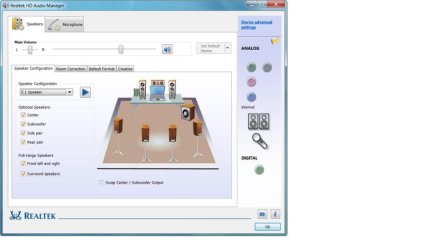
When you're using realtec sound without a sound card and you select next, you should see a screen similar to this-

realtechdsoundmanagerscreenshot.jpg

It's where you can make all kinds of adjustments.
 

My Computer My Computer

At a glance

Windows 7 Pro SP1 64 bit8 GB
Computer type
Laptop
Computer Manufacturer/Model Number
Dell M6500 Precision Work Station
OS
Windows 7 Pro SP1 64 bit
Memory
8 GB
Screen Resolution
1920x
Internet Speed
30 Mbps
Antivirus
Norton Security
Browser
IE 11
I wish I had your choices. I just click on "Speakers/Headphone" Realtek Audio and have a choice of Stereo, Quadraphonic or 5.1 Surround - no choice of speakers. So bottom line is I can not make those adjustments.


Q - I see you are at Realtek HD Audio Manager - I do not have that, I searched for program. I searched for Audio Manager download and despite what is stated, the only thing I can find to download is the Audio Driver (which I've already done). So, is there a difference and if so how do I install Audio Manager?


Thanks W2
 

My Computer My Computer

At a glance

Windows 7 Home Premium 64 bitIntel Core2 Quad 2.33Ghz4Gb 1066 MHz DDR3 SDRAM (non-ECC only)PCI Express x16 graphics adapter
Computer type
PC/Desktop
Computer Manufacturer/Model Number
Dell Optiplex 780
OS
Windows 7 Home Premium 64 bit
CPU
Intel Core2 Quad 2.33Ghz
Motherboard
intel Q45 Express chipset w/ICH10DO
Memory
4Gb 1066 MHz DDR3 SDRAM (non-ECC only)
Graphics Card(s)
PCI Express x16 graphics adapter
Hard Drives
SATA hard drive
ST 3250310AS ATA
Antivirus
Microsoft Security essentials
Browser
Mozilla Firefox (primary), Windows IE (use sometimes)
The audio manager is included with the driver.

Depending on your speaker setup, you should see the speaker icons and be able to test them. Stereo should show two speakers, 5.1 would show 6, etc.

How many speakers do you have? Are you making the connections per the Harmon Kardon instructions? Does your subwoofer have an on/off switch? Is it turned on? Would you post the model number for your Harmon Kardon speaker package?

Go to Start, Search and run msconfig. Is the Realtek audio manager listed in the Startup tab and is it enabled?

Note that I'm going by memory in regards to the Realtek sound. I installed a sound card on this system and the realtek driver isn't installed. On my other system, it also doesn't use Realtek.
 
Last edited:

My Computer My Computer

At a glance

Windows 7 Pro SP1 64 bit8 GB
Computer type
Laptop
Computer Manufacturer/Model Number
Dell M6500 Precision Work Station
OS
Windows 7 Pro SP1 64 bit
Memory
8 GB
Screen Resolution
1920x
Internet Speed
30 Mbps
Antivirus
Norton Security
Browser
IE 11
are you sure you have a Dell Inspiron and not a Dell Optiplex, ArtMurphy?


The Dell Optiplex 780 does not use Realtek audio hardware. It uses ADI/SoundMax HD Audio hardware and the drivers for Analog Devices ADI 198x Integrated HD Audio are listed on the Dell Optiplex 780 driver downloads page (in the Audio section).
 

My Computer My Computer

At a glance

Windows 7 SP1 Home Premium 64bit [x64]Intel(R) Core(TM) i5-2310 CPU @ 2.90GHz6 GBIntel HD Graphics 2000
Computer type
PC/Desktop
Computer Manufacturer/Model Number
Dell Inspiron 620
OS
Windows 7 SP1 Home Premium 64bit [x64]
CPU
Intel(R) Core(TM) i5-2310 CPU @ 2.90GHz
Memory
6 GB
Graphics Card(s)
Intel HD Graphics 2000
Sound Card
Conexant CX20641 HD Audio
Hard Drives
Western Digital 1TB (1024GB) WD10EALX-759BA1
Internet Speed
Spectrum Cable Internet up to 100Mbps
Yes, I can see the configuration in my Speakers/Headphones. I only have two speakers and subwoofer. No sound, of course, when I test. Problem is everything has been working for years and then suddenly stopped???


I do have the Realtek audio manager listed and enabled in the startup tab. In checking, no driver available or needed for HK695-01 Harman Kardon speakers.


Total frustration!! I read through previous problems w/Realtek and sound and could not come to a definitive solution. It "should" be something simple?? I need to see the audio icon on the speakers I'm using - per screen grab. Whats going onW2?
Appreciate your help very much. Art
 

My Computer My Computer

At a glance

Windows 7 Home Premium 64 bitIntel Core2 Quad 2.33Ghz4Gb 1066 MHz DDR3 SDRAM (non-ECC only)PCI Express x16 graphics adapter
Computer type
PC/Desktop
Computer Manufacturer/Model Number
Dell Optiplex 780
OS
Windows 7 Home Premium 64 bit
CPU
Intel Core2 Quad 2.33Ghz
Motherboard
intel Q45 Express chipset w/ICH10DO
Memory
4Gb 1066 MHz DDR3 SDRAM (non-ECC only)
Graphics Card(s)
PCI Express x16 graphics adapter
Hard Drives
SATA hard drive
ST 3250310AS ATA
Antivirus
Microsoft Security essentials
Browser
Mozilla Firefox (primary), Windows IE (use sometimes)
Yes it is definitely a Dell Inspiron 3847 - per system properties.
 

My Computer My Computer

At a glance

Windows 7 Home Premium 64 bitIntel Core2 Quad 2.33Ghz4Gb 1066 MHz DDR3 SDRAM (non-ECC only)PCI Express x16 graphics adapter
Computer type
PC/Desktop
Computer Manufacturer/Model Number
Dell Optiplex 780
OS
Windows 7 Home Premium 64 bit
CPU
Intel Core2 Quad 2.33Ghz
Motherboard
intel Q45 Express chipset w/ICH10DO
Memory
4Gb 1066 MHz DDR3 SDRAM (non-ECC only)
Graphics Card(s)
PCI Express x16 graphics adapter
Hard Drives
SATA hard drive
ST 3250310AS ATA
Antivirus
Microsoft Security essentials
Browser
Mozilla Firefox (primary), Windows IE (use sometimes)
ah ok.


use any of the older Realtek audio drivers on your Inspiron 3847 (see driver downloads in Audio section). seems like it uses Waves Maxxaudio with the Realtek HD audio drivers and the bundled Maxxaudio software needs to be installed along with the Realtek drivers.


edit: disconnect the Harman Kardon speakers from your computer and try another set of Speakers to see if the sound works with another set


btw, my relative's old Dell Inspiron 580 uses Realtek ALC3220 audio w/ up to 7.1 surround sound though I have a pair of Dell AX210 usb powered stereo speakers connected to it.
 

My Computer My Computer

At a glance

Windows 7 SP1 Home Premium 64bit [x64]Intel(R) Core(TM) i5-2310 CPU @ 2.90GHz6 GBIntel HD Graphics 2000
Computer type
PC/Desktop
Computer Manufacturer/Model Number
Dell Inspiron 620
OS
Windows 7 SP1 Home Premium 64bit [x64]
CPU
Intel(R) Core(TM) i5-2310 CPU @ 2.90GHz
Memory
6 GB
Graphics Card(s)
Intel HD Graphics 2000
Sound Card
Conexant CX20641 HD Audio
Hard Drives
Western Digital 1TB (1024GB) WD10EALX-759BA1
Internet Speed
Spectrum Cable Internet up to 100Mbps
ArtMurphy- I'm confused. Your system specs show the Optiplex 780 and your topic says you have an Inspiron? I based my earlier comments on what you show for your system specs.

According to this-

https://downloads.dell.com/manuals/...spiron-3847-desktop_reference guide_en-us.pdf

you have one receptacle for the speakers. It's the green one. As a result, you would plug the the subwoofer into that.

This website-

Dell Inspiron 3847 Desktop Drivers Download and Update – Support Windows 8, 7, Vista, XP, 2000.

provides a Realtek driver for your system.
 

My Computer My Computer

At a glance

Windows 7 Pro SP1 64 bit8 GB
Computer type
Laptop
Computer Manufacturer/Model Number
Dell M6500 Precision Work Station
OS
Windows 7 Pro SP1 64 bit
Memory
8 GB
Screen Resolution
1920x
Internet Speed
30 Mbps
Antivirus
Norton Security
Browser
IE 11
Back
Top