Solved No sound on my desktop

Retiredbill

New member
Member
VIP
Local time
10:32 PM
Messages
247
I have a desktop running Win 7 home premium, 64 bit. Recently my sound stopped working. I have a pair of external speakers that are turned on with the volume turned up. I haven't made any changes to the settings. I checked the speaker icon in the task bar and it shows the volume turned to max and not muted. When I try to play music in the CD/DVD player I get the window showing the music playing but no sound. I cannot get any sound on audio emails or the internet. Any suggestions?
 

My Computer My Computer

At a glance

Win7, home premium, 64 bit2.9 GHZ6 Gbytes
Computer Manufacturer/Model Number
Gateway SX 2841
OS
Win7, home premium, 64 bit
CPU
2.9 GHZ
Memory
6 Gbytes
Hard Drives
1 terra byte
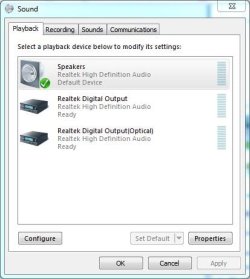
Go to the Control Panel/Hardware and Sound and finally the Sound Panel, playback section. The "Speakers" should be set as the default playback device. This is the first step.
 

My Computer My Computer

At a glance

Windows 10 64 bitIntel i7 6700K16GB Corsair DominatorIntel CPU Graphics
Computer type
PC/Desktop
Computer Manufacturer/Model Number
My Own Build
OS
Windows 10 64 bit
CPU
Intel i7 6700K
Motherboard
ASUS ROG Maximus VIII Hero
Memory
16GB Corsair Dominator
Graphics Card(s)
Intel CPU Graphics
Sound Card
RealTek
Monitor(s) Displays
27" Dell S2719dgf
Screen Resolution
2560X1440
Hard Drives
1 TB Samsung 850 EVO SSD for Win 10 Pro
500GB Samsung 850 EVO SSD for Win 10 Insider
2 TB drive for backup
PSU
EVGA Supernova 750G2
Case
BeQuiet Silent Base 600
Cooling
Deepcool Captain 120EX
Keyboard
Microsoft Wireless 2000
Mouse
Microsoft wireless
Internet Speed
100 MB/sec (Cable)
Antivirus
Microsoft Defender and Malwarebytes
Browser
Edge/Firefox
Other Info
Cakewalk (Sonar) by BandLab and Studio One 4.1 Pro recording studio software. MOTU 896Mk3 Hybrid recording interface, Frontier Tranzport wireless control unit, Behringer X-Touch Control Surface.
Five USB connected optical drives for CD Audio production using Nero BurningROM
The spekers are listed as the default device. I also tried playing a digital recording using Audcity and it did not wotk either. Also when I turn on my backup drive, I don't the get usual sound when it starts.
 

My Computer My Computer

At a glance

Win7, home premium, 64 bit2.9 GHZ6 Gbytes
Computer Manufacturer/Model Number
Gateway SX 2841
OS
Win7, home premium, 64 bit
CPU
2.9 GHZ
Memory
6 Gbytes
Hard Drives
1 terra byte
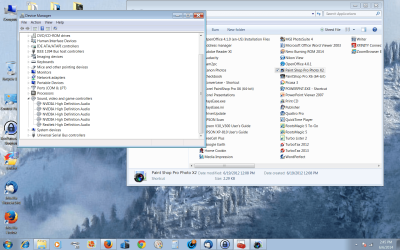
Check the Device Manager. The Sound device will either have an error code or it will be shown as working OK. If it has an error code post back with what it is. If it shows as working OK, RIGHT click on the entry for the sound device and then LEFT click "Uninstall". DO NOT check the box to also uninstall the drivers. Restart the PC and when Windows starts it will detect and reinstall the sound. This fixes most Windows corruption problems and hopefully will fix your problem.
 

My Computer My Computer

At a glance

Windows 10 64 bitIntel i7 6700K16GB Corsair DominatorIntel CPU Graphics
Computer type
PC/Desktop
Computer Manufacturer/Model Number
My Own Build
OS
Windows 10 64 bit
CPU
Intel i7 6700K
Motherboard
ASUS ROG Maximus VIII Hero
Memory
16GB Corsair Dominator
Graphics Card(s)
Intel CPU Graphics
Sound Card
RealTek
Monitor(s) Displays
27" Dell S2719dgf
Screen Resolution
2560X1440
Hard Drives
1 TB Samsung 850 EVO SSD for Win 10 Pro
500GB Samsung 850 EVO SSD for Win 10 Insider
2 TB drive for backup
PSU
EVGA Supernova 750G2
Case
BeQuiet Silent Base 600
Cooling
Deepcool Captain 120EX
Keyboard
Microsoft Wireless 2000
Mouse
Microsoft wireless
Internet Speed
100 MB/sec (Cable)
Antivirus
Microsoft Defender and Malwarebytes
Browser
Edge/Firefox
Other Info
Cakewalk (Sonar) by BandLab and Studio One 4.1 Pro recording studio software. MOTU 896Mk3 Hybrid recording interface, Frontier Tranzport wireless control unit, Behringer X-Touch Control Surface.
Five USB connected optical drives for CD Audio production using Nero BurningROM
The Device Manager said the audio devices were working properly so I uninstalled them anyway. I restarted the computer and the the problem still exists. During restart, the audio devices were installed.
 

My Computer My Computer

At a glance

Win7, home premium, 64 bit2.9 GHZ6 Gbytes
Computer Manufacturer/Model Number
Gateway SX 2841
OS
Win7, home premium, 64 bit
CPU
2.9 GHZ
Memory
6 Gbytes
Hard Drives
1 terra byte

My Computer My Computer

At a glance

Windows 10 64 bitIntel i7 6700K16GB Corsair DominatorIntel CPU Graphics
Computer type
PC/Desktop
Computer Manufacturer/Model Number
My Own Build
OS
Windows 10 64 bit
CPU
Intel i7 6700K
Motherboard
ASUS ROG Maximus VIII Hero
Memory
16GB Corsair Dominator
Graphics Card(s)
Intel CPU Graphics
Sound Card
RealTek
Monitor(s) Displays
27" Dell S2719dgf
Screen Resolution
2560X1440
Hard Drives
1 TB Samsung 850 EVO SSD for Win 10 Pro
500GB Samsung 850 EVO SSD for Win 10 Insider
2 TB drive for backup
PSU
EVGA Supernova 750G2
Case
BeQuiet Silent Base 600
Cooling
Deepcool Captain 120EX
Keyboard
Microsoft Wireless 2000
Mouse
Microsoft wireless
Internet Speed
100 MB/sec (Cable)
Antivirus
Microsoft Defender and Malwarebytes
Browser
Edge/Firefox
Other Info
Cakewalk (Sonar) by BandLab and Studio One 4.1 Pro recording studio software. MOTU 896Mk3 Hybrid recording interface, Frontier Tranzport wireless control unit, Behringer X-Touch Control Surface.
Five USB connected optical drives for CD Audio production using Nero BurningROM
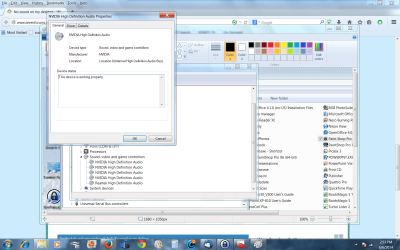
I've uploaded 2 screen shots. I couldn't locate the second one you mentioned. Is the second one the correct one? If not give me more detail on how to locate it.
 

Attachments

  • devicemanager.png
    devicemanager.png
    372.3 KB · Views: 1
  • device manager audio prop.png
    device manager audio prop.png
    169.4 KB · Views: 0

My Computer My Computer

At a glance

Win7, home premium, 64 bit2.9 GHZ6 Gbytes
Computer Manufacturer/Model Number
Gateway SX 2841
OS
Win7, home premium, 64 bit
CPU
2.9 GHZ
Memory
6 Gbytes
Hard Drives
1 terra byte
The Sound Panel, Playback section is accessed from Start/Control Panel/Hardware and Sound.
The "Speakers" should be set as the default playback device.
 

My Computer My Computer

At a glance

Windows 10 64 bitIntel i7 6700K16GB Corsair DominatorIntel CPU Graphics
Computer type
PC/Desktop
Computer Manufacturer/Model Number
My Own Build
OS
Windows 10 64 bit
CPU
Intel i7 6700K
Motherboard
ASUS ROG Maximus VIII Hero
Memory
16GB Corsair Dominator
Graphics Card(s)
Intel CPU Graphics
Sound Card
RealTek
Monitor(s) Displays
27" Dell S2719dgf
Screen Resolution
2560X1440
Hard Drives
1 TB Samsung 850 EVO SSD for Win 10 Pro
500GB Samsung 850 EVO SSD for Win 10 Insider
2 TB drive for backup
PSU
EVGA Supernova 750G2
Case
BeQuiet Silent Base 600
Cooling
Deepcool Captain 120EX
Keyboard
Microsoft Wireless 2000
Mouse
Microsoft wireless
Internet Speed
100 MB/sec (Cable)
Antivirus
Microsoft Defender and Malwarebytes
Browser
Edge/Firefox
Other Info
Cakewalk (Sonar) by BandLab and Studio One 4.1 Pro recording studio software. MOTU 896Mk3 Hybrid recording interface, Frontier Tranzport wireless control unit, Behringer X-Touch Control Surface.
Five USB connected optical drives for CD Audio production using Nero BurningROM
The speakers are the default device and have been.
 

My Computer My Computer

At a glance

Win7, home premium, 64 bit2.9 GHZ6 Gbytes
Computer Manufacturer/Model Number
Gateway SX 2841
OS
Win7, home premium, 64 bit
CPU
2.9 GHZ
Memory
6 Gbytes
Hard Drives
1 terra byte
You can test the speakers in that panel. Click on the Speakers to highlight the device and then Click on the Configure button. You can set the type of speakers and test them there.

One other thought, can you test the speakers on a different system to make sure they work. Or using headset to see if you get sound with the headset.
 

Attachments

  • Capture.JPG
    Capture.JPG
    32 KB · Views: 11

My Computer My Computer

At a glance

Windows 10 64 bitIntel i7 6700K16GB Corsair DominatorIntel CPU Graphics
Computer type
PC/Desktop
Computer Manufacturer/Model Number
My Own Build
OS
Windows 10 64 bit
CPU
Intel i7 6700K
Motherboard
ASUS ROG Maximus VIII Hero
Memory
16GB Corsair Dominator
Graphics Card(s)
Intel CPU Graphics
Sound Card
RealTek
Monitor(s) Displays
27" Dell S2719dgf
Screen Resolution
2560X1440
Hard Drives
1 TB Samsung 850 EVO SSD for Win 10 Pro
500GB Samsung 850 EVO SSD for Win 10 Insider
2 TB drive for backup
PSU
EVGA Supernova 750G2
Case
BeQuiet Silent Base 600
Cooling
Deepcool Captain 120EX
Keyboard
Microsoft Wireless 2000
Mouse
Microsoft wireless
Internet Speed
100 MB/sec (Cable)
Antivirus
Microsoft Defender and Malwarebytes
Browser
Edge/Firefox
Other Info
Cakewalk (Sonar) by BandLab and Studio One 4.1 Pro recording studio software. MOTU 896Mk3 Hybrid recording interface, Frontier Tranzport wireless control unit, Behringer X-Touch Control Surface.
Five USB connected optical drives for CD Audio production using Nero BurningROM
My speaker window looks like the one shown. I double-clicked on the speaker icon and checked the contents. It said it was working properly. I tried one other thing. I went to Windows sounds page and enabled sounds that have been disabled such as the Windows startup sound. It offers a test feature and I didn't get any sound. I also tried turning on my external backup drive and I do not get the familiar beep although the drive is recognized and I can use it.
 

My Computer My Computer

At a glance

Win7, home premium, 64 bit2.9 GHZ6 Gbytes
Computer Manufacturer/Model Number
Gateway SX 2841
OS
Win7, home premium, 64 bit
CPU
2.9 GHZ
Memory
6 Gbytes
Hard Drives
1 terra byte
But, you didn't follow my instructions and test the speakers using the "Configure" button.

Assuming your speakers are still connected to the PC correctly and have power, Step #1 is to test the speakers vial the Configure button in the panel I've shown. There is no need to try anything else until you verify whether the speakers work with the test.

Exactly what speakers do you have? Are they connected via a 3.5mm (1/8") stereo plug to the GREEN speaker jack on the PC? AND have a separate power connection for the speakers?
 

My Computer My Computer

At a glance

Windows 10 64 bitIntel i7 6700K16GB Corsair DominatorIntel CPU Graphics
Computer type
PC/Desktop
Computer Manufacturer/Model Number
My Own Build
OS
Windows 10 64 bit
CPU
Intel i7 6700K
Motherboard
ASUS ROG Maximus VIII Hero
Memory
16GB Corsair Dominator
Graphics Card(s)
Intel CPU Graphics
Sound Card
RealTek
Monitor(s) Displays
27" Dell S2719dgf
Screen Resolution
2560X1440
Hard Drives
1 TB Samsung 850 EVO SSD for Win 10 Pro
500GB Samsung 850 EVO SSD for Win 10 Insider
2 TB drive for backup
PSU
EVGA Supernova 750G2
Case
BeQuiet Silent Base 600
Cooling
Deepcool Captain 120EX
Keyboard
Microsoft Wireless 2000
Mouse
Microsoft wireless
Internet Speed
100 MB/sec (Cable)
Antivirus
Microsoft Defender and Malwarebytes
Browser
Edge/Firefox
Other Info
Cakewalk (Sonar) by BandLab and Studio One 4.1 Pro recording studio software. MOTU 896Mk3 Hybrid recording interface, Frontier Tranzport wireless control unit, Behringer X-Touch Control Surface.
Five USB connected optical drives for CD Audio production using Nero BurningROM
Dude, I have the same problem with Windows 7 Ultimate 32 bit. It's my nephew's rig, and he has to blow up some sounds. But this thing won't even grunt.

I installed 7 Ultimate as an upgrade from XP when that went south, and it hasn't uttered a sound since. And I can't remember if it was actually working when I brought it in here to do the upgrade.

I've done all of the basic troubleshooting, and it still doesn't make a sound(sic)...
All of my settings are correct, all of the usual indicators are there. Speaker appears to be functioning. Device Mgr properties says it is working properly. I'd hate to reinstall this stuff. I just got ALL of the updates done! And oh, yeah, the computer manufacturer (COMPAQ) says it was shipped with an AC'97 Audio driver. I downloaded that after I didn't get anywhere with the Realtek HD Audio driver. I've installed, and uninstalled, this thing six times, to no avail!
Where's Brink? He probably has the answer...
 

My Computer My Computer

At a glance

Windows 7 Ultimate 64-bit2.90 gigahertz AMD A8-3850 APU with Radeon HD...8170 Megabytes Usable Installed MemoryATI Radeon HD 5450 [Display adapter]
Computer Manufacturer/Model Number
BIOSTAR Group A55MH
OS
Windows 7 Ultimate 64-bit
CPU
2.90 gigahertz AMD A8-3850 APU with Radeon HD Graphics
Motherboard
BIOSTAR Group A55MH Bus Clock: 100 megahertz BIOS: American
Memory
8170 Megabytes Usable Installed Memory
Graphics Card(s)
ATI Radeon HD 5450 [Display adapter]
Sound Card
AMD High Definition Audio Device
Monitor(s) Displays
Samsung SyncMaster [Monitor] (19.1"vis, s/n HA19HVDP427004,
Screen Resolution
1440x900
Hard Drives
1500.20 Gigabytes Usable Hard Drive Capacity
1104.84 Gigabytes Hard Drive Free Space
Case
DELL Dimension 3000
Keyboard
HP KB 0228
Mouse
GH optical-wired
Internet Speed
50+MB
The speakers have a separate power supply and are connected to the computer via the green jack. I used the configure routine and ran a test of the speakers with no sound from either the left or right speaker. I then turned the volume on the speakers to max (the volume was turned down to min, I don't know how or why). It now works!!! DUH!! DUH!! My mind must be in a pause state. Thanks for you help and attention.
 

My Computer My Computer

At a glance

Win7, home premium, 64 bit2.9 GHZ6 Gbytes
Computer Manufacturer/Model Number
Gateway SX 2841
OS
Win7, home premium, 64 bit
CPU
2.9 GHZ
Memory
6 Gbytes
Hard Drives
1 terra byte
Bill, not a problem. Its fixed...
 

My Computer My Computer

At a glance

Windows 10 64 bitIntel i7 6700K16GB Corsair DominatorIntel CPU Graphics
Computer type
PC/Desktop
Computer Manufacturer/Model Number
My Own Build
OS
Windows 10 64 bit
CPU
Intel i7 6700K
Motherboard
ASUS ROG Maximus VIII Hero
Memory
16GB Corsair Dominator
Graphics Card(s)
Intel CPU Graphics
Sound Card
RealTek
Monitor(s) Displays
27" Dell S2719dgf
Screen Resolution
2560X1440
Hard Drives
1 TB Samsung 850 EVO SSD for Win 10 Pro
500GB Samsung 850 EVO SSD for Win 10 Insider
2 TB drive for backup
PSU
EVGA Supernova 750G2
Case
BeQuiet Silent Base 600
Cooling
Deepcool Captain 120EX
Keyboard
Microsoft Wireless 2000
Mouse
Microsoft wireless
Internet Speed
100 MB/sec (Cable)
Antivirus
Microsoft Defender and Malwarebytes
Browser
Edge/Firefox
Other Info
Cakewalk (Sonar) by BandLab and Studio One 4.1 Pro recording studio software. MOTU 896Mk3 Hybrid recording interface, Frontier Tranzport wireless control unit, Behringer X-Touch Control Surface.
Five USB connected optical drives for CD Audio production using Nero BurningROM
djbillyd, please start a new thread, not hijack an existing thread that is closed.
 

My Computer My Computer

At a glance

Windows 10 64 bitIntel i7 6700K16GB Corsair DominatorIntel CPU Graphics
Computer type
PC/Desktop
Computer Manufacturer/Model Number
My Own Build
OS
Windows 10 64 bit
CPU
Intel i7 6700K
Motherboard
ASUS ROG Maximus VIII Hero
Memory
16GB Corsair Dominator
Graphics Card(s)
Intel CPU Graphics
Sound Card
RealTek
Monitor(s) Displays
27" Dell S2719dgf
Screen Resolution
2560X1440
Hard Drives
1 TB Samsung 850 EVO SSD for Win 10 Pro
500GB Samsung 850 EVO SSD for Win 10 Insider
2 TB drive for backup
PSU
EVGA Supernova 750G2
Case
BeQuiet Silent Base 600
Cooling
Deepcool Captain 120EX
Keyboard
Microsoft Wireless 2000
Mouse
Microsoft wireless
Internet Speed
100 MB/sec (Cable)
Antivirus
Microsoft Defender and Malwarebytes
Browser
Edge/Firefox
Other Info
Cakewalk (Sonar) by BandLab and Studio One 4.1 Pro recording studio software. MOTU 896Mk3 Hybrid recording interface, Frontier Tranzport wireless control unit, Behringer X-Touch Control Surface.
Five USB connected optical drives for CD Audio production using Nero BurningROM
I was directed to this thread by the search engine in the forum. I have the same sound problem. I apologize for "hijacking" your thread. I am just looking for the solution.

Again dude, I sincerely apologize. Geez...
 

My Computer My Computer

At a glance

Windows 7 Ultimate 64-bit2.90 gigahertz AMD A8-3850 APU with Radeon HD...8170 Megabytes Usable Installed MemoryATI Radeon HD 5450 [Display adapter]
Computer Manufacturer/Model Number
BIOSTAR Group A55MH
OS
Windows 7 Ultimate 64-bit
CPU
2.90 gigahertz AMD A8-3850 APU with Radeon HD Graphics
Motherboard
BIOSTAR Group A55MH Bus Clock: 100 megahertz BIOS: American
Memory
8170 Megabytes Usable Installed Memory
Graphics Card(s)
ATI Radeon HD 5450 [Display adapter]
Sound Card
AMD High Definition Audio Device
Monitor(s) Displays
Samsung SyncMaster [Monitor] (19.1"vis, s/n HA19HVDP427004,
Screen Resolution
1440x900
Hard Drives
1500.20 Gigabytes Usable Hard Drive Capacity
1104.84 Gigabytes Hard Drive Free Space
Case
DELL Dimension 3000
Keyboard
HP KB 0228
Mouse
GH optical-wired
Internet Speed
50+MB
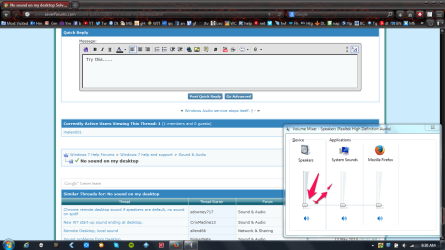
Try this...... new.png Maybe the volume in the mixer is all the ways down like you see it here....... SORRY, just noticed that the issue is resolved..........
 

My Computer My Computer

At a glance

Wins 7 x64 SP1 Home Premiumintel core i5 3rd Generation6 GB DDR3-1600Intel 4000
Computer type
Laptop
Computer Manufacturer/Model Number
Toshiba Satellite P845-S4200
OS
Wins 7 x64 SP1 Home Premium
CPU
intel core i5 3rd Generation
Motherboard
Toshiba
Memory
6 GB DDR3-1600
Graphics Card(s)
Intel 4000
Hard Drives
750 GB
Antivirus
Norton 2014 Antivirus
Browser
Firefox
Hi djbillyd; No apology necessary. If what you found, helps, good.
 

My Computer My Computer

At a glance

Win7, home premium, 64 bit2.9 GHZ6 Gbytes
Computer Manufacturer/Model Number
Gateway SX 2841
OS
Win7, home premium, 64 bit
CPU
2.9 GHZ
Memory
6 Gbytes
Hard Drives
1 terra byte
Back
Top