
No Sound, Tried Everything, Please Help!

It seems silly but if you have front pannel audio sockets on your PC have you tried plugging your headphones in there ? Also I once built a system with an HD audio front panel on the case wich refused to play any sound until I set it to AC97 Disabling auto jack detection and rear speaker mute so you might try that.
 

My Computer My Computer

Computer Manufacturer/Model Number
Self Build
OS
Windows 7 64 Bit
CPU
Core i7 930
Motherboard
Gigabite GA X58A UDR3
Memory
6 GB Corsair 16000
Graphics Card(s)
Redion HD5770
Sound Card
Onboard Realtec HD audio
Monitor(s) Displays
BenQ 2410HD
Screen Resolution
Something x 1080
Hard Drives
Samsung F3 1GB
PSU
Corsair TX750
Case
Cooler master CM Something Dominator 2
Cooling
3 case fans, stock CPU cooler
Keyboard
Microsoft PS/2
Mouse
A cheap one PS/2
Internet Speed
3G HSDPA
Other Info
No over clocking yet but set multiplyer to x22 2.9 ghz
Blue Ray writer
It seems silly but if you have front pannel audio sockets on your PC have you tried plugging your headphones in there ? Also I once built a system with an HD audio front panel on the case wich refused to play any sound until I set it to AC97 Disabling auto jack detection and rear speaker mute so you might try that.
Yes, I've plugged them in to both. Also, how did you do the AC97 thing?...
 

My Computer My Computer

OS
Windows 7 Home Premium 64-Bit
Capture.PNG

Here it is on mine. Double-click the folder (highlighted with a red square) and the Connector settings dialogue appears. Ensure both options are checked. I can't see how this would prevent your sound from working, however. All it does is enable my front sockets so that I can use headphones if I wanted to (if I do, I have to manually mute my speakers because an AC'97 front panel doesn't have the correct configuration to mute the rear audio sockets when connected to an HD codec).
 

My Computer My Computer

Computer type
PC/Desktop
Computer Manufacturer/Model Number
Dwarf Dwf/11/2012 r09/2013
OS
Windows 8.1 Pro RTM x64
CPU
Intel Core-i5-3570K 4-core @ 3.4GHz (Ivy Bridge) (OC 4.4GHz)
Motherboard
ASRock Z77 Extreme4-M
Memory
4 x 4GB DDR3-1600 Corsair Vengeance CMZ8GX3M2A1600C9B (16GB)
Graphics Card(s)
MSI GeForce GTX770 Gaming OC 2GB
Sound Card
Realtek High Definition on board solution (ALC 898)
Monitor(s) Displays
ViewSonic VA1912w Widescreen (VGA)
Screen Resolution
1440x900
Hard Drives
OCZ Agility 3 SSD 120GB SATA III x2 (RAID 0)
Samsung HD501LJ 500GB SATA II x2
Hitachi HDS721010CLA332 1TB SATA II
Iomega 1.5TB Ext USB 2.0
WD 2.0TB Ext USB 3.0
PSU
XFX Pro Series 850W Semi-Modular
Case
Gigabyte IF233
Cooling
1 x 120mm Front Inlet 1 x 120mm Rear Exhaust
Keyboard
Microsoft Comfort Curve Keyboard 3000 (USB)
Mouse
Microsoft Comfort Mouse 3000 for Business (USB)
Internet Speed
NetGear DG834Gv3 ADSL Modem/Router (Ethernet) ~4.0 Mb/s (O2)
Antivirus
Avast! 8.0.1497
Browser
IE 11
Other Info
Optical Drive: HL-DT-ST BD-RE BH10LS30 SATA Bluray
Lexmark S305 Printer/Scanner/Copier (USB)
WEI Score: 8.1/8.1/8.5/8.5/8.25
Asus Eee PC 1011PX Netbook (Windows 7 x86 Starter)
This can have an effect because if the system " THINKS " it has something pluged in at the front it will mute the rear audio. Also I think this sounds like some sort of muting problem because you do get some sound out if only very little. I don't know if you get ANY sound out with a faulty driver.
 

My Computer My Computer

Computer Manufacturer/Model Number
Self Build
OS
Windows 7 64 Bit
CPU
Core i7 930
Motherboard
Gigabite GA X58A UDR3
Memory
6 GB Corsair 16000
Graphics Card(s)
Redion HD5770
Sound Card
Onboard Realtec HD audio
Monitor(s) Displays
BenQ 2410HD
Screen Resolution
Something x 1080
Hard Drives
Samsung F3 1GB
PSU
Corsair TX750
Case
Cooler master CM Something Dominator 2
Cooling
3 case fans, stock CPU cooler
Keyboard
Microsoft PS/2
Mouse
A cheap one PS/2
Internet Speed
3G HSDPA
Other Info
No over clocking yet but set multiplyer to x22 2.9 ghz
Blue Ray writer
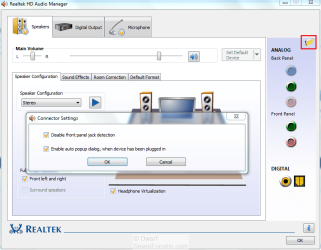
View attachment 89193

Here it is on mine. Double-click the folder (highlighted with a red square) and the Connector settings dialogue appears. Ensure both options are checked. I can't see how this would prevent your sound from working, however. All it does is enable my front sockets so that I can use headphones if I wanted to (if I do, I have to manually mute my speakers because an AC'97 front panel doesn't have the correct configuration to mute the rear audio sockets when connected to an HD codec).
They have both been checked. I'm getting sound out of both, the headphones and the speakers, when I try to test them, the volume is just really low. Most people probably wouldn't even hear it.
 

My Computer My Computer

OS
Windows 7 Home Premium 64-Bit
I used both the speakers and the headphones with my phone, and they work fine, so the problem must be with my hardware.
 

My Computer My Computer

OS
Windows 7 Home Premium 64-Bit
I used both the speakers and the headphones with my phone, and they work fine, so the problem must be with my hardware.


Have you tried any other Brand of speakers or headphones to see if different ones may work ?
 

My Computer My Computer

Computer type
PC/Desktop
Computer Manufacturer/Model Number
Built them myself, Science Experiments !
OS
Win7 Enterprise, Win7 x86 (Ult 7600), Win7 x64 Ult 7600, TechNet RTM on AMD x64 (2.8Ghz)
CPU
AMD fx8350 4ghz, AMD-32 2400mhz, AMD-64 3200mhz, AMDx64 2.8G
Motherboard
SIS 755, ECS-K8M890M-M (Ult 7600), GigaByte & others
Memory
2gb, 4gb on the Ult 7600, 4gb on Technet RTM, 32gb on FX8350
Graphics Card(s)
Draw my own Graphics, several nVidia cards
Sound Card
on motherboard
Monitor(s) Displays
19" flat scr, 28" I-Inc widescr,22" Emprex Widescr, 23" Acer
Screen Resolution
1280 x 1024, 1440 x 900, 1920 x 1080
Hard Drives
6 pata Ide HD's & 2 Sata HD's
added 80gb external on Ult 7600 computer,
numerous extra 1tb, 2TB, 3Tb SATA HD's
A collection of ext HD Docks w/ HDs
PSU
430w, 550w, 600w, 700, 800, etc
Case
All Generic Full Towers
Cooling
Open Air & a few fans, some w/ colored LEDs
Keyboard
Compaq & Dell recycled from GoodWill
Mouse
Made in China Optical Wired Mouse
Internet Speed
Fast Cable InterNet
Antivirus
AVG Free on 24 different Desktops, NO Problems!
Browser
IE 8 is preferred, but use FireFox sometimes
Other Info
Linksys Routers, switches, & Hubs
Too Many USB Flash Drives to count, Biggest is 64GB !
Eight computers in my home network.
Sixteen computers at my business network.
Linked via TeamViewer !
Lots of old used spare computer parts everywhere!
Well the built-in speakers are a different brand than the speakers than the external speakers, and both had the same problem.
 

My Computer My Computer

OS
Windows 7 Home Premium 64-Bit
I have read through all your posts again and you say near the begining that it did work with windows 7. As you have reinstalled the drivers and even windows you should have all the default settings. From a software point I can't think of anything else to try. Just one thought though. Did you upgrade from an hp provided version of Vista ? If so then Windows 7 may have taken some settings from there that have now been lost. Fancy a reinstall of vista to check ? :-)
 
Last edited:

My Computer My Computer

Computer Manufacturer/Model Number
Self Build
OS
Windows 7 64 Bit
CPU
Core i7 930
Motherboard
Gigabite GA X58A UDR3
Memory
6 GB Corsair 16000
Graphics Card(s)
Redion HD5770
Sound Card
Onboard Realtec HD audio
Monitor(s) Displays
BenQ 2410HD
Screen Resolution
Something x 1080
Hard Drives
Samsung F3 1GB
PSU
Corsair TX750
Case
Cooler master CM Something Dominator 2
Cooling
3 case fans, stock CPU cooler
Keyboard
Microsoft PS/2
Mouse
A cheap one PS/2
Internet Speed
3G HSDPA
Other Info
No over clocking yet but set multiplyer to x22 2.9 ghz
Blue Ray writer
Often times in cases like this it needs a bigger software package, or the software package installed is not exactly correct.

You referred repeatedly to "driver" but this is one of those devices that requires additional software. While it appears that you do have the Realtek, maybe you don't have the full package or don't have the exact one. Research to know for sure you have the fullest and correct software package.

I would also uninstall software cleanly in Control Panel or using Revo, including Sound driver(s) in Device manager, then reinstall the full software package thus making sure you are picking up its driver and not a lesser preliminary driver that came in installer or Updates.

I admit it is slim pickings, but that's what I'd do if I was there. Also Google sound + your model and read everything others have experienced as I've solved sound issues this way sometimes. You may have already had this solved if you had posted your model and sound device in title, or googled it thoroughly.
 
I have read through all your posts again and you say near the begining that it did work with windows 7. As you have reinstalled the drivers and even windows you should have all the default settings. From a software point I can't think of anything else to try. Just one thought though. Did you upgrade from an hp provided version of Vista ? If so then Windows 7 may have taken some settings from there that have now been lost. Fancy a reinstall of vista to check ? :-)
I didn't upgrade from Vista. I had the Windows 7 beta before.
 

My Computer My Computer

OS
Windows 7 Home Premium 64-Bit
Often times in cases like this it needs a bigger software package, or the software package installed is not exactly correct.

You referred repeatedly to "driver" but this is one of those devices that requires additional software. While it appears that you do have the Realtek, maybe you don't have the full package or don't have the exact one. Research to know for sure you have the fullest and correct software package.

I would also uninstall software cleanly in Control Panel or using Revo, including Sound driver(s) in Device manager, then reinstall the full software package thus making sure you are picking up its driver and not a lesser preliminary driver that came in installer or Updates.

I admit it is slim pickings, but that's what I'd do if I was there. Also Google sound + your model and read everything others have experienced as I've solved sound issues this way sometimes. You may have already had this solved if you had posted your model and sound device in title, or googled it thoroughly.
Tried all of this for the last couple days, still nothing.
 

My Computer My Computer

OS
Windows 7 Home Premium 64-Bit
I have read through all your posts again and you say near the begining that it did work with windows 7. As you have reinstalled the drivers and even windows you should have all the default settings. From a software point I can't think of anything else to try. Just one thought though. Did you upgrade from an hp provided version of Vista ? If so then Windows 7 may have taken some settings from there that have now been lost. Fancy a reinstall of vista to check ? :-)
I didn't upgrade from Vista. I had the Windows 7 beta before.


This was a clean Win7 install for me too. What is so hard to understand is how we can get sound out of these boxes. I would have wven put blame on the motherboards but I install an independant sound card, recongized by win7 and still no sound!!!
 

My Computer My Computer

Computer Manufacturer/Model Number
HP P6110Y
OS
Windows 7
Back
Top