No sound with custom win 7 install

raijair

New member
Local time
4:36 AM
Messages
3
Howdy,

I seem to have ran into this troubling issue as well, I recently installed win 7 professional 32 bit from xp home and i noticed that i had no sound, some installing of drivers later from the manufacturer's website and even from the realtek website and still no sound to be had, the sound meter jumps up and down with the beat of the music but i hear nothing...

my mobo is a xfx 750i sli with integrated sound. windows update also says that i'm currently up to date on all updates and such

any and all help would be totally awesome

thanks in advance,

raij
 

My Computer My Computer

Computer Manufacturer/Model Number
me, myself and i
OS
Windows 7 Professional 32 bit
CPU
Intel Pentium D cpu 3.73ghz
Motherboard
xfx nForce 750i sli
Memory
2gb
Graphics Card(s)
Nvidia GeForce GTS 250
Sound Card
integrated
Monitor(s) Displays
Acer v223w
Screen Resolution
1680x1050
Hard Drives
1x 80gb
1x 500gb
Mouse
Logitech
Check the Control Panel/Hardware and Sound and finally the Sound Panel. In the playback section, make sure your speakers are selected as the default playback device. You can also configure and test your speakers in that panel.
 

My Computer My Computer

Computer type
PC/Desktop
Computer Manufacturer/Model Number
My Own Build
OS
Windows 10 64 bit
CPU
Intel i7 6700K
Motherboard
ASUS ROG Maximus VIII Hero
Memory
16GB Corsair Dominator
Graphics Card(s)
Intel CPU Graphics
Sound Card
RealTek
Monitor(s) Displays
27" Dell S2719dgf
Screen Resolution
2560X1440
Hard Drives
1 TB Samsung 850 EVO SSD for Win 10 Pro
500GB Samsung 850 EVO SSD for Win 10 Insider
2 TB drive for backup
PSU
EVGA Supernova 750G2
Case
BeQuiet Silent Base 600
Cooling
Deepcool Captain 120EX
Keyboard
Microsoft Wireless 2000
Mouse
Microsoft wireless
Internet Speed
100 MB/sec (Cable)
Antivirus
Microsoft Defender and Malwarebytes
Browser
Edge/Firefox
Other Info
Cakewalk (Sonar) by BandLab and Studio One 4.1 Pro recording studio software. MOTU 896Mk3 Hybrid recording interface, Frontier Tranzport wireless control unit, Behringer X-Touch Control Surface.
Five USB connected optical drives for CD Audio production using Nero BurningROM
I did like you asked fireberd and still no dice. they are already selected as the default playback device and all of the sliders are at 100 and nothing is muted. even made sure nothing was muted in the realtek hd audio manager thing.

forgot to mention this in the first post but i even went into the bios and made sure the audio component was enabled which it was.

thanks!
 

My Computer My Computer

Computer Manufacturer/Model Number
me, myself and i
OS
Windows 7 Professional 32 bit
CPU
Intel Pentium D cpu 3.73ghz
Motherboard
xfx nForce 750i sli
Memory
2gb
Graphics Card(s)
Nvidia GeForce GTS 250
Sound Card
integrated
Monitor(s) Displays
Acer v223w
Screen Resolution
1680x1050
Hard Drives
1x 80gb
1x 500gb
Mouse
Logitech
Try plugging the speaker or headset on another stereo jack. If you plugged it on the front stereo jack, try plugging your speaker/headset to the rear stereo jack.

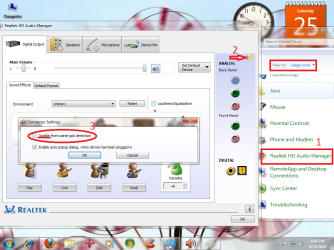
If you can now see the Realtek icon on the Control Panel whilst you have it on the Large Icons view, try to see if the "front panel" detection is NOT disabled . I had this problem too but I managed to fix it.

But on the Realtek version I have, it has a bug, I actually have to have the "disable front panel detection" option ticked to get my front panel working. Maybe it actually meant "enable front panel detection" but they made it wrongly. But this usually disabled by default. I fixed it this way.
 

Attachments

  • egegewg.png
    egegewg.png
    140.8 KB · Views: 36

My Computer My Computer

Computer Manufacturer/Model Number
Custom Built
OS
Windows 7 Ultimate 32 Bit, Windows Developer Preview, Linux Mint 9 Gnome 32 Bit
CPU
Intel Pentium Dual CPU E2180@2GHz
Motherboard
Elitegroup 671T-M3
Graphics Card(s)
NVIDIA GeForce 7200 GS
Monitor(s) Displays
AOC TFT1560 15" LCD Monitor
Screen Resolution
1024x768
Keyboard
Logitech USB Keyboard
thank you thank you vertex! I checked that box for front panel detection and my sound works again! my sound still doesnt work when i plug it in the back panel jack for some reason tho but it works when i plug it in the front!
 

My Computer My Computer

Computer Manufacturer/Model Number
me, myself and i
OS
Windows 7 Professional 32 bit
CPU
Intel Pentium D cpu 3.73ghz
Motherboard
xfx nForce 750i sli
Memory
2gb
Graphics Card(s)
Nvidia GeForce GTS 250
Sound Card
integrated
Monitor(s) Displays
Acer v223w
Screen Resolution
1680x1050
Hard Drives
1x 80gb
1x 500gb
Mouse
Logitech
Back
Top