Solved No Sound with HDMI connection

rabidwolf

New member
Local time
12:11 AM
Messages
10
I've just built my first computer, and everything works fantastic, except that when I connect my PC to my HDTV through HDMI, I get a crystal clear display but no sound. I can plug in headphones and hear everything that way, but that is my only option right now.

It is curious because I have installed a Radeon HD 5450 video card with an HDMI port. I installed the DVD driver (Version A8.98W) and the visual sizing was fixed, but like I said no audio. I've checked the playback devices, and my TV seems to be listed as "AMD HDMI Output", which wont play sound (even if I set it as the default device) . I've also checked the Device manager and seen that "AMD High Definition Audio Device" is listed under "Sound, video, and game controllers".

The only way to play sound is to disable the AMD HDMI Output and plug in headphones so that the audio is playing on what the PC thinks is speakers.

Anybody ever seen this before? Any help would be greatly appreciated.
 

My Computer My Computer

Computer type
PC/Desktop
Computer Manufacturer/Model Number
custom build
OS
Windows 7 Home 64bit
CPU
intel i5
Motherboard
asRock Z75Pro
Memory
GSkill
Graphics Card(s)
Radeon HD 5450
Get the latest driver from AMD for that card. See if that changes anything. It is supposed to have audio built on the card and if its not outputting the audio, I would say the card is defective.
 

My Computer My Computer

Computer type
PC/Desktop
Computer Manufacturer/Model Number
My Own Build
OS
Windows 10 64 bit
CPU
Intel i7 6700K
Motherboard
ASUS ROG Maximus VIII Hero
Memory
16GB Corsair Dominator
Graphics Card(s)
Intel CPU Graphics
Sound Card
RealTek
Monitor(s) Displays
27" Dell S2719dgf
Screen Resolution
2560X1440
Hard Drives
1 TB Samsung 850 EVO SSD for Win 10 Pro
500GB Samsung 850 EVO SSD for Win 10 Insider
2 TB drive for backup
PSU
EVGA Supernova 750G2
Case
BeQuiet Silent Base 600
Cooling
Deepcool Captain 120EX
Keyboard
Microsoft Wireless 2000
Mouse
Microsoft wireless
Internet Speed
100 MB/sec (Cable)
Antivirus
Microsoft Defender and Malwarebytes
Browser
Edge/Firefox
Other Info
Cakewalk (Sonar) by BandLab and Studio One 4.1 Pro recording studio software. MOTU 896Mk3 Hybrid recording interface, Frontier Tranzport wireless control unit, Behringer X-Touch Control Surface.
Five USB connected optical drives for CD Audio production using Nero BurningROM
New Ddriver not an improvement

I downloaded the very latest driver from AMD (Version 13.12) and I get the same issue.

On a side note, my display ONLY works if I plug into my video card output. My motherboard is a ASRock Z75 Pro, which has its own HDMI port, but no matter what I do if I plug HDMI into that port, I get no display and no sound. I am thinking these problems may be related. Any ideas?
 

My Computer My Computer

Computer type
PC/Desktop
Computer Manufacturer/Model Number
custom build
OS
Windows 7 Home 64bit
CPU
intel i5
Motherboard
asRock Z75Pro
Memory
GSkill
Graphics Card(s)
Radeon HD 5450
You've got an i5 CPU and it has built in Intel Video/HDMI support. Probably, you would have to remove the HD5450 video card for the HDMI video on the motherboard to become active. Most BIOS will automatically switch to a video card if one is installed. The Intel Video is probably equal or nearly equal to the HD5450 and if you haven't tried it, you may find out its just as good.

Does this motherboard also have other video ports (DVI, VGA ?).
 

My Computer My Computer

Computer type
PC/Desktop
Computer Manufacturer/Model Number
My Own Build
OS
Windows 10 64 bit
CPU
Intel i7 6700K
Motherboard
ASUS ROG Maximus VIII Hero
Memory
16GB Corsair Dominator
Graphics Card(s)
Intel CPU Graphics
Sound Card
RealTek
Monitor(s) Displays
27" Dell S2719dgf
Screen Resolution
2560X1440
Hard Drives
1 TB Samsung 850 EVO SSD for Win 10 Pro
500GB Samsung 850 EVO SSD for Win 10 Insider
2 TB drive for backup
PSU
EVGA Supernova 750G2
Case
BeQuiet Silent Base 600
Cooling
Deepcool Captain 120EX
Keyboard
Microsoft Wireless 2000
Mouse
Microsoft wireless
Internet Speed
100 MB/sec (Cable)
Antivirus
Microsoft Defender and Malwarebytes
Browser
Edge/Firefox
Other Info
Cakewalk (Sonar) by BandLab and Studio One 4.1 Pro recording studio software. MOTU 896Mk3 Hybrid recording interface, Frontier Tranzport wireless control unit, Behringer X-Touch Control Surface.
Five USB connected optical drives for CD Audio production using Nero BurningROM
Already tried removing the video card, even with no video card I cannot get a visual display via the built in HDMI port.

The motherboard does have a built in VGA port but I don't have a VGA cable to test with. May have to invest in one for troubleshooting purposes.
 

My Computer My Computer

Computer type
PC/Desktop
Computer Manufacturer/Model Number
custom build
OS
Windows 7 Home 64bit
CPU
intel i5
Motherboard
asRock Z75Pro
Memory
GSkill
Graphics Card(s)
Radeon HD 5450
Some HDMI coonections do not do audio - have you checked your specs to make sure that this is not the case here?
 

My Computer My Computer

Computer type
Laptop
Computer Manufacturer/Model Number
Asus K52F or Lenovo B51-80
OS
Win 7 x64 Home Premium (and x86 VirtualBox VM)/Win10
CPU
i3 370M/i7 6500U
Motherboard
Asus/Lenovo
Memory
8GB - finally :)/8GB
Graphics Card(s)
it's an i3, dude!/dual Intel&nVidia
Sound Card
onboard
Monitor(s) Displays
15.6" built-in
Screen Resolution
1366x768/1920x1080
Hard Drives
750GB Seagate internal
Sundry external drives attached to other computers on the local network
1TB SSD on the Lenovo
PSU
n/a
Internet Speed
as much as I can get - usually on a dongle/phone, so <1MB/s
Antivirus
MSE/Defender
Browser
IE11/12/Edge/Chrome/FF(if I must)
According to what I find the HD5450 has built in audio. He also shows the HDMI Audio in the Device Manager.
 

My Computer My Computer

Computer type
PC/Desktop
Computer Manufacturer/Model Number
My Own Build
OS
Windows 10 64 bit
CPU
Intel i7 6700K
Motherboard
ASUS ROG Maximus VIII Hero
Memory
16GB Corsair Dominator
Graphics Card(s)
Intel CPU Graphics
Sound Card
RealTek
Monitor(s) Displays
27" Dell S2719dgf
Screen Resolution
2560X1440
Hard Drives
1 TB Samsung 850 EVO SSD for Win 10 Pro
500GB Samsung 850 EVO SSD for Win 10 Insider
2 TB drive for backup
PSU
EVGA Supernova 750G2
Case
BeQuiet Silent Base 600
Cooling
Deepcool Captain 120EX
Keyboard
Microsoft Wireless 2000
Mouse
Microsoft wireless
Internet Speed
100 MB/sec (Cable)
Antivirus
Microsoft Defender and Malwarebytes
Browser
Edge/Firefox
Other Info
Cakewalk (Sonar) by BandLab and Studio One 4.1 Pro recording studio software. MOTU 896Mk3 Hybrid recording interface, Frontier Tranzport wireless control unit, Behringer X-Touch Control Surface.
Five USB connected optical drives for CD Audio production using Nero BurningROM
Yes fireberd is correct about both of those, I also have used this hdmi cable to connect other devices to the TV with complete success, so I have ruled out a bad TV and cable.
 

My Computer My Computer

Computer type
PC/Desktop
Computer Manufacturer/Model Number
custom build
OS
Windows 7 Home 64bit
CPU
intel i5
Motherboard
asRock Z75Pro
Memory
GSkill
Graphics Card(s)
Radeon HD 5450
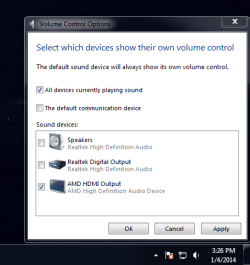
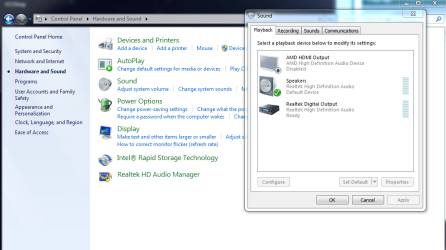
What is shown in playback in Control Panel -> sound and in volume control options (right click volume in systray)
 

My Computer My Computer

Computer type
Laptop
Computer Manufacturer/Model Number
HP Pavilion dv6-6c10us
OS
x64 (6.3.9600) Win8.1 Pro & soon dual boot x64 (6.1.7601) Win7_SP1 HomePrem
CPU
AMD A6-3420M APU with Radeon(tm) HD Graphics
Motherboard
Hewlett-Packard 1805
Memory
6.00 GB
Graphics Card(s)
AMD Radeon(TM) HD 6520G
Sound Card
(1) AMD High Definition Audio Device (2) IDT High Definiti
Monitor(s) Displays
HP W2072a 20" LCD (1600 x 900) @ 60 Hz
Screen Resolution
1366 x 768 x 32 bits (4294967296 colors) @ 60 Hz
Hard Drives
ST640LM0 00 HM641JI SATA Disk Device
Keyboard
Logitech k520 wireless KB
Mouse
Logitech m320 wireless mouse (bundled with KB)
Internet Speed
15/5 | 54 MB Wireless 'n'
Antivirus
Realtime: Defender or Avast | On-demand: Malwarebytes, ESET
Browser
IE 11 on Win8, IE 10 on win 7
Other Info
Media: [Gimp, Audacity, VLC] || Comm: [WEmail 2012, Skype] || Productivity: [OpenOffice,| Textpad] || Utils: [Sysinternals, cCleaner, Speccy, Defraggler]
volume control shows the "AMD HDMI Output" when it is enabled, but no sound comes out. I have to disable the HDMI Output in order for sound to play on "Speakers" which is what my headphones are plugged into.
 

Attachments

  • VCOSnip.PNG
    VCOSnip.PNG
    18.7 KB · Views: 39

My Computer My Computer

Computer type
PC/Desktop
Computer Manufacturer/Model Number
custom build
OS
Windows 7 Home 64bit
CPU
intel i5
Motherboard
asRock Z75Pro
Memory
GSkill
Graphics Card(s)
Radeon HD 5450
And this is with the HD Audio disabled in Control Panel --> Sound, allowing me to listen on headphones through the speakers.
 

Attachments

  • CPSSnip.PNG
    CPSSnip.PNG
    50.3 KB · Views: 1

My Computer My Computer

Computer type
PC/Desktop
Computer Manufacturer/Model Number
custom build
OS
Windows 7 Home 64bit
CPU
intel i5
Motherboard
asRock Z75Pro
Memory
GSkill
Graphics Card(s)
Radeon HD 5450
Thanks
I see Realtek HD audio is enabled (and it's manager in Control Panel)

What happens if you enable the AMD and disable the Realtek?
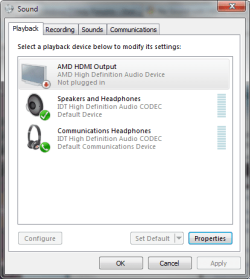
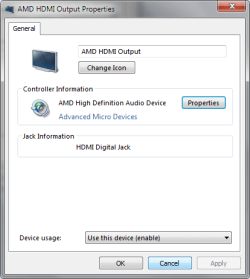
Screenshots from my machine below
 

Attachments

  • HDMI aud-a.png
    HDMI aud-a.png
    17.8 KB · Views: 23
  • HDMI-b.png
    HDMI-b.png
    12 KB · Views: 23

My Computer My Computer

Computer type
Laptop
Computer Manufacturer/Model Number
HP Pavilion dv6-6c10us
OS
x64 (6.3.9600) Win8.1 Pro & soon dual boot x64 (6.1.7601) Win7_SP1 HomePrem
CPU
AMD A6-3420M APU with Radeon(tm) HD Graphics
Motherboard
Hewlett-Packard 1805
Memory
6.00 GB
Graphics Card(s)
AMD Radeon(TM) HD 6520G
Sound Card
(1) AMD High Definition Audio Device (2) IDT High Definiti
Monitor(s) Displays
HP W2072a 20" LCD (1600 x 900) @ 60 Hz
Screen Resolution
1366 x 768 x 32 bits (4294967296 colors) @ 60 Hz
Hard Drives
ST640LM0 00 HM641JI SATA Disk Device
Keyboard
Logitech k520 wireless KB
Mouse
Logitech m320 wireless mouse (bundled with KB)
Internet Speed
15/5 | 54 MB Wireless 'n'
Antivirus
Realtime: Defender or Avast | On-demand: Malwarebytes, ESET
Browser
IE 11 on Win8, IE 10 on win 7
Other Info
Media: [Gimp, Audacity, VLC] || Comm: [WEmail 2012, Skype] || Productivity: [OpenOffice,| Textpad] || Utils: [Sysinternals, cCleaner, Speccy, Defraggler]
Disabling Realtek Digital Output basically does nothing, my assumption is it disables the audio in the back of the case, which is set up for surround sound. Disabling speakers disables the audio jack in the front, and the HDMI needs to be disabled for sound to play on the "speakers".
 

My Computer My Computer

Computer type
PC/Desktop
Computer Manufacturer/Model Number
custom build
OS
Windows 7 Home 64bit
CPU
intel i5
Motherboard
asRock Z75Pro
Memory
GSkill
Graphics Card(s)
Radeon HD 5450
Ok, thanks.

I do not have the AMD HDMI Output checkbox ticked in the Volume Control Options (your screen shot does) - I only have "All devices cureently palying sound" ticked

When I open the volume mixer, I see
Speakers and Headphones (IDT HD Audio CODEC)
System Sounds

I do have the AMD volume control when I connect my laptop to my TV

A quick search found:
Uninstall both the Realtek and AMD drivers
Install only the AMD dirver

AND

Solved FIX - AMD HDMI no sound output to monitor speakers
 

My Computer My Computer

Computer type
Laptop
Computer Manufacturer/Model Number
HP Pavilion dv6-6c10us
OS
x64 (6.3.9600) Win8.1 Pro & soon dual boot x64 (6.1.7601) Win7_SP1 HomePrem
CPU
AMD A6-3420M APU with Radeon(tm) HD Graphics
Motherboard
Hewlett-Packard 1805
Memory
6.00 GB
Graphics Card(s)
AMD Radeon(TM) HD 6520G
Sound Card
(1) AMD High Definition Audio Device (2) IDT High Definiti
Monitor(s) Displays
HP W2072a 20" LCD (1600 x 900) @ 60 Hz
Screen Resolution
1366 x 768 x 32 bits (4294967296 colors) @ 60 Hz
Hard Drives
ST640LM0 00 HM641JI SATA Disk Device
Keyboard
Logitech k520 wireless KB
Mouse
Logitech m320 wireless mouse (bundled with KB)
Internet Speed
15/5 | 54 MB Wireless 'n'
Antivirus
Realtime: Defender or Avast | On-demand: Malwarebytes, ESET
Browser
IE 11 on Win8, IE 10 on win 7
Other Info
Media: [Gimp, Audacity, VLC] || Comm: [WEmail 2012, Skype] || Productivity: [OpenOffice,| Textpad] || Utils: [Sysinternals, cCleaner, Speccy, Defraggler]
No luck.

I notice that my Device manager does not have the subheader "Audio inputs and outputs" that the link describes. In any case, I uninstalled both drivers and devices under "Sound, video, and game controllers" and only installed the AMD driver (the newest one that I downloaded from their website).

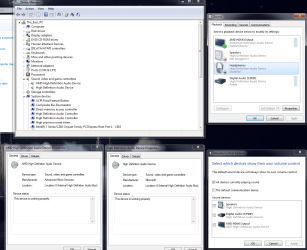
My devices no longer come with Realtek in their description, and I now have actual headphones as an option which is my front audio jack, but not matter what I disable or enable or set as default, my audio never plays through the TV. Im attaching a screenshot with as much information as possible.

I still have two devices under "Sound, video, and game controllers" even after the uninstall/reinstall, one by Microsoft and one by AMD. The disabling/enabling the AMD device appears to disable/enable the TV, while disabling the Microsoft device disables/enables the speakers,headphones, and digital audio in my video control options window.

Damn this is frustrating.
 

Attachments

  • NoIdea.PNG
    NoIdea.PNG
    96.3 KB · Views: 6

My Computer My Computer

Computer type
PC/Desktop
Computer Manufacturer/Model Number
custom build
OS
Windows 7 Home 64bit
CPU
intel i5
Motherboard
asRock Z75Pro
Memory
GSkill
Graphics Card(s)
Radeon HD 5450
There are two HD audio controllers listed under System devices. I can't tell what they are, but sometimes driver uninstalls need a little help cleaning up.

Download, install, and run Driver Fusion
Direct Download

Anything Realtek - let Driver Fusion remove.

It might be necessary to uninstall AMD, run Driver Fusion, and then re-install AMD. Your choice, try to clean up only Realtek, or remove AMD, run Driver Fusion (this time any AMD or Realtek - let Driver Fusion remove), install AMD
 

My Computer My Computer

Computer type
Laptop
Computer Manufacturer/Model Number
HP Pavilion dv6-6c10us
OS
x64 (6.3.9600) Win8.1 Pro & soon dual boot x64 (6.1.7601) Win7_SP1 HomePrem
CPU
AMD A6-3420M APU with Radeon(tm) HD Graphics
Motherboard
Hewlett-Packard 1805
Memory
6.00 GB
Graphics Card(s)
AMD Radeon(TM) HD 6520G
Sound Card
(1) AMD High Definition Audio Device (2) IDT High Definiti
Monitor(s) Displays
HP W2072a 20" LCD (1600 x 900) @ 60 Hz
Screen Resolution
1366 x 768 x 32 bits (4294967296 colors) @ 60 Hz
Hard Drives
ST640LM0 00 HM641JI SATA Disk Device
Keyboard
Logitech k520 wireless KB
Mouse
Logitech m320 wireless mouse (bundled with KB)
Internet Speed
15/5 | 54 MB Wireless 'n'
Antivirus
Realtime: Defender or Avast | On-demand: Malwarebytes, ESET
Browser
IE 11 on Win8, IE 10 on win 7
Other Info
Media: [Gimp, Audacity, VLC] || Comm: [WEmail 2012, Skype] || Productivity: [OpenOffice,| Textpad] || Utils: [Sysinternals, cCleaner, Speccy, Defraggler]
SOLVED!

Driver Fusion was not needed, although I did mess around with it for a bit. My solution was a bit counterintuitive.

What I had to do was run the .exe file that I used to install the latest AMD driver, but instead of installing, I had it uninstall everything form AMD. After that I reinstalled, selected custom install (instead of the reccomended express) and had it reinstall everything EXCEPT for the HDMI Audio Control. Rebooted the computer and BOOM, TV audio playing perfect.

Thank you anyone who even attempted to help me, I really appreciate you all giving me someideas to try. Let me know if I can answer and other questions or if anyone runs into this issue like I did.
 

My Computer My Computer

Computer type
PC/Desktop
Computer Manufacturer/Model Number
custom build
OS
Windows 7 Home 64bit
CPU
intel i5
Motherboard
asRock Z75Pro
Memory
GSkill
Graphics Card(s)
Radeon HD 5450
Great news rabidwolf!

What, if anything, did you do re: Realtek?
What's the staus of AMD HDMI then in DevMgr?

Your information might help others. We were on the reight track - driver conflict, but you worked through it.
Good job!
 

My Computer My Computer

Computer type
Laptop
Computer Manufacturer/Model Number
HP Pavilion dv6-6c10us
OS
x64 (6.3.9600) Win8.1 Pro & soon dual boot x64 (6.1.7601) Win7_SP1 HomePrem
CPU
AMD A6-3420M APU with Radeon(tm) HD Graphics
Motherboard
Hewlett-Packard 1805
Memory
6.00 GB
Graphics Card(s)
AMD Radeon(TM) HD 6520G
Sound Card
(1) AMD High Definition Audio Device (2) IDT High Definiti
Monitor(s) Displays
HP W2072a 20" LCD (1600 x 900) @ 60 Hz
Screen Resolution
1366 x 768 x 32 bits (4294967296 colors) @ 60 Hz
Hard Drives
ST640LM0 00 HM641JI SATA Disk Device
Keyboard
Logitech k520 wireless KB
Mouse
Logitech m320 wireless mouse (bundled with KB)
Internet Speed
15/5 | 54 MB Wireless 'n'
Antivirus
Realtime: Defender or Avast | On-demand: Malwarebytes, ESET
Browser
IE 11 on Win8, IE 10 on win 7
Other Info
Media: [Gimp, Audacity, VLC] || Comm: [WEmail 2012, Skype] || Productivity: [OpenOffice,| Textpad] || Utils: [Sysinternals, cCleaner, Speccy, Defraggler]
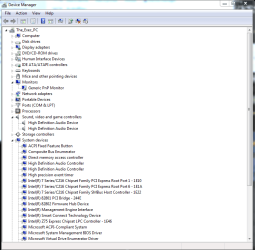
The AMD HDMI is now just "Digital Audio (HDMI)" in the playback devices.

I uninstalled all of the realtek drivers before I did anything to AMD, so Realtek is essentially non-existent in my audio now. As a sidenote Realtek has a driver for my network connection, which I never touched since I need that for network connectivity, and that is still active under device manage-->Network Adapters, labeled "Realtek PCIe GBE Family Controller". Seems to have nothing to do with audio.

Im attaching screenshots of the current status of my playback devices and Device Manager, hopefully anyone with similar issues can take a look any help themselves.
 

Attachments

  • PBDevices.PNG
    PBDevices.PNG
    13.5 KB · Views: 16
  • DManager.PNG
    DManager.PNG
    26 KB · Views: 1

My Computer My Computer

Computer type
PC/Desktop
Computer Manufacturer/Model Number
custom build
OS
Windows 7 Home 64bit
CPU
intel i5
Motherboard
asRock Z75Pro
Memory
GSkill
Graphics Card(s)
Radeon HD 5450
I had the same problem and stumbled onto this thread which gave me an idea which is much simpler and it worked.

Instead of uninstalling and reinstalling, just go to device manager, AMD HDMI audio and roll back drivers. It'll work immediately.
 

My Computer My Computer

OS
Windows 7 Ultimate x86
Back
Top