
Hi All,
First time poster and only limited self taught knowledge. Any help is greatly appreciated as have spent many hours over the past few days trying to get sound working on my PC. A life without gaming is getting me down! I have searched hundreds of forum posts but can't seem to resolve my problem.
ERROR
No speakers or headphones are plugged in - Windows 7 Error (ASUS P7P55D-E Onboard Sound)
Hardware Checks
Software Checks
Other Issues/Info
Could it be ASUS onboard sound card failure? Should I try new PSE sound card? Or update BIOS?
Ideally just need some sensible suggestions before I either go mad or take it somewhere for an expensive professional to look at.
Many thanks,
Richard
First time poster and only limited self taught knowledge. Any help is greatly appreciated as have spent many hours over the past few days trying to get sound working on my PC. A life without gaming is getting me down! I have searched hundreds of forum posts but can't seem to resolve my problem.
ERROR
No speakers or headphones are plugged in - Windows 7 Error (ASUS P7P55D-E Onboard Sound)
Hardware Checks
Checked plugged in / power on / mute off / sound up etc
Tested all devices in multiple USB / jack ports (front jacks + USB not working but seems to be plugged in correctly to Mobo. Back ports have always worked previously, but now not working either)
Tested 2 x jack headsets and 1 x jack speakers on new laptop all working but not on PC
Tested USB headset on new laptop working correctly but not on PC
Tested all devices in multiple USB / jack ports (front jacks + USB not working but seems to be plugged in correctly to Mobo. Back ports have always worked previously, but now not working either)
Tested 2 x jack headsets and 1 x jack speakers on new laptop all working but not on PC
Tested USB headset on new laptop working correctly but not on PC
Software Checks
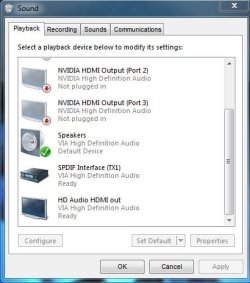
Set as default play back device/unmuted etc.
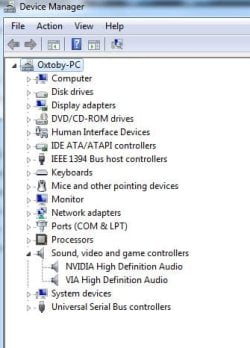
Device manager seems to show no errors
Uninstalled audio drivers
Reinstalled audio drivers for Realtek HD/Windows HD Audio/VIA HD (original ASUS mobo P7P55D-E default) none worked
Enabled BIOS onboard sound card (HDA Controller Enabled and set to HD Audio) for ASUS P7P55D-E Mobo
Device manager seems to show no errors
Uninstalled audio drivers
Reinstalled audio drivers for Realtek HD/Windows HD Audio/VIA HD (original ASUS mobo P7P55D-E default) none worked
Enabled BIOS onboard sound card (HDA Controller Enabled and set to HD Audio) for ASUS P7P55D-E Mobo
Other Issues/Info
Recently upgraded to GTX 660 (HDMI audio ports on video card showing in sound menu but not in use/onboard audio in BIOS still seems to be enabled)
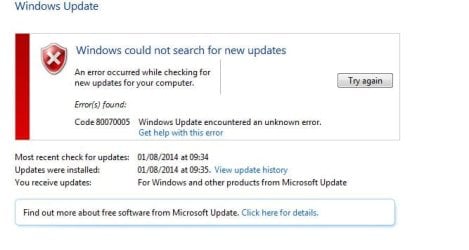
Windows Update Error 80070005
Can't Install Windows Update Agent 7.6.7600.320
sfc /scan error unable to fix corrupt files
Unable to resintall windows 7 from disc
Driver Tuner software showing all drivers upto date
I recently managed to get one headset working, but since unplugging I can't get it back
Windows Update Error 80070005
Can't Install Windows Update Agent 7.6.7600.320
sfc /scan error unable to fix corrupt files
Unable to resintall windows 7 from disc
Driver Tuner software showing all drivers upto date
I recently managed to get one headset working, but since unplugging I can't get it back
Could it be ASUS onboard sound card failure? Should I try new PSE sound card? Or update BIOS?
Ideally just need some sensible suggestions before I either go mad or take it somewhere for an expensive professional to look at.
Many thanks,
Richard
Attachments
My Computer
At a glance
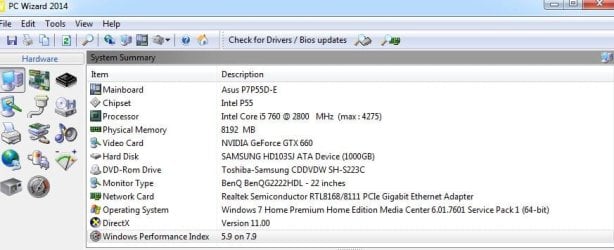
Windows 7 Home Premium x64bit SP1Intel Core i5 760 @ 28008GBNVIDIA GeForce GTX 660
- Computer type
- PC/Desktop
- Computer Manufacturer/Model Number
- ASUS / Custom
- OS
- Windows 7 Home Premium x64bit SP1
- CPU
- Intel Core i5 760 @ 2800
- Motherboard
- ASUS P7P55D-E
- Memory
- 8GB
- Graphics Card(s)
- NVIDIA GeForce GTX 660
- Hard Drives
- Samsung HD103SJ ATA Device (100G0B)
- Antivirus
- BullGuard
- Browser
- Explorer/Chrome

