No surround sound through HDMI in Windows 7

ErikX

New member
Local time
9:48 AM
Messages
6
I have a Asrock 330 running Windows 7. Whatever I do I am not able to get surround sound via HDMI.

My setup:
- Asrock 330 running Windows 7 pro rtm
- HDX-1000 media streamer
- Samsung 55" 7070 LED display
- Onkyo surround reciever

The Asrock and the HDX-1000 is hooked up tp the TV via HDMI cable. The TV is hooked up to the reciever via optical cable.

The problem: I am not able to get surround sound (Dolby Digital and DTS) through HDMI on the Asrock.
Important info: Surround sound via HDMI from the HDX-1000 works like a charm.

The problem and a solution is described on Asrock support pages. However, the article only covers Windows Vista, not Windows 7. It's available here: http://www.asrock.com/support/qa/TSDQA-75.pdf

- I have tried to follow the instructions in the article and installed the exact same drivers in the exact same order as described. This to no avail.
- I have tried to follow the instructions in the article but instead of installing the drivers reffered to, tried to find the corresponding Windows 7 drivers.

When pursuing both of these approches I have succeded getting stereo sound. However, no surround sound. When clicking on the HDMI device in the Sound settings, and then choosing Configure, there is no option for 5.1 surround. The only option available is Stereo.

If someone out there can help me resolve this, I would be forever grateful! :-)
 

My Computer My Computer

At a glance

Windows 7
OS
Windows 7
ErikX, welcome to the forums.

If I am reading this correctly you have something like this (little crude, but you get the idea),

connections.png

If that is how you have it connected, the audio and video passing over the connection to the TV, you won't get 5.1/surround sound as there are very few if any TV's that will pass the sound through.
 

My Computer My Computer

At a glance

Win 7 Ultimate x64FX-8350 @ 4.6 GHz so farADATA XPG V1 Series Black 8GB DDR3 1600Sapphire R9 270x Dual-X
Computer type
PC/Desktop
Computer Manufacturer/Model Number
Me
OS
Win 7 Ultimate x64
CPU
FX-8350 @ 4.6 GHz so far
Motherboard
Asus M5A97 EVO
Memory
ADATA XPG V1 Series Black 8GB DDR3 1600
Graphics Card(s)
Sapphire R9 270x Dual-X
Sound Card
Xonar DGX w/ Corsair Vengence 1300
Monitor(s) Displays
Acer S232HL Abid
Screen Resolution
1920x1080
Hard Drives
120 GB OCZ Vertex 3
500 GB Seagate 7200.12
PSU
Antec Earthwatts 650W Green
Case
Antec Three Hundred
Cooling
Cooler Master 212 EVO
Keyboard
Logitech G510
Mouse
Logitech G500s
Internet Speed
35000/3000
Thanx for your reply stormy13! Neither the Asrock nor the HDX is connected directly to the reciever. Both are connected to the TV, and the TV is connected to the reciever via optical. TV does pass the sound to the reciever, as I get full surround when using the HDX.

Edit: post #318 in this forum claims that there is a issue with Windows 7 and hdmi:
http://www.avforums.com/forums/home-cinema-pcs/1024281-asrock-ion-330-a-22.html
 
Last edited:

My Computer My Computer

At a glance

Windows 7
OS
Windows 7
This your TV,

Filarkiv SAMSUNG

If so this is directly from the manual (the bold bit is mine),

When the receiver (home theatre) is set to On, you can hear sound output from the TV’s Optical jack. When the TV is
displaying a DTV(air) signal, the TV will send out 5.1 channel sound to the Home theatre receiver. When the source is a
digital component such as a DVD / Blu-ray player / Cable Box / Satellite receiver (Set-Top Box) and is connected to the
TV via HDMI, only 2 channel sound will be heard from the Home Theatre receiver.
If you want to hear 5.1 channel audio,
connect the digital audio out jack on DVD / Blu-ray player / Cable Box / Satellite receiver (Set-Top Box) directly to an
Amplifier or Home Theatre, not the TV

then all you are going to get is stereo from the TV as it doesn't pass through the signal.
 

My Computer My Computer

At a glance

Win 7 Ultimate x64FX-8350 @ 4.6 GHz so farADATA XPG V1 Series Black 8GB DDR3 1600Sapphire R9 270x Dual-X
Computer type
PC/Desktop
Computer Manufacturer/Model Number
Me
OS
Win 7 Ultimate x64
CPU
FX-8350 @ 4.6 GHz so far
Motherboard
Asus M5A97 EVO
Memory
ADATA XPG V1 Series Black 8GB DDR3 1600
Graphics Card(s)
Sapphire R9 270x Dual-X
Sound Card
Xonar DGX w/ Corsair Vengence 1300
Monitor(s) Displays
Acer S232HL Abid
Screen Resolution
1920x1080
Hard Drives
120 GB OCZ Vertex 3
500 GB Seagate 7200.12
PSU
Antec Earthwatts 650W Green
Case
Antec Three Hundred
Cooling
Cooler Master 212 EVO
Keyboard
Logitech G510
Mouse
Logitech G500s
Internet Speed
35000/3000
Nice research stormy13! However, this really baffels me, as I am certainly getting both DTS and Dolby Digital when playing movies from my HDX-1000.
 

My Computer My Computer

At a glance

Windows 7
OS
Windows 7
A closer look at the documentation revelas that your findings are probably only relevant if you connect a HDMI cable to the optical out. It's described under 11 Digital Audio Out (Optical). This coupled with the fact that my HDX outputs dts and dolby digital leads me to belive that getting surround sound from the PC should indeed be possible.
 

My Computer My Computer

At a glance

Windows 7
OS
Windows 7
It could come down to it not supporting Dobly or DTS. The one thing I couldn't find anywhere on the product page,

ASRock > Products > Nettop Series > ION 330

or in the manual was any mention at all of either one. From what I can see is that it use a VIA chip for the audio; too bad it doesn't say which one.
 

My Computer My Computer

At a glance

Win 7 Ultimate x64FX-8350 @ 4.6 GHz so farADATA XPG V1 Series Black 8GB DDR3 1600Sapphire R9 270x Dual-X
Computer type
PC/Desktop
Computer Manufacturer/Model Number
Me
OS
Win 7 Ultimate x64
CPU
FX-8350 @ 4.6 GHz so far
Motherboard
Asus M5A97 EVO
Memory
ADATA XPG V1 Series Black 8GB DDR3 1600
Graphics Card(s)
Sapphire R9 270x Dual-X
Sound Card
Xonar DGX w/ Corsair Vengence 1300
Monitor(s) Displays
Acer S232HL Abid
Screen Resolution
1920x1080
Hard Drives
120 GB OCZ Vertex 3
500 GB Seagate 7200.12
PSU
Antec Earthwatts 650W Green
Case
Antec Three Hundred
Cooling
Cooler Master 212 EVO
Keyboard
Logitech G510
Mouse
Logitech G500s
Internet Speed
35000/3000
Hm, hm.. Now I'm even more confused. In this thread a Samsung techie confirms what stormy13 just told me:
Samsung LCD Audio Passthrough Issue - CNET Samsung Forums

I will have to take a closer look at this as I get home tonight. Could it be that I have only imagined that my HDX is getting DTS and DD? Sounds crazy, but who knows? I have only had this setup for a couple of days, so it's not impossible that I have overlooked something...

Anyway, thanx alot for putting me on the track!
 

My Computer My Computer

At a glance

Windows 7
OS
Windows 7

My Computer My Computer

At a glance

Windows 7
OS
Windows 7
I'm having the same problem. my computer is connected to my surround sound box then to the TV. But windows only lets you choose 2 ch stero output via the HDMI. The only explaination i could come up for this is that windows detects my TV having only two speakers and doesn't detect my surround sound having 7.1 speaker set up....? how can you force win 7 to output 5.1 via HDMI????
 

My Computer My Computer

At a glance

win 7AMD Athlon 64x2 5200
Computer Manufacturer/Model Number
AMD
OS
win 7
CPU
AMD Athlon 64x2 5200
Monitor(s) Displays
32" LCD
Screen Resolution
1080i
I installed and setup a new computer using my TV as display initially connected via my Yamaha RX by HDMI and dirct to a HDMI port on LED TV. Win 7 never managed more than stereo despite my ASUS motherboard having a Creative SupremeFX X-Fi. Its driver was installed direct from the creative site but only stereo is available to HDMI. I only use 2.1 sound on speakers at the PC now so its not a problem currently. I would think this HDMI problem is a win7 / Creative compatability thing and am waiting for an update.
 

My Computer My Computer

At a glance

win 7 professional 32 bitintel i7 8604GbPalit GTX260 Sonic216SP
OS
win 7 professional 32 bit
CPU
intel i7 860
Motherboard
Asus maximus III Formula
Memory
4Gb
Graphics Card(s)
Palit GTX260 Sonic216SP
Sound Card
SupremeFX X-Fi
Monitor(s) Displays
Samsung Syncmaster 2232bw
Hard Drives
2 Seagate 500Gb in RAID 0
PSU
Thermaltake 750w
Case
Thermaltake Cosmos S
Cooling
standard
jairichard, welcome to the forums.

First off that sound card is in no way, shape or form a Creative sound card. It is nothing more than a SoundMax/ADI based card (and use that loosely as it is more of just a riser card than an actual sound card), and not a X-Fi. It uses the ADI/Soundmax drivers which you have to get from the motherboard manufacturer, the X-Fi part comes from it getting to use some of the X-Fi software; it does not use the Creative drivers, so not sure what you managed to install from Creative's site.

Have a look through some of these threads dealing with that sound card,

Windows 7 Forums - Search Results

and what others have done to get it to work properly in Windows 7.
 

My Computer My Computer

At a glance

Win 7 Ultimate x64FX-8350 @ 4.6 GHz so farADATA XPG V1 Series Black 8GB DDR3 1600Sapphire R9 270x Dual-X
Computer type
PC/Desktop
Computer Manufacturer/Model Number
Me
OS
Win 7 Ultimate x64
CPU
FX-8350 @ 4.6 GHz so far
Motherboard
Asus M5A97 EVO
Memory
ADATA XPG V1 Series Black 8GB DDR3 1600
Graphics Card(s)
Sapphire R9 270x Dual-X
Sound Card
Xonar DGX w/ Corsair Vengence 1300
Monitor(s) Displays
Acer S232HL Abid
Screen Resolution
1920x1080
Hard Drives
120 GB OCZ Vertex 3
500 GB Seagate 7200.12
PSU
Antec Earthwatts 650W Green
Case
Antec Three Hundred
Cooling
Cooler Master 212 EVO
Keyboard
Logitech G510
Mouse
Logitech G500s
Internet Speed
35000/3000
Thanks for the explanation Stormy13. I think I may have been confused as I managed to overcome the lack of an audio console that I had no activation code for and now have a pretty blue Creative console after reading this forum. This of course did not change the audio drivers. My Maximus III Formula had and has great sound and on suitable speakers it con be configured up to 7.1 although I just use stereo 2.1. The HDMI output (and the SPDIF) can only be configured to stereo and no more and could not produce more than stereo on my Yamaha RX wich is 7.1 capable but used as 5.1. This is the limitation I referred to which must be an Asus driver inadequacy.
 

My Computer My Computer

At a glance

win 7 professional 32 bitintel i7 8604GbPalit GTX260 Sonic216SP
OS
win 7 professional 32 bit
CPU
intel i7 860
Motherboard
Asus maximus III Formula
Memory
4Gb
Graphics Card(s)
Palit GTX260 Sonic216SP
Sound Card
SupremeFX X-Fi
Monitor(s) Displays
Samsung Syncmaster 2232bw
Hard Drives
2 Seagate 500Gb in RAID 0
PSU
Thermaltake 750w
Case
Thermaltake Cosmos S
Cooling
standard
The answer is in the tv manual

Ok old thread but I have been looking for an answer to the surround sound passthrough and haven't found an answer on the net. But I did get the answer in the TV manual.

So I have been trying to get surround sound from my HTPC -hdmi-> TV -optical-> Sound System but could only manage stereo.

This is the text from the TV manual in reference to digital audio system:
- 5.1CH audio is possible when the tv is connected to an external device supporting 5.1CH
- When the receiver (home theater) is set to On, you can hear sound output from the TV's Optical jack. When the TV is displaying a DTV(air) signal, the TV will send out 5.1 channel sound to the Home theater receiver. When the source is a digital component such as DVD and is connected to the TV via HDMI, only 2 channel sound will be heard from the Home Theater receiver. If you want to hear 5.1 channel audio, connect the DIGITAL AUDIO OUT (Optical) jack on the DVD player or Cable#Satellite Box directly to an Amplifier or Home Theater, not the TV.

Basically the TV HDMI in does not support surround sound, that's why Windows7 will only show stereo as an option. Hope this will help...

My TV is a Samsung 5 series.
 

My Computer My Computer

At a glance

Windows 7 Ultimate
OS
Windows 7 Ultimate
surround

Hi, i had the same problem that i even didn't use my surround reciever ( onkyo tx-sr607 ) .
No surround with HDMI or SPDIF , now after intens trying and searching i finaly found it.

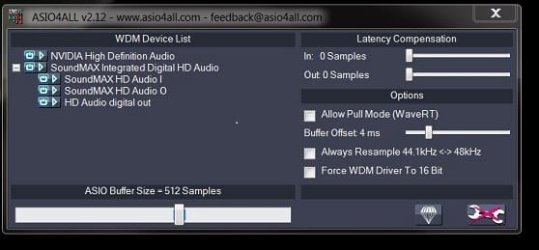
When i want to use my HDMI i need to set my nvidia settings to multiple screens then i configure my sound in Windows configuration screen to HDMI and restart PC, then start ASIO4ALL - Universal ASIO Driver asio4all and make sure all connections are green/blue like in .jpg. I use PowerDVD 15 to play media files.

And now my i got finaly my PLII Dolby input on my reciever for stereo music or video files and 5.1 sound from stereo input files.

Hope this works
 

Attachments

  • asio4all.JPG
    asio4all.JPG
    27.4 KB · Views: 6

My Computer My Computer

At a glance

Windows7
Computer type
PC/Desktop
OS
Windows7
Back
Top