No system restore or rstrui.exe on my Windows 7 computer?

psongman

New member
Local time
3:32 AM
Messages
10
Hi, first time user here, thanks for listening. I went to set a system restore point on my computer when I got it all up and running, with all the bells and whistles I want and need. So, I have to set the tone here, so all who read and respond will understand. I have tried all the posts and threads on the Net, and have had a techie up the street try to help me. There is no instance of system restore on my computer.

So, how can I add this feature, it is not on my install disk either, please assist. Hopefully, there is a way, that is can be done, Mission Possible, psongman
 

My Computer My Computer

At a glance

windows 7 32 bit
Computer type
PC/Desktop
OS
windows 7 32 bit
Hello psongman and Welcome to SevenForums :)

Start→Control Panel→System and Security. Click the System link.
Click the System Protection link in the left panel.
From the System Properties dialog box that appears, select the System Protection tab and click the Create button.
 

My Computer My Computer

At a glance

Windows 10 Pro x64Core2Quad Q9550 @2.83GHz (o/c @3.82GHz)8GB (4x2GB DDR2)ASUS ROG STRIX GTX1050 Ti O4G Gaming
Computer type
PC/Desktop
Computer Manufacturer/Model Number
Custom Build
OS
Windows 10 Pro x64
CPU
Core2Quad Q9550 @2.83GHz (o/c @3.82GHz)
Motherboard
ASUS P5K Premium WiFi
Memory
8GB (4x2GB DDR2)
Graphics Card(s)
ASUS ROG STRIX GTX1050 Ti O4G Gaming
Sound Card
Creative Soundblaster X-Fi Platinum
Monitor(s) Displays
ACER ED273WIDX 27"
Screen Resolution
1920 x 1080
Hard Drives
SAMSUNG SSD 840 Series 120GB
SAMSUNG 500GB SATA 7200 rpm
2xWD Velociraptor 150GB 10000 rpm
PSU
600W
Case
CoolerMaster Centurion
Cooling
Cooler Master V8
Keyboard
VPRO V700
Mouse
Logitech G602
Antivirus
Norton IS
Browser
Firefox x64
Yeah, I can create one but I can't go in and access it. This has been the theme of my trying to activate system restore. So, what next, it was created, how can I get at it, thanks for assisting, psongman
 

My Computer My Computer

At a glance

windows 7 32 bit
Computer type
PC/Desktop
OS
windows 7 32 bit
Here is what happens when I try to access "maybe" created restore point.

The system cannot find the file specified 0x8007002
 

My Computer My Computer

At a glance

windows 7 32 bit
Computer type
PC/Desktop
OS
windows 7 32 bit
Hi Psongman,
Can you go
Control Panel >> Admin tools >> Services>> scroll to Volume shadow copy

It should be set to either automatic or manual, if its dissabled system restore will not work.

Roy

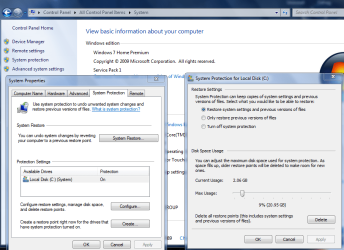
your system restore settings should be like this
 

Attachments

  • sysrest.PNG
    sysrest.PNG
    56.9 KB · Views: 0

My Computer My Computer

At a glance

W7 home premium 32bit/W7HP 64bit/w10 tp insid...E5300 dual core3gbNvidia Geforce 7100 Nforce 630i
Computer type
PC/Desktop
Computer Manufacturer/Model Number
medionl/Aspire 6930G/acer x55a
OS
W7 home premium 32bit/W7HP 64bit/w10 tp insider ring
CPU
E5300 dual core
Motherboard
medion MS7366
Memory
3gb
Graphics Card(s)
Nvidia Geforce 7100 Nforce 630i
Monitor(s) Displays
avixc
Internet Speed
n (isp resticted to 72)
Antivirus
mse/pands
Browser
palemoon
Other Info
Belkin Fd7050 n USB using Railink RT2870 drivers, more upto date
Yeah, its all working, just no way to access restore points. I mean what happens when they make them. When I click on Restore in the area you have been describing, it won't let me. I have been at this all day, am thinking there is no answer. By the way, those System Restore Manager and Creating a System Restore Point Shortcut posts, are bogus, they don't work either. They say, creating and then it is created and that's it. Does anybody who owns or runs a Windows computer have a clue as to what I am trying to figure out. I told you in the initial thread that I don't have system restore stuff. Well, keep helping, if possible, but it needs to be a simple create and get to created restore point method, thanks again, psongman
 

My Computer My Computer

At a glance

windows 7 32 bit
Computer type
PC/Desktop
OS
windows 7 32 bit
Simple, I need rstrui.exe for Windows 7?

You seem to have posted in a few threads on this,

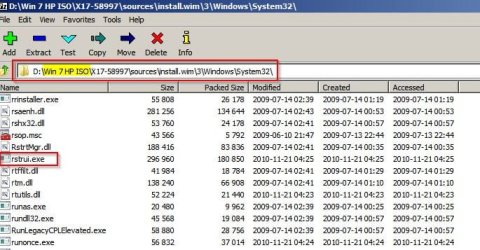
If you've got a Windows 7 ISO or install disk you can try extracting rstrui.exe

Win 7 HP ISO_sources_install.wim_3_Windows_System32.jpg

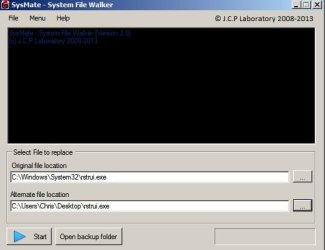
Then you can replace the missing file. Note: You can't just copy & paste it.

SysMate - System File Walker.jpg

Maybe the above will work. I'm not entirely sure. I'd let you have my copy of rstrui.exe but the ISO i have is for 64bit Windows 7 and although the rstrui.exe file is in the system32 folder I'm not sure if it's identical to your version.

EDIT: Also fill out your system spec to include the version of Windows 7 you are using.
 
Last edited:

My Computer My Computer

At a glance

Microsoft Windows 7 Home Premium 64-bit 7601 ...AMD C-60 APU with Radeon(tm) HD Graphics4.00 GBAMD Radeon HD 6290 Graphics
Computer type
Laptop
Computer Manufacturer/Model Number
ASUS
OS
Microsoft Windows 7 Home Premium 64-bit 7601 Multiprocessor Free Service Pack 1
CPU
AMD C-60 APU with Radeon(tm) HD Graphics
Motherboard
ASUSTeK COMPUTER INC. X501U
Memory
4.00 GB
Graphics Card(s)
AMD Radeon HD 6290 Graphics
Sound Card
(1) AMD High Definition Audio Device (2) Realtek High Defi
Screen Resolution
1366 x 768 x 32 bits (4294967296 colors) @ 60 Hz
Hard Drives
Hitachi HTS545050A7E380 SATA Disk Device
Antivirus
Comodo CIS & FW, SecureAplus App Whitelisting, Threatfire
Browser
Cyberfox 64bit, Opera 64bit, Airfox
Other Info
Spy-The-Spy, HitmanPro.Alert, Norton Connect Safe, MJRegWatcher, BitDefender TrafficLight, Voodoo Shield, Zemana AntiMalware
Thanks for assisting, all who responded. NO, I don't have rstrui.exe, and I have Window 7 ultimate 32 bit. I guess the guy before me fiddled with something in the DVD, anyway, can this be purchased on the Net, just asking, thanks again. OH, so that proggie is the reason for all the frustration, right, psongman
 

My Computer My Computer

At a glance

windows 7 32 bit
Computer type
PC/Desktop
OS
windows 7 32 bit
Back
Top