Windows 7 locking up, cannot run disk defrag, no system restore points

hkingbomb

New member
Local time
11:45 AM
Messages
4
Long post alert. This started with one issue and has snowballed into several. The performance of my system (Dell Latitude E6410, Windows 7 Professional) has gotten bad in the last few weeks. I'll be using a browser and maybe one other application, or have a folder open, and everything locks up. I can't move the mouse or open Task Manager and Ctrl+Alt+Delete does nothing. I have waited up to 5-10 minutes and eventually just do a hard reset.

After doing a second hard reset today, I received this message:
Checking file system on C:
The type of the file system is NTFS.
One of your disks needs to be checked for consistency. You may cancel the disk check, but it is strongly recommended that you continue.
Windows will now check the disk.

I let it run the check and it restarted normally, so I don't think it found any issues. It did recover a few orphaned files. After that finished, I had the same issue again, so I did another hard reset and started googling. One of the troubleshooting suggestions was to start with the disk defragmenter. When I try to open that, it says "Disk Defragmenter was scheduled using another program. Disk Defragmenter is currently using customized settings created by another program. Before you can modify the schedule, you must remove the customized settings." When I click Remove settings, that box closes, but nothing else happens. I try to run it again, same message.

So I google that problem. Another troubleshooting guide starts with run antivirus/anti-spyware program. I run my Microsoft Security Essentials full scan, and it comes back with no issues.

Next step is check that disk free space is more than 10% - I have about 45% free.

Next: check disk for errors, properties - tools - check now. I rebooted and it ran the check, again no errors.

Next: open system restore and restore to a point from before the issue started happening. I open SR and I only have one restore point from 3 days ago! I know I have created more than that. I try it, but it fails due to an Adobe Reader issue.

The next step says to find the dfrg.inf file and try reinstalling. I go to look for it, and it's not there. So I try another angle, looking at the task scheduler to see if maybe defrag is scheduled there. When I open it, I get 76 pop-ups in a row, each showing the name of a task and saying the task image is corrupt or has been tampered with.

Amazingly, my system hasn't locked up once since I started typing this, but now I feel the need to address all of these other issues!
1. Disk defrag not running and can't find file to reinstall
2. Restore points not being created and/or saved
3. All of my tasks (or task image?) being corrupt

Where to start?
 

My Computer

Computer type
PC/Desktop
Computer Manufacturer/Model Number
Dell Latitude E6410
OS
Windows 7 Professional
CPU
Intel Core i5
Motherboard
Dell Inc. 07XJP9
Memory
4 GB RAM
Graphics Card(s)
NVIDIA NVS 3100M
Hard Drives
Local fixed disk with NTFS file system
Antivirus
Microsoft Security Essentials
Browser
Firefox

My Computer

Computer type
PC/Desktop
Computer Manufacturer/Model Number
Mellon Labs (custom build)
OS
Win 7 Pro x64/Win 10 Pro x64 dual boot
CPU
AMD FX 8350 Vishera @ 4200
Motherboard
ASUS M5A97 R2.0
Memory
16 GB Mushkin Blackline DDR3-2400 @ 1866 (9-10-10-10-31)
Graphics Card(s)
XFX Radeon R9 280 Double D Black Edition
Sound Card
Realtek HD Audio on MB. Sounds great.
Monitor(s) Displays
Acer 24", Acer 22"
Screen Resolution
3840 x 1080
Hard Drives
1 x Mushkin Chronos 120 GB SSD (Win 10)
1 x Samsung 850 EVO 250 GB SSD (Win 7)
1 x WD 1TB SATA Blue
1 x WD 1TB SATA Green
PSU
Corsair TX-750
Case
CoolerMaster HAF 912+
Cooling
Coolermaster Seidon 240M Liquid AIO. 6 case fans
Keyboard
Logitech G710+
Mouse
Logitech G500s
Internet Speed
Much better since I got fiber, but still way overpriced.
Antivirus
MSE, Malware Bytes for scanning
Browser
Firefox
Other Info
Corsair VOID USB headphones.

A Mellon Labs X-1 - LCD Smartie driven system status display.

Brought to you by the letter E
Welcome to our forum hkingbomb.

Just some ideas off the top of my head.
Using Malwarebytes mentioned by Mellon Head is a great idea.

**What operating system came with this troubled computer from Dell?

A tutorial by Brink that could be helpful. Can't hurt.

http://www.sevenforums.com/tutorials/1538-sfc-scannow-command-system-file-checker.html

Completing this tutorial by Golden exactly as the tutorial states could show us some information that might be helpful.

http://www.sevenforums.com/tutorials/274797-disk-management-post-screen-capture-image.html
 

My Computer

Computer type
PC/Desktop
Computer Manufacturer/Model Number
Home made Desktop
OS
Windows 10 Pro. 64/ version 1709 Windows 7 Pro/64
CPU
Intel i7-6800K @ 4.3
Motherboard
ASUS X-99 Deluxe II
Memory
Corsair Platinum 16 gig @2400
Graphics Card(s)
EVGA GTX 1070 OC
Monitor(s) Displays
Asus 27" LED LCD/VE278Q
Screen Resolution
1920-1080 or 1280-720 HDMI
Hard Drives
INTEL SSD 730-240 Gb Sata 3.0/
PSU
EVGA Platium 1200W
Case
Phanteks Luxe Tempered Glass 8 fans/ one radiator
Cooling
XSPC/ Water Cooled CPU
Keyboard
Das 4 Professional
Mouse
Logitech M705/MX Anywhere 2-S
Internet Speed
100 mbits
Antivirus
Microsoft Security Essentials/ Malwarebytes Premium 3.0/ SAS
Browser
I.E. 11 default/Firefox/ ISP Time Warner Cable/Spectrum
Other Info
LG BluRay Burner/
Sound system-KLipsch-THX/
Icy Dock ssd Hot Swap bays.
Hi Mellon, I ran MalwareBytes as you recommended and it returned 9 "Potentially Unwanted Programs". 2 Registry values, 2 Registry keys, 2 Registry data, 2 folders and 1 file. Those are all removed now.

Layback, my OS is Windows 7 Professional. I completed the tutorial and it did not find any integrity violations. That's good!

I also just checked to see if the restore point I created the other day is in System Restore, but it's gone, as is the one from 8 days ago that I mentioned in my original post. There is only one from 3 days ago now. Also still having the issue with disk defrag saying it is in use.

Thanks for your help so far!
 

My Computer

Computer type
PC/Desktop
Computer Manufacturer/Model Number
Dell Latitude E6410
OS
Windows 7 Professional
CPU
Intel Core i5
Motherboard
Dell Inc. 07XJP9
Memory
4 GB RAM
Graphics Card(s)
NVIDIA NVS 3100M
Hard Drives
Local fixed disk with NTFS file system
Antivirus
Microsoft Security Essentials
Browser
Firefox
Any suggestions for other things to try? Still having the same issues. The system locked up for about 20 minutes yesterday until I gave up and did a hard reset.
 

My Computer

Computer type
PC/Desktop
Computer Manufacturer/Model Number
Dell Latitude E6410
OS
Windows 7 Professional
CPU
Intel Core i5
Motherboard
Dell Inc. 07XJP9
Memory
4 GB RAM
Graphics Card(s)
NVIDIA NVS 3100M
Hard Drives
Local fixed disk with NTFS file system
Antivirus
Microsoft Security Essentials
Browser
Firefox

My Computer

Computer type
PC/Desktop
Computer Manufacturer/Model Number
Home made Desktop
OS
Windows 10 Pro. 64/ version 1709 Windows 7 Pro/64
CPU
Intel i7-6800K @ 4.3
Motherboard
ASUS X-99 Deluxe II
Memory
Corsair Platinum 16 gig @2400
Graphics Card(s)
EVGA GTX 1070 OC
Monitor(s) Displays
Asus 27" LED LCD/VE278Q
Screen Resolution
1920-1080 or 1280-720 HDMI
Hard Drives
INTEL SSD 730-240 Gb Sata 3.0/
PSU
EVGA Platium 1200W
Case
Phanteks Luxe Tempered Glass 8 fans/ one radiator
Cooling
XSPC/ Water Cooled CPU
Keyboard
Das 4 Professional
Mouse
Logitech M705/MX Anywhere 2-S
Internet Speed
100 mbits
Antivirus
Microsoft Security Essentials/ Malwarebytes Premium 3.0/ SAS
Browser
I.E. 11 default/Firefox/ ISP Time Warner Cable/Spectrum
Other Info
LG BluRay Burner/
Sound system-KLipsch-THX/
Icy Dock ssd Hot Swap bays.
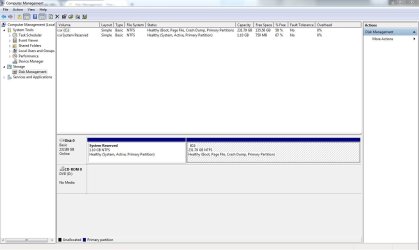
Somehow missed your second link about the screen shot, but it's attached now.

This troubled computer came with Windows 7 Professional. That's how I purchased it, I didn't install it, nor did I mention that I installed it. Sorry for any confusion.
 

Attachments

  • Capture.JPG
    Capture.JPG
    125.6 KB · Views: 17

My Computer

Computer type
PC/Desktop
Computer Manufacturer/Model Number
Dell Latitude E6410
OS
Windows 7 Professional
CPU
Intel Core i5
Motherboard
Dell Inc. 07XJP9
Memory
4 GB RAM
Graphics Card(s)
NVIDIA NVS 3100M
Hard Drives
Local fixed disk with NTFS file system
Antivirus
Microsoft Security Essentials
Browser
Firefox
I'm no security expert so I'm going to request your thread be moved to our security section.
I believe that you are still infected and/or the damage done by your previously found infection is still there.

You should get better help there with security problems.
It would be very helpful if you could post what infections were found using Malwarebytes. I will also see if I can get a security expert to take a look.

I know what I would do if it was my computer but it's not my computer so I will just watch how the expert handles your problem.
 

My Computer

Computer type
PC/Desktop
Computer Manufacturer/Model Number
Home made Desktop
OS
Windows 10 Pro. 64/ version 1709 Windows 7 Pro/64
CPU
Intel i7-6800K @ 4.3
Motherboard
ASUS X-99 Deluxe II
Memory
Corsair Platinum 16 gig @2400
Graphics Card(s)
EVGA GTX 1070 OC
Monitor(s) Displays
Asus 27" LED LCD/VE278Q
Screen Resolution
1920-1080 or 1280-720 HDMI
Hard Drives
INTEL SSD 730-240 Gb Sata 3.0/
PSU
EVGA Platium 1200W
Case
Phanteks Luxe Tempered Glass 8 fans/ one radiator
Cooling
XSPC/ Water Cooled CPU
Keyboard
Das 4 Professional
Mouse
Logitech M705/MX Anywhere 2-S
Internet Speed
100 mbits
Antivirus
Microsoft Security Essentials/ Malwarebytes Premium 3.0/ SAS
Browser
I.E. 11 default/Firefox/ ISP Time Warner Cable/Spectrum
Other Info
LG BluRay Burner/
Sound system-KLipsch-THX/
Icy Dock ssd Hot Swap bays.

My Computer

Computer type
PC/Desktop
Computer Manufacturer/Model Number
Self Assembled
OS
Microsoft Windows 10 Pro Insider Preview 64-bit
CPU
Intel(R) Core(TM) i3-4130 CPU @ 3.40GHz
Motherboard
Gigabyte Technology Co., Ltd. B85M-D3H
Memory
Corsair Vengence 4GB x2 (8.00GB Dual-Channel DDR3 @ 798MHz)
Graphics Card(s)
2047MB GeForce GTS 450 (ZOTAC International)
Sound Card
Onboard (Realtek High Definition Audio)
Monitor(s) Displays
LG Flatron E2040T
Screen Resolution
1600x900
Hard Drives
Western Digital 1 TB
Seagate 500 GB
PSU
Corsair VS550
Case
Cooler Master K380
Cooling
Cooler Master Seidon 120V Plus
Keyboard
Logitech MK260r
Mouse
Logitech MK260r
Internet Speed
PMPL Broadband
Antivirus
Windows Defender + MBAM
Browser
Firefox
Other Info
Dell Studio 15" Laptop
Hi,
Review Jacee’s instructions to run Adwcleaner here post #7,
Ignore the title of the thread,
http://www.sevenforums.com/system-security/316404-instant-savings-app.html
On the BleepingComputer site use the button that looks like this,
adwcleaner-button.JPG


Did you select scan for Rootkits in malwarebytes ?
Scan/ Custom scan/ Configure scan
mbam scan for rootkits.jpg
 

My Computer

Computer type
PC/Desktop
Computer Manufacturer/Model Number
Custom assembled by me :}
OS
Win-7-Pro64bit 7-H-Prem-64bit
CPU
i7-5930K 2nd i9-9940x both water blocked VRM's too
Motherboard
ASUS SABERTOOTH X99 2nd ASUS x299 Apex
Memory
Trident-z 3200C14 2nd Trident-z 3600C16
Graphics Card(s)
EVGA 1080ti ftw3 2nd Titan Xp both water blocked
Sound Card
Built-in Realtek
Monitor(s) Displays
1-AOC G2460PG 24"G-Sync 144Hz/ 2nd 1-ASUS VG248QE 24" 144Hz
Screen Resolution
1920 x 1080 144Hz
Hard Drives
2-Samsung M.2 Evo & Evo Plus
2-Samsung 850 EVO 500GB SSD's/ 3-2.5 W.D. Black 1tb-&3-1tb/3-3.5 WD Black 1tb hdd's
PSU
EVGA SuperNOVA 1000-P2 2nd 1200-P2
Case
2-Corsair Obsidian Series 450D Black ATX Mid Tower
Cooling
Custom water loops
Keyboard
Logitech G710+/ 2nd Logitech G910
Mouse
2-RedDragon M901 Perdition 16400 dpi Gaming mouse = wired
Internet Speed
Comcast Ping 19ms 89.31mbps download speed 6.12mbps upload
Antivirus
Malwarebytes Pro/ Superantispyware Pro
Browser
FireFox & Pale moon
Other Info
2nd ASUS X299 Apex/Intel i9-9940x with Custom water loop/7H-Prem-x64/Corsair 450D case/Ram Trident-z 3600C16 4x8gb / Samsung970Evo plus 500gb SSD/Dual ssd EZ swap evo/PSU EVGA SuperNova 1200w-P2 80+Platinum/GPU Titan Xp /8-ML-140 on push-pull on 2-280GTX rads

My Computer

Computer type
PC/Desktop
Computer Manufacturer/Model Number
Own build (new) Desk1 / Asus ROG Win 7 / Desk2 1st build
OS
Desk1 7 Home Prem / Desk2 10 Pro / Main lap Asus ROG 10 Pro 2 laptop Toshiba 7 Pro Asus P2520 7 & 10
CPU
Desk1 i5 3750K / Laptop i7 GTX 860M / Desk2 i5 2500
Motherboard
Desk1 Asus P877-V / Desk2 Gigabyte H67 UD3H / Laptop ?
Memory
Desk1 8GB (1866) / Desk2 16GB (1333) / Laptop 8Gb DDR3
Graphics Card(s)
Desk 1& 2NVidia GTX 650 & Laptops on board Intel
Sound Card
Desk 1 & 2 -XONAR DG Realtek High Def audio Laptop
Monitor(s) Displays
Desk 1 Benq HD 2450 / Desk2 Philips 24" / Laptop 17.5"
Screen Resolution
1920x1080 D1 & D2 & Laptop 1
Hard Drives
Desk1 Samsung 120GB 830 SSD
Asus ROG 256GB 850 Pro SSD
Desk2 Samsung 840 256 SSD
Toshiba 120GB EVO
PSU
Desk 1 Corsair HX 1050/ Laptop ? / Desk 2 Corsair HX 650
Case
Desk 1 Cooler HAF XM ? Toshiba laptop / Desk2 Coolermaster
Cooling
Fans on all Desk1 -2 Desk2 - all Coolermasters 5 Laptop ?
Keyboard
Desk 1 MS Sidewinder X6 Desk 2 MS Sidewinder X 4
Mouse
Desk 1&2 - Gigabyte MS 900 gamer - laptop - Logitec wireless
Internet Speed
ADSL2+
Other Info
One other Desktop (tester) and spare Toshba laptop both with SSD's
Running Kaspersky 2016 ISS on all machines config'd identically
Logitec audio stereo systems on each machine (x3)
Canon MG5250MFC
Router/modem TP-Link running WPA2SK
Back
Top