No updates installed since 2010. Which updates do I need?

BestUsername

New member
Local time
9:07 PM
Messages
18
I've had automatic updates turned off on my pc since I got it in 2010, and have never installed any updates.

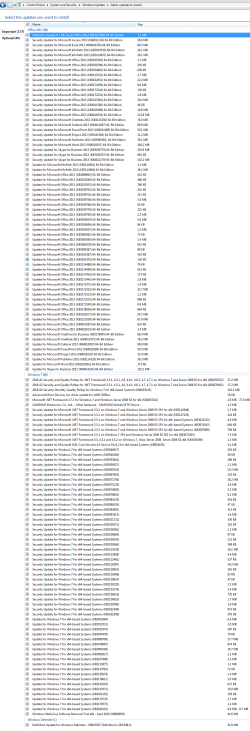
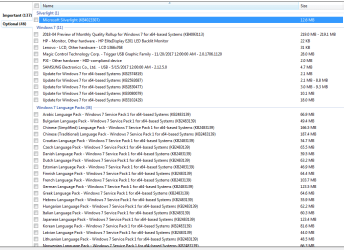
There are now 137 "important updates", and 46 "optional updates."

I have attached screenshots of these recommended updates.

Which of these updates do I really need and how may installing them change the way my computer performs?

Should I install the latest versions of certain updates, or do I need to install every version of them for the latest version to work? Or are each update unique? In other words, does the latest version of a security update already include the past updates from the former version?

Do I need these security updates if I am running another updated security program on the PC? (ESET NOD32)

(Of the optional updates, I know I personally do not need the language pack updates.)

Thank you.
 

Attachments

  • Capture.PNG
    Capture.PNG
    7.5 KB · Views: 26
  • Capture01.PNG
    Capture01.PNG
    63.4 KB · Views: 3
  • Capture05.PNG
    Capture05.PNG
    20.8 KB · Views: 2

My Computer My Computer

At a glance

Win 7 Home Premium 644096MB RAM
Computer type
Laptop
Computer Manufacturer/Model Number
Lenovo
OS
Win 7 Home Premium 64
Motherboard
4383
Memory
4096MB RAM
Hard Drives
Local Disk (C:) 152 GB free of 254 GB
LENOVO (D:) 26.5 GB free of 28.9 GB
Antivirus
Avast
Optional updates: If everything is working ok with your computer and with all attached devices, I suggest that you don't install any of the "optional" updates. If your computer has any issues which are addressed by any of the "optional" updates, and you have tried everything else to fix these issues, then install only those optional updates which are for the issues that you couldn't resolve any other way.

Important updates: I suggest you install all "important" updates prior to January 1, 2018. But don't install any of the "important" updates from 2018, because there are a lot of problems reported with many of the 2018 updates.
 
Last edited:

My Computer My Computer

At a glance

Linux Mint 18.2 xfce 64-bit (VMWare host) / W...Haswell4 GB
Computer type
PC/Desktop
Computer Manufacturer/Model Number
Dell
OS
Linux Mint 18.2 xfce 64-bit (VMWare host) / Windows 8.1 Pro 32-bit (VMWare guest)
CPU
Haswell
Memory
4 GB
Monitor(s) Displays
Acer 23"
Screen Resolution
1920 x 1080
Hard Drives
Two hard drives, 1TB each: One for Linux, one for my data.
Keyboard
IBM Model M
Antivirus
Sophos (Linux), Trend Micro (Windows)
Browser
Firefox, Opera
Other Info
I use Samba to share my data drive with the other computers at my house and with my guest session in VMWare Workstation Player.
Optional updates: If everything is working ok with your computer and with all attached devices, I suggest that you don't install any of the "optional" updates. If your computer has any issues which are addressed by any of the "optional" updates, and you have tried everything else to fix these issues, then install only those optional updates which are for the issues that you couldn't resolve any other way.

Important updates: I suggest you install all "important" updates prior to January 1, 2018. But don't install any of the "important" updates from 2018, because there are a lot of problems reported with many of the 2018 updates.

Wow it's that bad, eh? (Referring to the post-2018 important updates). Is this besides having to do with Spectre and Meltdown mitigation patches?
 

My Computer My Computer

At a glance

Windows 8 Pro x64Two Xeon Core2 Quad 3.2 GHz Processors16 GB DDR2 800 MHznVidia Quadro FX 3800 PCI
Computer type
PC/Desktop
Computer Manufacturer/Model Number
HP xw8600 Workstation
OS
Windows 8 Pro x64
CPU
Two Xeon Core2 Quad 3.2 GHz Processors
Motherboard
Proprietary
Memory
16 GB DDR2 800 MHz
Graphics Card(s)
nVidia Quadro FX 3800 PCI
Sound Card
Realtek HD Audio
Monitor(s) Displays
Samsung SyncMaster 213T 21" 4x3 Flat Screen
Screen Resolution
1600x1200
Hard Drives
Two Seagate Cheetah 300 GB SAS Disks
PSU
Proprietary
Case
HP xw8600 Workstation Case
Cooling
Two CPU Fans and a Larger Case Fan
Keyboard
PS/2 Keyboard
Mouse
Microsoft USB Optical Mouse
Internet Speed
7 mbps
Antivirus
Windows Defender
Browser
Firefox ESR 102
Other Info
Two LSI 3000 SAS Adapters
Back
Top