Solved No USB ports detected when trying to restore image

Sharkiefan

New member
Local time
9:46 AM
Messages
2
I have a custom built laptop running Windows 7 Professional x64 with 2x USB2 and 2x USB3 ports. The USB3 ports have always been temperamental - working for a short while then seemingly disconnecting - so I rarely use them. The USB2 ports have always worked fine.

My problem is this - I have used backup software for a long time on a previous Win7 laptop with no issues (that was USB2 only). But this newish one is a nightmare. It will create a system image to external HDD easily enough. However, when I use the software image Live CD, (on either USB or CD), the USB2/3 works to start the backup software but then no USB devices are detected when it's running: including the mouse, external HDD or even the flash drive I used to start the software to begin with. It also makes no difference which Image Backup software I use.

I read up on what the problem might be and it seemed that maybe it was that USB3 doesn't play nicely with Win7. I followed the advice other people got to create a Live CD with USB3 drivers on and if necessary manually install from within the Image software - I got a message that the drivers had installed correctly but still none of the USB ports worked. I also tried removing and putting back in the plugged in devices to 'wake up' the USB ports but that also didn't work.

I looked in the BIOS and there is no option to disable or downgrade USB3.

In a last ditch attempt I installed Win 8.1, as I had read that that has native support for USB3, it made no difference - still no USB devices detected when Live CD running. Since I prefer Win 7 I have now reinstalled it, but ideally I would like to install the image that I had made about a week ago.

I have fairly basic computer knowledge but any help would be greatly appreciated. Thank you.
 
Last edited:

My Computer My Computer

At a glance

Windows 7 Professional x64
Computer type
Laptop
Computer Manufacturer/Model Number
Custom
OS
Windows 7 Professional x64
Hello and welcome Sharkie mate very hard to help without knowing what is in the machine please do this
System Info - See Your System Specs or just use the system specs in your profile.

Just one thing I would ask well two really have you updated the drivers for the USB's and if you are using an SSD and it is a Samsung have you loaded the Samsung Magician software - something I know that will make access to the USB ports go down because it has happened to me.

Plus between OS's did you clean the drive first before installing the next OS?

But the specs are what we need because we cannot direct you to the drivers until we know what you have component wise.
 

My Computer My Computer

At a glance

Desk1 7 Home Prem / Desk2 10 Pro / Main lap A...Desk1 i5 3750K / Laptop i7 GTX 860M / Desk2 i...Desk1 8GB (1866) / Desk2 16GB (1333) / Laptop...Desk 1& 2NVidia GTX 650 & Laptops on board Intel
Computer type
PC/Desktop
Computer Manufacturer/Model Number
Own build (new) Desk1 / Asus ROG Win 7 / Desk2 1st build
OS
Desk1 7 Home Prem / Desk2 10 Pro / Main lap Asus ROG 10 Pro 2 laptop Toshiba 7 Pro Asus P2520 7 & 10
CPU
Desk1 i5 3750K / Laptop i7 GTX 860M / Desk2 i5 2500
Motherboard
Desk1 Asus P877-V / Desk2 Gigabyte H67 UD3H / Laptop ?
Memory
Desk1 8GB (1866) / Desk2 16GB (1333) / Laptop 8Gb DDR3
Graphics Card(s)
Desk 1& 2NVidia GTX 650 & Laptops on board Intel
Sound Card
Desk 1 & 2 -XONAR DG Realtek High Def audio Laptop
Monitor(s) Displays
Desk 1 Benq HD 2450 / Desk2 Philips 24" / Laptop 17.5"
Screen Resolution
1920x1080 D1 & D2 & Laptop 1
Hard Drives
Desk1 Samsung 120GB 830 SSD
Asus ROG 256GB 850 Pro SSD
Desk2 Samsung 840 256 SSD
Toshiba 120GB EVO
PSU
Desk 1 Corsair HX 1050/ Laptop ? / Desk 2 Corsair HX 650
Case
Desk 1 Cooler HAF XM ? Toshiba laptop / Desk2 Coolermaster
Cooling
Fans on all Desk1 -2 Desk2 - all Coolermasters 5 Laptop ?
Keyboard
Desk 1 MS Sidewinder X6 Desk 2 MS Sidewinder X 4
Mouse
Desk 1&2 - Gigabyte MS 900 gamer - laptop - Logitec wireless
Internet Speed
ADSL2+
Other Info
One other Desktop (tester) and spare Toshba laptop both with SSD's
Running Kaspersky 2016 ISS on all machines config'd identically
Logitec audio stereo systems on each machine (x3)
Canon MG5250MFC
Router/modem TP-Link running WPA2SK
Thank you!

I'm sorry it's taken so long to reply - I've been up so long trying to sort this out and I just crashed.

I downloaded the 'My System Specs' file, unfortunately I couldn't get it to run as I didn't have .net framework installed and Windows Update wouldn't work to download it.

I have solved the problem though.

I ran the system image software Live CD until it loaded the program but then ejected the CD while the program was still running and put in the main software drivers CD then loaded the drivers from that. Voila! It worked!

Apparently it would only load the drivers from the driver CD - not copies I had put on HDD that I could access through Live CD 'Explore My Computer' option, or even copies loaded onto the Live CD itself when I created it. Hopefully this may help someone in the future.

I have now written those instructions onto the label of my Live CD to remind me in the future.

I've now restored the system image to just a few weeks ago - it also wrote over the residues from the Win 8 and new Win 7 installation that I had tried. I am a happy Sharkie again!

I want to thank you for trying to help me - I really appreciate it. Thanks!


Hello and welcome Sharkie mate very hard to help without knowing what is in the machine please do this
System Info - See Your System Specs or just use the system specs in your profile.
 

My Computer My Computer

At a glance

Windows 7 Professional x64
Computer type
Laptop
Computer Manufacturer/Model Number
Custom
OS
Windows 7 Professional x64
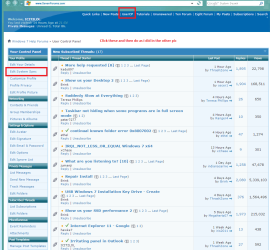
Ok Sharkie glad it is ok now. Just in case you want to post in the future all you need to do is go to your User CP at the top of this post page and it will give you options for a lot of things and one is the specs of your system see pics of mine:p

If ypu want to fidn out exactly what you have use this - PART B:
Using HW Info
PART A:
You can test the volts on the PSU with HW Info HWiNFO, HWiNFO32/64 - Download < download the right bit version and close the right hand window select Sensors and scroll down to the power section where you will see what the volts are doing see my pic. Now the section you want will be labelled - fpr example Asus boards usually have "Nuvoton" and Gigabyte boards "ITE" in any case the section you want will have Vbatt or VBAT in it (dead give away)
The original right hand window shows the machine running and is handy for that but for looking at the components in some detail close it and use the main left hand side panel
FOR OTHER COMPONENTS
PART B:
Open each small square with + in it on the section the components are in and then click on the individual component/s (it will highlight in blue) - in the right hand side will appear all sorts of details including brands speeds and other essential info that particular device. See pic for example.
 

Attachments

  • PROFILE.PNG
    PROFILE.PNG
    66.7 KB · Views: 1
  • PROFILE 2.PNG
    PROFILE 2.PNG
    59.3 KB · Views: 1
  • HW INFO DEVICES.PNG
    HW INFO DEVICES.PNG
    32.3 KB · Views: 1

My Computer My Computer

At a glance

Desk1 7 Home Prem / Desk2 10 Pro / Main lap A...Desk1 i5 3750K / Laptop i7 GTX 860M / Desk2 i...Desk1 8GB (1866) / Desk2 16GB (1333) / Laptop...Desk 1& 2NVidia GTX 650 & Laptops on board Intel
Computer type
PC/Desktop
Computer Manufacturer/Model Number
Own build (new) Desk1 / Asus ROG Win 7 / Desk2 1st build
OS
Desk1 7 Home Prem / Desk2 10 Pro / Main lap Asus ROG 10 Pro 2 laptop Toshiba 7 Pro Asus P2520 7 & 10
CPU
Desk1 i5 3750K / Laptop i7 GTX 860M / Desk2 i5 2500
Motherboard
Desk1 Asus P877-V / Desk2 Gigabyte H67 UD3H / Laptop ?
Memory
Desk1 8GB (1866) / Desk2 16GB (1333) / Laptop 8Gb DDR3
Graphics Card(s)
Desk 1& 2NVidia GTX 650 & Laptops on board Intel
Sound Card
Desk 1 & 2 -XONAR DG Realtek High Def audio Laptop
Monitor(s) Displays
Desk 1 Benq HD 2450 / Desk2 Philips 24" / Laptop 17.5"
Screen Resolution
1920x1080 D1 & D2 & Laptop 1
Hard Drives
Desk1 Samsung 120GB 830 SSD
Asus ROG 256GB 850 Pro SSD
Desk2 Samsung 840 256 SSD
Toshiba 120GB EVO
PSU
Desk 1 Corsair HX 1050/ Laptop ? / Desk 2 Corsair HX 650
Case
Desk 1 Cooler HAF XM ? Toshiba laptop / Desk2 Coolermaster
Cooling
Fans on all Desk1 -2 Desk2 - all Coolermasters 5 Laptop ?
Keyboard
Desk 1 MS Sidewinder X6 Desk 2 MS Sidewinder X 4
Mouse
Desk 1&2 - Gigabyte MS 900 gamer - laptop - Logitec wireless
Internet Speed
ADSL2+
Other Info
One other Desktop (tester) and spare Toshba laptop both with SSD's
Running Kaspersky 2016 ISS on all machines config'd identically
Logitec audio stereo systems on each machine (x3)
Canon MG5250MFC
Router/modem TP-Link running WPA2SK
Back
Top